MagicMirror Forum
    • Recent
    • Tags
    • Unsolved
    • Solved
    • MagicMirror² Repository
    • Documentation
    • 3rd-Party-Modules
    • Donate
    • Discord
    • Register
    • Login
    A New Chapter for MagicMirror: The Community Takes the Lead
    Read the statement by Michael Teeuw here.

    VoiceControl module

    Scheduled Pinned Locked Moved Utilities
    79 Posts 27 Posters 114.3k Views 29 Watching
    Loading More Posts
    • Oldest to Newest
    • Newest to Oldest
    • Most Votes
    Reply
    • Reply as topic
    Log in to reply
    This topic has been deleted. Only users with topic management privileges can see it.
    • J Offline
      Jeff
      last edited by

      Hi,
      I was about to try this voice control modul to start/stop my music.
      But I can’t uploade or record files to snowboy at the moment, maybe it is partly down…

      But in the meantime I was triying to understand how to correctly install everything, but I think I’m not getting it.

      Can somebody maybe put everything in correct order.
      Where do I put the codes, what do I have to change in the mm-music-player module, where do I have to put the node_helper.js (what does it do), and so on…

      In this topic there are several questions and also answers, but I would be great to put in in order and make a summary.

      Thanks

      1 Reply Last reply Reply Quote 0
      • G Offline
        GinSeng
        last edited by

        @Jeff
        Lets see if i can make a complete list for you.
        Step 1. cd in your MagicMirror/module folder then git clone the modul ( https://github.com/alexyak/voicecontrol.git )
        Step 2. cd in the voice module and install dependencies ( sudo apt-get install python-pyaudio python3-pyaudio sox )
        Step 3. Create snowboy files and copy them into the ( im not sure which works i copied them in 3 placed) 1. voice control module 2. mm-music-player module and MagicMirror folder
        Step 4. cd into your mm-music-player and sudo nano mm-music-player.js add following lines after this lines:
        start: function() {
        Log.info("Starting module: " + this.name);
        },

        ->> Add this
        notificationReceived: function(notification, payload, sender) {
        if (notification === “PLAY”){
        var playButton = document.getElementById(‘play-button’);
        playButton.click();

        if (notification === “STOP”){
        var pauseButton = document.getElementById(‘pause-button’);
        pauseButton.click();

        then go down to

            playButton.className = "play";
            playButton.innerHTML = '<i class="fa fa-play" aria-hidden="true"></i>'; 
        

        playButton.id = ‘play-button’;

            pauseButton.className = "pause";
            pauseButton.innerHTML = '<i class="fa fa-pause" aria-hidden="true"></i>'; 
        

        pauseButton.id = ‘pause-button’;

        Then cd in your MagicMirror config and sudo nano config.js

        and add the following lines

        {
        module: ‘voicecontrol’,
        position: ‘bottom_right’,
        config: {
        models: [
        {
        keyword: “play music”, // keyword
        description:
        file: “yourfile.pmdl”,
        message: “PLAY”,
        },
        {
        keyword: “stopmusic”, // keyword
        description:
        file: “yourfile.pmdl”,
        message: “STOP”
        },

        This should be all.
        If it doesn’t work, feel free to write me a PM.
        greez GinSeng

        F J 2 Replies Last reply Reply Quote 3
        • F Offline
          frodrd00 @GinSeng
          last edited by

          Hi @GinSeng ,

          How can I change the volume with the voice?

          if (notification === “VOLUME_UP”){
          ?¿?¿?¿?¿?
          }
          if (notification === “VOLUME_DOWN”){
          ?¿?¿?¿
          }

          Thanks.

          1 Reply Last reply Reply Quote 0
          • G Offline
            GinSeng
            last edited by GinSeng

            @frodrd00 Hey sorry i didn’t try this. Maybe i find time in the Christmas vacations but exams are near so i can’t promise you :P

            1 Reply Last reply Reply Quote 0
            • J Offline
              Jeff @GinSeng
              last edited by

              @GinSeng said in VoiceControl module:

              greez GinSeng

              Thanks for the great instructions, but I think my mic isn’t working correctly :(

              I think I have to order a new one first.

              S 1 Reply Last reply Reply Quote 0
              • S Offline
                shashank @Jeff
                last edited by

                @Jeff hi, i wanted to share my Mirror with Family for individual Email on MM, can it be possible to use voice and access individual emails, making the previous person email hide and show the other member email

                1 Reply Last reply Reply Quote 0
                • D Offline
                  DevilRev
                  last edited by

                  Is there a way to set a snowboy tolerance?
                  Because even tho my command is 5 words long it gets triggered all the time when I talk normally with a friend or watch a TV show.

                  1 Reply Last reply Reply Quote 0
                  • D Offline
                    DevilRev
                    last edited by

                    So, I found out that there is a sensitivity setting which can be changed in one of the snowboy configs permanently but it can also be controlled for each hotword individually.

                    It would be a great feature if we could set a sensitivity for each hotword in the normal config file, if you find the time i would be really thankful for this addition.

                    G 1 Reply Last reply Reply Quote 0
                    • MedoM Offline
                      Medo
                      last edited by Medo

                      Searching for endless hours now, but no solution in sight…

                      Im trying to trigger the mm-music-player module with this voicecontrol module (i say “MUSIK ON” and the mm-music-player starts a certain mp3 file). But no luck…

                      My microfone can record audio (tested with arecord …) …

                      (note: i had to change my “sudo nano /usr/share/alsa/alsa.conf” and the entries “defaults.ctl.card 1” and “defaults.pcm.card 1” from “0” to “1” to get my USB microphone working/recording)

                      …and my mp3 soundfile can be played (tested with “omxplayer -o hdmi …”) - and also if i click on the mm-music-player-module…

                      pm2 logs mm (after a reboot) shows this:

                      [STREAMING] Now streaming realtime logs for [mm] process
                      0|mm | ALSA lib pcm_dmix.c:1022:(snd_pcm_dmix_open) unable to open slave
                      0|mm | ALSA lib pcm.c:2239:(snd_pcm_open_noupdate) Unknown PCM cards.pcm.rear
                      0|mm | ALSA lib pcm.c:2239:(snd_pcm_open_noupdate) Unknown PCM cards.pcm.center_lfe
                      0|mm | ALSA lib pcm.c:2239:(snd_pcm_open_noupdate) Unknown PCM cards.pcm.side
                      0|mm | ALSA lib pcm.c:2239:(snd_pcm_open_noupdate) Unknown PCM cards.pcm.hdmi
                      0|mm | ALSA lib pcm.c:2239:(snd_pcm_open_noupdate) Unknown PCM cards.pcm.hdmi
                      0|mm | ALSA lib pcm.c:2239:(snd_pcm_open_noupdate) Unknown PCM cards.pcm.modem
                      0|mm | ALSA lib pcm.c:2239:(snd_pcm_open_noupdate) Unknown PCM cards.pcm.modem
                      0|mm | ALSA lib pcm.c:2239:(snd_pcm_open_noupdate) Unknown PCM cards.pcm.phoneline
                      0|mm | ALSA lib pcm.c:2239:(snd_pcm_open_noupdate) Unknown PCM cards.pcm.phoneline
                      0|mm | ALSA lib pulse.c:243:(pulse_connect) PulseAudio: Unable to connect: Connection refused
                      0|mm | ALSA lib pulse.c:243:(pulse_connect) PulseAudio: Unable to connect: Connection refused
                      0|mm | ALSA lib pcm_dmix.c:1022:(snd_pcm_dmix_open) unable to open slave
                      0|mm | Cannot connect to server socket err = No such file or directory
                      0|mm | Cannot connect to server request channel
                      0|mm | jack server is not running or cannot be started
                      0|mm | Expression ‘paInvalidSampleRate’ failed in ‘src/hostapi/alsa/pa_linux_alsa.c’, line: 2048
                      0|mm | Expression ‘PaAlsaStreamComponent_InitialConfigure( &self->capture, inParams, self->primeBuffers, hwParamsCapture, &realSr )’ failed in ‘src/hostapi/alsa/pa_linux_alsa.c’, line: 2719
                      0|mm | Expression ‘PaAlsaStream_Configure( stream, inputParameters, outputParameters, sampleRate, framesPerBuffer, &inputLatency, &outputLatency, &hostBufferSizeMode )’ failed in ‘src/hostapi/alsa/pa_linux_alsa.c’, line: 2843
                      0|mm | Traceback (most recent call last):
                      0|mm | File “./modules/voicecontrol/snowboy/kws-multiple.py”, line 34, in
                      0|mm | detector = snowboydecoder.HotwordDetector(models, sensitivity=sensitivity)
                      0|mm | File “/home/pi/MagicMirror/modules/voicecontrol/snowboy/snowboydecoder.py”, line 115, in init
                      0|mm | stream_callback=audio_callback)
                      0|mm | File “/usr/lib/python2.7/dist-packages/pyaudio.py”, line 747, in open
                      0|mm | stream = Stream(self, *args, **kwargs)
                      0|mm | File “/usr/lib/python2.7/dist-packages/pyaudio.py”, line 442, in init
                      0|mm | self._stream = pa.open(**arguments)
                      0|mm | IOError: [Errno Invalid sample rate] -9997

                      I…

                      • installed the voicecontrol and mm-music-player
                      • double checked the code
                      • changed the mp3 file with another
                      • implemented the code like “GinSeng” stated some lines above.
                      • created the hotwords over at snowboy and copied them to “/MagicMirror”, “voicecontrol” and “mm-music-player” directories
                      • …
                        But im not able to find the problem…

                      Any suggestions?

                      Thanks a lot for your help…

                      J 1 Reply Last reply Reply Quote 0
                      • thereisnotry87T Offline
                        thereisnotry87
                        last edited by yawns

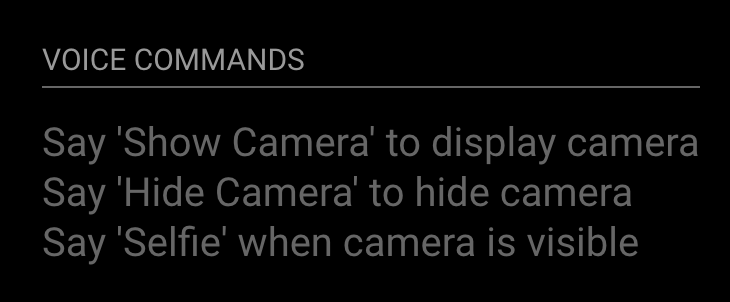
                        Hello guys, it seems I have the same problem as @frodrd00 and @Medo and cannot properly run the voicecontrol module. In my case I want to use the camera module which works together with the mentioned one. I’ve checked the voicemodule.js to match with its corresponding declaration in config.js and everything looks fine.

                        **config.js**
                        {
                            	module: 'voicecontrol',
                            	position: 'bottom_left',
                            	config: {
                                	models: [
                                    	{
                                        	keyword: "Show Camera",
                                        	description: "Say 'Show Camera' to display camera",
                                        	file: "ShowCamera.pmdl",
                                        	message: "SHOW_CAMERA"
                                    	},
                                    	{
                                        	keyword: "Hide Camera",
                                        	description: "Say 'Hide Camera' to hide camera",
                                        	file: "HideCamera.pmdl",
                                        	message: "HIDE_CAMERA"
                                    	},
                                    	{
                                        	keyword: "Selfie",
                                        	description: "Say 'Selfie' when camera is visible",
                                        	file: "Selfie.pmdl",
                                        	message: "SELFIE"
                                    },
                                	]
                            	}
                        },
                        

                        voicecontrol.js

                        models: [
                        	{
                        		keyword: "Show Camera",
                        		description: "Say 'Show Camera' to display camera",
                        		file: "ShowCamera.pmdl",
                        		message: "SHOW_CAMERA"
                        	},
                        	{
                        		keyword: "Hide Camera",
                        		description: "Say 'Hide Camera' to hide camera",
                        		file: "HideCamera.pmdl",
                        		message: "HIDE_CAMERA"
                        	},
                        	{
                        		keyword: "Selfie",
                        		description: "Say 'Selfie' when camera is visible",
                        		file: "Selfie.pmdl",
                        		message: "SELFIE"
                        	},
                        ]
                        

                        How did you manage this problem?

                        ALSA lib pcm_dmix.c:1022:(snd_pcm_dmix_open) unable to open slave
                        ALSA lib pcm.c:2239:(snd_pcm_open_noupdate) Unknown PCM cards.pcm.rear
                        ALSA lib pcm.c:2239:(snd_pcm_open_noupdate) Unknown PCM cards.pcm.center_lfe
                        ALSA lib pcm.c:2239:(snd_pcm_open_noupdate) Unknown PCM cards.pcm.side
                        ALSA lib pcm.c:2239:(snd_pcm_open_noupdate) Unknown PCM cards.pcm.hdmi
                        ALSA lib pcm.c:2239:(snd_pcm_open_noupdate) Unknown PCM cards.pcm.hdmi
                        ALSA lib pcm.c:2239:(snd_pcm_open_noupdate) Unknown PCM cards.pcm.modem
                        ALSA lib pcm.c:2239:(snd_pcm_open_noupdate) Unknown PCM cards.pcm.modem
                        ALSA lib pcm.c:2239:(snd_pcm_open_noupdate) Unknown PCM cards.pcm.phoneline
                        ALSA lib pcm.c:2239:(snd_pcm_open_noupdate) Unknown PCM cards.pcm.phoneline
                        
                        ALSA lib pulse.c:243:(pulse_connect) PulseAudio: Unable to connect: Connection refused
                        
                        ALSA lib pulse.c:243:(pulse_connect) PulseAudio: Unable to connect: Connection refused
                        
                        ALSA lib pcm_dmix.c:1022:(snd_pcm_dmix_open) unable to open slave
                        Cannot connect to server socket err = No such file or directory
                        Cannot connect to server request channel
                        jack server is not running or cannot be started
                        

                        Thanks a lot in advance ))

                        S 1 Reply Last reply Reply Quote 0
                        • S Offline
                          shashank @thereisnotry87
                          last edited by yawns

                          @thereisnotry87 hi, no need to mention voicecontrol commands in config.js file, just mention only as below , make sure you have installed

                          sudo apt-get install python-pyaudio python3-pyaudio sox
                          

                          and
                          copy all pmdl files in MM root folder

                          {
                          module: 'voicecontrol',
                          	    position: 'top_left',
                          	config: {
                                      }
                          },
                          

                          go to /usr/share/alsa/alsa.conf and change 0 to 1 in below parameters

                          defaults.ctl.card 1
                          defaults.pcm.card 1,
                          

                          this worked for me.

                          1 Reply Last reply Reply Quote 1
                          • S Offline
                            shramik49
                            last edited by

                            hi,
                            i am having difficulty in adding voicecontrol module on my magic mirror.
                            i want to use voicecontrol to use camera.
                            so can someone help me with the steps to follow?

                            1 Reply Last reply Reply Quote 0
                            • P Offline
                              pepemujica
                              last edited by

                              Hi! is it possible with this module to hide/show different modules or even switch profile with profile switcher?

                              Kind regards

                              1 Reply Last reply Reply Quote 0
                              • D Offline
                                disakos
                                last edited by

                                Hello Guys , @alexyak .
                                I;m running this module and hot word detection is working ok, i used my own keyword and send notfication to other modules. I can see in console.log .

                                MMM-temp-ds18b20 received a module notification: LUSTRO from sender: voicecontrol
                                

                                In all my modules. but i’m unable to run for example script … I tried to modify node_helper.js

                                /* Magic Mirror
                                 * Module: voicecontrol
                                 *
                                 * By Alex Yaknin
                                 * MIT Licensed.
                                 */
                                
                                const NodeHelper = require('node_helper');
                                const exec = require('child_process').exec;
                                
                                module.exports = NodeHelper.create({
                                    start: function () {
                                        this.started = false;
                                
                                    },
                                
                                    socketNotificationReceived: function(notification, payload) {
                                                if (notification === "CONNECT") {
                                                        this.startRecognition(payload);
                                                        return;
                                                }
                                                if (notification === "LUSTRO"’) {
                                                        exec("/opt/vc/bin/tvservice -o", null);
                                                //      this.autosleep();
                                              }
                                        },


                                but it is not working … ;)

                                1 Reply Last reply Reply Quote 0
                                • romainR Offline
                                  romain
                                  last edited by

                                  Hello everybody, I try to use this voicecontrol module AND mmm-alexa in the same time (mmm-alexa need to be trigger by a notification. That where voicecontrol is interesting at the moment) but because both the module use the mic, it doesn’t work.
                                  If I put only one module at the time no problem. Both of them in the same time, voice control doesn’t work.
                                  How can I use the same mic for two different module ?

                                  1 Reply Last reply Reply Quote 0
                                  • D Offline
                                    disakos
                                    last edited by

                                    @romain , do you use voicecontrol module to run some scripts ? If so please let me know how to do it … ;) my module is detecting my voice … but i’m unable to run something … ;)

                                    romainR 1 Reply Last reply Reply Quote 0
                                    • romainR Offline
                                      romain @disakos
                                      last edited by romain

                                      @disakos I didn’t use it to run script, I wanted it specificaly for mmm-alexa. However I did check that the other module received the notification It send.
                                      I did that by writing my own useless module that only print the notification it received.
                                      You need in your main file a

                                      notificationReceived: function(notification, payload, sender){
                                         //Whatever you want to do
                                      },
                                      

                                      This is different to “socketNotificationReceived” , socket notification receive only deal with your node helper file. But “notificationReceived” catch notification send from a module to another.

                                      With that in mind, you can add the notificationReceived thing to the module you want to control with the voicecontrol module or add whatever you need to it if it already exist

                                      1 Reply Last reply Reply Quote 0
                                      • romainR Offline
                                        romain
                                        last edited by

                                        I did it, It wasn’t easy but it’s work, I can use voicecontrol and others voicecontrol driven module at the same time.
                                        I had to change my /etc/asound.conf file again (yes, again. Because changing it already solve some of my issue on the past)

                                        before my file looked like this:

                                        pcm.!default {
                                                type asym
                                                playback.pcm {
                                                        type plug
                                                        slave.pcm "hw:0,0"
                                                }
                                                capture.pcm {
                                                        type plug
                                                        slave.pcm "hw:1,0"
                                                }
                                        }
                                        

                                        Easy enough when you know what your doing (that wasn’t my case). this file is there to say what is the default device to playback and capture (A lot of application or software just use the default device so if the default configuration isn’t working for you, you need to change it for you.) In my cas ethe microphone is the “hw:1,0” and my speaker is the “hw:0,0”

                                        That worked well when my microphone is used by one application at the time. However, not so much when it need to be used by multiple ones.
                                        So my new /etc/asound.conf file is looking like this now

                                        pcm.myTest {
                                            type dsnoop
                                            ipc_key 2241234
                                            slave {
                                                pcm "hw:1,0"
                                                channels 1
                                            }
                                        }
                                        
                                        pcm.!default {
                                                type asym
                                                playback.pcm {
                                                        type plug
                                                        slave.pcm "hw:0,0"
                                                }
                                                capture.pcm {
                                                        type plug
                                                        slave.pcm "myTest"
                                                }
                                        }
                                        

                                        instead of directly say that my input device is the “hw:1,0” I say it’s “myTest”, which is describe above. myTest’s type is “dsnoop” , that’s whats allow the michrophone to be use by multiple application at the same time. The ipc_key is there with a random value because when I tested with arecord, it asked me to put one. The channels is there because it was on the documentation ( http://alsa.opensrc.org/Dsnoop ) >.> not sure what it does though.
                                        And there you go, after that I could use two voice control things at the time

                                        1 Reply Last reply Reply Quote 2
                                        • R Offline
                                          Rattenjunge8080
                                          last edited by

                                          Hello,

                                          I’m new here, and I need a little bit help…
                                          I still don’t get the concept of this module for 100%, but I will describe my problem as accurate as possible.

                                          So I downloaded the module and installed python-pyaudio. I created a PMDL-File (here: http://filehorst.de/d/bDfbfCBE), tested it and saved it in the MagicMirror-Location (and many other locations…). I recorded it on the Pi btw, microphone is also still working.

                                          I don’t know if I miss anything, but when I start the MM, the modules are totally fine, I keep saying my command (“Go to sleep”), but nothing happens. I also checked the dev-mode and set breakpoints…but like I said, I’m not 100% sure what every class is doing in particular. Here is my code, do I miss anything?

                                          config.js

                                          {
                                          			module: "helloworld1",
                                          			position: "bottom_right",	// This can be any of the regions.
                                          			config: {
                                          				// See 'Configuration options' for more information.
                                          				text: "Hello world!"
                                          			}
                                          		},
                                          		{
                                                      module: 'voicecontrol',
                                                      config: {
                                                          models: [
                                                              {
                                                                  keyword: "gotosleep",   // keyword 
                                                                  file: "GoToSleep.pmdl", // trained model file name
                                                                  message: "gotosleep"   // notification message that's broadcast in the MagicMirror app
                                                              },
                                          					{
                                                                  keyword: "wake up",   // keyword 
                                                                  file: "Wake_up.pmdl", // trained model file name
                                                                  message: "wake_up"   // notification message that's broadcast in the MagicMirror app
                                                              },
                                                          ]
                                                      }
                                                  },
                                          

                                          Voicecontrol.js

                                          
                                          'use strict';
                                          
                                          Module.register("voicecontrol", {
                                          
                                          	// Default module config.
                                          
                                              defaults: {
                                          		models: [
                                          					{
                                          						keyword: "gotosleep",   // keyword 
                                          						description: "Go To Sleep",
                                                                  file: "GoToSleep.pmdl", // trained model file name
                                                                  message: "gotosleep"   // notification message that's broadcast in the MagicMirror app
                                          					},
                                          					{
                                          						keyword: "Hide Camera",
                                          						description: "Say 'Hide Camera' to hide camera",
                                          						file: "hideCamera.pmdl",
                                          						message: "HIDE_CAMERA"
                                          					},
                                          					{
                                          						keyword: "Selfie",
                                          						description: "Say 'Selfie' when camera is visible",
                                          						file: "selfie.pmdl",
                                          						message: "SELFIE"
                                          					},
                                          				]
                                          	},
                                          
                                              start: function() { 
                                          
                                                  this.sendSocketNotification("CONNECT", this.config);
                                          
                                              },
                                          
                                              getStyles: function() {
                                          		return ['voicecontrol.css'];
                                          	},
                                          
                                              socketNotificationReceived: function(notification, payload){
                                                  if (notification === "KEYWORD_SPOTTED"){
                                                      //Broadcast the message
                                                      this.sendNotification(payload.message, {type: "notification"});
                                                  }
                                          	},
                                          
                                              getDom: function() {
                                                  var wrapper = document.createElement("div");
                                                  var header = document.createElement("header");
                                                  header.innerHTML = "Voice Commands";
                                                  wrapper.appendChild(header);
                                                  var models = this.config.models;
                                          
                                                  models.forEach(function(model) {
                                                      var command = document.createElement("div");
                                                      command.innerHTML = model.description;
                                                      command.className = "small dimmed top";
                                                      wrapper.appendChild(command);
                                                  }, this);
                                          
                                                  return wrapper;
                                              }
                                          
                                          });


                                          helloworld1.js (I wanted to log the notification to see if it works…)

                                          Module.register("helloworld1",{
                                          
                                          	// Default module config.
                                          	defaults: {
                                          		text: "World!"
                                          	},
                                          	
                                          	start: function() {
                                          		Log.log("Starting module: " + this.name);
                                          	},
                                          
                                          	notificationReceived: function(notification, payload, sender) {
                                          				
                                          		if (notification === "gotosleep"){
                                          			Log.log("Go To Sleep");
                                          		}
                                          	},
                                          
                                          	// Override dom generator.
                                          	getDom: function() {
                                          		var wrapper = document.createElement("div");
                                          		wrapper.innerHTML = this.config.text;
                                          		return wrapper;
                                          	}
                                          });
                                          
                                          
                                          1 Reply Last reply Reply Quote 0
                                          • romainR Offline
                                            romain
                                            last edited by

                                            The code look’s fine to me at first glance. (You don’t need to have the { keyword: "gotosleep", // keyword description: "Go To Sleep", file: "GoToSleep.pmdl", // trained model file name message: "gotosleep" // notification message that's broadcast in the MagicMirror app }, in both config file and the voice controle.js at the same time though. But that’s not an issue.)

                                            Maybe try to add a position for the voicecontrol module just to be sure the module itself doesn’t crash (If you add a position it should print the description of the words on screen. If nothing appear it probably mean something went wrong.)
                                            If nothing wrong and the cd ~/MagicMirror/ ; DISPLAY=:0 npm start dev didnt show an error, maybe the issue is with your mic configuration. If the module dosn’t hear you it might not work.

                                            Add a Log.log("Helloworld1 received " + notification); before the if in the helloword1.js . SO you print every single notification you receive and maybe add a Log in the socketNotificationReceive of voicecontrol.js to see if it spot your keywords at all.

                                            also, do you use your microphone with this module only or with multiple application ? Because by default, I think, a microphone can only be open by one thing at the time. So try toclose every application that use your microphone and run the mirror. If the that’s work you might to configure your microphone so it can be open in multiple application

                                            1 Reply Last reply Reply Quote 0

                                            Hello! It looks like you're interested in this conversation, but you don't have an account yet.

                                            Getting fed up of having to scroll through the same posts each visit? When you register for an account, you'll always come back to exactly where you were before, and choose to be notified of new replies (either via email, or push notification). You'll also be able to save bookmarks and upvote posts to show your appreciation to other community members.

                                            With your input, this post could be even better 💗

                                            Register Login

                                            • 1
                                            • 2
                                            • 3
                                            • 4
                                            • 1 / 4
                                            • First post
                                              Last post
                                            Enjoying MagicMirror? Please consider a donation!
                                            MagicMirror created by Michael Teeuw.
                                            Forum managed by Sam, technical setup by Karsten.
                                            This forum is using NodeBB as its core | Contributors
                                            Contact | Privacy Policy