Read the statement by Michael Teeuw here.
stronger Raspberry Pi 3 Alternatives
-
Several modules like the ones for face recognition, speech recognition or even streaming from webcams bring the Raspberry Pi 3 to it’s performance limits by max out it’s memory and cpu. I found some older topics where several alternatives where named. Unfortunately those post were abandoned like half a year ago and really hard to read, due to the overlapping conversations.
I really want to find a powerful alternative to the Pi3. Perhaps the experienced builders can briefly share what they have done for experience with your alternatives. I think the following criteria are interesting.
Everybody else please don’t forget to up vote the contributions of those who share.
Model: Raspberry Pi 3 Model B
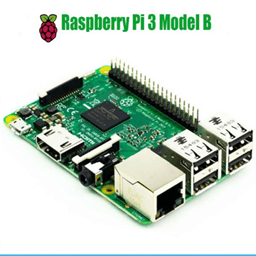
Price
- Board - 35 $
- Power Supply (mini USB) - 5 $
in Total: about 40 $
Dimensions
85.60mm x 56mm x 21mm

Hardware Specifications
- CPU: Quad Core 1.2GHz Broadcom BCM2837 64bit CPU
- Memory: 1GB RAM
- WLAN: BCM43438 wireless LAN and Bluetooth Low Energy (BLE) on board
- GPIO Pins:: 40-pin extended
- USB: 4x USB 2.0 ports
- Video & Stereo output: 4 Pole stereo output and composite video port
- Full size HDMI
- CSI camera port for connecting a Raspberry Pi camera
- DSI display port for connecting a Raspberry Pi touchscreen display
- Micro SD port for loading your operating system and storing data
- Upgraded switched Micro USB power source up to 2.5A
Software:
OS: Raspian
Is able to run:- NodeJS - yes
Installation of MM:
- Is the standard installation script executable? - yes
bash -c "$(curl -sL https://raw.githubusercontent.com/MichMich/MagicMirror/master/installers/raspberry.sh)Remarks:
- Strong spread, big supportive community.
Model: Intel Thin Mini-ITX Motherboard
like ASUS H110T/CSM LGA 1151 Intel H110 HDMI SATA 6Gb/s USB 3.0 Thin Mini-ITX Motherboards
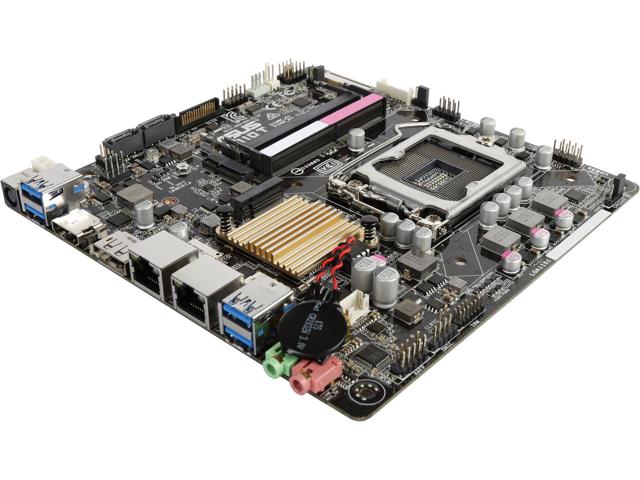
Price
- Board: 80 $
- Ram: 8 GB - 70 $
- Wifi Card: 27 $
- CPU: 56 $
- Cooler: 20$
- SSD: 128GB - 30 $
- accepts 12 to 19 Volts Power Supply as for notebooks - 15 $
in Total: about 300 $ (depending on components)
Dimensions
1702mm x 1702 x 25mm
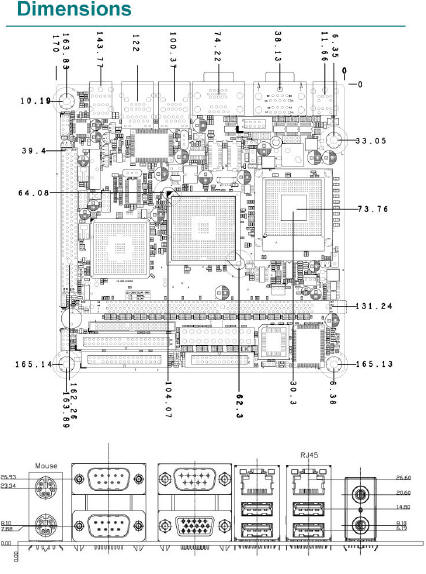
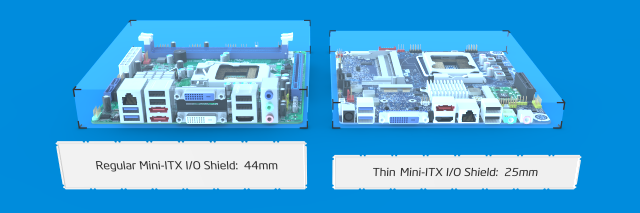
Hardware Specifications
- Supported CPU (CPU not included)
- Socket Type: LGA 1151
- CPU Type: **Core i7 / i5 / i3 / Pentium / Celeron (LGA1151)
- Supported CPU Technologies: * Turbo Boost Technology 2.0
- Memory (not included)
- Number of Memory Slots: 2×260pin
- Memory Standard: DDR4 2133
- Maximum Memory Supported: 32GB
- Channel Supported: Dual Channel
- Onboard Video:
- Integrated Graphics Processor
- Multi-VGA output support: DP/HDMI/LVDS ports
- Supports HDMI with max. resolution of 4096 x 2160 @ 24Hz / 2560 x 1600 @ 60Hz
- Supports LVDS with max. resolution of 1920 x 1200 @ 60Hz
- Supports DisplayPort with max. resolution of 4096 x 2304 @ 60 Hz
- Maximum shared memory of 1024MB
- WLAN: only by using expansion Slot for 1 x M.2 Socket 1 with E key, type 2230 for WIFI device
- LAN: Dual 10/100/1000Mbps with Realtek 8111H
- GPIO Pins: no
- Rear Panel Ports
- 1 x HDMI
- 2 x RJ45
- 1 x DisplayPort
- 4 x USB 3.0
- 2 Audio Ports
- Onboard USB:
- 2 x USB 2.0 2-port connectors support additional 4 USB 2.0 ports
- 1 x USB 2.0 1-port connectors support additional 1 USB 2.0 port
- Video & Stereo output: 4 Pole stereo output and composite video port
- Full size HDMI
Software:
Operating System Support:
- Unbuntu
- Windows 10*
- Windows 8.1*
- Windows 7
- 64-bit supported only
Is able to run:
- NodeJS - yes
Installation of MM:
- Is the standard installation script executable? - yes
bash -c "$(curl -sL https://raw.githubusercontent.com/MichMich/MagicMirror/master/installers/raspberry.sh)Remarks:
- Powerfull Board with several upgrading capabilities which comes with a bigger pice tag
- Quotes:
- “So things like @strawberry-3-141 voice module is REALLY fast and responsive. I’m also using an IR touch frame that responds quite well with no additional drivers needed.”
-
I am using an RPi3 for my bathroom but the 32" inch mirror I"m using a mini itx board with intel chip 8 gig of ram and 120G SSD.
It has the wireless mini card and the video is amazing. I realize the mirror was built based on the RPi but using a real board gives it that much more power.
So things like @strawberry-3-141 voice module is REALLY fast and responsive. I’m also using an IR touch frame that responds quite well with no additional drivers needed.
Love the RPi but it just wasn’t giving me what I wanted and wanted to be able to do with this project so I opted for more power… :)
-
@cowboysdude
Thanks for your answer.
Could you please share a link which mini itx board board you’re exactly using?Looking for some building inspiration?
Check out my large, thin and metal framed mirror on robstechlog.com.Modules released:
MMM-GoogleAnalytics
MMM-GrafanaChart
MMM-GrafanaGauges -
It’s the ASUS H110T/CSM LGA 1151 Intel H110 HDMI SATA 6Gb/s USB 3.0 Thin Mini-ITX Motherboards - Intel
Link is here but it’s no longer available:
https://www.newegg.com/Product/Product.aspx?Item=N82E16813132833I’m pretty sure there are others with similar specs out there… I’m using a notebook power supply for this.
Ram: https://www.amazon.com/gp/product/B015HQ9TGW/ref=oh_aui_detailpage_o03_s00?ie=UTF8&psc=1
WiFi card: https://www.amazon.com/gp/product/B00GUNZUG0/ref=oh_aui_detailpage_o02_s00?ie=UTF8&psc=1
CPU: https://www.newegg.com/Product/Product.aspx?Item=N82E16819117625
CPU Cooler: https://www.newegg.com/Product/Product.aspx?Item=N82E16835220067
And a SanDisk 120GB SSD
-
Hello can you show the set up of the mini itx in situ at all? And what case you used if any. Thank you
-
@cowboysdude
I just updated the summary post, could you please check, if there is everything correct?!Looking for some building inspiration?
Check out my large, thin and metal framed mirror on robstechlog.com.Modules released:
MMM-GoogleAnalytics
MMM-GrafanaChart
MMM-GrafanaGauges -
@Damian said in stronger Raspberry Pi 3 Alternatives:
Hello can you show the set up of the mini itx in situ at all? And what case you used if any. Thank you
I will take a pic this weekend but as of right now it’s ‘on the bench’ and I don’t have a case as of yet. More than likely will be designed to attached to the wall of the cabinet and not in a case…
-
@SvenSommer said in stronger Raspberry Pi 3 Alternatives:
@cowboysdude
I just updated the summary post, could you please check, if there is everything correct?!Operating System Support: Windows 10* Windows 8.1* Windows 7 64-bit supported onlyUnder that I would also put Linux… I’m running Unbuntu on the machine currently which makes it much easier to run MM :)
-
I would, and will at some point, use one of these in place of the SSD… to further compact things…
-
@cowboysdude said in stronger Raspberry Pi 3 Alternatives:
More than likely will be designed to attached to the wall of the cabinet and not in a case…
Thank you. Yes i looked at cases but none were slim/small enough. Look forward to your snaps to see how yours look set up. What power source did you use?
-
@Damian I am using a laptop power supply :)
-
@cowboysdude said in stronger Raspberry Pi 3 Alternatives:
@Damian I am using a laptop power supply :)
thank you. i could not see a link to it in the first post so just wondered what one you chose. looking forward to your pictures of the setup of your itx when you get time
-
I just found this one: https://www.kickstarter.com/projects/librecomputer/libre-computer-board-next-gen-4k-sbc-dev-board-for/description
It may be an alternative. :)If you cant find it, make it and share it
MMM-homeassistant-sensors,MMM-Modulebar,MMM-Profilepicture,MMM-Videoplayer,MMM-TautulliLatest -
@Snille Yes, very interesting. I liked the idea of comparing the boards with Geekbench. Maybe this is a measurable unit to compare.
@cowboysdude Are you willing to run such a Geekbench on your system?Somebody backed this and is going to get a one?
Looking for some building inspiration?
Check out my large, thin and metal framed mirror on robstechlog.com.Modules released:
MMM-GoogleAnalytics
MMM-GrafanaChart
MMM-GrafanaGauges -
I think that’s awesome. IF it has more power, and it seems these boards are getting more powerful all the time, that’s a good thing!
-
@SvenSommer Yes, I’m backing it. :) I’m going (if it works) to replace my Pi3 with it. :)
If you cant find it, make it and share it
MMM-homeassistant-sensors,MMM-Modulebar,MMM-Profilepicture,MMM-Videoplayer,MMM-TautulliLatest -
@Snille I would but right now I have so much going on that backing anything else would be counter productive.
I’m backing a Thermostat right now… and that’s keeping my butt busy :)
-
hello. I cannot remember if you did a post here about your steps installing ubuntu? can you direct me to it please, if you did indeed do one?
I’m about to dual boot a win7 mini itx with ubuntu over the weekend, and then install MM, for the extra power it will give, and also wondered if JRE is installed with the ubuntu installer, or whether I need to do that separately? if this is needed of course?Also any hints/tips/pitfalls you can offer, about the install, will be greatly appreciated. thank you.
-
@Damian said in stronger Raspberry Pi 3 Alternatives:
JRE
I didn’t do dual boot only because well Windows is blah LOL
I straight just installed Unbuntu then followed the instructions for manual Magic Mirror install and I’ve had no problems at all! :)
Here’s a guide for Unbuntu:
https://tutorials.ubuntu.com/tutorial/tutorial-install-ubuntu-desktop#0
I installed from a USB Stick :)
-
@cowboysdude said in stronger Raspberry Pi 3 Alternatives:
JRE
Yes, was unsure if I needed to install the Java Runtime Environment as a seperate, or whether ubuntu installs that itself? Or indeed if it is needed at all?
I didn’t do dual boot only because well Windows is blah LOL
Agree, but i want to keep it on the other half of the 500gb drive for a future project.
I straight just installed Unbuntu then followed the instructions for manual Magic Mirror install and I’ve had no problems at all! :)
Good to know there is no issues/problems to look out for. This will be first time installing and using ubuntu, so was unsure if it is as straight forward as raspbian to set up and run, and get MM on top.
I will now look forward to use MM without the usual RP3 constraints.
Here’s a guide for Unbuntu:
https://tutorials.ubuntu.com/tutorial/tutorial-install-ubuntu-desktop#0
I installed from a USB Stick :)
Than you very much for this, I will have an enjoyable weekend setting this all up.




Hello! It looks like you're interested in this conversation, but you don't have an account yet.
Getting fed up of having to scroll through the same posts each visit? When you register for an account, you'll always come back to exactly where you were before, and choose to be notified of new replies (either via email, or push notification). You'll also be able to save bookmarks and upvote posts to show your appreciation to other community members.
With your input, this post could be even better 💗
Register Login