Read the statement by Michael Teeuw here.
MMM-Lunartic
-
Description:
Up to the minute information about our Lunar partner, with a splash of EyeCandy, to boot!
How it works
First, a rather impressive animation of the night moon, with clouds rolling by.
Then you are offered updated information every minute, such as:
-
The distance of the moon from the Earth’s core at this moment. (Ever changing)
-
The distance of the moon to the sun at this moment. (Ever changing)
-
The date of the next full moon. (Very important if you’re a werewolf!)
-
The date of the next new moon. (Also very important if you’re a werewolf!)
-
The age of the current moon’s phase.
-
How much of the moon is illuminated at this moment.
-
The stage of the present moon (waning, waxing, etc…)
Examples:
The moon will be animated. See picture below.
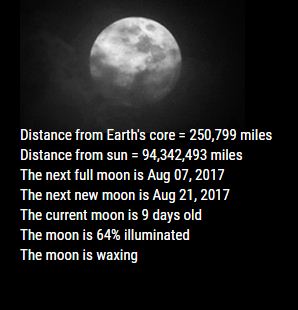
- The animation can be hidden if only the information is wanted.
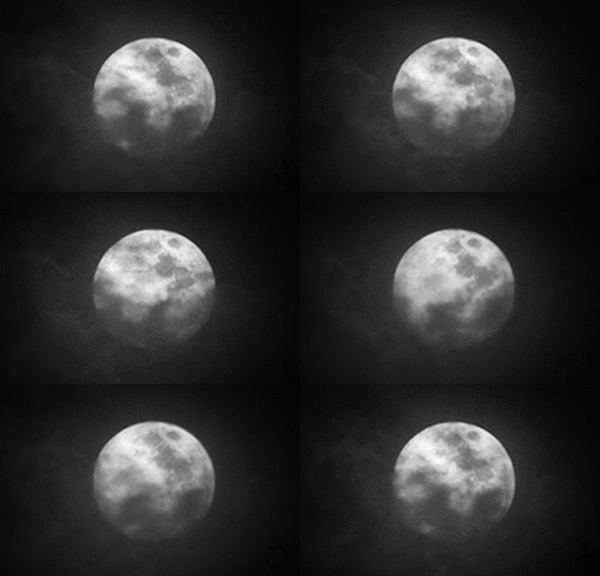
This can be hidden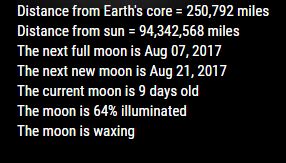
To show only this- Annotated .css file included for aligning and coloring text and header.
Download:
[card:mykle1/MMM-Lunartic]
Version 1.0.0
-
-
Hi,
i love it is it possible to traduce it in french ?
i can help you for translation.
thx ;) -
@Fonfon see everything before the = sign needs to be translated… if you are offering yes I’m sure he’d love that!!
If you could complete the right hand side that would do it :)
{
“Distance from Earth’s core”: “Distance from Earth’s core”,
“Distance from sun”: “Distance from sun”,
"The next full moon is ": "The next full moon is ",
"The next new moon is ": "The next new moon is ",
"The current moon is ": "The current moon is ",
"The moon is ": “The moon is “,
“% illuminated”: “% illuminated”,
“When the Moon hits your eye . . .”: “When the Moon hits your eye . . .”,
" days old”: " days old”
} -
@Fonfon said in MMM-Lunartic:
i can help you for translation.
That would be great! Thanks Fonfon. Please follow @cowboysdude’s direction and it will be added to the module.
Again, thanks for your interest in the module and the willingness to help and contribute!
-
@cowboysdude said in MMM-Lunartic:
If you could complete the right hand side that would do it :)
Yo! Thanks for setting that up for me bro. Much appreciated!
-
@Fonfon said in MMM-Lunartic:
i can help you for translation.
Are these correct?
{ "Distance from Earth's core": "Distance du noyau terrestre", "Distance from sun": "Distance du soleil", "The next full moon is ": "La prochaine pleine lune est ", "The next new moon is ": "La prochaine nouvelle lune est ", "The current moon is ": "La lune actuelle a ", Ex: La lune actuelle a cinq jours "The moon is ": "La lune a ", " illuminated": " illuminé", " days old": " jours", "When the Moon hits your eye . . .": "Quand la lune frappe votre œil. . ." } -
Went to add a config option for km or miles and discovered I had already done that . BOOM! :^)
-
Can someone chime in on these translations? Are they correct? If not, can you tell me what they should be?
Many thanks!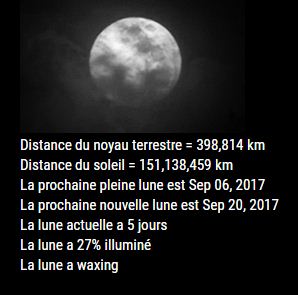
-
You’re welcome !!
the correct french translation is:{
“Distance from Earth’s core”: “Distance du noyau terrestre”,
“Distance from sun”: “Distance du soleil”,
"The next full moon is ": "Prochaine pleine lune: ",
"The next new moon is ": "Prochaine nouvelle lune: ",
"The current moon is ": "La lune actuelle a ", Ex: La lune actuelle a cinq jours
“The moon is “: “La lune a “,
" illuminated”: " illuminée”,
" days old”: " jours”,
“When the Moon hits your eye . . .”: “Quand la lune frappe votre œil. . .”
}I’m happy to contribute !
-
@Fonfon said in MMM-Lunartic:
I’m happy to contribute !
Great! Thank you. I’ll change those right now
-
@Fonfon said in MMM-Lunartic:
I’m happy to contribute !
How about the two words?
waxing = ? (The moon is waxing)
waning = ? (The moon is waning) -
Good?
{ "Distance from Earth's core = ": "Distance du noyau terrestre = ", "Distance from sun = ": "Distance du soleil = ", "The next full moon is ": "Prochaine pleine lune: ", "The next new moon is ": "Prochaine nouvelle lune: ", "The current moon is ": "La lune actuelle a ", "The moon is ": "La lune a ", "% illuminated": "% illuminée", " days old": " jours", "waxing": " croissance", "waning": "diminue", "When the Moon hits your eye . . .": "Quand la lune frappe votre œil. . ." } -
Now is good
@Mykle1 said in MMM-Lunartic:
Good?
{ "Distance from Earth's core = ": "Distance du noyau terrestre = ", "Distance from sun = ": "Distance du soleil = ", "The next full moon is ": "Prochaine pleine lune: ", "The next new moon is ": "Prochaine nouvelle lune: ", "The current moon is ": "La lune actuelle a ", "The moon is ": "La lune a ", "% illuminated": "% illuminée", " days old": " jours", "waxing": " croissante", "waning": "décroissante", "When the Moon hits your eye . . .": "Quand la lune frappe votre œil. . ." } -
-
@Fonfon said in MMM-Lunartic:
Now is good
Please do this one as well
“waxing”: “croissance”, “waxing gibbous”:“Glacier”, “full”: “plein”, “wanning gibbous”:“lune gibbeuse décroissante”, “third quarter”: “troisième quart”, “waning crescent”:“Croissant décroissant”, “new”: “Nouveau”, “waxing crescent”:“Croissant de cire”, “first quarter”:“premier quart” -
I think that’s it
@Mykle1 said in MMM-Lunartic:@Fonfon said in MMM-Lunartic:
Now is good
Please do this one as well
“waxing”: “croissante”, “waxing gibbous”:“Gibbeuse croissante”, “full”: “pleine”, “wanning gibbous”:“Gibbeuse décroissante”, “third quarter”: “troisième quartier”, “waning crescent”:“Croissante”, “new”: “Nouvelle”, “waxing crescent”:“Décroissante”, “first quarter”:“premier quartier” -
@Fonfon said in MMM-Lunartic:
I think that’s it
Thank you again. I’ll add that to the module right now
-
A special Thank You to @Fonfon for his English to French translation for this module. Bravo!
-
Also, a special Thank You to @cowboysdude for his help and guidance on implementing translations within the module.
-
In the unlikely event that someone else is interested in translating this module to their own language, simply substitute your language translation on the right, replacing the French translation INSIDE the quotes. I will gladly add it to the module.
{
"Distance from Earth's core = ": "Distance du noyau terrestre = ",
"Distance from sun = ": "Distance du soleil = ",
"The next full moon is ": "Prochaine pleine lune: ",
"The next new moon is ": "Prochaine nouvelle lune: ",
"The current moon is ": "La lune actuelle a ",
"The moon is ": "La lune a ",
"% illuminated": "% illuminée",
" days old": " jours",
"waxing": " croissance",
"waning": "décroissante",
"waxing": "croissante",
"waxing gibbous":"Gibbeuse croissante",
"full": "pleine",
"wanning gibbous":"Gibbeuse décroissante",
"third quarter": "troisième quartier",
"waning crescent":"Croissante",
"new": "Nouvelle",
"waxing crescent":"Décroissante",
"first quarter":"premier quartier",
"When the Moon hits your eye . . .": "Quand la lune frappe votre œil. . ."
}


Hello! It looks like you're interested in this conversation, but you don't have an account yet.
Getting fed up of having to scroll through the same posts each visit? When you register for an account, you'll always come back to exactly where you were before, and choose to be notified of new replies (either via email, or push notification). You'll also be able to save bookmarks and upvote posts to show your appreciation to other community members.
With your input, this post could be even better 💗
Register Login