Read the statement by Michael Teeuw here.
MMM-CalendarExt
-
@redink
More detailed adjusting might be needed, but commonly see this.https://forum.magicmirror.builders/topic/4624/mmm-calendarext/148
And, add
onlyStartingTime: 1,in yourviewconfiguration -
Seems I cannot get the module to load. tried a few things, but it is just blank. I have the latest version of MM
-
@isaac2004 I need log or more detailed info to catch what happened.
-
I successfully use the module on two other screens. I just set up a new one without tweaks and I run into the following error in the console (nothing gets loaded, server-side there are no errors being logged):
Uncaught (in promise) TypeError: hookDom.appendChild is not a function at Render.js:590 at Array.forEach (<anonymous>) at Render.drawViews (Render.js:581) at Class.getDom (MMM-CalendarExt.js:209) at main.js:110 at new Promise (<anonymous>) at updateDom (main.js:109) at Object.updateDom (main.js:518) at Class.updateDom (module.js:358) at Class.draw (MMM-CalendarExt.js:680) -
@mmmmh did you set a position of view? your error says there might be an issue. I’m on a business trip now so i cannot check at this moment. later i’ll look inside.
-
@Sean yes, I set it to top_left:
{
            module: 'MMM-CalendarExt',
            position: "top_left", //anywhere. It is not related to real position of view
            classes: "default standard everyone",
            config: { // Read below
                system: {
                    show: ['current', 'upcoming'],
                    locale: 'de',
                    showEmptyView: 0,
                    fullDayEventLocalize: 1,
                    redrawInterval: 300000,
                },
                defaultView: {
                    position: 'calendar',
                    positionOrder: -1,
                    overflowRolling: 0,
                    overflowHeight: 0,
                    overflowDuration: 2,
                    timeFormat: 'H:mm',
                    dateFormat: "ddd, D. MMM",
                    fullDayEventDateFormat: "ddd, D. MMM",
                    ellipsis: 0,
                    limit: 20,
                    oneLineEvent: 1,
                },
                views: {
                    current: {
                        title: "Now...",
                        direction: "column",
                        showEmptyView: 0,
                        useRelative: 0,
                    },
                    upcoming: {
                        title: "Was steht an...",
                        direction: "column",
                        useRelative: 0,
                        overflowHeight: 0,
                        overflowRolling: 0,
                    },
                },
                calendars: [
                    {
                        name: "XXXX",
                        symbol: "male",
                        styleName: "style24",
                        url: "redacted",

                        auth: {
                            user: 'redacted',
                            pass: 'redacted',
                            method: 'basic'
                        }
                    },

                ],

            },
        },
Don’t worry, it’s not urgent.
-
@mmmmh
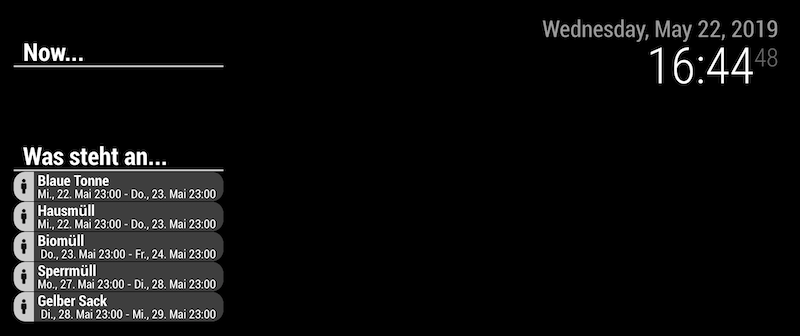
Well, I tried with yours and it works.
But two things you probably have wrong.url: "redacted",is it right? it will make parsing error and it could be reason of your front error message.showEmptyView:1will affect on onlysystemlevel, notviewlevel. You’ve setshowEmptyView:0insystem, so empty view will not appear.
-
@Sean thanks for making the effort to test it. I went the same way now. I removed everything and picked a public trash collection calendar (nice idea of yours) - still the same error. (I also commented out the showEmptyView options.)
The error appears locally (RPI3+) as well as in web browsers of all flavors.
Here’s the full config file:
var config = { address: "", port: 8080, ipWhitelist: [], language: "de", timeFormat: 24, units: "metric", modules: [ { module: 'MMM-CalendarExt', position: "top_left", //anywhere. It is not related to real position of view classes: "default standard everyone", config: { // Read below system: { show: ['current', 'upcoming'], locale: 'de', // showEmptyView: 0, fullDayEventLocalize: 1, redrawInterval: 300000, }, defaultView: { position: 'calendar', positionOrder: -1, overflowRolling: 0, overflowHeight: 0, overflowDuration: 2, timeFormat: 'H:mm', dateFormat: "ddd, D. MMM", fullDayEventDateFormat: "ddd, D. MMM", ellipsis: 0, limit: 20, oneLineEvent: 1, }, views: { current: { title: "Now...", direction: "column", // showEmptyView: 0, useRelative: 0, }, upcoming: { title: "Upcoming...", direction: "column", useRelative: 0, overflowHeight: 0, overflowRolling: 0, }, }, calendars: [ { name: "Trash", symbol: "male", styleName: "style24", url: "https://www.ekm-mittelsachsen.de/de/service-dienstleistungen/entsorgungstermine-abfallkalender/abfallkalender/ical/stadt/4870/year/2019/", }, ], }, }, ] }; /*************** DO NOT EDIT THE LINE BELOW ***************/ if (typeof module !== "undefined") { module.exports = config; } -
@mmmmh i’m on business trip now, after back home, i’ll try your new config.
-
Is there a way to repaint the calendar module? I am working on hiding/showing the module with voice control, and for the life of me, I can’t get the UI to repaint after hiding. module.show() is not available in the module so it is not as simple as that
-
@isaac2004
Sorry, I cannot catch your point. MMM-CalendarExt can be hidden and revealed by.show()and.hide(). “module.show() is not available in the module” what this means? -
@Sean said in MMM-CalendarExt:
did you set a position of view? your error says there might be an issue.
@mmmmh I don’t know why I missed it. As I’ve said, you have a wrong on
position.defaultView: { position: 'calendar',positionshould be region name liketop_left,bottom_bar, … Modify it.
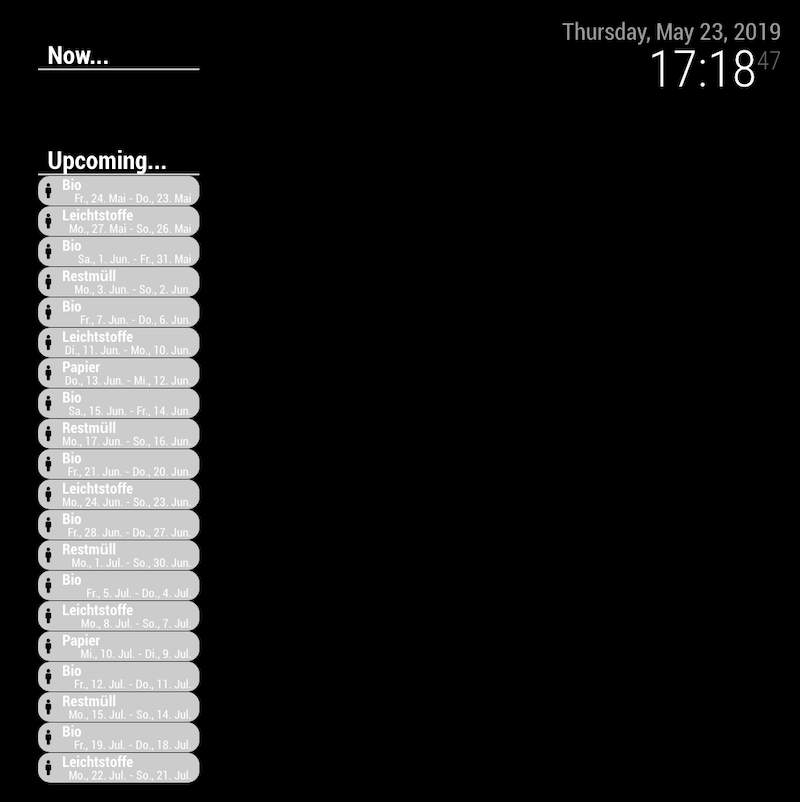
(I’m in London now, so the time of events in screenshot will not match with the German time) -
Dang! Thanks. On my other screen I have that region and I didn’t replace it at all places! I owe you one.
-
Hello,
I have downloaded that Docker image to make some tests on MagicMirror :
https://hub.docker.com/r/bastilimbach/docker-magicmirror/I don’t know why the MMM-CalendarExt is not displayed. I have tested multiple settings, even the simpliest provided in the doc page but still nothing appears.
When I use the Browser debugger, I see a size of 0x0 for the div.container
The calendar urls are working fine with the default calendar module.
Is there something missing on the Docker Image ? I doubt because I have same issue with the module on my RaspberryPi MagicMirror
Would someone accept to test my config module on his MagicMirror ?
If anyone has some ideas, thanks.
-
@djtale
Leave the issue on github with your configuration. -
Hello,
I would like to decrease the size of characters in “{
module: ‘MMM-CalendarExt’,” “calendars: [”
In title and description.
How to do this? -
How can I adjust the height and ad the month to the daily header?
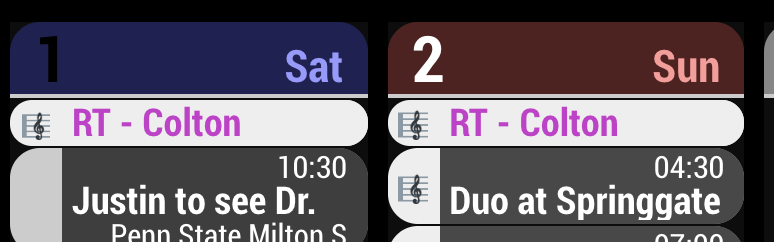
I want it to say 1 June Sat, 2 June Sun and so on & adjust the height
RT
-
@Doudy @Robtrowb
1)Left side of slot header would betitleand Right side would besubtitle. So you can formatting withtitleFormatandsubtitleFormat.
By example;titleFormat: "D MMM ddd", subtitleFormat: " ",would be

Or,
titleFormat: " ",
subtitleFormat: "D MMM ddd",
would be

Or,
titleFormat: "D MMM",
subtitleFormat: "ddd",
would be

- CSS Selectors of
titleanddescriptionwould be.CALEXT .eventContentand.CALEXT .eventDescription. So if you add this intocss/custom.cssyou can get smaller title.
.CALEXT .eventContent {
  font-size:10px;
}
Read https://github.com/eouia/MMM-CalendarExt/wiki and try by yourself.
- CSS Selectors of
-
@Sean TY
-
@Sean
How can i solve this problem like photo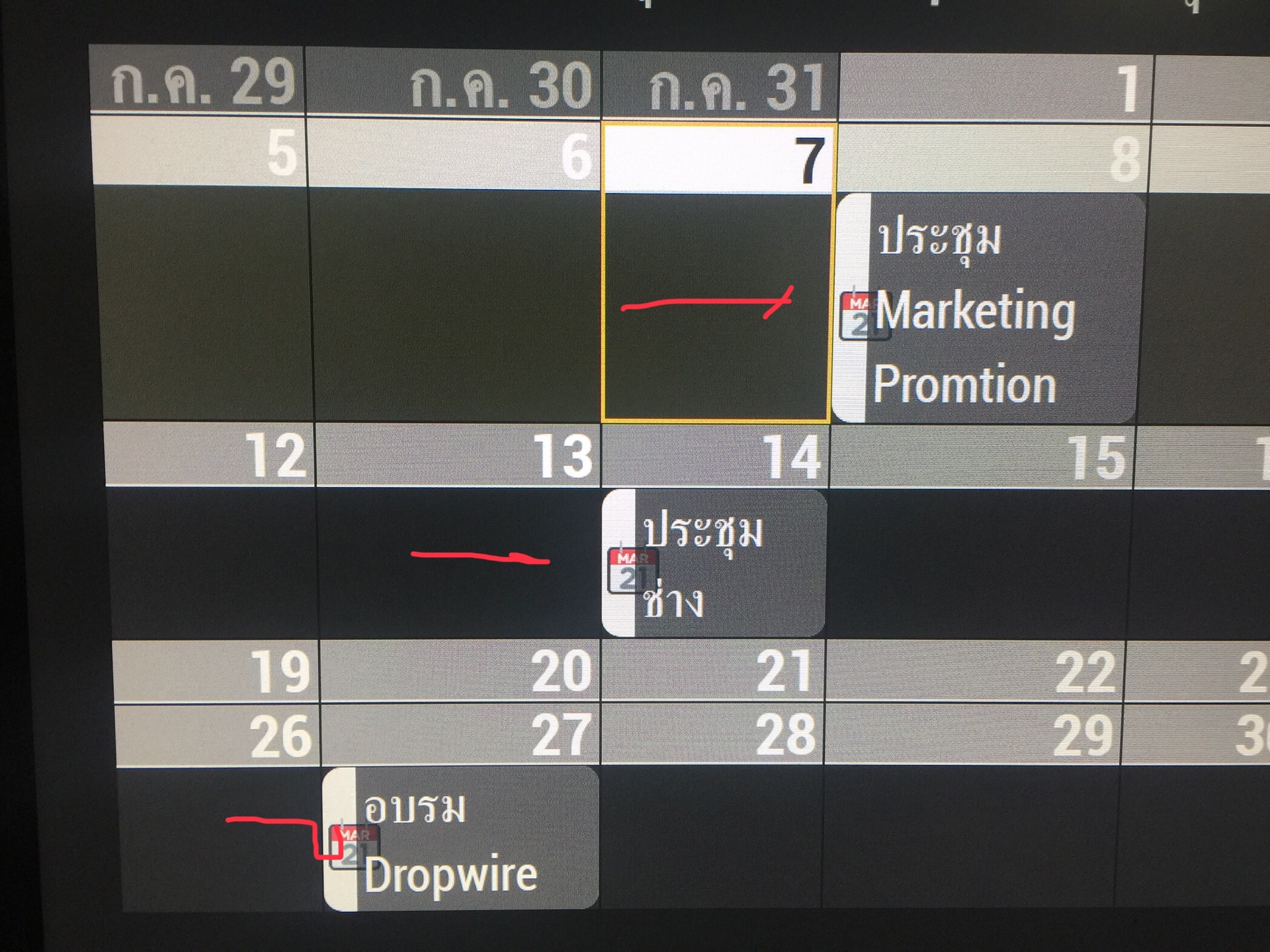
the width of column not match the width of symbol
Thanks for your help
Hello! It looks like you're interested in this conversation, but you don't have an account yet.
Getting fed up of having to scroll through the same posts each visit? When you register for an account, you'll always come back to exactly where you were before, and choose to be notified of new replies (either via email, or push notification). You'll also be able to save bookmarks and upvote posts to show your appreciation to other community members.
With your input, this post could be even better 💗
Register Login