MagicMirror Forum
    • Recent
    • Tags
    • Unsolved
    • Solved
    • MagicMirror² Repository
    • Documentation
    • 3rd-Party-Modules
    • Donate
    • Discord
    • Register
    • Login
    A New Chapter for MagicMirror: The Community Takes the Lead
    Read the statement by Michael Teeuw here.

    MMM-CalendarExt

    Scheduled Pinned Locked Moved Productivity
    198 Posts 45 Posters 272.2k Views 45 Watching
    Loading More Posts
    • Oldest to Newest
    • Newest to Oldest
    • Most Votes
    Reply
    • Reply as topic
    Log in to reply
    This topic has been deleted. Only users with topic management privileges can see it.
    • cruunnerrC
      cruunnerr
      last edited by

      Thanks for your reply.

      I already used limit for the upcoming view. I have 3 calendars in the upcoming view and the limit works fine.

      But i want to show the same calendar once in the weeks view with up to 20 entries and in the upcoming view max. 2 so the other calendar entries will not be blocked by the calendar i just need 2 entries.

      anyhow, it seems not to be possible. But thank u anyway. Great module at all :)

      1 Reply Last reply
      Reply Quote 0
      • MortenVSM
        MortenVS
        last edited by yawns

        Hi,
        Thanks a lot for a great module!!!

        Currently doing my finishing touches on my MagicMirror and CalendarExt.
        I’m using 1 daily view (bottom_bar) and 2 column view (top_left), each with a dedicated google calendar.
        Have tried to configure 2 upcoming view, still without any luck.

        I have 2 questions:

        1. How can I set up CalendarExt to use 2 upcoming views or reconfigure one of the other views to function and present as the upcoming view?
          (Preferable without being affected by future updates.)

        2. Is there any method (or planned feature) to limit my calendars from 3 to 1 by filtering, including or excluding events per view?
          Example:

        		 calendars: [
                                {
                                name: "Birthdays",
                                title: "Birthdays",
                                views: ['upcoming'],
        			includeEvent: ["/Birthday/gi']
                                url: "https://calendar.google.com/calendar/ical/....",
                                },
                                {
                                name: "Calendar",
                                views: ['daily'],
        			excludeEvent: ["/Birthday/gi']
                                url: "https://calendar.google.com/calendar/ical/....",
                                },
                                ],
        

        Hope you can help.

        ? 1 Reply Last reply
        Reply Quote 0
        • ?
          A Former User @MortenVS
          last edited by

          @MortenVS

          1. You cannot use “2 upcoming views” at the same time. sorry. If you use “profile”, you can select or change to show the view from “multi upcoming views”, but not together.
          2. I hadn’t imagined that kind of function. I think some kind of filtering function would be needed for your purpose. When I have a time, I might add that.
          1 Reply Last reply
          Reply Quote 1
          • MortenVSM
            MortenVS
            last edited by

            Thanks for your update and for considering the feature.
            Hope to see filtering sometime in the future in this already great module.

            1 Reply Last reply
            Reply Quote 0
            • D
              d3r
              last edited by

              @Sean
              Hey, is there a way to rename/hide the location of an event for a specific calendar?
              Similar to the replaceTitle configuration.
              Thanks,

              ? 1 Reply Last reply
              Reply Quote 0
              • ?
                A Former User @d3r
                last edited by

                @d3r

                Hey, is there a way to rename/hide the location of an event for a specific calendar?

                You can hide location by modifying CSS, but no way to rename. You should do it in your feed.

                1 Reply Last reply
                Reply Quote 0
                • S
                  simzdk
                  last edited by

                  I have a problem that a all day event, also shows up the next day. Have tried both daily and weeks view, and same error.
                  I use locale da-DK

                  N ? 2 Replies Last reply
                  Reply Quote 0
                  • N
                    ninjabreadman @simzdk
                    last edited by

                    @simzdk Seems @nn1mda is having the same problem here. @Sean is busy, but maybe we can convince him to have a look. As @modderhut suggests, best to open an issue on Github.

                    Problem with config or JavaScript? Copy/paste it into JSHint.
                    Check out the detailed walkthroughs on install, config, modules, etc.

                    1 Reply Last reply
                    Reply Quote 0
                    • ?
                      A Former User @simzdk
                      last edited by [[global:former-user]]

                      @simzdk
                      Send me your configuration and ical to test.
                      My email is in my profile.
                      And as @ninjabreadman said, I’m so busy to catch up the forum. if you leave your request in Github, I’ll try to support.

                      S 1 Reply Last reply
                      Reply Quote 0
                      • S
                        simzdk @Guest
                        last edited by

                        @Sean, Thanks!

                        Email sent!

                        1 Reply Last reply
                        Reply Quote 0
                        • A
                          abetterway
                          last edited by

                          This may be a silly question, but I am pretty new to using git. I am wanting to install this module on a RPI Zero and cannot figure out how to “git clone” the sub tree repository with the RPI 1 compatibility changes.

                          Is there a way to tell the git to clone from a sub folder/branch?

                          Thanks!

                          N 1 Reply Last reply
                          Reply Quote 0
                          • N
                            ninjabreadman @abetterway
                            last edited by

                            @abetterway I think you mean switch the origin branch of the MMM-CalendarExt repository to forRPI1.

                            In this case, use git checkout forRPI1 within the ~/MagicMirror/modules/MMM-CalendarExt directory.

                            Problem with config or JavaScript? Copy/paste it into JSHint.
                            Check out the detailed walkthroughs on install, config, modules, etc.

                            1 Reply Last reply
                            Reply Quote 1
                            • A
                              abetterway
                              last edited by

                              That’s exactly what I needed. Thank you!

                              1 Reply Last reply
                              Reply Quote 0
                              • R
                                ragincajunintx
                                last edited by ragincajunintx

                                This post is deleted!
                                1 Reply Last reply
                                Reply Quote 0
                                • J
                                  jckubiaczyk
                                  last edited by

                                  Hello,

                                  I would like to know if it is possible to have a visual per hour.
                                  For example from 8h to 18h.
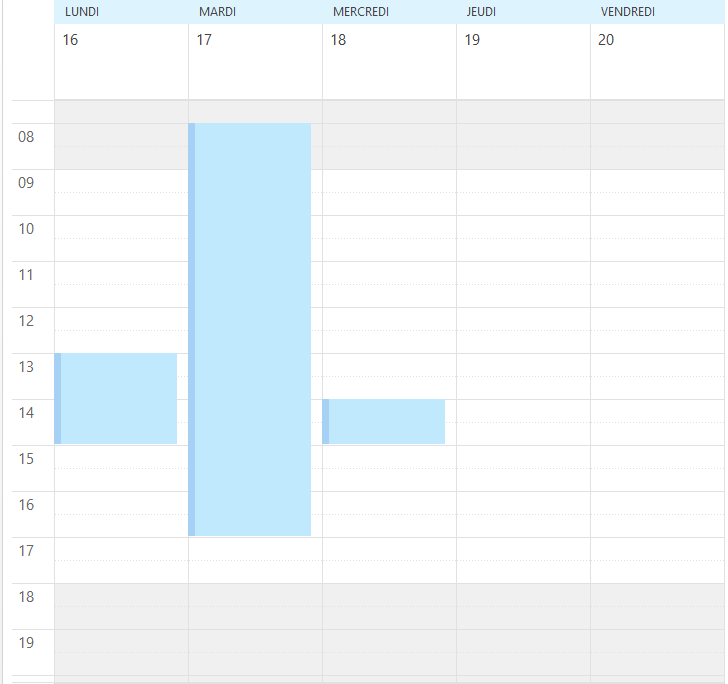
                                  0_1523527816773_calendrier.png

                                  Thank you

                                  1 Reply Last reply
                                  Reply Quote 0
                                  • B
                                    Bernhard
                                    last edited by

                                    Hi Guys!

                                    I hope you can help me. ;-)
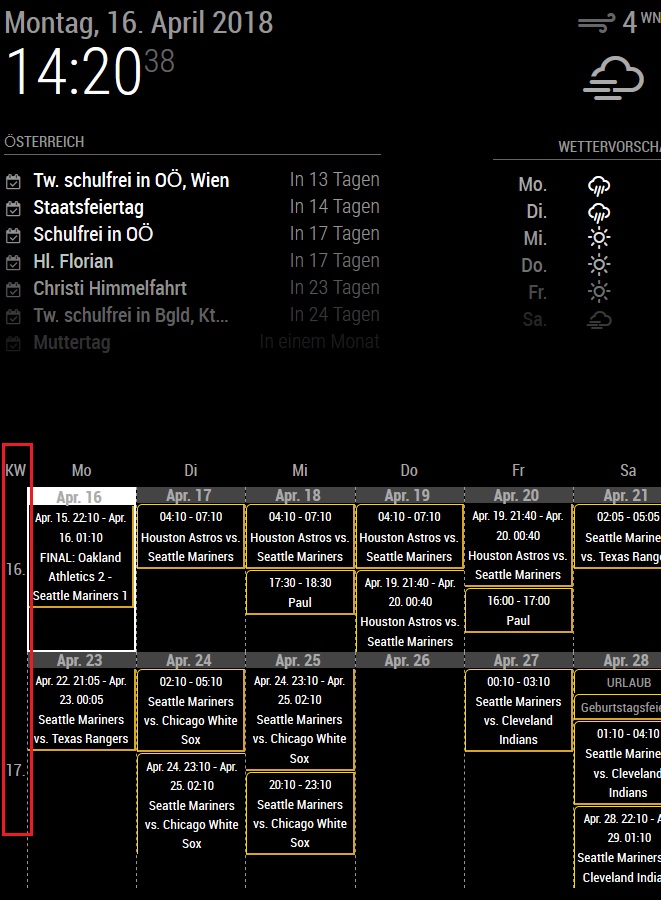
                                    I’m looking for a way to hide the column “KW”.
                                    So the first column should be the “Monday (Mo)” column - at the " weeks" view.

                                    (Hide the red marked column)
                                    0_1523882300372_1.jpg

                                    Is that possible?!

                                    1 Reply Last reply
                                    Reply Quote 0
                                    • Y
                                      yawns Moderator
                                      last edited by

                                      Yes, look at https://github.com/eouia/MMM-CalendarExt/wiki/Configuration, search for showWeeks and add that to your config.

                                      B 1 Reply Last reply
                                      Reply Quote 0
                                      • B
                                        Bernhard @yawns
                                        last edited by

                                        @yawns
                                        THANK YOU
                                        It’s so easy - I have to be blind

                                        1 Reply Last reply
                                        Reply Quote 0
                                        • R
                                          ragincajunintx
                                          last edited by ragincajunintx

                                          Hi… thank you so much for building this module… I am trying to customize the views… i originally setup weeks view with just one week… got my css where I wanted it, but I realized what i really wanted was a days view… the days view is much different and doesn’t show times on the events… can you help me get exactly like my picture, but in the days view? with the week starting on monday. I have my locale set to en-US…
                                          Thursday, Friday, and Saturday day names are missing though…

                                          0_1523887667524_MVIMG_20180404_081442.jpg

                                          1 Reply Last reply
                                          Reply Quote 0
                                          • G
                                            ganther
                                            last edited by

                                            First of all thankyou for this great module!!

                                            One little question. I use my calendar in weekly View with 2 weeks shown.
                                            I would like to reduce the black margin left and right. Could you tell me which code I have to add in the custom.css to define the width of the calendar?

                                            Thank you so much
                                            Sandy

                                            1 Reply Last reply
                                            Reply Quote 0

                                            Hello! It looks like you're interested in this conversation, but you don't have an account yet.

                                            Getting fed up of having to scroll through the same posts each visit? When you register for an account, you'll always come back to exactly where you were before, and choose to be notified of new replies (either via email, or push notification). You'll also be able to save bookmarks and upvote posts to show your appreciation to other community members.

                                            With your input, this post could be even better 💗

                                            Register Login

                                            • 1
                                            • 2
                                            • 3
                                            • 4
                                            • 5
                                            • 6
                                            • 9
                                            • 10
                                            • 4 / 10
                                            • First post
                                              Last post
                                            Enjoying MagicMirror? Please consider a donation!
                                            MagicMirror created by Michael Teeuw.
                                            Forum managed by Sam, technical setup by Karsten.
                                            This forum is using NodeBB as its core | Contributors
                                            Contact | Privacy Policy