MagicMirror Forum
    • Recent
    • Tags
    • Unsolved
    • Solved
    • MagicMirror² Repository
    • Documentation
    • 3rd-Party-Modules
    • Donate
    • Discord
    • Register
    • Login
    A New Chapter for MagicMirror: The Community Takes the Lead
    Read the statement by Michael Teeuw here.

    Electron CPU usage

    Scheduled Pinned Locked Moved Troubleshooting
    247 Posts 46 Posters 597.6k Views 42 Watching
    Loading More Posts
    • Oldest to Newest
    • Newest to Oldest
    • Most Votes
    Reply
    • Reply as topic
    Log in to reply
    This topic has been deleted. Only users with topic management privileges can see it.
    • W Offline
      wtidwell
      last edited by wtidwell

      It’s a Samsung 32gb microsd. It’s Class10, u1 which I was wondering if that may be a problem? It says I have 22.9gb free out of 27.9 total.

      Also I tried to reinstall electron and it said there was an unmet peer dependency for styleint. So now I’m trying to figure out how to install that.

      Edit: got stylelint installed but it’s still laggy.

      Mykle1M 1 Reply Last reply Reply Quote 0
      • Mykle1M Offline
        Mykle1 Project Sponsor Module Developer @wtidwell
        last edited by

        @wtidwell

        The capacity is certainly large enough. I don’t know if the U1 designation has anything to do with it. There is a recommended SD card list somewhere. Your free space is more than adequate, assuming you expanded the swap file during installation of the OS, or something like that. If stylelint was a warning, and not an error, then that shouldn’t affect performance. I know, all of this doesn’t help you, so . . .

        A few more thoughts. Are you running Raspbian Jessie? Lite? Are node and npm up to date?

        I know it’s a hassle, but I always suggest a clean, MANUAL installation as opposed to troubleshooting, which could take hours, or days. Some people have had troubles with the automatic installer. That’s just my opinion, for what it’s worth.

        Create a working config
        How to add modules

        W 1 Reply Last reply Reply Quote 0
        • R Offline
          roramirez Core Contributors @wtidwell
          last edited by

          @wtidwell Can you share the configuration when did you get a big CPU usage?

          What version are you using?

          Easy module development with MagicMirror Module Template

          W 1 Reply Last reply Reply Quote 0
          • W Offline
            wtidwell @Mykle1
            last edited by

            @Mykle1
            Looks like I’m running Jessie and my SD card is on the recommended list so I’ll try a manual reinstall.

            Thanks for all your help!

            1 Reply Last reply Reply Quote 0
            • W Offline
              wtidwell @roramirez
              last edited by

              @roramirez
              @Mykle1

              I just did a full clean install of everything including Raspian and I had to install stretch instead of Jessie but everything else installed smoothly but I’m still having this lag.

              Mykle1M 1 Reply Last reply Reply Quote 0
              • Mykle1M Offline
                Mykle1 Project Sponsor Module Developer @wtidwell
                last edited by

                @wtidwell
                2 clean installations, 1 with Jessie and 1 with Stretch and the same issue appears? Unless some step is missing with the OS or MM then I’d hate to assume you have a hardware issue. I really need to get a spare Pi3 so that I can troubleshoot more effectively. I’m only on a dev machine at the moment.

                Perhaps @roramirez has some input here

                Create a working config
                How to add modules

                R 1 Reply Last reply Reply Quote 0
                • SnilleS Offline
                  Snille Module Developer
                  last edited by

                  Hmm… I always thought this was a normal behavior? Electron always runs pretty high on my RPI Mirror. This is my “task-list” using nmon on the RPi (via SSH) with basically nothing on the Mirror Screen but as you can see Electron is pretty active. :)
                  0_1503316867133_Busy-Electron.jpg
                  I do have quite a lot of active plugins of course…

                  If you cant find it, make it and share it!
                  Modules: MMM-homeassistant-sensors, MMM-Modulebar, MMM-Profilepicture, MMM-Videoplayer

                  W 1 Reply Last reply Reply Quote 0
                  • W Offline
                    wtidwell @Snille
                    last edited by

                    @Mykle1
                    Yeah I’d hate that too. =/ gonna try another clean install but this time of Raspian lite. I guess I can try a new SD card as well.

                    @Snille
                    That’s what mine looks like now with only default modules. And it spikes all the time.

                    Mykle1M 2 Replies Last reply Reply Quote 0
                    • Mykle1M Offline
                      Mykle1 Project Sponsor Module Developer @wtidwell
                      last edited by

                      @wtidwell & @Snille

                      For what it’s worth:

                      Here are my screenshots from my Pi3 mirror, via VNC, as of this morning, August 21, 2017
                      at 8:26am New York time. You can clearly see that Magic Mirror is running. It’s minimized
                      in the top Menu Bar so I could run Task Manager for this test. I marked the significant
                      details with red stars. This is on top of a standard Raspbian Jessie installation that was
                      done in January, 2017 and Magic Mirror version 2.1.0. It has been running this way for
                      8 months now, without a hitch. These screenshots were done with all of the below modules
                      running. I also included a screenshot of my system stats to show the temperature of my Pi’s
                      CPU and my system load, as they both may relate to performance and throttling issues.

                      0_1503323377666_bb.JPG

                      0_1503323400308_ee.JPG

                      • Modules running during test and screenshots.

                      motiondetector
                      compliments
                      MMM-Fortune
                      MMM-EasyPix - 2 instances
                      MMM-EARTH
                      clock
                      calendar
                      MMM-Events
                      MMM-SystemStats
                      MMM-NetworkScanner
                      MMM-WunderGround - 2 instances
                      MMM-doomsDay
                      camera
                      MMM-Lottery
                      voicecontrol
                      MMM-EyeCandy
                      newsfeed

                      Create a working config
                      How to add modules

                      1 Reply Last reply Reply Quote 1
                      • SnilleS Offline
                        Snille Module Developer
                        last edited by Snille

                        @Mykle1 Can you do a screenshot from a terminal running nmon?
                        If you are ok with that… Here is how to do it.

                        1. Open a terminal (or log in via SSH).
                        2. Install nmon (sudo apt-get install nmon).
                        3. Open nmon by just typing “nmon”. :)
                        4. Press “t”, “l” and “m” to get “task list”, “longer term CPU averages” and “Memory & Swap stats”.
                        5. Press + to increase the update rate.
                        6. Let nmon fill the “CPU” meter and take a screenshot. :)
                          Press “q” to quit nmon.
                          Good thing about nmon is that you can use it from ssh (via putty). :)

                        Thank you!

                        If you cant find it, make it and share it!
                        Modules: MMM-homeassistant-sensors, MMM-Modulebar, MMM-Profilepicture, MMM-Videoplayer

                        Mykle1M 1 Reply Last reply Reply Quote 0
                        • R Offline
                          roramirez Core Contributors @Mykle1
                          last edited by

                          @Mykle1 said in Electron CPU usage:

                          Perhaps @roramirez has some input here

                          What version of electron did you is installed in the system?

                          Easy module development with MagicMirror Module Template

                          1 Reply Last reply Reply Quote 0
                          • Mykle1M Offline
                            Mykle1 Project Sponsor Module Developer @Snille
                            last edited by

                            @Snille said in Electron CPU usage:

                            Can you do a screenshot from a terminal running nmon?

                            I think I did this correctly and I think you wanted a screenshot of each, so here they are. How do my stats look?
                            0_1503361152257_1.JPG 0_1503361162219_2.JPG 0_1503361174429_3.JPG

                            Create a working config
                            How to add modules

                            1 Reply Last reply Reply Quote 1
                            • Mykle1M Offline
                              Mykle1 Project Sponsor Module Developer @wtidwell
                              last edited by

                              @wtidwell said in Electron CPU usage:

                              I guess I can try a new SD card as well.

                              Yeah, you gotta try something to eliminate all possibilities. Let me know how you make out. Good luck!

                              Create a working config
                              How to add modules

                              W 1 Reply Last reply Reply Quote 0
                              • W Offline
                                wtidwell @Mykle1
                                last edited by

                                @Mykle1
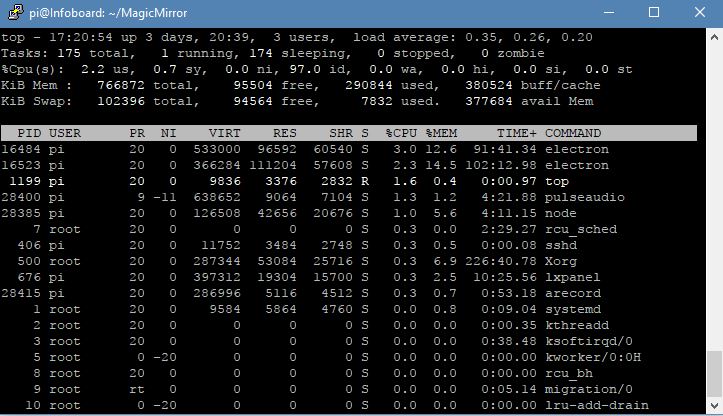
                                I just made sure I updated to electron1.7.5 and it’s still chugging like before. I got some errors aboutHere is my nmon reading as well.
                                Imgur.com/np2mv54

                                I don’t know what to make of this haha

                                Mykle1M 1 Reply Last reply Reply Quote 0
                                • Mykle1M Offline
                                  Mykle1 Project Sponsor Module Developer @wtidwell
                                  last edited by Mykle1

                                  @wtidwell said in Electron CPU usage:

                                  I don’t know what to make of this haha

                                  It can be frustrating. Hang in there. We’ll try to get you sorted or at least find out what the issue is so it can be corrected.

                                  Now, let me look at your nmon

                                  Edit: Ouch! :-(

                                  Create a working config
                                  How to add modules

                                  1 Reply Last reply Reply Quote 0
                                  • SnilleS Offline
                                    Snille Module Developer
                                    last edited by

                                    @Mykle1 Thank you! :) You can actually get all three on the same “screen”. :) But what matters is that your CPU is hovering around 5% and mine (ours) are hovering around 20%x2… That is strange.

                                    @wtidwell Are you rinnung a “lite” version or a full version of the OS?

                                    If you cant find it, make it and share it!
                                    Modules: MMM-homeassistant-sensors, MMM-Modulebar, MMM-Profilepicture, MMM-Videoplayer

                                    W Mykle1M 2 Replies Last reply Reply Quote 0
                                    • W Offline
                                      wtidwell @Snille
                                      last edited by

                                      @Snille
                                      I’m running a full version. I intend on reinstalling Raspian lite when I have some free time if I can’t troubleshoot it until then.

                                      When I was installing electron, I tried to install it globally with the -g command like it suggested in the electron readme. However it said I didn’t have permission and I tried to repeat it with sudo and it still said the same thing. Not sure if that means anything significant. I did get it to install non globally with no errors but I dunno if that may be my problem.

                                      1 Reply Last reply Reply Quote 0
                                      • SnilleS Offline
                                        Snille Module Developer
                                        last edited by

                                        @wtidwell Nah, I’m running the “lite” version of Jessie… So it’s not that… I did not do a separate install of electron actually. I used the “install-script” from MM at the beginning… It’s goning to be interesting to see if you get any better results with another SD card…

                                        If you cant find it, make it and share it!
                                        Modules: MMM-homeassistant-sensors, MMM-Modulebar, MMM-Profilepicture, MMM-Videoplayer

                                        W 1 Reply Last reply Reply Quote 0
                                        • W Offline
                                          wtidwell @Snille
                                          last edited by

                                          @Snille
                                          Speaking of hardware, and this may be a dumb question, but any chance the mouse and keyboard are causing this performance hitch? I just plugged in the ones on my desk which are the corsair strafe and logitech g600, both more intricate than normal pnp mouse and keyboard…

                                          1 Reply Last reply Reply Quote 0
                                          • SnilleS Offline
                                            Snille Module Developer
                                            last edited by

                                            @wtidwell Nope, I don’t think so. I have not had any keyboard nor mouse connected since I installed it. :)

                                            If you cant find it, make it and share it!
                                            Modules: MMM-homeassistant-sensors, MMM-Modulebar, MMM-Profilepicture, MMM-Videoplayer

                                            1 Reply Last reply Reply Quote 0

                                            Hello! It looks like you're interested in this conversation, but you don't have an account yet.

                                            Getting fed up of having to scroll through the same posts each visit? When you register for an account, you'll always come back to exactly where you were before, and choose to be notified of new replies (either via email, or push notification). You'll also be able to save bookmarks and upvote posts to show your appreciation to other community members.

                                            With your input, this post could be even better 💗

                                            Register Login

                                            • 1
                                            • 2
                                            • 7
                                            • 8
                                            • 9
                                            • 10
                                            • 11
                                            • 12
                                            • 13
                                            • 9 / 13
                                            • First post
                                              Last post
                                            Enjoying MagicMirror? Please consider a donation!
                                            MagicMirror created by Michael Teeuw.
                                            Forum managed by Sam, technical setup by Karsten.
                                            This forum is using NodeBB as its core | Contributors
                                            Contact | Privacy Policy