MagicMirror Forum
    • Recent
    • Tags
    • Unsolved
    • Solved
    • MagicMirror² Repository
    • Documentation
    • 3rd-Party-Modules
    • Donate
    • Discord
    • Register
    • Login
    A New Chapter for MagicMirror: The Community Takes the Lead
    Read the statement by Michael Teeuw here.

    Electron CPU usage

    Scheduled Pinned Locked Moved Troubleshooting
    247 Posts 46 Posters 597.6k Views 42 Watching
    Loading More Posts
    • Oldest to Newest
    • Newest to Oldest
    • Most Votes
    Reply
    • Reply as topic
    Log in to reply
    This topic has been deleted. Only users with topic management privileges can see it.
    • Mykle1M Offline
      Mykle1 Project Sponsor Module Developer @wtidwell
      last edited by Mykle1

      @wtidwell said in Electron CPU usage:

      Hey all, new user here.

      You see what you started? :^)

      Create a working config
      How to add modules

      1 Reply Last reply Reply Quote 0
      • R Offline
        Reotch2 @loctruong96
        last edited by

        @loctruong96 said in Electron CPU usage:

        1. sudo npm install electron@1.4.15 -g
        2. WAIT PATIENTLY FOR ELECTRON TO LOAD IN THE BACKGROUND
        3. a new line appear indicate electron has finished installing
        4. Go to your download folder, exact Magic Mirror 2.1.0
        5. Go to the newly exacted forlder, open another folder named config
        6. Change the file name Config.js.example to Config.js inside the config folder

        @Mykle1

        I keep getting the same issue as @EventHorizon but none of his fixes seem to work (sudo npm install -g electron --unsafe-perm=true) or (nom @latest -g).

        I’m starting with a fresh STRETCH install, and get to step 9 (npm install && npm start) where I get the (types/node) fault.

        Any ideas?

        Thanks all.

        L Mykle1M 2 Replies Last reply Reply Quote 0
        • L Offline
          loctruong96 @Reotch2
          last edited by

          @Reotch2 Hello I think this happened because electron was not successfully installed using npm as a global variable. It happened to me too and i had to reinstall electron as a global variable which is the -g at the end is for. Can you confirm that you have successfully install electron ?

          R 1 Reply Last reply Reply Quote 0
          • R Offline
            Reotch2 @loctruong96
            last edited by

            @loctruong96 Still no luck. I ran (sudo npm install electron@1.4.15 -g) after the clean install, triple verifying that I had the (-g) on there, and no luck.

            -Raspberry Pi 3
            -Raspbian Stretch
            -Definitely ran (sudo apt-get update)
            -Full error listed below:

            npm ERR! 404 Not Found
            npm ERR! 404 
            npm ERR! 404 'types/node' is not in the npm registry.
            npm ERR! 404 You should bug the author to publish it
            npm ERR! 404 It was specified as a dependency of 'electron'
            npm ERR! 404 
            npm ERR! 404 Note that you can also install from a
            npm ERR! 404 tarball, folder, or http url, or git url.
            
            npm ERR! System Linux 4.9.41-v7+
            npm ERR! command "/usr/bin/nodejs" "/usr/bin/npm" "install"
            npm ERR! cwd /home/pi/MagicMirror
            npm ERR! node -v v4.8.2
            npm ERR! npm -v 1.4.21
            npm ERR! code E404
            npm ERR! 
            npm ERR! Additional logging details can be found in:
            npm ERR!     /home/pi/MagicMirror/npm-debug.log
            npm ERR! not ok code 0
            
            
            L 1 Reply Last reply Reply Quote 0
            • L Offline
              loctruong96 @Reotch2
              last edited by

              @Reotch2 hmmm can you try this: npm install npm@latest -g

              R 1 Reply Last reply Reply Quote 0
              • R Offline
                Reotch2 @loctruong96
                last edited by

                @loctruong96 Yup… that did the trick. odd… seems like I’ve done the same steps 10 times, but it worked on the 11th.

                I can’t seem to find electron under MagicMirror/node_modules/ to verify the version. Where else can I look?

                -Rich

                L 1 Reply Last reply Reply Quote 0
                • L Offline
                  loctruong96 @Reotch2
                  last edited by loctruong96

                  @Reotch2 wow… it seems different people have different version of npm installed and you need the latest one. I will add that into the steps. Thank you for verifying. Good luck on your project!
                  As for electron version you can confirm by trying “npm list -g” or “npm list” depend on global variable settings of your packages.

                  Mykle1M 1 Reply Last reply Reply Quote 1
                  • Mykle1M Offline
                    Mykle1 Project Sponsor Module Developer @Reotch2
                    last edited by

                    @Reotch2 said in Electron CPU usage:

                    I keep getting the same issue as @EventHorizon but none of his fixes seem to work (sudo npm install -g electron --unsafe-perm=true) or (nom @latest -g).
                    I’m starting with a fresh STRETCH install, and get to step 9 (npm install && npm start) where I get the (types/node) fault.
                    Any ideas?

                    Personally, I had some troubles with Stretch, so I went back to Jessie, July release I believe. I’m guessing that most are using Jessie as well. Also, I think that with an installation of MM 2.1.0 you get Electron 1.4.15 by default. That combination is what we have found to work best regarding the CPU usage issue. sudo npm install electron@1.4.15 has worked for everyone. I don’t know why it wasn’t working for you. Perhaps there is something else going on there

                    Create a working config
                    How to add modules

                    1 Reply Last reply Reply Quote 0
                    • Mykle1M Offline
                      Mykle1 Project Sponsor Module Developer @loctruong96
                      last edited by Mykle1

                      @loctruong96 said in Electron CPU usage:

                      it seems different people have different version of npm installed and you need the latest one.

                      With regards to this topic only, you do NOT need or want the latest version of npm.

                      You can also find the version of npm here MagicMirror/node_modules/electron/dist/version

                      Create a working config
                      How to add modules

                      L 1 Reply Last reply Reply Quote 0
                      • cowboysdudeC Offline
                        cowboysdude Module Developer
                        last edited by

                        This post is deleted!
                        Mykle1M 1 Reply Last reply Reply Quote 0
                        • L Offline
                          loctruong96 @Mykle1
                          last edited by

                          @Mykle1 Agree, i was thinking the same thing. But some users are experiencing the problem where their npm failed to run install and start which i can only think of updating it which turned out to get it to work so far. I have also indicated a note in the install guide to have people aware of it.

                          Mykle1M 1 Reply Last reply Reply Quote 0
                          • cowboysdudeC Offline
                            cowboysdude Module Developer
                            last edited by

                            This post is deleted!
                            L 1 Reply Last reply Reply Quote 0
                            • Mykle1M Offline
                              Mykle1 Project Sponsor Module Developer @cowboysdude
                              last edited by

                              @cowboysdude said in Electron CPU usage:

                              my bathroom mirror is a pi and it’s updated and I’m not having any of these issues…

                              Would you please post your results, as everyone has above, for comparison? Raspbian version, MM version, Electron version and Pi version, and your nmon results

                              Create a working config
                              How to add modules

                              1 Reply Last reply Reply Quote 0
                              • L Offline
                                loctruong96 @cowboysdude
                                last edited by loctruong96

                                Yeah, many didn’t update npm and have no problem whatsoever, only two users reported having 404 problem and only 1 user tried to npm install npm@latest -g and it worked for him. I made a note in my guide up in the thread in regard of this issue.

                                cowboysdudeC 1 Reply Last reply Reply Quote 1
                                • cowboysdudeC Offline
                                  cowboysdude Module Developer @loctruong96
                                  last edited by

                                  This post is deleted!
                                  1 Reply Last reply Reply Quote 0
                                  • Mykle1M Offline
                                    Mykle1 Project Sponsor Module Developer @loctruong96
                                    last edited by

                                    @loctruong96 said in Electron CPU usage:

                                    I have also indicated a note in the install guide to have people aware of it.

                                    Very good! Thanks!

                                    Create a working config
                                    How to add modules

                                    1 Reply Last reply Reply Quote 0
                                    • Mr.SpontiM Offline
                                      Mr.Sponti
                                      last edited by

                                      Hello, here are some details on my configuration and the steps I’ve made to downgrade from 2.1.1 to MM 2.1.0 & electron 1.4.15. First, I use the following PI and OS

                                      • Pi 3 Model B, 1024MB RAM

                                      • Raspbian Stretch

                                      pi@Infoboard:~ $ uname -a
                                      Linux Infoboard 4.9.41-v7+ #1023 SMP Tue Aug 8 16:00:15 BST 2017 armv7l GNU/Linux
                                      

                                      Downgrade MagicMirror from 2.1.1 to 2.1.0:
                                      -rename of my MagicMirror folder to MagicMirrorSAVE
                                      -download and unzip MM 2.1.0
                                      -rename dir MagicMirror-2.1.0 to MagicMirror
                                      -cd to MagicMirror
                                      -npm install electron@1.4.15 # I didn’t install electron as a global package
                                      -nano package.json
                                      –> change electron version under dependencies to electron 1.4.15

                                      {
                                        "name": "magicmirror",
                                        "version": "2.1.0",
                                        "description": "A modular interface for smart mirrors.",
                                        "main": "js/electron.js",
                                        "scripts": {
                                          "start": "electron js/electron.js"
                                        },
                                        "repository": {
                                          "type": "git",
                                       ...
                                       "dependencies": {
                                          "electron": "1.4.15",
                                          "express": "^4.14.0",
                                          "express-ipfilter": "latest",
                                          "feedme": "latest",
                                      ....
                                      

                                      now, install MagicMirror

                                      -npm install
                                      -copy your own modules from the MagicMirrorSAVE to the respective MM2.1.0 directory
                                      -install necessary node modules for your own modules
                                      done
                                      Check the installed version of electron

                                      pi@Infoboard:~ $ more MagicMirror/node_modules/electron/dist/version
                                      v1.4.15
                                      

                                      run MM with ‘npm start’ and monitor the CPU usage with ‘top’
                                      and the magic is there: 2 to 3 % CPU usage in case you are not running newsfeed or other modules with a lot of rendering stuff. If I include the newfeed modul CPU usage will increase up to 30%. So, I go without newsfeed!
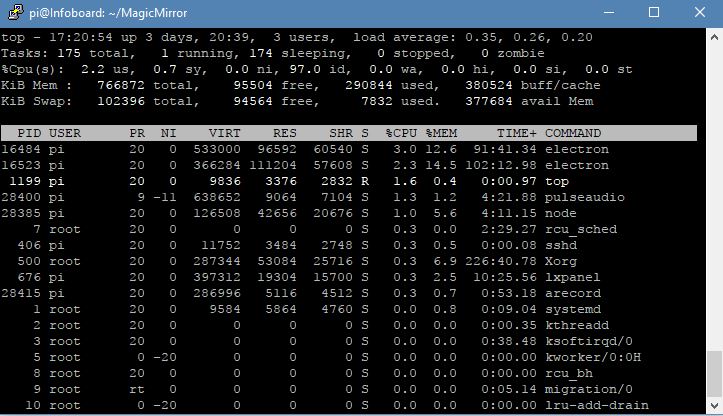
                                      alt text

                                      I hope that help some or the other.

                                      Mykle1M K 2 Replies Last reply Reply Quote 3
                                      • Mykle1M Offline
                                        Mykle1 Project Sponsor Module Developer @Mr.Sponti
                                        last edited by

                                        @Mr.Sponti said in Electron CPU usage:

                                        I hope that help some or the other.

                                        Thank you for adding your results to this topic, and the steps you took to downgrade MM and Electron. I’m sure your post will help someone, as this topic has helped quite a few people.

                                        Did you downgrade because you were having the CPU usage issue? Can you tell me what your usage was before you downgraded? Thanks


                                        Create a working config
                                        How to add modules

                                        Mr.SpontiM 1 Reply Last reply Reply Quote 0
                                        • Mr.SpontiM Offline
                                          Mr.Sponti @Mykle1
                                          last edited by

                                          @Mykle1 Yes, I downgraded due to high CPU usage with MM2.1.1 & electron1.4.17. Top showed a usage between 100 and 200% and my own written moduls had a really bad performance.

                                          Mykle1M 1 Reply Last reply Reply Quote 1
                                          • Mykle1M Offline
                                            Mykle1 Project Sponsor Module Developer @Mr.Sponti
                                            last edited by

                                            @Mr.Sponti said in Electron CPU usage:

                                            Yes, I downgraded due to high CPU usage with MM2.1.1 & electron1.4.17. Top showed a usage between 100 and 200% and my own written moduls had a really bad performance.

                                            Ok, thank you. I’m glad that you’re seeing the benefit of this workaround. Let’s hope that it gets addressed and corrected sometime in the future.

                                            Create a working config
                                            How to add modules

                                            1 Reply Last reply Reply Quote 1

                                            Hello! It looks like you're interested in this conversation, but you don't have an account yet.

                                            Getting fed up of having to scroll through the same posts each visit? When you register for an account, you'll always come back to exactly where you were before, and choose to be notified of new replies (either via email, or push notification). You'll also be able to save bookmarks and upvote posts to show your appreciation to other community members.

                                            With your input, this post could be even better 💗

                                            Register Login

                                            • 1
                                            • 2
                                            • 7
                                            • 8
                                            • 9
                                            • 10
                                            • 11
                                            • 12
                                            • 13
                                            • 9 / 13
                                            • First post
                                              Last post
                                            Enjoying MagicMirror? Please consider a donation!
                                            MagicMirror created by Michael Teeuw.
                                            Forum managed by Sam, technical setup by Karsten.
                                            This forum is using NodeBB as its core | Contributors
                                            Contact | Privacy Policy
