MagicMirror Forum
    • Recent
    • Tags
    • Unsolved
    • Solved
    • MagicMirror² Repository
    • Documentation
    • 3rd-Party-Modules
    • Donate
    • Discord
    • Register
    • Login
    A New Chapter for MagicMirror: The Community Takes the Lead
    Read the statement by Michael Teeuw here.

    MMM-GoogleMapsTraffic

    Scheduled Pinned Locked Moved Transport
    87 Posts 27 Posters 83.4k Views 28 Watching
    Loading More Posts
    • Oldest to Newest
    • Newest to Oldest
    • Most Votes
    Reply
    • Reply as topic
    Log in to reply
    This topic has been deleted. Only users with topic management privileges can see it.
    • P Offline
      pflodo @vicmora
      last edited by

      @vicmora I like it.
      To make it generic , probably should expose the zoom as a variable, in my area I prefer showing a larger area with only major roads showing.

      With black background of mirror I also prefer the night mode of this sample: https://developers.google.com/maps/documentation/javascript/examples/style-array

      Maybe expose the Style as a variable as well, letting the user define it or leave it blank for default, alternatively you could hardcode a particular inverse colour style, and have a config to enable it.

      1 Reply Last reply Reply Quote 0
      • O Offline
        Osyris
        last edited by Osyris

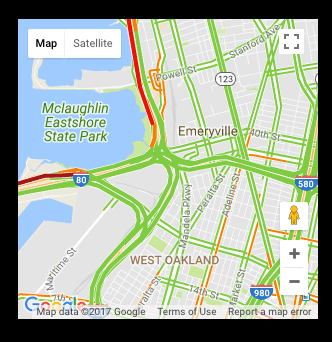
        Hey guys, I figured it’s easy enough to style the map by editing the JS file. So in order to get the night mode as shown in pflodo’s post (and to disable the UI buttons) I added the following to the JS code:

        //original code
                script.onload = function () {
                    var map = new google.maps.Map(document.getElementById("map"), {
                    	zoom: 10,
                    	center: {
                    		lat: lat,
                    		lng: lng
                    	},
        //add a comma after the } above
        //new code:
        		disableDefaultUI: true,
        		styles: [
        			{elementType: 'geometry', stylers: [{color: '#242f3e'}]},
        			{elementType: 'labels.text.stroke', stylers: [{color: '#242f3e'}]},
        			{elementType: 'labels.text.fill', stylers: [{color: '#746855'}]},
        			{
        			    featureType: 'administrative.locality',
        			    elementType: 'labels.text.fill',
        			    stylers: [{color: '#d59563'}]
        			},
        			{
        				featureType: 'poi',
        				elementType: 'labels.text.fill',
        				stylers: [{color: '#d59563'}]
        			},
        			{
        				featureType: 'poi.park',
        			        elementType: 'geometry',
        			        stylers: [{color: '#263c3f'}]
        			},
        			{
        				featureType: 'poi.park',
        				elementType: 'labels.text.fill',
        				stylers: [{color: '#6b9a76'}]
        			},
        			{
        				featureType: 'road',
        				elementType: 'geometry',
        				stylers: [{color: '#38414e'}]
        			},
        			{
        				featureType: 'road',
        				elementType: 'geometry.stroke',
        					  stylers: [{color: '#212a37'}]
        			},
        			{
        				featureType: 'road',
        				elementType: 'labels.text.fill',
        					  stylers: [{color: '#9ca5b3'}]
        			},
        			{
        				featureType: 'road.highway',
        				elementType: 'geometry',
        				stylers: [{color: '#746855'}]
        			},
        			{
        				featureType: 'road.highway',
        				elementType: 'geometry.stroke',
        				stylers: [{color: '#1f2835'}]
        			},
        			{
        				featureType: 'road.highway',
        				elementType: 'labels.text.fill',
        				stylers: [{color: '#f3d19c'}]
        			},
        			{
        				featureType: 'transit',
        				elementType: 'geometry',
        				stylers: [{color: '#2f3948'}]
        			},
        			{
        			        featureType: 'transit.station',
        				elementType: 'labels.text.fill',
        				stylers: [{color: '#d59563'}]
        			},
        			{
        			        featureType: 'water',
        			        elementType: 'geometry',
        				stylers: [{color: '#17263c'}]
        			},
        			{
        				featureType: 'water',
        				elementType: 'labels.text.fill',
        				stylers: [{color: '#515c6d'}]
        			},
        			{
        				featureType: 'water',
        				elementType: 'labels.text.stroke',
        				stylers: [{color: '#17263c'}]
        			}
        		]
        //old code again
                    });
        

        Have fun!

        Also, if you want to make the background black (so it looks cool on the mirror), set the first attribute ‘geometry’ to ‘#000000’.

        K 2 Replies Last reply Reply Quote 0
        • K Offline
          knubbl @Osyris
          last edited by

          Good work.

          Any ideas how to adjust the zoom of the map?

          O 1 Reply Last reply Reply Quote 0
          • O Offline
            Osyris @knubbl
            last edited by

            @knubbl See line 4 in the old code of my code snippet above. You can simply adjust the ‘zoom’ parameter: smaller numbers to zoom out, bigger numbers to zoom in.

            strawberry 3.141S 1 Reply Last reply Reply Quote 0
            • strawberry 3.141S Offline
              strawberry 3.141 Project Sponsor Module Developer @Osyris
              last edited by

              @Osyris as you figured out to make those modifications, don’t you want to make config options for it and add it to the repository, so users can use it without the need of modificate the module and can easily update on new versions?

              Please create a github issue if you need help, so I can keep track

              1 Reply Last reply Reply Quote 0
              • V Offline
                vicmora
                last edited by

                @Osyris are you willing to submit a pull request on github with what @strawberry-3-141 mentioned?

                If not, I can take care of this as soon as I get some time.

                1 Reply Last reply Reply Quote 0
                • O Offline
                  Osyris
                  last edited by

                  I can do that, but the Git seems to be locked so I can’t make branches. Also, there seems to be another user who forked your Git and added a night mode.

                  strawberry 3.141S 1 Reply Last reply Reply Quote 0
                  • strawberry 3.141S Offline
                    strawberry 3.141 Project Sponsor Module Developer @Osyris
                    last edited by

                    @Osyris as you’re not added to the project the only way for you is to create a fork do your stuff there and then create a pull request to the source project

                    Please create a github issue if you need help, so I can keep track

                    1 Reply Last reply Reply Quote 0
                    • O Offline
                      Osyris
                      last edited by

                      Ok, I’m at it.

                      1 Reply Last reply Reply Quote 0
                      • O Offline
                        Osyris
                        last edited by

                        Could someone test the changes from my fork? I have no time to test this on my mirror right now and I’m afraid there could be errors in the code:
                        https://github.com/Osyris187/MMM-GoogleMapsTraffic

                        1 Reply Last reply Reply Quote 0
                        • sailboarder79S Offline
                          sailboarder79
                          last edited by

                          I had a question about how often this updates traffic. Does this auto refresh every hour or something or does it only update when the magic mirror is booted up?

                          1 Reply Last reply Reply Quote 0
                          • O Offline
                            Osyris
                            last edited by

                            The traffic layer does update itself just as on the Google Maps website. I don’t know how long the update interval is, but it’s as good as it gets. Google does not provide any APIs for the traffic layer.

                            sailboarder79S 1 Reply Last reply Reply Quote 0
                            • sailboarder79S Offline
                              sailboarder79 @Osyris
                              last edited by

                              @Osyris okay thanks!

                              1 Reply Last reply Reply Quote 0
                              • Z Offline
                                zzaidi148 @vicmora
                                last edited by

                                @vicmora Hi, I’ve been trying for the past week to get your module to work on my magic mirror. The closest I’ve gotten is getting my magic mirror to boot up with the default modules with no google maps traffic module showing. I used npm start dev to see the console it and it looked perfectly fine, saying that it had launched. I’ve tried placing the module in different places in the config. Below is my config, I’ve put it both at the beginning and end of this config. Please let me know which place to put it and how to fix the issue. Thanks!

                                /* Magic Mirror Config Sample
                                 *
                                 * By Michael Teeuw http://michaelteeuw.nl
                                 * MIT Licensed.
                                 *
                                 * For more information how you can configurate this file
                                 * See https://github.com/MichMich/MagicMirror#configuration
                                 *
                                 */
                                var config = {
                                
                                	address: "localhost", // Address to listen on, can be:
                                	                      // - "localhost", "127.0.0.1", "::1" to listen on loopback interface
                                	                      // - another specific IPv4/6 to listen on a specific interface
                                	                      // - "", "0.0.0.0", "::" to listen on any interface
                                	                      // Default, when address config is left out, is "localhost"
                                	port: 8080,
                                	ipWhitelist: ["127.0.0.1", "::ffff:127.0.0.1", "::1"], // Set [] to allow all IP addresses
                                	                                                       // or add a specific IPv4 of 192.168.1.5 :
                                	                                                       // ["127.0.0.1", "::ffff:127.0.0.1", "::1", "::ffff:192.168.1.5"],
                                	                                                       // or IPv4 range of 192.168.3.0 --> 192.168.3.15 use CIDR format :
                                	                                                       // ["127.0.0.1", "::ffff:127.0.0.1", "::1", "::ffff:192.168.3.0/28"],
                                
                                	language: "en",
                                	timeFormat: 12,
                                	units: "imperial",
                                
                                	modules: [
                                		{
                                            		module: 'MMM-GoogleMapsTraffic',
                                            		config: {
                                                	key: 'i have this',
                                                	lat: 37.8262306,
                                                	lng: -122.2920096,
                                                	height: '300px',
                                                	width: '300px'
                                            			}
                                        		}
                                    			]
                                		},
                                		{
                                			module: "alert",
                                		},
                                
                                		{
                                			module: "updatenotification",
                                			position: "top_bar",
                                		},
                                
                                		{
                                			module: "clock",
                                			position: "top_left",
                                		},
                                
                                		{
                                			module: "calendar",
                                			header: "US Holidays",
                                			position: "top_left",
                                			config: {
                                				calendars: [
                                					{
                                					symbol: "calendar-check-o",
                                					url: "webcal://www.calendarlabs.com/templates/ical/US-Holidays.ics",
                                					}
                                				]
                                			}
                                		},
                                		
                                		{
                                			module: "compliments",
                                			position: "lower_third",
                                		},
                                		
                                		{
                                			module: "currentweather",
                                			position: "top_right",
                                			config: {
                                				location: "Dallas",
                                				locationID: "4684888",  //ID from http://www.openweathermap.org/help/city_list.txt
                                				appid: "private",
                                			}
                                		},
                                		
                                		{
                                			module: "weatherforecast",
                                			position: "top_right",
                                			header: "Weather Forecast",
                                			config: {
                                				location: "Dallas",
                                				locationID: "4684888",  //ID from http://www.openweathermap.org/help/city_list.txt
                                				appid: "private",
                                			}
                                		},
                                		{
                                			module: "newsfeed",
                                			position: "bottom_bar",
                                			config: {
                                				feeds: [
                                					{
                                						title: "New York Times",
                                						url: "http://www.nytimes.com/services/xml/rss/nyt/HomePage.xml"
                                					}
                                				],
                                				showSourceTitle: true,
                                				showPublishDate: true
                                			}
                                		},
                                		{
                                            	        module: 'MMM-GoogleMapsTraffic',
                                            		config: {
                                                	   key: 'I have this',
                                                	   lat: 37.8262306,
                                                	   lng: -122.2920096,
                                                	   height: '300px',
                                                	   width: '300px',
                                            	        }
                                        	},
                                	]
                                		};
                                
                                /*************** DO NOT EDIT THE LINE BELOW ***************/
                                if (typeof module !== "undefined") {module.exports = config;}
                                
                                
                                ? 1 Reply Last reply Reply Quote 0
                                • ? Offline
                                  A Former User @zzaidi148
                                  last edited by

                                  @zzaidi148
                                  I’ve found what is wrong.
                                  you should set position of this module.

                                  module: 'MMM-GoogleMapsTraffic',
                                  position: 'top_left', //this is missed.
                                  config: {
                                        	   key: 'I have this',
                                  

                                  manual of @vicmora has missed this.

                                  Z 1 Reply Last reply Reply Quote 0
                                  • Z Offline
                                    zzaidi148 @Guest
                                    last edited by

                                    @Sean Thank you so much! Finally, after toiling away at it, with your help, I got it to work. Next up, your calendar module!

                                    1 Reply Last reply Reply Quote 0
                                    • B Offline
                                      blue2monster
                                      last edited by

                                      @vicmora : I’ve been trying all night long: just cant get the map to be shown.
                                      I can see that the module is started in the dev logs.

                                      Funny thing: If I add some different HTML Output in the module.js It is printed on my screen, the only thing missing is the map.
                                      Same thing is happening on MMM-fuel and MMM-googlemap. Modules are working but the map itself is not shown.
                                      Different one for iFrame: This one is working.

                                      Interesting fact: If I check on the google dashboard for the traffic of this specific api key, I do not see any traffic. Is there anything special in the google api that I need to enable, or any additional module that needs to be installed.

                                      Any ideas: Thanks a lot for the help.

                                      B V 2 Replies Last reply Reply Quote 0
                                      • B Offline
                                        blue2monster @blue2monster
                                        last edited by

                                        @blue2monster: found now a workaround with the iframe module: This one works… but I haven’t made to switch the traffic layer on

                                        1 Reply Last reply Reply Quote 0
                                        • V Offline
                                          vicmora @blue2monster
                                          last edited by

                                          @blue2monster Have you tried adding position: ‘top_left’ to your config? I missed this in the docs but will update them.


                                          B 1 Reply Last reply Reply Quote 0
                                          • B Offline
                                            blue2monster @vicmora
                                            last edited by

                                            @vicmora : yes, I added position to various spots(e.g top_left; bottom_center,…) and tried various width and heights but still frame not visible.
                                            Tried as well a complete empty config with only this module loaded-> no sucess.
                                            I guess it might be an Google api key issue: Could you please show you google api devboard: Which service needs to be activated in google api? An which is showing traffic on your google api?
                                            Thanks.

                                            V 1 Reply Last reply Reply Quote 0

                                            Hello! It looks like you're interested in this conversation, but you don't have an account yet.

                                            Getting fed up of having to scroll through the same posts each visit? When you register for an account, you'll always come back to exactly where you were before, and choose to be notified of new replies (either via email, or push notification). You'll also be able to save bookmarks and upvote posts to show your appreciation to other community members.

                                            With your input, this post could be even better 💗

                                            Register Login

                                            • 1
                                            • 2
                                            • 3
                                            • 4
                                            • 5
                                            • 1 / 5
                                            • First post
                                              Last post
                                            Enjoying MagicMirror? Please consider a donation!
                                            MagicMirror created by Michael Teeuw.
                                            Forum managed by Sam, technical setup by Karsten.
                                            This forum is using NodeBB as its core | Contributors
                                            Contact | Privacy Policy