Read the statement by Michael Teeuw here.
MMM-xiaomi - Temperature and Humidity from your smarthome
-
I am a step ahead!
I followed the instructions to get the token “Getting the token when using the Mi Home app”
This was working. I could see all the connected devices to the Gateway.pi@raspberrypi:~/MagicMirror/modules/MMM-xiaomi $ miio --discover --sync INFO Discovering devices. Press Ctrl+C to stop. Device ID: 52238776 Model info: Unknown Address: 192.168.13.1 Token: 6eea5ac1eb475bfedbfff98aab7c2bc7 via auto-token Support: Unknown Device ID: 158d000119fcb2 Model info: lumi.magnet (magnet) Address: Owned by 52238776 Token: Automatic via parent device Support: At least basic Device ID: 158d00013e28ee Model info: lumi.plug (power-plug) Address: Owned by 52238776 Token: Automatic via parent device Support: At least basic Device ID: 158d00015aa973 Model info: lumi.switch (controller) Address: Owned by 52238776 Token: Automatic via parent device Support: At least basic Device ID: 158d00015736a8 Model info: lumi.sensor_ht (sensor) Address: Owned by 52238776 Token: Automatic via parent device Support: At least basicAt this point I had to switch over to the Pi with the installed MagicMirror:
pi@MagicMirror:~ $ miio --discover
 INFO  Discovering devices. Press Ctrl+C to stop.

Device ID: 52238776
Model info: Unknown
Address: 192.168.2.107
Token: ???
Support: Unknown
I’ve updated the Token as described:
pi@MagicMirror:~ $ miio --update 52238776 --token 6eea5ac1eb475bfedbfff98aab7c2bc7
 INFO  Attempting to update 52238776
 INFO  Device updated
I’ve searched for devices again. Now with success!
pi@MagicMirror:~ $ miio --discover

 INFO  Discovering devices. Press Ctrl+C to stop.

Device ID: 52238776
Model info: Unknown
Address: 192.168.2.107
Token: 6eea5ac1eb475bfedbfff98aab7c2bc7 via stored token
Support: Unknown

Device ID: 158d000119fcb2
Model info: lumi.magnet (magnet)
Address: Owned by 52238776
Token: Automatic via parent device
Support: At least basic

Device ID: 158d00013e28ee
Model info: lumi.plug (power-plug)
Address: Owned by 52238776
Token: Automatic via parent device
Support: At least basic

Device ID: 158d00015aa973
Model info: lumi.switch (controller)
Address: Owned by 52238776
Token: Automatic via parent device
Support: At least basic

Device ID: 158d00015736a8
Model info: lumi.sensor_ht (sensor)
Address: Owned by 52238776
Token: Automatic via parent device
Support: At least basic
The problem so far is, that I still don’t get any informations visible in MM. I’ve tried ‘158d00015736a8’ and as well ‘52238776’ as id.
The second problem is, that I’ve lost the Gateway in my Mi Home app after updating the Token!The question is, how to copy ( Store?) over the Token to a different Machine?
mm error:
error: Token could not be auto-discovered at Device._tokenResolve (/home/pi/MagicMirror/modules/MMM-xiaomi/node_modules/miio/lib/device.js:141:13) at Device._onMessage (/home/pi/MagicMirror/modules/MMM-xiaomi/node_modules/miio/lib/device.js:80:9) at emitTwo (events.js:106:13) at Socket.emit (events.js:194:7) at UDP.onMessage [as onmessage] (dgram.js:545:8) -
Ok at least some progress. So first to enable your manual token just update the configuration:
config: {
	 interval: 30,
	 gatewayIP: '192.168.13.1',
	 gatewayToken: '6eea5ac1eb475bfedbfff98aab7c2bc7',
	 devices : [{
	     id: '158d00015736a8',
	     name: 'MyRoom1'
	 }]
}
You only need the IDs from your sensors, not the gateway.
About the Mi Home App and your lost token, I would try once this works to reconfigure your gateway with the Mi Home app, and then try to fetch the auto-token again (in your first sample it seems to provide auto-token).
-
I did the steps again to get the (new) Token. Now, I have a new Token and the Gateway again in my Mi Home app. I didn’t updated the Token on the different machine this time.
I’ve tried out your new config. I still don’t see more than before on the MM, but I don’t have an error log as well, which make it a bit more harder.
I have checked the IP address of the Gateway, its still the same. Dev is still enabled.
My config with the new Token.
		{
		module: 'MMM-xiaomi',
		position: 'bottom_left',
		header: 'Temperatur / Feuchtigkeit',  // This is optional
		config: {
			interval: 30,
			gatewayIP: '192.168.2.107',
			gatewayToken: '050591e66a82f7adc92bfa6b03058cdb',
			devices: [{ id: '158d00015736a8', name: 'Wohnzimmer' }]
			// See 'Configuration options' for more information.
				}
		},
Edit:
I get a error when I try to discover with miio:
pi@MagicMirror:~/MagicMirror/modules/MMM-xiaomi/node_modules/miio $ miio --discover INFO Discovering devices. Press Ctrl+C to stop. Device ID: 52238776 Model info: Unknown Address: 192.168.2.107 Token: 6eea5ac1eb475bfedbfff98aab7c2bc7 via stored token Support: Unknown (node:3626) UnhandledPromiseRejectionWarning: Unhandled promise rejection (rejection id: 1): Error: Call to device timed out -
Where did miio stored the Token?
The Token Miio used “Token: 6eea5ac1eb475bfedbfff98aab7c2bc7 via stored token”
is the old one! the new one is 050591e66a82f7adc92bfa6b03058cdb -
Hmm not sure about miio details, I just know that you can sync the tokens via
miio --discover --syncElse I would try manually setting to the correct (new) token.
For the MM: try to uncomment line 51 in node_helper.js, this logs all found devices. You could also add some more logs here to see where the program fails. -
Hi Mirko! Thanks for your reply!
Before and after I uncommented the line 51 and restartet MM.
Still with the old Tokenpi@MagicMirror:~ $ miio --discover --sync INFO Discovering devices. Press Ctrl+C to stop. Device ID: 52238776 Model info: Unknown Address: 192.168.2.107 Token: 6eea5ac1eb475bfedbfff98aab7c2bc7 via stored token Support: Unknown (node:25652) UnhandledPromiseRejectionWarning: Unhandled promise rejection (rejection id: 1): Error: Call to device timed outBut right now after uncommenting the line the error log is different. In the log i can already see the Temperature and humidity (_properties: { temperature: 19.51, humidity: 62.44 },)!! The next step!
> magicmirror@2.1.3 start /home/pi/MagicMirror > sh run-start.sh Starting MagicMirror: v2.1.3 Loading config ... Loading module helpers ... No helper found for module: alert. No helper found for module: clock. Initializing new module helper ... Module helper loaded: calendar No helper found for module: currentweather. No helper found for module: weatherforecast. Initializing new module helper ... Module helper loaded: MMM-DWD-WarnWeather Initializing new module helper ... Module helper loaded: MMM-PNews Initializing new module helper ... Module helper loaded: newsfeed Initializing new module helper ... Module helper loaded: MMM-Remote-Control No helper found for module: MMM-Remote-Control-Repository. Initializing new module helper ... Module helper loaded: internet-monitor Initializing new module helper ... Module helper loaded: MMM-MovieListings Initializing new module helper ... Module helper loaded: MMM-Fuel Initializing new module helper ... Module helper loaded: MMM-NetworkScanner Initializing new module helper ... Module helper loaded: MMM-nasaastropic Initializing new module helper ... Module helper loaded: MMM-SystemStats Initializing new module helper ... Module helper loaded: MMM-Departures No helper found for module: MMM-Carousel. Initializing new module helper ... Module helper loaded: MMM-Events Initializing new module helper ... Module helper loaded: MMM-xiaomi All module helpers loaded. Starting server on port 8080 ... You're using a full whitelist configuration to allow for all IPs Server started ... Connecting socket for: calendar Starting node helper for: calendar Connecting socket for: MMM-DWD-WarnWeather MMM-DWD-WarnWeather helper started... Connecting socket for: MMM-PNews Starting module: MMM-PNews Connecting socket for: newsfeed Starting module: newsfeed Connecting socket for: MMM-Remote-Control Starting node helper for: MMM-Remote-Control Connecting socket for: internet-monitor internet-monitor helper started ... Connecting socket for: MMM-MovieListings MMM-MovieListing helper started... Connecting socket for: MMM-Fuel Starting module helper: MMM-Fuel Connecting socket for: MMM-NetworkScanner Starting module: MMM-NetworkScanner Connecting socket for: MMM-nasaastropic Starting node helper: MMM-nasaastropic Connecting socket for: MMM-SystemStats Connecting socket for: MMM-Departures Connecting socket for: MMM-Events Starting node_helper for: MMM-Events Connecting socket for: MMM-xiaomi Starting xiaomi helper Sockets connected & modules started ... Launching application. Create new calendar fetcher for url: https://calendar.google.com/calendar/ical/htc.one.m2304%40gmail.com/private-;-)/basic.ics - Interval: 300000 Create new news fetcher for url: http://www.haz.de/rss/feed/haz_schlagzeilen - Interval: 300000 Create new news fetcher for url: http://www.spiegel.de/schlagzeilen/index.rss - Interval: 300000 starting internet monitor node helper MMM-NetworkScanner received CONFIG astro helper: config received retrieveAndUpdate() Triggering Xiaomi Gateway upate MMM-Departures error: Error: getaddrinfo ENOTFOUND transportrest-sbiermann.rhcloud.com transportrest-sbiermann.rhcloud.com:80 NASA Astro Pic of the Day URL: https://apod.nasa.gov/apod/image/1711/m5_hubblesmessier1024c.jpg Magnet { domain: null, _events: {}, _eventsCount: 0, _maxListeners: undefined, model: 'lumi.magnet', id: '158d000119fcb2', type: 'magnet', capabilities: [], _properties: {}, _propertiesToMonitor: [], _propertyDefinitions: {}, _parent: Gateway { domain: null, _events: {}, _eventsCount: 0, _maxListeners: undefined, id: undefined, type: 'gateway', model: 'lumi.gateway.v3', capabilities: [ 'color:rgb', 'brightness', 'sensor', 'illuminance' ], address: '192.168.2.107', port: 54321, writeOnly: false, packet: Packet { header: , _serverStampTime: 1509842296639, _token: , _tokenKey: , _tokenIV: , data: , _serverStamp: 48587 }, socket: Socket { domain: null, _events: [Object], _eventsCount: 1, _maxListeners: undefined, _handle: [Object], _receiving: true, _bindState: 2, type: 'udp4', fd: -42, _reuseAddr: undefined, _queue: undefined }, _id: 4, _promises: {}, _hasFailedToken: false, _properties: { illuminance: 307, rgb: [Object], brightness: 0 }, _propertiesToMonitor: [ 'illumination', 'rgb' ], _propertyDefinitions: { illumination: [Object], rgb: [Object] }, _reversePropertyDefinitions: { illuminance: 'illumination' }, _loadProperties: [Function: bound _loadProperties], management: DeviceManagement { device: [Circular] }, debug: { [Function: debug] namespace: 'miio.device.[192.168.2.107]', enabled: false, useColors: false, color: 1, inspectOpts: {} }, _devices: { '158d000119fcb2': [Object], '158d00013e28ee': [Object], '158d00015aa973': [Object], '158d00015736a8': [Object] }, _monitorInterval: 60000, _propertyMonitor: Timeout { _called: false, _idleTimeout: 60000, _idlePrev: [Object], _idleNext: [Object], _idleStart: 69767, _onTimeout: [Function: bound _loadProperties], _timerArgs: undefined, _repeat: 60000 }, _lastToken: 1509842294044, _developerKey: 'xqbs1fvtsq6x4oby', devApi: DeveloperApi { domain: null, _events: [Object], _eventsCount: 2, _maxListeners: undefined, address: '192.168.2.107', debug: [Object], socket: [Object], devices: [], ready: false }, setRGB: [Function], setBrightness: [Function], _deviceListTimer: Timeout { _called: false, _idleTimeout: 1800000, _idlePrev: [Object], _idleNext: [Object], _idleStart: 72417, _onTimeout: [Function: bound _updateDeviceList], _timerArgs: undefined, _repeat: 1800000 } }, management: SubDeviceManagement { _device: [Circular] }, debug: { [Function: debug] namespace: 'miio.device.[192.168.2.107].158d000119fcb2', enabled: false, useColors: false, color: 1, inspectOpts: {} } } Switch { domain: null, _events: {}, _eventsCount: 0, _maxListeners: undefined, model: 'lumi.switch', id: '158d00015aa973', type: 'controller', capabilities: [], _properties: {}, _propertiesToMonitor: [], _propertyDefinitions: {}, _parent: Gateway { domain: null, _events: {}, _eventsCount: 0, _maxListeners: undefined, id: undefined, type: 'gateway', model: 'lumi.gateway.v3', capabilities: [ 'color:rgb', 'brightness', 'sensor', 'illuminance' ], address: '192.168.2.107', port: 54321, writeOnly: false, packet: Packet { header: , _serverStampTime: 1509842296639, _token: , _tokenKey: , _tokenIV: , data: , _serverStamp: 48587 }, socket: Socket { domain: null, _events: [Object], _eventsCount: 1, _maxListeners: undefined, _handle: [Object], _receiving: true, _bindState: 2, type: 'udp4', fd: -42, _reuseAddr: undefined, _queue: undefined }, _id: 4, _promises: {}, _hasFailedToken: false, _properties: { illuminance: 307, rgb: [Object], brightness: 0 }, _propertiesToMonitor: [ 'illumination', 'rgb' ], _propertyDefinitions: { illumination: [Object], rgb: [Object] }, _reversePropertyDefinitions: { illuminance: 'illumination' }, _loadProperties: [Function: bound _loadProperties], management: DeviceManagement { device: [Circular] }, debug: { [Function: debug] namespace: 'miio.device.[192.168.2.107]', enabled: false, useColors: false, color: 1, inspectOpts: {} }, _devices: { '158d000119fcb2': [Object], '158d00013e28ee': [Object], '158d00015aa973': [Object], '158d00015736a8': [Object] }, _monitorInterval: 60000, _propertyMonitor: Timeout { _called: false, _idleTimeout: 60000, _idlePrev: [Object], _idleNext: [Object], _idleStart: 69767, _onTimeout: [Function: bound _loadProperties], _timerArgs: undefined, _repeat: 60000 }, _lastToken: 1509842294044, _developerKey: 'xqbs1fvtsq6x4oby', devApi: DeveloperApi { domain: null, _events: [Object], _eventsCount: 2, _maxListeners: undefined, address: '192.168.2.107', debug: [Object], socket: [Object], devices: [], ready: false }, setRGB: [Function], setBrightness: [Function], _deviceListTimer: Timeout { _called: false, _idleTimeout: 1800000, _idlePrev: [Object], _idleNext: [Object], _idleStart: 72417, _onTimeout: [Function: bound _updateDeviceList], _timerArgs: undefined, _repeat: 1800000 } }, management: SubDeviceManagement { _device: [Circular] }, debug: { [Function: debug] namespace: 'miio.device.[192.168.2.107].158d00015aa973', enabled: false, useColors: false, color: 3, inspectOpts: {} } } SensorHT { domain: null, _events: {}, _eventsCount: 0, _maxListeners: undefined, model: 'lumi.sensor_ht', id: '158d00015736a8', type: 'sensor', capabilities: [ 'sensor', 'temperature', 'humidity' ], _properties: { temperature: 19.51, humidity: 62.44 }, _propertiesToMonitor: [ 'temperature', 'humidity' ], _propertyDefinitions: { temperature: { mapper: [Function] }, humidity: { mapper: [Function] } }, _parent: Gateway { domain: null, _events: {}, _eventsCount: 0, _maxListeners: undefined, id: undefined, type: 'gateway', model: 'lumi.gateway.v3', capabilities: [ 'color:rgb', 'brightness', 'sensor', 'illuminance' ], address: '192.168.2.107', port: 54321, writeOnly: false, packet: Packet { header: , _serverStampTime: 1509842296639, _token: , _tokenKey: , _tokenIV: , data: , _serverStamp: 48587 }, socket: Socket { domain: null, _events: [Object], _eventsCount: 1, _maxListeners: undefined, _handle: [Object], _receiving: true, _bindState: 2, type: 'udp4', fd: -42, _reuseAddr: undefined, _queue: undefined }, _id: 4, _promises: {}, _hasFailedToken: false, _properties: { illuminance: 307, rgb: [Object], brightness: 0 }, _propertiesToMonitor: [ 'illumination', 'rgb' ], _propertyDefinitions: { illumination: [Object], rgb: [Object] }, _reversePropertyDefinitions: { illuminance: 'illumination' }, _loadProperties: [Function: bound _loadProperties], management: DeviceManagement { device: [Circular] }, debug: { [Function: debug] namespace: 'miio.device.[192.168.2.107]', enabled: false, useColors: false, color: 1, inspectOpts: {} }, _devices: { '158d000119fcb2': [Object], '158d00013e28ee': [Object], '158d00015aa973': [Object], '158d00015736a8': [Object] }, _monitorInterval: 60000, _propertyMonitor: Timeout { _called: false, _idleTimeout: 60000, _idlePrev: [Object], _idleNext: [Object], _idleStart: 69767, _onTimeout: [Function: bound _loadProperties], _timerArgs: undefined, _repeat: 60000 }, _lastToken: 1509842294044, _developerKey: 'xqbs1fvtsq6x4oby', devApi: DeveloperApi { domain: null, _events: [Object], _eventsCount: 2, _maxListeners: undefined, address: '192.168.2.107', debug: [Object], socket: [Object], devices: [], ready: false }, setRGB: [Function], setBrightness: [Function], _deviceListTimer: Timeout { _called: false, _idleTimeout: 1800000, _idlePrev: [Object], _idleNext: [Object], _idleStart: 72417, _onTimeout: [Function: bound _updateDeviceList], _timerArgs: undefined, _repeat: 1800000 } }, management: SubDeviceManagement { _device: [Circular] }, debug: { [Function: debug] namespace: 'miio.device.[192.168.2.107].158d00015736a8', enabled: false, useColors: false, color: 6, inspectOpts: {} } } -
One more. When I run the MM as standalone server (node serveronly) I get this in the Browser console:
MMM-xiaomi.js:28 received XIAOMI_DATA MMM-xiaomi.js:212 Uncaught TypeError: Cannot read property 'id' of null at Class. (MMM-xiaomi.js:212) at Function.each (jquery-2.2.3.min.js:2) at Class.renderText (MMM-xiaomi.js:210) at Class.render (MMM-xiaomi.js:100) at Class.socketNotificationReceived (MMM-xiaomi.js:29) at module.js:183 at r. (socketclient.js:25) at r.emit (index.js:133) at r.onevent (socket.js:270) at r.MMSocket.self.socket.onevent (socketclient.js:19) (anonymous) @ MMM-xiaomi.js:212 each @ jquery-2.2.3.min.js:2 renderText @ MMM-xiaomi.js:210 render @ MMM-xiaomi.js:100 socketNotificationReceived @ MMM-xiaomi.js:29 (anonymous) @ module.js:183 (anonymous) @ socketclient.js:25 r.emit @ index.js:133 r.onevent @ socket.js:270 MMSocket.self.socket.onevent @ socketclient.js:19 r.onpacket @ socket.js:228 (anonymous) @ index.js:21 r.emit @ index.js:133 r.ondecoded @ manager.js:345 (anonymous) @ index.js:21 r.emit @ index.js:133 s.add @ index.js:241 r.ondata @ manager.js:335 (anonymous) @ index.js:21 r.emit @ index.js:133 r.onPacket @ socket.js:457 (anonymous) @ socket.js:274 r.emit @ index.js:133 r.onPacket @ transport.js:145 r.onData @ transport.js:137 ws.onmessage @ websocket.js:147 -
Try the latest update (git pull), I just checked for null items - even i that should not happen.
-
I did so. Restarted MM.
No errors in the logs.mm out:
Triggering Xiaomi Gateway upate
Found device with ID 158d000119fcb2 of type magnet
Found device with ID 158d00015aa973 of type controller
Found device with ID 158d00015736a8 of type sensor
This I got from the Browser Debug:
main.js:404 Initializing MagicMirror. translator.js:197 Loading core translation file: translations/de.json translator.js:219 Loading core translation fallback file: translations/en.json loader.js:182 Load script: modules/MMM-xiaomi//MMM-xiaomi.js module.js:406 Check MagicMirror version for module 'MMM-xiaomi' - Minimum version: 2.0.0 - Current version: 2.1.3 module.js:408 Version is ok! module.js:414 Module registered: MMM-xiaomi loader.js:152 Bootstrapping module: MMM-xiaomi loader.js:182 Load script: modules/MMM-xiaomi/String.format.js String.format.js Failed to load resource: the server responded with a status of 404 (Not Found) loader.js:190 Error on loading script: modules/MMM-xiaomi/String.format.js script.onerror @ loader.js:190 loader.js:182 Load script: https://code.jquery.com/jquery-2.2.3.min.js loader.js:157 Scripts loaded for: MMM-xiaomi loader.js:197 Load stylesheet: modules/MMM-xiaomi/MMM-xiaomi.css loader.js:159 Styles loaded for: MMM-xiaomi loader.js:161 Translations loaded for: MMM-xiaomi loader.js:197 Load stylesheet: css/custom.css MMM-xiaomi.js:35 Starting module: MMM-xiaomi main.js:422 All modules started! module.js:117 MMM-xiaomi received a system notification: ALL_MODULES_STARTED module.js:117 MMM-xiaomi received a system notification: DOM_OBJECTS_CREATED MMM-xiaomi.js:28 received XIAOMI_DATA MMM-xiaomi.js:242 Uncaught TypeError: this.html.col.format is not a function at Class. (MMM-xiaomi.js:242) at Function.each (jquery-2.2.3.min.js:2) at Class.renderText (MMM-xiaomi.js:210) at Class.render (MMM-xiaomi.js:100) at Class.socketNotificationReceived (MMM-xiaomi.js:29) at module.js:183 at r. (socketclient.js:25) at r.emit (index.js:133) at r.onevent (socket.js:270) at r.MMSocket.self.socket.onevent (socketclient.js:19) -
Ok, now another try :) Forgot to add utility class which was already present from other modules on my instance. Please update from GIT.
-
Sometimes a pictures tells you more than words…

You did it! Great job! Thank you! :-)
Next step are to integrate te Yeelights ;-)
-
Good to hear! :)
Suggestions welcome, I have just added ventilation recommendation(see latest update), will also add window sensors - but still unsure how to visualize all that information. Suggestions welcome!
-
Looking forward to see the window sensors! I would like to see the current state & the last change of it. Are you planing something like this?
Name     State     Last change
Kitchen  closed   1.Nov. 18:01
What I would like to see on my mirror as well are the sate of the Yeelights ( on / off)
-
So, sadly the german customs took my whole order from China.
:(
No CE sign, no german manual, wirless connection needs to be tested…
i could puke.Can someone recommend a company i can order from germany, without getting to the customs (EU-Warenlager) ?
-
@barnosch
So sad. I want to know also, is there good IoT set for home in EU(Germany).
I’ve tested some “Jinvoo” (another Chinese product?), it works somehow, but API is not opened. -
Most of my Chinese stuff I get from gearbest.com If you choose „Standard Shipping > Germany Express“ you won’t get any problems. Watch out for mi smart home bundles on there website.
-
The order was from gearbest .
Usually you have to choose “priority line” to get it without problems.
It wasn’t available at this time for the ordered stuff.
So i made the mistake.
But anycase, my problem. Don’t want to highjack the thread with some customs problems.Found now a dealer to order the gateway from EU-warehouse and another dealer to get the sensors via Belgium.
Hopeing for the best ;) -
I just recieved my order of another 6 window sensors yesterday :) But I really think they will shut this down soon, guess they (gearbest) are not paying any taxes at all…
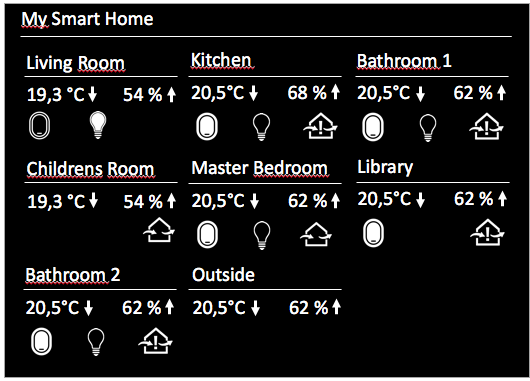
Working on the new version, this is what I have in mind:
-
This looks great! As far as I understand there is for every room a thermometer & humidity with trent, light indicator (Yeelight?) and Windows sensors? Pretty nice!
Are you going to release this as a new module, or as a change of the old one? I would prefer a new module, because this one takes a lot of space and is hardly to integrate in a single screen. I
But I really think they will shut this down soon, guess they (gearbest) are not paying any taxes at all…I think the same. It already took more time to receive and it’s getting less products you can order with „Standard Shipping > Germany Express“
-
I’m in the US and I ordered from Gearbest and did not will not again… I put in my order and it I never got what I ordered so I put a claim in against them … they told me ‘well we now have the items in stock so if you drop your claim…’
According to their site the stuff I ordered was already in stock… when I ordered them.
I said uhhhhhh no. So they refunded me…and I ordered them from another company and hopefully they’ll be here next week :) They shipped them right out and gave me a tracking number… Gearbest… I don’t trust them.

Hello! It looks like you're interested in this conversation, but you don't have an account yet.
Getting fed up of having to scroll through the same posts each visit? When you register for an account, you'll always come back to exactly where you were before, and choose to be notified of new replies (either via email, or push notification). You'll also be able to save bookmarks and upvote posts to show your appreciation to other community members.
With your input, this post could be even better 💗
Register Login