Read the statement by Michael Teeuw here.
MMM-xiaomi - Temperature and Humidity from your smarthome
-
I’ve pulled the latest update today. Since this i don’t see the temperature / humidity any more. I don’t have any errors in my logs depending MMM-xiaomi. The config.js is the same as well. Browser debug without errors. The only error which is new in my log is about the module nerwork scanner.
By the way: Do I add the window sensors the same way as the Temperature sensor? Which lights are supported?

mm error:
TypeError: Cannot read property 'network' of undefined
    at Class.scanNetworkMAC (/home/pi/MagicMirror/modules/MMM-NetworkScanner/node_helper.js:42:36)
    at Class.socketNotificationReceived (/home/pi/MagicMirror/modules/MMM-NetworkScanner/node_helper.js:30:18)
    at Socket. (/home/pi/MagicMirror/modules/node_modules/node_helper/index.js:103:11)
    at emitTwo (events.js:106:13)
    at Socket.emit (events.js:194:7)
    at /home/pi/MagicMirror/node_modules/socket.io/lib/socket.js:514:12
    at _combinedTickCallback (internal/process/next_tick.js:73:7)
    at process._tickCallback (internal/process/next_tick.js:104:9)
mm out:
> magicmirror@2.1.3 start /home/pi/MagicMirror > sh run-start.sh Starting MagicMirror: v2.1.3 Loading config ... Loading module helpers ... No helper found for module: alert. No helper found for module: clock. Initializing new module helper ... Module helper loaded: calendar No helper found for module: currentweather. No helper found for module: weatherforecast. Initializing new module helper ... Module helper loaded: MMM-Remote-Control Initializing new module helper ... Module helper loaded: MMM-DWD-WarnWeather Initializing new module helper ... Module helper loaded: MMM-PNews Initializing new module helper ... Module helper loaded: newsfeed Initializing new module helper ... Module helper loaded: internet-monitor Initializing new module helper ... Module helper loaded: MMM-MovieListings Initializing new module helper ... Module helper loaded: MMM-Fuel Initializing new module helper ... Module helper loaded: MMM-NetworkScanner Initializing new module helper ... Module helper loaded: MMM-nasaastropic Initializing new module helper ... Module helper loaded: MMM-SystemStats No helper found for module: MMM-Carousel. Initializing new module helper ... Module helper loaded: MMM-Events Initializing new module helper ... Module helper loaded: MMM-xiaomi All module helpers loaded. Starting server on port 8080 ... You're using a full whitelist configuration to allow for all IPs Server started ... Connecting socket for: calendar Starting node helper for: calendar Connecting socket for: MMM-Remote-Control Starting node helper for: MMM-Remote-Control Connecting socket for: MMM-DWD-WarnWeather MMM-DWD-WarnWeather helper started... Connecting socket for: MMM-PNews Starting module: MMM-PNews Connecting socket for: newsfeed Starting module: newsfeed Connecting socket for: internet-monitor internet-monitor helper started ... Connecting socket for: MMM-MovieListings MMM-MovieListing helper started... Connecting socket for: MMM-Fuel Starting module helper: MMM-Fuel Connecting socket for: MMM-NetworkScanner Starting module: MMM-NetworkScanner Connecting socket for: MMM-nasaastropic Starting node helper: MMM-nasaastropic Connecting socket for: MMM-SystemStats Connecting socket for: MMM-Events Starting node_helper for: MMM-Events Connecting socket for: MMM-xiaomi Starting xiaomi helper Sockets connected & modules started ... Launching application. MMM-NetworkScanner received SCAN_NETWORK MMM-NetworkScanner is performing arp-scan Whoops! There was an uncaught exception... MagicMirror will not quit, but it might be a good idea to check why this happened. Maybe no internet connection? If you think this really is an issue, please open an issue on GitHub: https://github.com/MichMich/MagicMirror/issues Create new calendar fetcher for url: https://calendar.google.com/calendar/ical/basic.ics - Interval: 300000 Create new news fetcher for url: http://www.haz.de/rss/feed/haz_schlagzeilen - Interval: 300000 Create new news fetcher for url: http://www.spiegel.de/schlagzeilen/index.rss - Interval: 300000 starting internet monitor node helper MMM-NetworkScanner received CONFIG astro helper: config received retrieveAndUpdate() Sat Nov 18 2017 10:10:53 GMT+0100 (CET): Triggering Xiaomi Gateway connect NASA Astro Pic of the Day URL: https://apod.nasa.gov/apod/image/1711/20171117dawnTezel1200c.jpg Found device with ID 158d000119fcb2 of type magnet Found device with ID 158d00015aa973 of type controller Found device with ID 158d00015736a8 of type sensor -
Can you post your configuration for the module? You now need to define your rooms, it looks like the module simply does not find any room to show.
And yes, you add all devices to your room configuration, the module can identify the type and handle it correspondingly.BTW: suggest tracking issues on the github issue tracker: https://github.com/mirko3000/MMM-xiaomi/issues
-
Am sorry, it was my mistake. I did not checked my config.js. Out of nowhere there was again
devices:instead of
rooms:Thank you for your help!
I’ve tried to get the icon for the open state of the window sensors working this way:
The first ID is the temperature sensor, the second one the window sensors:{ module: 'MMM-xiaomi', position: 'bottom_left', header: 'Temperatur / Feuchtigkeit', // This is optional config: { gatewayIP: '192.168.2.160', gatewayToken: '6ebf9b84e5c615c09268166a99b95f0a', showWindow: true, rooms: [ { name: 'Wohnzimmer', sortOrder: 30, devices : ['158d00015736a8', '158d000119fcb2'] }, ] } },and this way:
{
		module: 'MMM-xiaomi',
		position: 'bottom_left',
		header: 'Temperatur / Feuchtigkeit',  // This is optional
		config: {
			gatewayIP: '192.168.2.160',
			gatewayToken: '6ebf9b84e5c615c09268166a99b95f0a',
			rooms: [
			{ name: 'Wohnzimmer', sortOrder: 30, showWindow: true, devices : ['158d00015736a8', '158d000119fcb2'] },
					]
				}
		},
Both times MM did not started because of errors in the config. How is the right way to get this solved?
-
Your first config is correct, I guess you might have made an error somewhere else in your config, I could run your config successfully.
-
Hmm… I must have had a typo somewhere. Now the config is working for me as well but still no icon.
this is how it works so far:
{
		module: 'MMM-xiaomi',
		position: 'bottom_left',
		header: 'Temperatur / Feuchtigkeit',  // This is optional
		config: {
			gatewayIP: '192.168.2.160',
			gatewayToken: '6ebf9b84e5c615c09268166a99b95f0a',
			showWindow: true,
			rooms: [
			{ name: 'Wohnzimmer', sortOrder: 30, devices : ['158d00015736a8', '158d000119fcb2'] },
					]
			// See 'Configuration options' for more information.
				}
		},
This is what I get:

mm out:
> magicmirror@2.1.3 start /home/pi/MagicMirror
> sh run-start.sh

Starting MagicMirror: v2.1.3
Loading config ...
Loading module helpers ...
No helper found for module: alert.
No helper found for module: clock.
Initializing new module helper ...
Module helper loaded: calendar
No helper found for module: currentweather.
No helper found for module: weatherforecast.
Initializing new module helper ...
Module helper loaded: MMM-Remote-Control
Initializing new module helper ...
Module helper loaded: MMM-PNews
Initializing new module helper ...
Module helper loaded: newsfeed
Initializing new module helper ...
Module helper loaded: internet-monitor
Initializing new module helper ...
Module helper loaded: MMM-MovieListings
Initializing new module helper ...
Module helper loaded: MMM-Fuel
Initializing new module helper ...
Module helper loaded: MMM-NetworkScanner
Initializing new module helper ...
Module helper loaded: MMM-nasaastropic
Initializing new module helper ...
Module helper loaded: MMM-SystemStats
No helper found for module: MMM-Carousel.
Initializing new module helper ...
Module helper loaded: MMM-Events
Initializing new module helper ...
Module helper loaded: MMM-xiaomi
All module helpers loaded.
Starting server on port 8080 ...
You're using a full whitelist configuration to allow for all IPs
Server started ...
Connecting socket for: calendar
Starting node helper for: calendar
Connecting socket for: MMM-Remote-Control
Starting node helper for: MMM-Remote-Control
Connecting socket for: MMM-PNews
Starting module: MMM-PNews
Connecting socket for: newsfeed
Starting module: newsfeed
Connecting socket for: internet-monitor
internet-monitor helper started ...
Connecting socket for: MMM-MovieListings
MMM-MovieListing helper started...
Connecting socket for: MMM-Fuel
Starting module helper: MMM-Fuel
Connecting socket for: MMM-NetworkScanner
Starting module: MMM-NetworkScanner
Connecting socket for: MMM-nasaastropic
Starting node helper: MMM-nasaastropic
Connecting socket for: MMM-SystemStats
Connecting socket for: MMM-Events
Starting node_helper for: MMM-Events
Connecting socket for: MMM-xiaomi
Starting xiaomi helper
Sockets connected & modules started ...
Launching application.
Create new calendar fetcher for url: https://calendar.google.com/calendar/ical/basic.ics - Interval: 300000
Create new news fetcher for url: http://www.haz.de/rss/feed/haz_schlagzeilen - Interval: 300000
Create new news fetcher for url: http://www.spiegel.de/schlagzeilen/index.rss - Interval: 300000
starting internet monitor node helper
MMM-NetworkScanner received CONFIG
astro helper: config received
retrieveAndUpdate()
Sat Nov 18 2017 15:55:41 GMT+0100 (CET): Triggering Xiaomi Gateway connect
NASA Astro Pic of the Day URL: https://apod.nasa.gov/apod/image/1711/20171117dawnTezel1200c.jpg
Found device with ID 158d000119fcb2 of type magnet
Found device with ID 158d00015aa973 of type controller
Found device with ID 158d00015736a8 of type sensor
No errors in the log
-
Note that the icon only appears on open windows - its a white star. If the window is closed you will not see any icon. Also I have noticed that the open state is not really reliable, need to check with miio why there are so many false states sent.
-
@mirko3000 said in MMM-xiaomi - Temperature and Humidity from your smarthome:
Note that the icon only appears on open windows - its a white star.
That was the point that i’ve missed! when I open the window, the white star appears impatiently! I love this module! Thank you for your work!
-
Don’t forget to update the npm packages (miio), there is a bugfix which caused wrong close events of the windows. Either ‘npm update’ in the MMM-xiaomi folder, or delete the “node_modules” folder and simply execute ‘npm install’ again.
-
@mirko3000 said in MMM-xiaomi - Temperature and Humidity from your smarthome:
Don’t forget to update the npm packages (miio), there is a bugfix which caused wrong close events of the windows. Either ‘npm update’ in the MMM-xiaomi folder, or delete the “node_modules” folder and simply execute ‘npm install’ again.
Now I did so. Thank you for the hint!
-
My new sensors are arrived… I love it! Great work!

Which lights are supported?
-
Check your devices here:
https://github.com/aholstenson/miio/blob/master/docs/devices/README.md#models-by-nameAs you see not all Yeelights are supported, others are untested. My module retrieves all devices of type ‘light’, so it might work for all of them.
-
hi,
finally my gateway arrived today. Great. it is working after a little struggeling to get the correct App to initally configure the stuff.
I added 4 temp/humidity sensors and i am wondering how to see in the miio discovery whick one is in which room?
Any chance to get that ?
I the app itself i sadly can’t see the IDs of the sensors?How did you figured this out?
-
I’ve added them one by one. Remove them all and add them one by one. Or add all of them to the module. Then its easy to discover if you keep one of them somewhere cold, all the other warm. The Id and the temperature will guide you.
-
Hi, if i set in the custom css file mmm-xiaomi .xsmall and the text-align: right then the humidity and temerature are going on the right side but the “>” stay. How can I move also “>” to right?
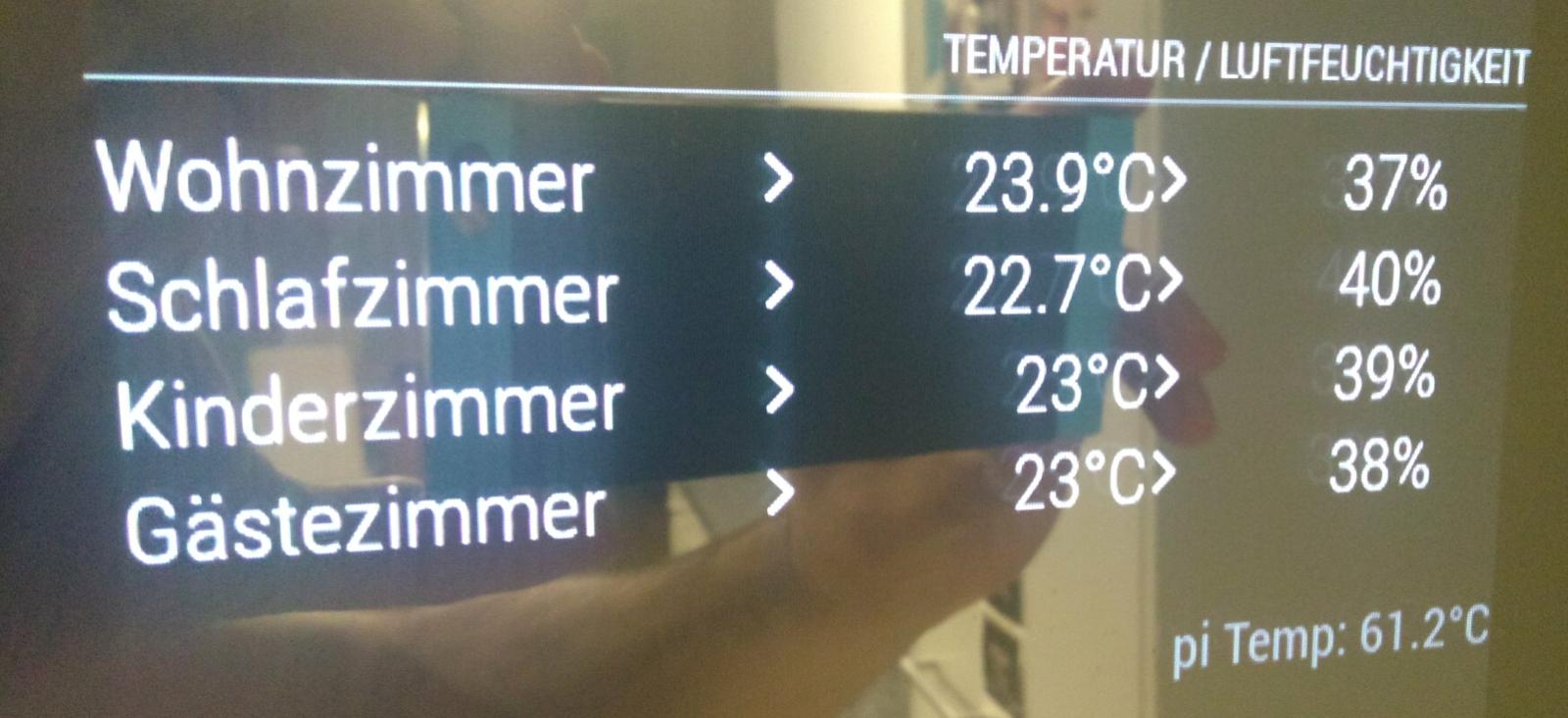
@barnosch I have done it like @Albert2002 described.
THX
-
@trividar
they are not belonging to the same TD so it is not moving aswell.is it the trending, or what is it good for? i don’t really like it to be honest.
For me it was too close also, i just added some nbsp; to get some spaces between.
thanks for the hints.
i added all the ids and checked in the app, which room is showing the current values and added it to the correct rooms i created in the config. -
Yes the identification of the sensors is not really good, did not find a better solution so far.
As for the trend indicators: I pushed a new version where you can disable the trend icons (showTrend: false). -
Just want to say that there is no different between the Xiaomi and Aqara Temperature sensor. Both are working like a charm. The only different is that the Aqara shows the Air pressure (in the MiHome app) as well.
@Mirko3000 Thank you for your hard work! You are always improving the module in light-speed!
I was playing around with my Yeelights colorbulbs but I didn’t get it working on MM. Guessing its because of they have they own ID, IP and token. However, thats why am still using the app. :-)
-
Did you try with the ‘miio --discover’ command line utility? Do the lights show up there?
-
@mirko3000 said in MMM-xiaomi - Temperature and Humidity from your smarthome:
Did you try with the ‘miio --discover’ command line utility? Do the lights show up there?
Yes I did so with success. I got the ID, IP and token. I had tried to add it like a sensor this way:
config: {
			gatewayIP: '192.168.2.160',
			gatewayToken: '6ebf9b84e5c615c09268166a99b95f0a',
			showWindow: true,
			showVentilation: false,
			minTemperature: false,
			maxHumidity: false,
                        showLights: true
			rooms: [
			{ name: 'Wohnzimmer', sortOrder: 30, devices : ['158d00015736a8', '158d000119fcb2'] },
			{ name: 'Bad', sortOrder: 30, devices : ['158d0001b911b9'] },
			{ name: 'Schlafzimmer', sortOrder: 30, devices : ['158d0001b91177', '158d00011919a3', '56234267'] }, //Bulp ID
			{ name: 'Arbeitszimmer', sortOrder: 30, devices : ['158d0001b9035b'] },
			{ name: 'Draußen', sortOrder: 30, devices : ['158d0001b920bd'] },
					],
				}
		},
and this way:
config: {
			gatewayIP: '192.168.2.160',
			gatewayToken: '6ebf9b84e5c615c09268166a99b95f0a',
			showWindow: true,
			showVentilation: false,
			minTemperature: false,
			maxHumidity: false,
                        showLights: true
			{ name: 'Bad', sortOrder: 30, devices : ['158d0001b911b9'] },
			{ name: 'Schlafzimmer', sortOrder: 30, devices : ['158d0001b91177', '158d00011919a3', ] },
			{ name: 'Arbeitszimmer', sortOrder: 30, devices : ['158d0001b9035b'] },
			{ name: 'Draußen', sortOrder: 30, devices : ['158d0001b920bd'] },
					],
                       gatewayIP: '192.168.2.101', // IP of the bulp
			gatewayToken: 'fd1d31c907fc5506fc379445eb6bd146', // token of the bulp
rooms: [
{ name: 'Flur', sortOrder: 30, devices : ['56234267'] }, // ID of the bulp
               ]


				}
		},
Btw I noticed some behaver am not sure about.
How to get rid of the notification about Humidity?

Its Full screen and always on the top. Even when the pages changing using MMM-Carousel its still on top.
Using stars as notification for open windows:
When I was gone to bed at night with open window there was a star shown. In the morning still with open window the star was gone. What happens there?Are there no more indicators for the trent?

-
Hmm those Yeelights seem to be quite different, guess it will be hard to implement without having at least one piece on my own…
For the notifications: this is a magic mirror default, so I can’t change the behaviour. In your case you should configure your outside sensor (parameter outsideSensorId), then this will not show any notification. It is mainly used for indoor rooms. I can of course add a config to disable notifications at all.
The window states are not 100% reliable. It seems that sometimes the sensors send wrong values, I need to investigate why this is the case.
To your last question: I disabled the trend indicators by default, but you can re-enable them by setting the config:
showTrend: true
Hello! It looks like you're interested in this conversation, but you don't have an account yet.
Getting fed up of having to scroll through the same posts each visit? When you register for an account, you'll always come back to exactly where you were before, and choose to be notified of new replies (either via email, or push notification). You'll also be able to save bookmarks and upvote posts to show your appreciation to other community members.
With your input, this post could be even better 💗
Register Login