Read the statement by Michael Teeuw here.
Sync private iCloud calendar with MagicMirror
-
I have several reoccurring events on the same day, only one of each event is showing up. The number of events is set at 10 but it is going out at least 4 months with that set. It should only go out about 3 weeks with 10 events listed. I’ll try raising the number of events and limiting the time.
-
This post is deleted! -
This post is deleted! -
Hi
So i am getting stuck with this and don’t know how to fix the issue.
The UUID is beside my Calendar and in my iCloud this is my default one.
but the one i want to use is home (Home Calendar) but No UUID shows up
same goes for the work one.The only one i am interested in is the Home Calendar
pi@raspberrypi:~/MagicMirror $ vdirsyncer discover
Discovering collections for pair iCloud_to_MagicMirror
Mirror:
iCloud:
  - "tasks" ("Reminders")
  - "AE********-E**4-4D**-A**4-*****************" ("Calendar")
  - "home" ("Home Calendar")
  - "work" ("Work")
warning: No collection "HERE-GOES-THE-UUID-OF-THE-CALENDAR-YOU-WANT-TO-SYNC" found for storage Mirror.
Should vdirsyncer attempt to create it? [y/N]:
Thanks for any help given :)
-
Last issue resolved
So my issue not really an issue just me expecting something different than what i got when i ran
vdirsyncer discoverySo the example on page 1 looks like this
Mirror:
iCloud:
  - "25CB285C-E163-4E0E-B420-C3FB469B7C00" ("Calendar 1")
  - "9221FEE8-E8B4-4D07-9402-8638529919EC" ("Calendar 2")
  - "953A5477-E405-4ED6-A5C3-473444EACC95" ("Calendar 3")
warning: No collection "9221FEE8-E8B4-4D07-9402-8638529919EC" found for storage Mirror.
Should vdirsyncer attempt to create it? [y/N]:
With all the Calendars having a string for UUID E.G. 9221FEE8-E8B4-4D07-9402-8638529919EC
And this is what i got
pi@raspberrypi:~/MagicMirror $ vdirsyncer discover
Discovering collections for pair iCloud_to_MagicMirror
Mirror:
iCloud:
  - "tasks" ("Reminders")
  - "9221FEE8-E8B4-4D07-9402-8638529919EC" ("Calendar")
  - "home" ("Home Calendar")
  - "work" ("Work")
warning: No collection "HERE-GOES-THE-UUID-OF-THE-CALENDAR-YOU-WANT-TO-SYNC" found for storage Mirror.
Should vdirsyncer attempt to create it? [y/N]:
Now what i didn’t know was that i did get a return of UUID for each Calendar
(Reminders) UUID is"tasks"
(Calendar) UUID is"9221FEE8-E8B4-4D07-9402-8638529919EC"
(Home Calendar) UUID is"home"Hope this helps other people in the future.
took me a bit of digging around. -
paddyhughes,
Had the exact same issue.
Had one calendar called “worK”, all the rest had the long UUID names.
I keep looking for the “work” calendar, of course it’s UUID was “work”.
Put that in and now it works.
Some lessons are learned the hard way.
Maestro-82
-
Ya kept thinking I did something wrong set up 3 different Rpi thinking I did something some were in the code to mess up. Finally got it working ;)
@maestro82 said in Sync private iCloud calendar with MagicMirror:
paddyhughes,
Had the exact same issue.
Had one calendar called “worK”, all the rest had the long UUID names.
I keep looking for the “work” calendar, of course it’s UUID was “work”.
Put that in and now it works.
Some lessons are learned the hard way.
Maestro-82
-
Have any1 made a video how to set it up, I have some problems? :-D
-
Hi what’s the issue
@Devert -
I saw someone back on page 1 getting this error but not a solution:
Traceback (most recent call last):
File “/usr/bin/vdirsyncer”, line 7, in
from vdirsyncer.cli import main
ImportError: No module named ‘vdirsyncer’In answer to the reply of if I added python3 to the executable, I already have.
-
@Doubleve How did you fix this issue? I’m getting the same error.
-
Thanks for the tutorial, this is incredibly helpful.
I’m to the point where my MagicMirror displays events from my Home calendar, but it seems that vdirsyncer.timer is not actually working. When I run
systemctl --user enable vdirsyncer.timerthe console doesn’t output any errors and just returns to a new line. I never see any updates to events on the calendar if I remove/add.I’ve modified the timer settings, and changed a few settings on the MagicMirror side as well but the only way I can get the .ics files to update is if I manually run
vdirsyncer sync. I’ve ready through the docs over here: https://vdirsyncer.pimutils.org/en/stable/index.html but there really isn’t any useful information about the timer.Any thoughts or leads to finding an answer?
-
Hi all,
i’m trying to prepare everything on SW site before i start building MM and i have almost everything except birthdays … :(
i’m using iCloud to store my contacts birthdays but i’m not able to find way how to import them to calendar module on MM2
i’ve found and installed this module :
MMM-iCloud-Clienti’ve installed it and also dependecies :
npm install ical-generator
npm install icloud
npm install nedb --savein config/config.js i’ve updated entry with
{
module: ‘MMM-iCloud-Client’,
config: {
username: “appleID”,
password: “password”,
countrycode: “49”,
}
},also i’ve edited modules/default/calendar/calendar.js and added this code to it (below US-Holidays.ics …entry) :
{
symbol: ‘birthday-cake’,
url: ‘http://localhost:8080/MMM-iCloud-Client/birthdays’,
}but it’s still not showing any birthday even if upcomming are in 2 days.
Can someone help me what i’m doing wrong ?
Thank you
-
noone ? i realy want to see upcomming birthday but i’m not able to get it work
-
i’ve tried to remove module MMM-iCloud-Client
(rm -rf MMM-iCloud-Client in modules dir)then i’ve installed it from beginning as written in Readme
when i’ve executed “npm install” in MMM-iCloud-Client directory i get this information :
/MagicMirror/modules/MMM-iCloud-Client $ npm install
npm WARN deprecated node-uuid@1.4.8: Use uuid module instead
npm notice created a lockfile as package-lock.json. You should commit this file.
added 59 packages from 71 contributors and audited 74 packages in 14.839s
found 1 low severity vulnerability
runnpm audit fixto fix them, ornpm auditfor detailsi’ve executed “npm audit” and error is according lodash
i’ve tried also “npm audit fix” but i get
/MagicMirror/modules/MMM-iCloud-Client $ npm install
npm WARN deprecated node-uuid@1.4.8: Use uuid module instead
npm notice created a lockfile as package-lock.json. You should commit this file.
added 59 packages from 71 contributors and audited 74 packages in 14.839s
found 1 low severity vulnerability
runnpm audit fixto fix them, ornpm auditfor detailsi’ve searched and tried to install lodash manually by “npm install lodash”
/MagicMirror/modules/MMM-iCloud-Client $ npm install lodash
- lodash@4.17.10
updated 1 package and audited 74 packages in 7.673s
found 1 low severity vulnerability
runnpm audit fixto fix them, ornpm auditfor details
can someone help ? I’m not sure if this is root cause why Birthday is not working as it should but this is the only error i can see.
- lodash@4.17.10
-
Or is there any posibility how to add birthday ? Google calendar maybe?
-
there is a default calendar module that automatically came with MM2
And there are others, I personally like MMM-CalendarExt.
-
Yes but is there possibility to add birthday calendar ?
Icloud or google ? -
I work mainly with Google, I haven’t personally used iCloud. Have also worked with Yahoo and Hotmail. Google is my favorite…
This is my list of calendars:
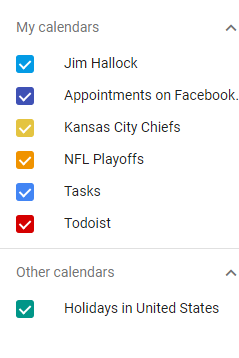
And, this is how I put into my calendar module…
"calendars": [ { "name": "Family Stuff", "symbol": "heart@fa", "url": "Calendar link here", "interval": 24*60*60*1000 }, { "name": "US Holiday", "url": "Calendar link here", "symbol": "gift@fa", "interval": 24*60*60*1000, "maxEntries": 50, "maxDays":365 }, { "name": "Birthdays", "symbol": "birthday-cake", "url": "Calendar link here" }, { // "name": "KC Chiefs", "symbol": "football-ball@fa", "url": "Calendar link here", "interval": 24*60*60*1000 }, { "name": "NFL Games", "url": "Calendar link here", "symbol": "football-ball@fa", "interval": 24*60*60*1000 }, { "name": "NFL Playoff Games", "url": "Calendar link here", "symbol": "football-ball@fa", "interval": 24*60*60*1000 }, ], -
@justjim1220 We are all able to do that, to clarify the issue. The objective is to find a way to use an iCloud calendar without having a public url, which is what your google calendar is currently using. By using a public URL, web crawlers are able to find and read your calendar events.


Hello! It looks like you're interested in this conversation, but you don't have an account yet.
Getting fed up of having to scroll through the same posts each visit? When you register for an account, you'll always come back to exactly where you were before, and choose to be notified of new replies (either via email, or push notification). You'll also be able to save bookmarks and upvote posts to show your appreciation to other community members.
With your input, this post could be even better 💗
Register Login