Read the statement by Michael Teeuw here.
assign a symbol to a module
-
Hello everyone :)
How can I assign a symbol to a module?
I have a modul which displayed some info´s for me.
Now i want to add a Symbol to this modul,
similar to the calender modul symbol. ( The modul has no .css file only .js files.)
But I don´t know how I get it.
Can someone help me?sorry for my bad endglisch and Greetings from Germany
-
@dominic ou can add a fontawesome icon in the header like the following lines here https://github.com/fewieden/MMM-Fuel/blob/master/MMM-Fuel.js#L49
and add
getStyles: function () { return ["font-awesome.css"]; }, -
@strawberry-3.141 said in assign a symbol to a module:
getStyles: function () {
return [“font-awesome.css”];
},I add:
 var header = document.createElement("header");   // in the getdom function and

getStyles: function () {
        return ["font-awesome.css"];
},
in the .js file. And now I have to do ?
how do i musst edit the config file ?
Note from admin: Please use Markdown on code snippets for easier reading!
-
getDom: function() {
	var wrapper = document.createElement("div");

	var symbol =  document.createElement("span");
	symbol.className = "fa fa-home";
	wrapper.appendChild(symbol);

	return wrapper;
}
This will result in a “house symbol”
-
@yawns said in assign a symbol to a module:
getDom: function() {
var wrapper = document.createElement(“div”);var symbol = document.createElement(“span”);
symbol.className = “fa fa-home”;
wrapper.appendChild(symbol);return wrapper;
}Thanks. When i add the code, i have the “house” but i have a getdom function with the following code…
getDom: function(){

		var wrapper = document.createElement("div");
		if(this.dataFile){
                        var humidityRegExp = /Humidity = (.*?) %/ig;
                        var humidity = humidityRegExp.exec(this.dataFile)[1];

                        var temperatureRegExp = /Temperature = (.*?) *C/ig;
                        var temperature = temperatureRegExp.exec(this.dataFile)[1];
			wrapper.innerHTML = "r.F.: " + humidity + "%, Temp.: " + temperature + "°C";
		} else {
			wrapper.innerHTML = "No data";
		}
		return wrapper;
	},
…how do I implement the code in this?
-
like this:
getDom: function() {
	var wrapper = document.createElement("div");
	if(this.dataFile){
		var humidityRegExp = /Humidity = (.*?) %/ig;
		var humidity = humidityRegExp.exec(this.dataFile)[1];

		var temperatureRegExp = /Temperature = (.*?) *C/ig;
		var temperature = temperatureRegExp.exec(this.dataFile)[1];

		var spacer = document.createElement("span");
		spacer.innerHTML = " ";
		var temperature_symbol =  document.createElement("span");
		temperature_symbol.className = "fa fa-home";
		var humidity_symbol =  document.createElement("span");
		humidity_symbol.className = "fa fa-tint";

		wrapper.appendChild(temperature_symbol);
		var temperature_text = document.createElement("span");
		temperature_text.innerHTML = " " + temperature + "°C";
		wrapper.appendChild(temperature_text);

		wrapper.appendChild(spacer);

		wrapper.appendChild(humidity_symbol);
		var humidity_text = document.createElement("span");
		humidity_text.innerHTML = " " + humidity + "%";
		wrapper.appendChild(humidity_text);
	} else {
		wrapper.innerHTML = "No data";
	}
	return wrapper;
},
Should give you a house symbol for temperature inside and a droplet for humidity.
-
I need add a symbol to text (before or behind).
Code:
getDom: function() {

		var header = document.createElement("header");
		var wrapper = document.createElement("div");
		if(this.config.title !== false){
			var title = document.createElement("header");
			title.innerHTML = this.config.title || this.name;
			wrapper.appendChild(title);
		}
		var logs = document.createElement("table");

		for (var i = this.messages.length - 1; i >= 0; i--) {
			//Create callWrapper
			var callWrapper = document.createElement("tr");
			callWrapper.classList.add("normal");


			var icon =  document.createElement("td");

			if (this.messages[i].type === "INFO"){
				icon.className = "fa fa-info";
			}
			else if (this.messages[i].type === "WARNING"){
				icon.className = "fa fa-exclamation";
			}
			else if (this.messages[i].type === "ERROR"){
				icon.className = "fa fa-exclamation-triangle";
			}
			else {
				icon.className = "fa fa-question";
			}


			//Set caller of row
			var caller =  document.createElement("td");
			caller.innerHTML = "[" + this.messages[i].type + "] " + this.messages[i].message + " " + wrapper.appendChild(icon);
			caller.classList.add("title", "small", "align-left");
			if(this.config.types.hasOwnProperty(this.messages[i].type)){
				caller.classList.add(this.config.types[this.messages[i].type]);
			}
			callWrapper.appendChild(caller);

			//Set time of row
			var time =  document.createElement("td");
			time.innerHTML = this.config.format ? moment(this.messages[i].timestamp).format(this.config.format) : moment(this.messages[i].timestamp).fromNow();
			time.classList.add("time", "light", "xsmall");
			callWrapper.appendChild(time);

			//Add to logs
			logs.appendChild(callWrapper);
		}
		wrapper.appendChild(logs);
		return wrapper;
This is effect:
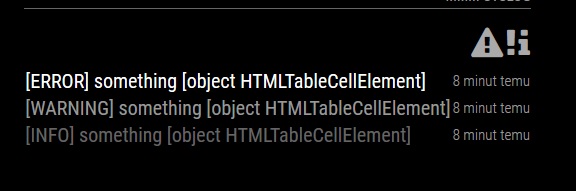
What is wrong?
-
Hi @Plati
The solution depends on how you want to display the table.
Do you want
- 3 columns in the following order:
| Icon | Message | Time | - Or 2 columns laid out as follows:
| Message Icon | Time |
- 3 columns in the following order:
-
Hi @ianperrin
| Icon | Message | Time | should be ok
-
@Plati said in assign a symbol to a module:
Hi @ianperrin
| Icon | Message | Time | should be ok
In that case, try this
var iconCell = document.createElement("td"); var icon = document.createElement("i"); if (this.messages[i].type === "INFO"){ icon.className = "fa fa-info"; } else if (this.messages[i].type === "WARNING"){ icon.className = "fa fa-exclamation"; } else if (this.messages[i].type === "ERROR"){ icon.className = "fa fa-exclamation-triangle"; } else { icon.className = "fa fa-question"; } iconCell.appendChild(icon); callWrapper.appendChild(iconCell); //Set caller of row var caller = document.createElement("td"); caller.innerHTML = "[" + this.messages[i].type + "] " + this.messages[i].message; -
You could also consider making the icon configurable via the options,
First add the default values for the options
	defaults: {
		max: 5,
		format: false,
		types: {
			INFO: "dimmed",
			WARNING: "normal",
			ERROR: "bright"
		},
		icons: {
			INFO: "info",
			WARNING: "exclamation",
			ERROR: "exclamation-triangle"
		}
	},
Then change the code to create the icon (and for bonus points, set class for the icon to the same as the message.
		var iconCell = document.createElement("td");
		var icon =  document.createElement("i");
		if(this.config.icons.hasOwnProperty(this.messages[i].type)){
			icon.classList.add("fa", "fa-" + this.config.icons[this.messages[i].type]);
		} else {
			icon.classList.add("fa", "fa-question");
		}
		if(this.config.types.hasOwnProperty(this.messages[i].type)){
			icon.classList.add(this.config.types[this.messages[i].type]);
		}
		iconCell.appendChild(icon);
		callWrapper.appendChild(iconCell);
Warning - this code was entered directly here in the comment so may contain TyoPs ;)
-
@ianperrin nice! I still have a lot to learn. I’m just beginning to learn JS, etc.
Now is almost perfect:
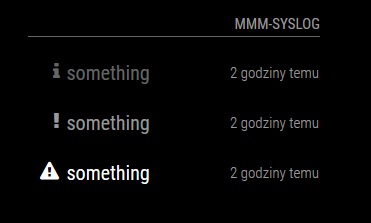
Now only center the icons and reduce the spacing between the lines.
-
@Plati glad to help - and we’re all learning here so don’t worry!
Fontawesome provides lots of support for managing the display of icons, so if the icons are throwing the alignment in the table out try making the icons Fixed Width by adding “fa-fw” to the icon e.g.
icon.classList.add("fa", "fa-fw", "fa-"…Alternatively, set the icon font-size to the same as the message, by using the inbuilt MM styles, e.g.
iconCell.classList.add("small");or a combination of both :)
-
@yawns Hi, Thanks it works.
I have an other question.how can I get the values , that they will displayed in two lines?
-
Hi @dominic
The simplest approach would be to add a “br” element between the temperature and humidity.
However, I would consider putting them in an unordered list and take advantage of the inbuilt layout controls within FontAwesome. E.g.
getDom: function() { var wrapper = document.createElement("div"); if(this.dataFile){ var humidityRegExp = /Humidity = (.*?) %/ig; var humidity = humidityRegExp.exec(this.dataFile)[1]; var temperatureRegExp = /Temperature = (.*?) *C/ig; var temperature = temperatureRegExp.exec(this.dataFile)[1]; var list = document.createElement("ul"); list.classList.add("fa-ul"); // add temperature var temperature_item = document.createElement("li"); var temperature_symbol = document.createElement("i"); temperature_symbol.classList.add("fa", "fa-li", "fa-home"); temperature_item.appendChild(temperature_symbol); temperature_item.appendChild(document.createTextNode(" " + temperature + "°C")); list.appendChild(temperature_item); // add humidity var humidity_item = document.createElement("li"); var humidity_symbol = document.createElement("i"); humidity_symbol.classList.add("fa", "fa-li", "fa-tint"); humidity_item.appendChild(humidity_symbol); humidity_item.appendChild(document.createTextNode(" " + humidity + "%")); list.appendChild(humidity_item); wrapper.appendChild(list); } else { wrapper.innerHTML = "No data"; } return wrapper; }, -
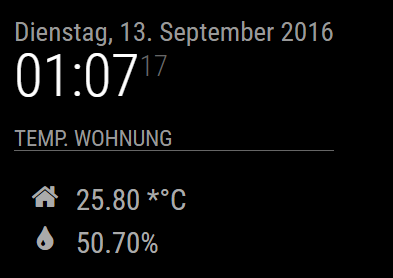
Hi ianperrin, thank you :)
Do you knwo, how can i erase the “*” befor the “°C” ?
-
@ianperrin you are wizard :) big thank you, now it works excellent
@dominic try delete " * " from var temperatureRegExp = /Temperature = (.*?) *C/ig;
try it:var temperatureRegExp = /Temperature = (.*?) C/ig;
-
@Plati do you know how regular expression works?makes no sense to remove the asterisks symbol, you need the asterisk because it is in the string otherwise you dont detect the value!
problem is that the asterisk has a special function in the regular expression context so you need to escape it like this
var temperatureRegExp = /Temperature = (.*?) \*C/ig; -
@Plati i have tried it. But than there will no data displayed.
@strawberry-3.141 Tahnks for your help, you are great.

Hello! It looks like you're interested in this conversation, but you don't have an account yet.
Getting fed up of having to scroll through the same posts each visit? When you register for an account, you'll always come back to exactly where you were before, and choose to be notified of new replies (either via email, or push notification). You'll also be able to save bookmarks and upvote posts to show your appreciation to other community members.
With your input, this post could be even better 💗
Register Login