MagicMirror Forum
    • Recent
    • Tags
    • Unsolved
    • Solved
    • MagicMirror² Repository
    • Documentation
    • 3rd-Party-Modules
    • Donate
    • Discord
    • Register
    • Login
    A New Chapter for MagicMirror: The Community Takes the Lead
    Read the statement by Michael Teeuw here.

    [octomirror-module] Monitor & Control an OctoPrint 3D Printer Server

    Scheduled Pinned Locked Moved Productivity
    47 Posts 17 Posters 37.2k Views 18 Watching
    Loading More Posts
    • Oldest to Newest
    • Newest to Oldest
    • Most Votes
    Reply
    • Reply as topic
    Log in to reply
    This topic has been deleted. Only users with topic management privileges can see it.
    • B Offline
      barnosch
      last edited by

      Perfect! Already pulled and adjusted.
      Thank you really much.
      I appreciate your fast and nice work.

      1 Reply Last reply Reply Quote 0
      • B Offline
        barnosch
        last edited by

        Is there any chance to give the stream object a CSS name to override the common resolution of the webstream via CSS?

        Right now, as i can see it, it fetches the stream from http://octopiIP:8080 as it is.
        Thats killing my mirror ;)

        1 Reply Last reply Reply Quote 0
        • S Offline
          shbatm Module Developer
          last edited by shbatm

          @barnosch - it’s on the To-do list.

          For now, try setting the height/width in your custom.css file with something like:

          div.octomirror-module img {
              height: 150px;
              width: 150px;
          }
          

          EDIT: Removed the > in the selector line above.

          1 Reply Last reply Reply Quote 0
          • B Offline
            barnosch
            last edited by

            Great. Good idea, since it is “only” a img tag, it is pretty easy.
            i was thinking to complicated. Now it fits nicely.
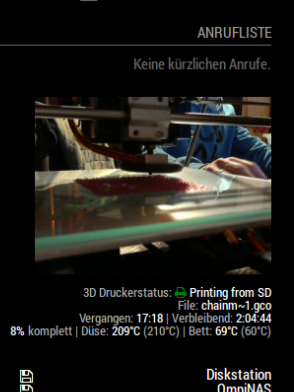
            0_1516814531991_005afc39-fe57-4c77-9773-6427357fe7f1-grafik.png

            Looking forward for the “hide camera window when not printing” feature.
            But no hurry.

            Great work!

            1 Reply Last reply Reply Quote 0
            • michael24hM Offline
              michael24h
              last edited by

              My stream showing upside down. any idea ?

              1 Reply Last reply Reply Quote 0
              • michael24hM Offline
                michael24h
                last edited by

                this works for me:
                div.octomirror-module img {
                transform: rotate(180deg);

                1 Reply Last reply Reply Quote 0
                • D Offline
                  d3r
                  last edited by

                  Installed this on my pi3 for the Mp select mini today. This is great!

                  1 Reply Last reply Reply Quote 0
                  • citizendevpiC Offline
                    citizendevpi
                    last edited by

                    I can not seam to get the informatin to show up all items say n/a but my video shows no problem, would realy apricate any help

                    1 Reply Last reply Reply Quote 0
                    • S Offline
                      shbatm Module Developer
                      last edited by

                      Can you please post your config section? Have you enabled the API and provided an API key?

                      citizendevpiC 2 Replies Last reply Reply Quote 0
                      • michael24hM Offline
                        michael24h
                        last edited by

                        @shbatm said in [octomirror-module] Monitor & Control an OctoPrint 3D Printer Server:
                        please post your config section

                        1 Reply Last reply Reply Quote 0
                        • citizendevpiC Offline
                          citizendevpi @shbatm
                          last edited by yawns

                          @shbatm

                          }, {
                                  module: "octomirror-module",
                                  position: "bottom_left",
                                  config: {
                                      url: "http://192.168.2.141",
                                      api_key: "B7ACF3C4BDD04D61BF5176C75778661E",
                                  }
                              },
                          

                          so i obviously cannot figure out how to copy paste my config i feel like i have some issues

                          1 Reply Last reply Reply Quote 0
                          • citizendevpiC Offline
                            citizendevpi @shbatm
                            last edited by

                            @shbatm yes I have enabled the API as you can c it is in my config

                            S 1 Reply Last reply Reply Quote 0
                            • S Offline
                              shbatm Module Developer @citizendevpi
                              last edited by

                              @citizendevpi Try adding debugMode: true, to the config and see if you get any useful information in the logs. I can’t remember if they’ll show up in the console or DevTools. Also, it’s been a while since I’ve used the module, but it will only show data when it’s actually printing too.

                              1 Reply Last reply Reply Quote 0
                              • michael24hM Offline
                                michael24h
                                last edited by sdetweil

                                @citizendevpi said in [octomirror-module] Monitor & Control an OctoPrint 3D Printer Server:

                                url: “http://192.168.2.141”
                                Looks like link isn’t complete. Should looks like this http://ip_address/webcam/?action=stream

                                {
                                        module: 'MMM-MotionEye',
                                        position: 'top_right',
                                            config:  {
                                            width: "460px",
                                            autoHide: false,
                                            url: "http://octoprint IP address/webcam/?action=stream",
                                            debug: false,    
                                            user: "pi"  
                                        }
                                    },   
                                

                                I hope this will help you

                                S 1 Reply Last reply Reply Quote 0
                                • michael24hM Offline
                                  michael24h
                                  last edited by

                                  Try open octoprint > go to webcam > then open image in new tab. and copy http address from web browser to your config file in octomirror-module.

                                  1 Reply Last reply Reply Quote 0
                                  • S Offline
                                    shbatm Module Developer @michael24h
                                    last edited by

                                    @michael24h said in [octomirror-module] Monitor & Control an OctoPrint 3D Printer Server:

                                    Looks like link isn’t complete. Should looks like this http://ip_address/webcam/?action=stream

                                    Nope, that shouldn’t be it. He said his stream was working and the url parameter is just for the octopi instance, not the stream. The module assumes it needs to add /webcam/?action=stream” unless streamUrl is provided.

                                    1 Reply Last reply Reply Quote 0
                                    • S Offline
                                      shbatm Module Developer
                                      last edited by

                                      @citizendevpi

                                      Just confirming: you are using my version https://github.com/shbatm/octomirror-module not the original, correct?

                                      citizendevpiC 2 Replies Last reply Reply Quote 0
                                      • citizendevpiC Offline
                                        citizendevpi @shbatm
                                        last edited by

                                        @shbatm let me check and yes u are correct I do have my stream no problem but no info and I would only expect it to give me stats when printing

                                        1 Reply Last reply Reply Quote 0
                                        • citizendevpiC Offline
                                          citizendevpi @shbatm
                                          last edited by

                                          @shbatm yes shbatm/octomirror-module

                                          1 Reply Last reply Reply Quote 0
                                          • citizendevpiC Offline
                                            citizendevpi
                                            last edited by

                                            This post is deleted!
                                            1 Reply Last reply Reply Quote 0

                                            Hello! It looks like you're interested in this conversation, but you don't have an account yet.

                                            Getting fed up of having to scroll through the same posts each visit? When you register for an account, you'll always come back to exactly where you were before, and choose to be notified of new replies (either via email, or push notification). You'll also be able to save bookmarks and upvote posts to show your appreciation to other community members.

                                            With your input, this post could be even better 💗

                                            Register Login

                                            • 1
                                            • 2
                                            • 3
                                            • 1 / 3
                                            • First post
                                              Last post
                                            Enjoying MagicMirror? Please consider a donation!
                                            MagicMirror created by Michael Teeuw.
                                            Forum managed by Sam, technical setup by Karsten.
                                            This forum is using NodeBB as its core | Contributors
                                            Contact | Privacy Policy