MagicMirror Forum
    • Recent
    • Tags
    • Unsolved
    • Solved
    • MagicMirror² Repository
    • Documentation
    • 3rd-Party-Modules
    • Donate
    • Discord
    • Register
    • Login
    A New Chapter for MagicMirror: The Community Takes the Lead
    Read the statement by Michael Teeuw here.

    MMM-Domiticz

    Scheduled Pinned Locked Moved Utilities
    68 Posts 18 Posters 51.3k Views 18 Watching
    Loading More Posts
    • Oldest to Newest
    • Newest to Oldest
    • Most Votes
    Reply
    • Reply as topic
    Log in to reply
    This topic has been deleted. Only users with topic management privileges can see it.
    • J Offline
      jaminben
      last edited by

      Hi Charley,

      Is it possible to get the colour of the values and icons to be white rather than grey?

      Thanks

      Ben

      1 Reply Last reply Reply Quote 0
      • C Offline
        Charley Module Developer
        last edited by

        Today I have added to set the text colour to White.
        Just add in your config.js the option

        textWhite:true
        

        MMM-Bose-Soundtouch, MMM-Domoticz, MMM-crypto-portfolio, MMM-Fibaro, MMM-rain-forecast

        1 Reply Last reply Reply Quote 0
        • J Offline
          jaminben
          last edited by

          I updated and adding the config option ‘textWhite: true,’ but it doesn’t appear to work… any ideas?

          1 Reply Last reply Reply Quote 0
          • C Offline
            Charley Module Developer
            last edited by

            0_1525011269934_textWhite.png

            Made a small change it should work now

            MMM-Bose-Soundtouch, MMM-Domoticz, MMM-crypto-portfolio, MMM-Fibaro, MMM-rain-forecast

            1 Reply Last reply Reply Quote 0
            • J Offline
              jaminben
              last edited by

              This post is deleted!
              1 Reply Last reply Reply Quote 0
              • J Offline
                jaminben
                last edited by

                @Charley said in MMM-Domiticz:

                textWhite:true

                All working great now… many thanks for taking the time to look at this for me :)

                1 Reply Last reply Reply Quote 0
                • P Offline
                  Peter
                  last edited by

                  Maybe a stupid question; do I have to make the changes in MM config.js file or in Domoticz.js file?
                  Peter

                  1 Reply Last reply Reply Quote 0
                  • C Offline
                    Charley Module Developer
                    last edited by

                    @Peter there are no stupid questions

                    You should make the changes in the MagicMirror config.js file, if you make them in the MMM-Domoticz.js they will be gone in the next updates.

                    In the MMM-Domoticz.js that are the default values if you don’t put it in the MM config.js file the value from the module will be used.

                    Good luck

                    MMM-Bose-Soundtouch, MMM-Domoticz, MMM-crypto-portfolio, MMM-Fibaro, MMM-rain-forecast

                    1 Reply Last reply Reply Quote 0
                    • P Offline
                      Peter
                      last edited by

                      Sorry, Charley, I deleted Domoticz folder, installed again and now I have a problem:
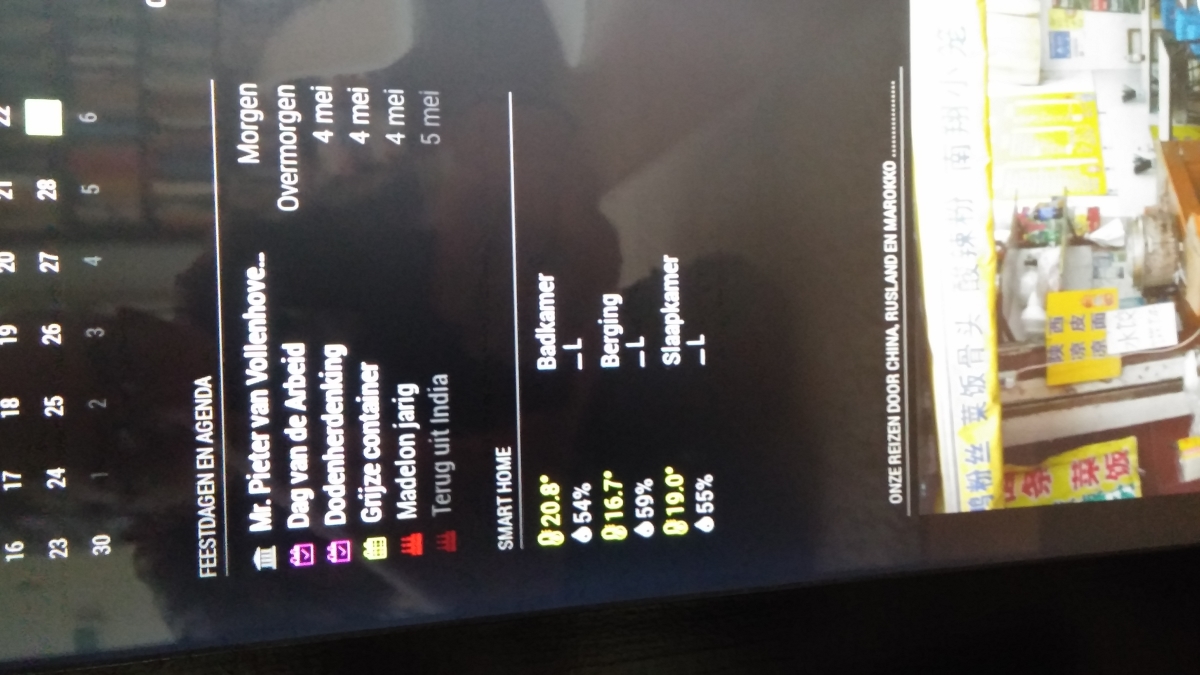
                      0_1525025137284_Probleem.jpg
                      How can I solve this?
                      Peter

                      1 Reply Last reply Reply Quote 0
                      • C Offline
                        Charley Module Developer
                        last edited by

                        @peter
                        I am sorry this happend. i flip the screen if you have the app on the left side. the L should point the otherway as well. I try to fix it on monday or tuesday. However is quick fix is putting the module op the right side in the config

                        MMM-Bose-Soundtouch, MMM-Domoticz, MMM-crypto-portfolio, MMM-Fibaro, MMM-rain-forecast

                        P 1 Reply Last reply Reply Quote 0
                        • P Offline
                          Peter @Charley
                          last edited by

                          @Charley thanks.
                          I will wait for the fix!
                          No hurry.
                          Peter

                          1 Reply Last reply Reply Quote 0
                          • C Offline
                            Charley Module Developer
                            last edited by Charley

                            @Peter made an update this morning.

                            The grouping must be set now and is not a default.
                            If you like the same sensor with different values grouped add

                            groupSensors: true
                            

                            To config.js for the module and the sensors will be grouped. However if the module is placed on a left position the hook └─ (right) ─┘(left) sometimes shows unexpected behavior.

                            MMM-Bose-Soundtouch, MMM-Domoticz, MMM-crypto-portfolio, MMM-Fibaro, MMM-rain-forecast

                            1 Reply Last reply Reply Quote 0
                            • C Offline
                              Charley Module Developer
                              last edited by Charley

                              To make the Domoticz System better I have made a WiFi Thermometer that is extremely precise. It is based on an infrared Non-touch sensor module. If you want to control devices this may be a good solution.
                              Available on gitHub WiFi highly precise thermometer

                              MMM-Bose-Soundtouch, MMM-Domoticz, MMM-crypto-portfolio, MMM-Fibaro, MMM-rain-forecast

                              1 Reply Last reply Reply Quote 0
                              • D Offline
                                DavA
                                last edited by

                                I cant see anything but temperature? No status on switches ON or OFF.
                                Also is it possible to not show all my temperature-sensors?

                                Thanks

                                1 Reply Last reply Reply Quote 0
                                • C Offline
                                  Charley Module Developer
                                  last edited by

                                  It shows only devices at are switched on.

                                  MMM-Bose-Soundtouch, MMM-Domoticz, MMM-crypto-portfolio, MMM-Fibaro, MMM-rain-forecast

                                  1 Reply Last reply Reply Quote 0
                                  • S Offline
                                    Smotx
                                    last edited by

                                    Hi,

                                    Thx for this module.

                                    How to exclude Xiaomi doors sensors ?

                                    Thx for help.

                                    C 1 Reply Last reply Reply Quote 0
                                    • C Offline
                                      Charley Module Developer
                                      last edited by

                                      Today added support for p1 Smart meters

                                      first update your module

                                      cd MagicMirror/modules/MMM-Domoticz
                                      git pull
                                      pm2 restart MagicMirror
                                      

                                      Add these 2 lines to the config file

                                      smartMeter:  true,
                                      smartMeterOffset: 0  


                                      You may need a commy behind the 0 from smartMeterOffset
                                      The offset you use if the meter wasn’t zero when you moved in or if you want to show total per year of month

                                      MMM-Bose-Soundtouch, MMM-Domoticz, MMM-crypto-portfolio, MMM-Fibaro, MMM-rain-forecast

                                      1 Reply Last reply Reply Quote 0
                                      • C Offline
                                        Charley Module Developer @Smotx
                                        last edited by

                                        @Smotx

                                        excluding can be done by adding the device names in the excludeDevices array in your config.js file

                                        MMM-Bose-Soundtouch, MMM-Domoticz, MMM-crypto-portfolio, MMM-Fibaro, MMM-rain-forecast

                                        1 Reply Last reply Reply Quote 0
                                        • A Offline
                                          Awn
                                          last edited by

                                          Hi,

                                          First of all, thank you for the hard work on those modules.

                                          I’m nex to the MM world, and in the linux world in global, and it seems that I won’t be able to make it without your help.
                                          The module shows “Loading Domoticz data…” and seems to never get them…

                                          My config.js contains this :

                                           {
                                                                  module: "MMM-Domoticz",
                                                                  position: "bottom_right", 
                                                                  config:
                                                                          {
                                                                          updateInterval: 20,
                                                                          apiBase: "https://192.168.**.***",
                                                                          apiPort: 443,
                                                                          apiUser: "**********",
                                                                          apiPw: "*********",
                                                                          moduleTitle: "Domoticz",
                                                                          temperatureTitle: "Températures dans la maison",
                                                                          subMenus: true,
                                                                          showItems: ['temperature', 'humidity'],
                                                                          textWhite: false,
                                                                          groupSensors: true,
                                                                          }
                                                          },


                                          Sadly, it seems that the pi running the MM isn’t getting an answer from the pi running Domoticz.

                                          I tried the url access from my browser:
                                          https://192.168..*/json.htm?type=devices&filter=all&used=true&order=Name

                                          I obtain a return with the different systems connected (RFXCom, Zwave, hue…)

                                          Can somebody guide me throught this please?

                                          Thanx !

                                          Regards,
                                          Awn

                                          S 1 Reply Last reply Reply Quote 0
                                          • P Offline
                                            Pl4nk
                                            last edited by

                                            This post is deleted!
                                            1 Reply Last reply Reply Quote 0

                                            Hello! It looks like you're interested in this conversation, but you don't have an account yet.

                                            Getting fed up of having to scroll through the same posts each visit? When you register for an account, you'll always come back to exactly where you were before, and choose to be notified of new replies (either via email, or push notification). You'll also be able to save bookmarks and upvote posts to show your appreciation to other community members.

                                            With your input, this post could be even better 💗

                                            Register Login

                                            • 1
                                            • 2
                                            • 3
                                            • 4
                                            • 2 / 4
                                            • First post
                                              Last post
                                            Enjoying MagicMirror? Please consider a donation!
                                            MagicMirror created by Michael Teeuw.
                                            Forum managed by Sam, technical setup by Karsten.
                                            This forum is using NodeBB as its core | Contributors
                                            Contact | Privacy Policy