Read the statement by Michael Teeuw here.
-
@sweup I just pushed a minor update with some new options. Feel free to try the new version out.
-
Hello! :D
Got some issue with the module. The module loads when starting up MagicMirror, but stays at “Fetching departures …”. I tried my API key here;
(https://api.resrobot.se/v2/trip?key=API-KEY-HERE&originId=740047279&destId=740010151&format=xml) and it worked fine. So the key itself seams to work. I’m using the API key from “ResRobot - Reseplanerare”. I set the key in the config.js.My current config.js;
                {
			module: "MMM-ResRobot",
                        position: "top_right",
                        header: "Departures",
                        config: {
                                routes: [ // stations from:
                                        {from: "740015972", to: ""},
                                ],
                                apiKey: "API-KEY-HERE"
                        },
                },
Terminal message;
[2020-09-23 03:21:58.036] [LOG]    node_helper for MMM-ResRobot received a socket notification: CONFIG - Payload: {
  "updateInterval": 60000,
  "animationSpeed": 2000,
  "fade": true,
  "fadePoint": 0.25,
  "apiBase": "https://api.resrobot.se/v2/departureBoard?format=json&passlist=0",
  "apiKey": "API-KEY-HERE",
  "routes": [
    {
      "from": "740015972",
      "to": ""
    }
  ],
  "skipMinutes": 0,
  "maximumEntries": 6,
  "truncateAfter": 5,
  "truncateLineAfter": 5,
  "showTrack": true,
  "getRelative": 0,
  "coloredIcons": false,
  "iconTable": {
    "B": "fa fa-bus",
    "S": "fa fa-subway",
    "J": "fa fa-train",
    "U": "fa fa-subway",
    "F": "fa fa-ship"
  },
  "colorTable": {
    "B": "#DA4439",
    "S": "#019CD5",
    "J": "#FDB813",
    "U": "#019CD5",
    "F": "#444400"
  }
}
Maybe someone can have an idea what might be wrong here :crazy_face:
-
@Zapman I’ll have a look. Your config looks fine at a first look.
-
@Alvinger - thx for you work in this module!
Sidenote, after updated my Rpi (3B) my wifi reception is far worst, never had problem with it before but now it’s loosing connection after a couple of minutes - but I was fast and manage to update to latest ResRobot :) working nicely -
@Zapman said in MMM-ResRobot - Public transport information for Sweden:
{ module: "MMM-ResRobot", position: "top_right", header: "Departures", config: { routes: [ // stations from: {from: "740015972", to: ""}, ], apiKey: "API-KEY-HERE" }, },@Zapman You can’t have a comment in the middle of the config. Remove the " // stations from: " and it should work.
This is what it looks like for me:
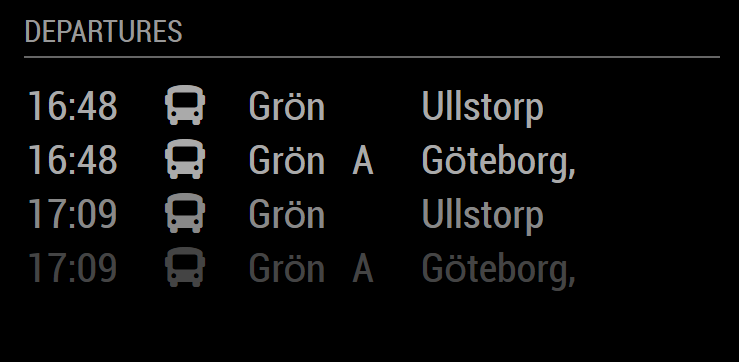
-
@Alvinger said in MMM-ResRobot - Public transport information for Sweden:
@Zapman You can’t have a comment in the middle of the config. Remove the " // stations from: " and it should work.
sure you can, they are ignored, there are comments all over the place
-
-
@Alvinger Everything is working great now! Thank you for the fast response to my issue! I’ll use this module a lot from now on :smiling_face_with_open_mouth:
-
@Alvinger i added that config to another module with the comment and got what was expected. 1 route structure in an array
-
-
@Zapman You’re welcome. Do let me know if you see anything you want to add/change.
-
@Alvinger Thank You for a brilliant module that works like a charm.
Do You have a simple fix for limiting updates?
I want frequent updates for my bus stop when present, and none when I’m not present…
I have a PIR sensor hooked up. Possible to use that? Suspend module?
OR a simple schedule as proposed by Trafiklab:
https://www.trafiklab.se/docs/using-trafiklab-data/best-practices/limiting-requests/Not a high prio request…
Cheers
/Sven -
@SvenT I would post an issue to the module GitHub issues page to engage the author
-
@SvenT I have experimented with a number of algorithms for minimizing updates but ended up with the one implemented. The current algorithm is:
-
If initial request, get updates from Trafiklab
-
If the first item in departure list (per routeId) is “old”, i.e. before cutoff time (now + skipMinutes), clear list (for routeId) and get updates from Trafiklab
What the above means is that updates only occur ON ACTUAL DEPARTURES, e.g. if a bus departs every 15 minutes the module will get updates from Trafiklab every 15 minutes (per routeId). In rush hour this often means that the module get updates every minute but at night it might only update once per 60 minutes or longer (per routeId). This behavior has the benefit of automatically adjusting to rush hour and slow hours without user intervention or tweaking.
If only one routeId is configured, the number of Trafiklab updates is usually way below the Trafiklab suggestions.
/j
-
-
@Alvinger I see.
My local bus station has departures every 3 minutes almost all day. :-(
I’ll tinker with the change profile module to see if I can pause the Reslust module.Cheers
/Sven -
@SvenT I think that if you just hide the module it will stop updating (but I’m not sure). Try it.
-
Has anyone gotten ResRobot v2.1 to work?
If so how does your config look like?I’m trying {from: “740000260”, to: “740000120”}, the rest is default except apiKey of course.
-
@noorm91 Please post your entire config for ResRobot (with the secrets masked).
-
I quickly looked but couldn’t find if “Kalmar län” is included?
-
@Populus ResRobot covers all of Sweden as far as I know.
Hello! It looks like you're interested in this conversation, but you don't have an account yet.
Getting fed up of having to scroll through the same posts each visit? When you register for an account, you'll always come back to exactly where you were before, and choose to be notified of new replies (either via email, or push notification). You'll also be able to save bookmarks and upvote posts to show your appreciation to other community members.
With your input, this post could be even better 💗
Register Login