Read the statement by Michael Teeuw here.
MMM-voice
-
After a long development process here is an offline voice recognition module
[card:fewieden/MMM-voice]
Features:
-
Turn HDMI on/off
-
Hide/Show all modules
With this module, you’re also able to control other modules like:
[card:fewieden/MMM-Fuel] [card:fewieden/MMM-NFL] [card:fewieden/MMM-ip] [card:fewieden/MMM-soccer]
Complete list of supported modules can be found here
You want your module to be supported as well? Take a look on the developers guide
There is a hidden easteregg, who can find it?
Thanks to all who helped me with this
-
-
Great job!!! :) This is awesome!
-
Hello,
thank you for the great Modul.
I have installed the Modul and then I get error message (you can see on the picture)Please can you help me with the problem?
http://www.bilder-upload.eu/show.php?file=444f91-1475951195.jpg
-
I would do this. Uninstall it, git clone it again and try running it again.
-
@Nonamexp are you running the installer as root? all the directories in the screenshot are in root
-
Try to run it like this:
sudo ./dependencies.sh
-
@strawberry-3.141
I am having trouble getting this module to recognize my USB Microphone.I am using this mic:
https://www.amazon.com/gp/product/B00IR8R7WQ/ref=ask_ql_qh_dp_hzaI previously used it when I built an Amazon Echo and I didn’t have any problem.
When I run the installer it returns this:
INFO] Possible Audio Devices to set in config.js0 [ALSA ]: bcm2835 - bcm2835 ALSA
bcm2835 ALSADo you know if there is any special configuration I need to do to get it find the mic?
-
Interesting I’m using the same mic with no issues…
What are you running it on? RPI 3? I would do this:
Terminal window:
sudo apt-get update
sudo apt-get dist-upgradeThat will install Pixel - the newest updated version… Then try to find your mic doing this in a terminal window:
arecord -l
See what that says… let me know!
-
I tried the command a record -I
it returned this:
pi@magicmirror:~ $ arecord -l
**** List of CAPTURE Hardware Devices ****
pi@magicmirror:~ $Its just not seeing it. I’m guessing that the mic broke.
-
@strawberry-3.141 I’ve conducted the command “sudo bash dependencies.sh”
I’ve tried the command ‘sudo chmod 777 /opt /home/pi/MagicMirror/modules/MMM-voice’ and than ‘bash dependencies.sh’ and it works!
-
@daveyg_71 i had this experience couple of weeks ago, what helped in my case was shutdown the rpi switch the microphone into another usb slot an restart the pi, then run the command
cat /proc/asound/cardsto get the same output as in the installer. Sometimes I had to do it a few times until it worked again. But since two months I didn’t had tis issue again.@Nonamexp Glad you could fix your issue
-
This post is deleted! -
Awesome work!
Would be great if you could configure keywords which show/hide certain modules and configure notifications … something like this:
keywords: {
    'HIDE WEATHER': {
        hide: ['weather']
    }
    'SHOW WEATHER': {
        show: ['weather']
    },
    'SIMPLE MODE': {
        hide: ['default','foo','bar'],
        show: ['simple']
    },
    'RESTART': {
        notification: 'RESTART'
    }
}
It might be good to know that I’ll probably be implementing this in the coming weeks: https://forum.magicmirror.builders/topic/241/revising-the-show-hide-mechanism
-
@daveyg_71 when you do what strawberry suggested after you reboot redo the
arecord -l
Like he said you may have to do it a couple times but it should show you more than likely your mic is 1
-
@Nonamexp my guess is because you installed it in /root/… instead of /home/pi/… so it cant find the file
-
@strawberry-3.141 Thanks for the advice. I plugged the mic into my Mac and I couldn’t get it to see it. Must be the mic. I ordered a new one so I will find out in a few days.
-
If I run the installation, there is allways a error when it wants to install the PocketSphinx.
What is wrong? -
@SimJim do you have some more output to provide?
-
This is what happens all the time…
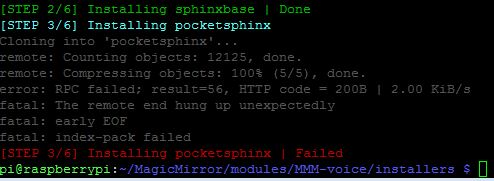
-
@SimJim i will test this tonight



Hello! It looks like you're interested in this conversation, but you don't have an account yet.
Getting fed up of having to scroll through the same posts each visit? When you register for an account, you'll always come back to exactly where you were before, and choose to be notified of new replies (either via email, or push notification). You'll also be able to save bookmarks and upvote posts to show your appreciation to other community members.
With your input, this post could be even better 💗
Register Login