MagicMirror Forum
    • Recent
    • Tags
    • Unsolved
    • Solved
    • MagicMirror² Repository
    • Documentation
    • 3rd-Party-Modules
    • Donate
    • Discord
    • Register
    • Login
    A New Chapter for MagicMirror: The Community Takes the Lead
    Read the statement by Michael Teeuw here.

    MMM-GooglePhotos

    Scheduled Pinned Locked Moved Entertainment
    294 Posts 56 Posters 341.4k Views 59 Watching
    Loading More Posts
    • Oldest to Newest
    • Newest to Oldest
    • Most Votes
    Reply
    • Reply as topic
    Log in to reply
    This topic has been deleted. Only users with topic management privileges can see it.
    • M Offline
      megagprime
      last edited by

      anybody have any issues with the photos stop changing after a while? i cant figure it out my post

      1 Reply Last reply Reply Quote 0
      • soubhik-khanS Offline
        soubhik-khan
        last edited by soubhik-khan

        I noticed this module is using huge data. Almost downloading more than 3gb/day. My refresh rate is 1.5min per photo. Anyone else noticed this? How can we reduce the data usage? Probably show photos from the cached data instead of downloading every time?

        S 1 Reply Last reply Reply Quote 0
        • S Offline
          sdetweil @soubhik-khan
          last edited by sdetweil

          @soubhik-khan I went over the code last month for some not refreshing problem. and it does build and use a local cache.

          how big are the pictures? and how many are there?

          at 1 mb each for 960 pics, it could be 1gb in a day

          Sam

          How to add modules

          learning how to use browser developers window for css changes

          soubhik-khanS 1 Reply Last reply Reply Quote 0
          • soubhik-khanS Offline
            soubhik-khan @sdetweil
            last edited by

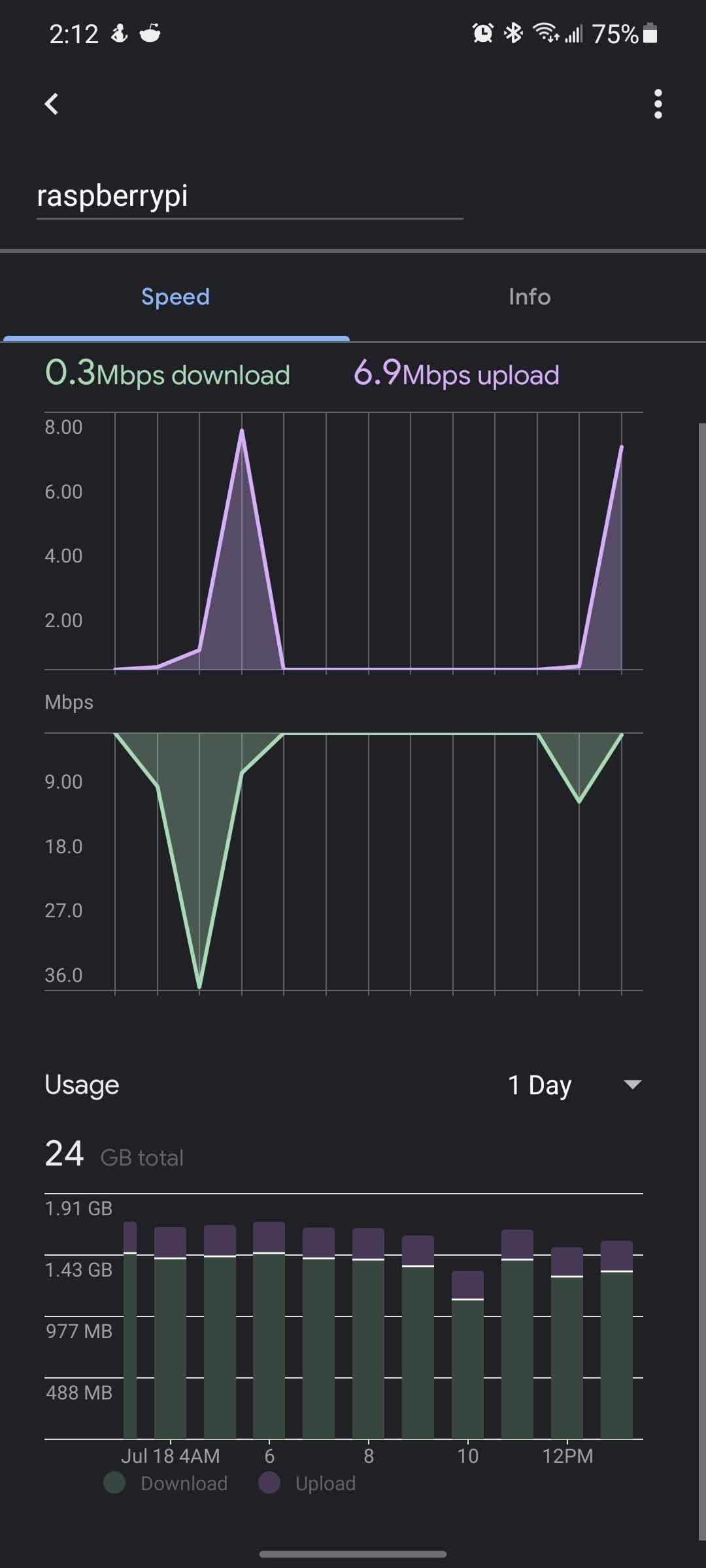
            @sdetweil yes you are right, I think I found the issue. Its not this module. There is something else on the pi hijacking my bandwidth! its insane ~ 24GB is last 24 hours!
            Screenshot_20210718-141208_Home.jpg

            I was about the do a clean install but then I thought I will just remove the unused folders first! I guess its from pocketshhinx or sphinxbase, I had installed some of those voice assistant modules! I removed those two folders and looks like now the data usage is back to normal. Will monitor for a day, if this doesnt help, will need to do a clean install

            1 Reply Last reply Reply Quote 0
            • C Offline
              celliott
              last edited by

              I am currently using this module to display one album that has 5 photos in it. I have it set to change the photo every 15 seconds. For some reason once it gets to the 5th photo, it only displays for barely 1 second and then starts from the beginning again. Any suggestions on how to fix this so that the last photo will display as long as the others?

              S 1 Reply Last reply Reply Quote 0
              • S Offline
                sdetweil @celliott
                last edited by

                @celliott I don’t know for sure but there is debugging info available

                edit the node_helper.js

                and add

                       debug:true,
                

                between these two lines

                module.exports = NodeHelper.create({
                  start: function() 
                

                then stop mm, pm2 stop all if using pm2

                then

                cd ~/MagicMirror
                npm start >somefile.txt
                

                wait til u see the error
                then ctrl-c on the mm terminal window
                (alt-spacebar, n to.minimize mm screen if you didn’t use ssh)

                Sam

                How to add modules

                learning how to use browser developers window for css changes

                1 Reply Last reply Reply Quote 0
                • O Offline
                  orayoflighto Project Sponsor
                  last edited by

                  For those just joining, I was able to get this to work using the Google OAuth desktop option and the V2 token generator that hermanho made at the link below

                  https://github.com/aneaville/MMM-GooglePhotos/issues/145

                  M 2 Replies Last reply Reply Quote 1
                  • M Offline
                    megagprime @orayoflighto
                    last edited by

                    @orayoflighto awesome thanks guys but some of us are really dumb and I can’t figure this out. No new get token no matter how hard I try and I don’t know how to do it on my local pc… If I copy the file over I get the following ![alt text](image url)

                    S 1 Reply Last reply Reply Quote 0
                    • M Offline
                      megagprime @orayoflighto
                      last edited by

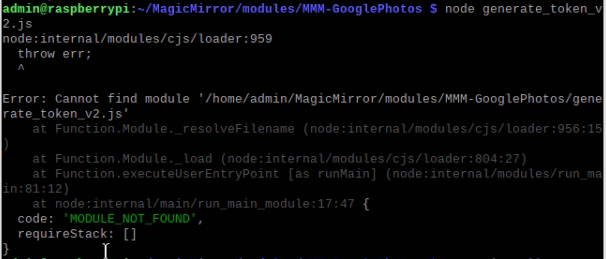
                      @orayoflighto i tried to do this but i am too dumb, how do i clone on local pc ? and when i do put v2 in folder and node i get this error 9fdb2fe4-798b-4de7-90fd-ea673cdfbd7f-image.png
                      1 Reply Last reply Reply Quote 0
                      • S Offline
                        sdetweil @megagprime
                        last edited by sdetweil

                        @megagprime to get a pull request

                        in the existing module folder do

                        git fetch origin pull/#/head:local_branch_name

                        replace # w 146
                        and pick a name for branch name

                        the when that completes (no message)
                        do
                        git checkout whatever name u used

                        now your photos module is using the pull request version

                        then the normal instructions should work

                        edit : shows what u get for not checking and trusting some ‘now old’ post on the internet!

                        Sam

                        How to add modules

                        learning how to use browser developers window for css changes

                        M 1 Reply Last reply Reply Quote 0
                        • M Offline
                          megagprime @sdetweil
                          last edited by

                          @sdetweil admin@raspberrypi:~/MagicMirror/modules/MMM-GooglePhotos $ pull/<145>/head:< g2 >
                          bash: syntax error near unexpected token `145’

                          S 1 Reply Last reply Reply Quote 0
                          • S Offline
                            sdetweil @megagprime
                            last edited by

                            @megagprime no <>

                            Sam

                            How to add modules

                            learning how to use browser developers window for css changes

                            1 Reply Last reply Reply Quote 0
                            • L Offline
                              Lilleberg
                              last edited by

                              I have just installed MagicMirror on my RaspberryPi and are now playing around trying to tweak my screen to my needs. Just now I want to show a slideshow of one of my albums in the top region of the screen. I have my screen vertically.
                              So the photo should show cover the whole top region from edge to edge, and maybe 1/3 down from the top edge. Trying to use the top_bar position, but the photos then are shown with a padding on the left side and in the top, and are not resized to fit inside the region. Anybody that can show how this can be done? Maybe in the css file?

                              bheplerB 1 Reply Last reply Reply Quote 0
                              • bheplerB Offline
                                bhepler Module Developer @Lilleberg
                                last edited by

                                @Lilleberg Try using the upper_third position for your pictures. That may be closer to what you want.

                                1 Reply Last reply Reply Quote 0
                                • 1 Offline
                                  1a2a3a
                                  last edited by

                                  hi, does anyone know how to configure the sizing of the gphoto?
                                  im trying to make the photo not full screen, but to perhaps just the top portion of the mirror or to some size of the mirror (havent really decided on the location) but having trouble sizing them.

                                  i changed the showWidth and showHeight but while they make the picture smaller, the quality seems to be reduce?
                                  i have also added #GPHOTO in CSS with width and height at 50% but it still feel like its showing full screen…

                                  1 Reply Last reply Reply Quote 0
                                  • 1 Offline
                                    1a2a3a
                                    last edited by

                                    Did something change here? I’m getting an invalid module position found for this configuration. My position is “fullscreen”. It used to be working fine…?

                                    S 1 Reply Last reply Reply Quote 0
                                    • S Offline
                                      sdetweil @1a2a3a
                                      last edited by sdetweil

                                      @1a2a3a yes we added checking for position names
                                      its fullscreen_above and fullscreen_below

                                      here is the list of MagicMirror module positions
                                      https://docs.magicmirror.builders/modules/configuration.html

                                      Sam

                                      How to add modules

                                      learning how to use browser developers window for css changes

                                      1 1 Reply Last reply Reply Quote 0
                                      • 1 Offline
                                        1a2a3a @sdetweil
                                        last edited by

                                        @sdetweil which option is the same as the previous ‘fullscreen’?

                                        S 1 Reply Last reply Reply Quote 0
                                        • S Offline
                                          sdetweil @1a2a3a
                                          last edited by

                                          @1a2a3a fullscreen_below

                                          Sam

                                          How to add modules

                                          learning how to use browser developers window for css changes

                                          1 Reply Last reply Reply Quote 0

                                          Hello! It looks like you're interested in this conversation, but you don't have an account yet.

                                          Getting fed up of having to scroll through the same posts each visit? When you register for an account, you'll always come back to exactly where you were before, and choose to be notified of new replies (either via email, or push notification). You'll also be able to save bookmarks and upvote posts to show your appreciation to other community members.

                                          With your input, this post could be even better 💗

                                          Register Login

                                          • 1
                                          • 2
                                          • 11
                                          • 12
                                          • 13
                                          • 14
                                          • 15
                                          • 15 / 15
                                          • First post
                                            Last post
                                          Enjoying MagicMirror? Please consider a donation!
                                          MagicMirror created by Michael Teeuw.
                                          Forum managed by Sam, technical setup by Karsten.
                                          This forum is using NodeBB as its core | Contributors
                                          Contact | Privacy Policy
