MagicMirror Forum
    • Recent
    • Tags
    • Unsolved
    • Solved
    • MagicMirror² Repository
    • Documentation
    • 3rd-Party-Modules
    • Donate
    • Discord
    • Register
    • Login
    A New Chapter for MagicMirror: The Community Takes the Lead
    Read the statement by Michael Teeuw here.

    Change newsfeed title to image/logo?

    Scheduled Pinned Locked Moved Development
    58 Posts 7 Posters 36.9k Views 7 Watching
    Loading More Posts
    • Oldest to Newest
    • Newest to Oldest
    • Most Votes
    Reply
    • Reply as topic
    Log in to reply
    This topic has been deleted. Only users with topic management privileges can see it.
    • C Offline
      cyberphox @justjim1220
      last edited by

      @justjim1220 I was just about to say that! lol

      Full time Dad, DJ and entertainer and lover of technology.

      justjim1220J 1 Reply Last reply Reply Quote 0
      • justjim1220J Offline
        justjim1220 Module Developer @cyberphox
        last edited by

        @cyberphox @blueadam @Sean

        I see that I didn’t notice the changes that the forums made when I copy/pasted the code.

        Apologies!

        I also missed a step: Need to add getStyles function to the newsfeed.js Pic for placement
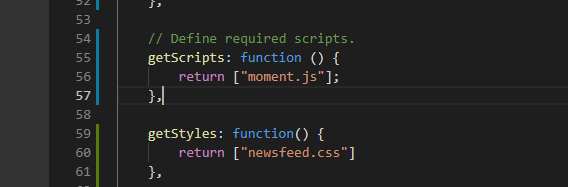
        0_1539381776852_Screenshot (145).png

        And this is what I tried to post and the forums didn’t like it and cahnged it, This is what you need to get it to work:

        0_1539381869307_Screenshot (146).png

        I will fix this in my original post.

        Again, Apologies!

        "Life's Too Short To Dance With Ugly People"
        Jim Hallock - 1995

        1 Reply Last reply Reply Quote 0
        • justjim1220J Offline
          justjim1220 Module Developer
          last edited by

          here it is with the New York Times…

          0_1539382581526_Screenshot (150).png

          "Life's Too Short To Dance With Ugly People"
          Jim Hallock - 1995

          C 1 Reply Last reply Reply Quote 0
          • C Offline
            cyberphox @justjim1220
            last edited by

            @justjim1220 figure out multiple feeds and logos yet? LOL

            Full time Dad, DJ and entertainer and lover of technology.

            justjim1220J 2 Replies Last reply Reply Quote 0
            • justjim1220J Offline
              justjim1220 Module Developer @cyberphox
              last edited by

              @cyberphox

              Working on it!!! :smiling_face_with_sunglasses:

              "Life's Too Short To Dance With Ugly People"
              Jim Hallock - 1995

              1 Reply Last reply Reply Quote 0
              • justjim1220J Offline
                justjim1220 Module Developer @cyberphox
                last edited by

                @cyberphox

                Did you get your to work?

                Apologies for the mistakes posted by forums.

                "Life's Too Short To Dance With Ugly People"
                Jim Hallock - 1995

                1 Reply Last reply Reply Quote 0
                • E Offline
                  electros Project Sponsor @blueadam
                  last edited by electros

                  @blueadam can you tell me please how i can make to look like this ?
                  And please tell me, who know of course the picture logo must have a specific dimensions like no big then… ?

                  ? 1 Reply Last reply Reply Quote 0
                  • ? Offline
                    A Former User @electros
                    last edited by

                    @electros
                    See ‘max-width’, and ‘max-height’ or you can use ‘background-position:contain’ as backfroundimage to adjust image size

                    E 1 Reply Last reply Reply Quote 0
                    • E Offline
                      electros Project Sponsor @Guest
                      last edited by

                      @sean
                      Thanks I thought it was because the logo image is too big so it does not display it. Now I have solved, the logo is displayed, but I have the same problem as @blueadam, which means I have the newsfeed 2 times the old version and the new version. And I’ve tried many variants, but I can not make the old one disappear.
                      That’s why I ask @blueadam to tell me how he got rid of the old one.
                      Thanks

                      1 Reply Last reply Reply Quote 0
                      • B Offline
                        blueadam
                        last edited by blueadam

                        @electros

                        I’ll try my best to explain how I managed to get rid of the old one. Also I made all of these changes to code before @justjim1220 posted updated version of the code so I don’t guarantee it will work with those changes but you can give a try.

                        So, what I noticed is that part of the code in newsfeed.js file that we fixed was the description part. I spent some time staring at mine MagicMirror and I noticed that those news titles won’t show as double. Instead, there is the original one and the second one that we have created which shows the news description, not the title.

                        First I fixed the code that it will show the title instead of the description. In other words change the word ‘description’ to ‘title’.
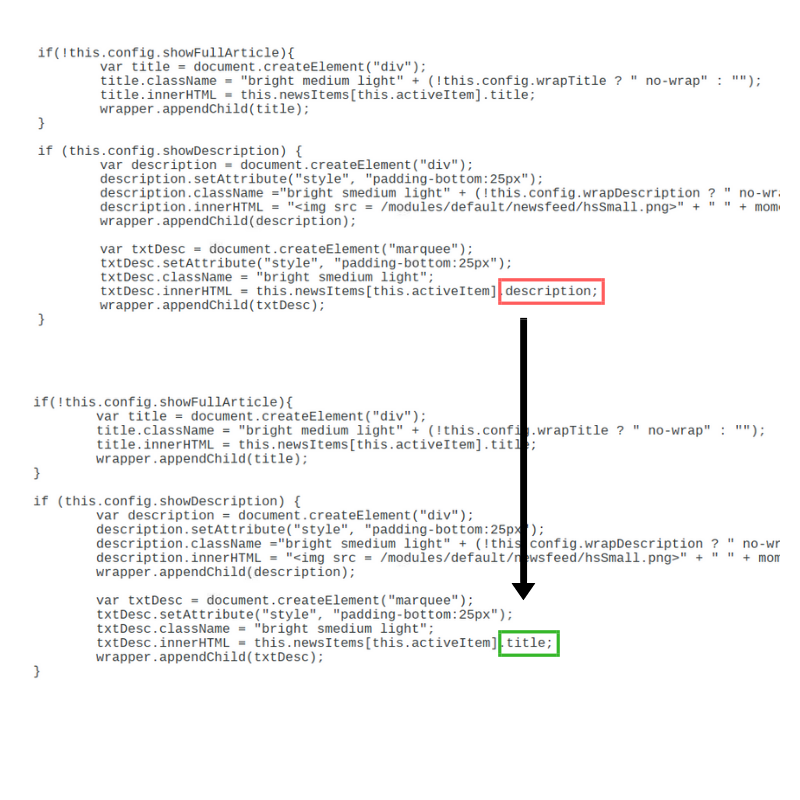
                        0_1539476532861_Nimetön suunn.malli (1).png

                        Now we have done that there are two titles like you said. To understand why this is happening let’s go through the newsfeed.js code to understand why this is happening.
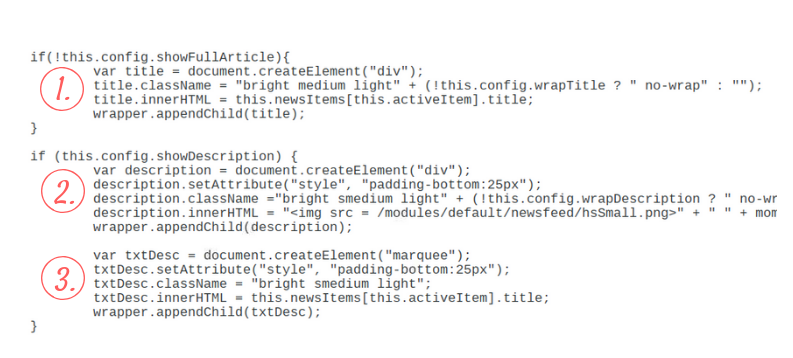
                        0_1539476952063_newsfeedlapi.png

                        1. orginal part of the code which prints the title
                        2. first part of the new code which prints the logo and the timer
                        3. second part of the new code which prints the scrolling headline.

                        The scrolling effect is quite cool but unfortunately it won’t fit to my Magic Mirror lay out so I decided to remove that part of the code. For that reason I removed this part of the code.

                        0_1539477438126_poista newsfeed.png

                        Next thing we notice that the title is coming before our logo and timer. That is why we have to move new part of the code above the old one.
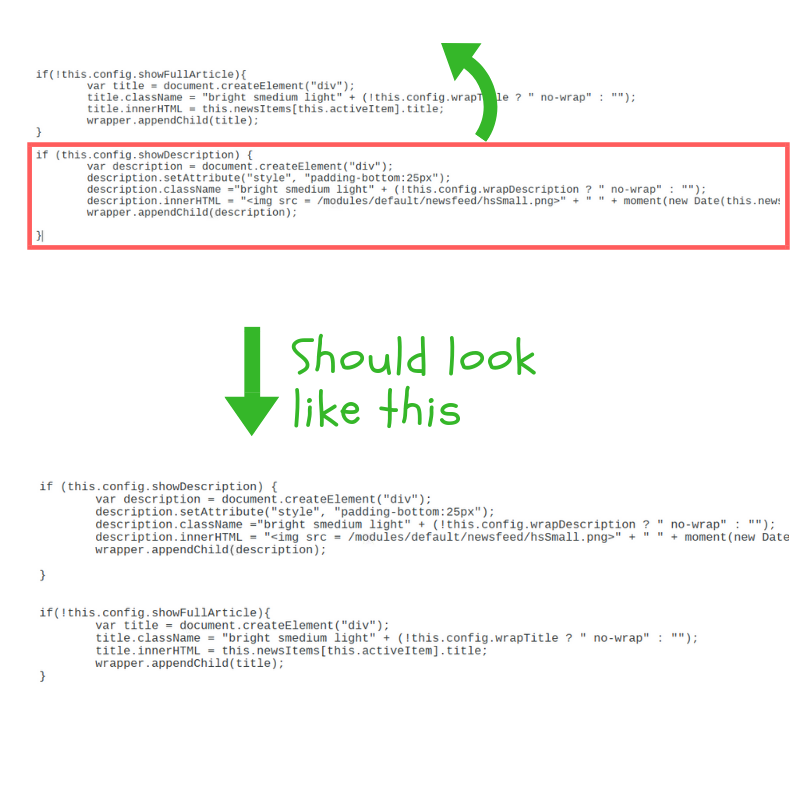
                        0_1539478263819_NF3.png

                        Now there is just one fault left which is that now there is our new logo + timer and the old text title + timer. To ‘remove’ the old one go to the config.js file and find the newsfeed module. Over there you can change showSourceTitle and showPublishDate values from ‘true’ to ‘false’. After that all should be working perfect.

                        I hope that helped you even a little.

                        justjim1220J E 2 Replies Last reply Reply Quote 0
                        • justjim1220J Offline
                          justjim1220 Module Developer @blueadam
                          last edited by

                          @blueadam

                          Cool, I have mine to show the title and description so I can at least see what the headline is and a brief description.

                          Just didn’t include that in the sample.

                          If you cahnge everything to false except what you are wanting to show, it will fix the double posting of the date. As I had it set to only show the description since everything is under that code snippet.

                          Still working on having more than one newsfeed with the logo images.
                          Thanks!

                          "Life's Too Short To Dance With Ugly People"
                          Jim Hallock - 1995

                          1 Reply Last reply Reply Quote 0
                          • E Offline
                            electros Project Sponsor @blueadam
                            last edited by

                            @blueadam yes, now everything is fine. thank you

                            1 Reply Last reply Reply Quote 1
                            • justjim1220J Offline
                              justjim1220 Module Developer @blueadam
                              last edited by

                              @blueadam @cyberphox @electros

                              MMM-NewsFeedTicker

                              0_1540002089489_Screenshot (407).png
                              0_1540002097195_Screenshot (406).png
                              0_1540002107196_Screenshot (401).png

                              Yes! I now have the scrolling newsfeed with logo that will change for more than 1 newsfeed!!! :smiling_face_with_sunglasses:

                              Thanks to @sdetweil and @Sean for helping me along and learning me!

                              "Life's Too Short To Dance With Ugly People"
                              Jim Hallock - 1995

                              S 1 Reply Last reply Reply Quote 1
                              • S Offline
                                StrIIker @justjim1220
                                last edited by

                                @justjim1220

                                I love this News Ticker. Can I ask how I can change the size of the ticker? My mirror is in Portrait mode and the font feels oversized. I would prefer 40-50% of the current release size which would also allow the full headline to show. Also, can you include an opacity value for the background? I like the maroon but would prefer it to be less intense. I am sure these could be handled via the custom.css but I am a novice with this all. Thank you again for a great module!

                                justjim1220J 1 Reply Last reply Reply Quote 1
                                • justjim1220J Offline
                                  justjim1220 Module Developer @StrIIker
                                  last edited by

                                  @striiker

                                  Add this to custom.css, Make the changes you want in it…

                                  .MMM-NewsFeedTicker {
                                      height: 100px;
                                      background-color: maroon;
                                      opacity: 1.0;
                                  }
                                  
                                  .MMM-NewsFeedTicker .headline {
                                      padding-top: 15px;
                                      font-size: 100%;
                                  }
                                  
                                  .MMM-NewsFeedTicker .image {
                                    height: 100px;
                                    background-color: #FFF;
                                  }
                                  

                                  Let me know if you have any problems with this.

                                  I am glad that you like it! :smiling_face_with_sunglasses:

                                  "Life's Too Short To Dance With Ugly People"
                                  Jim Hallock - 1995

                                  S 2 Replies Last reply Reply Quote 0
                                  • C Offline
                                    cyberphox
                                    last edited by

                                    Ok so to remove the old one and install this, let’s review the steps! :)
                                    Anyone…??

                                    Full time Dad, DJ and entertainer and lover of technology.

                                    S 1 Reply Last reply Reply Quote 0
                                    • S Offline
                                      StrIIker @cyberphox
                                      last edited by

                                      @cyberphox said in Change newsfeed title to image/logo?:

                                      Ok so to remove the old one and install this, let’s review the steps! :)
                                      Anyone…??

                                      Sure! I assume this is what you want…

                                      Refer to: https://github.com/justjim1220/MMM-NewsFeedTicker for the full install details etc.

                                      Install new news ticker:
                                      Log into your Raspberry Pi as pi and:

                                      cd ~/MagicMirror/modules
                                      git clone https://github.com/justjim1220/MMM-NewsFeedTicker.git
                                      

                                      This installs the requisite module into the correct directory.

                                      Remove old news and enable new news
                                      The nice thing with this is that enabling or disabling modules is done simply by adding or deleting entries in the config.js file. The only catch is that it’s touchy with proper syntax so make sure you aren’t missing something simple (like a trailing comma or a misplaced ‘}’ or ‘{’. I suggest backing up your current config.js so that you can revert to it if needed. This is generally a good policy when modifying any config files. To check your config for errors, reference the following article:
                                      https://forum.magicmirror.builders/topic/5399/how-to-check-your-config-for-errors-for-absolute-beginners/2
                                      So, onto making that backup copy…

                                      cd ~/MagicMirror/config
                                      cp config.js config.bak01
                                      

                                      Increment the trailing number if you want to retain multiple backup copies. If you make a mistake and want to start over, copy the backup to overwrite the current version of config.js…

                                      cp config.bak01 config.js
                                      

                                      Now edit the config file…

                                      nano config.js
                                      

                                      To disable the default news reader, delete the following: (you may have additional feeds if you added anything).

                                      {
                                      			"module": "newsfeed",
                                      			"position": "bottom_bar",
                                      			"config": {
                                      				"feeds": [
                                      					{
                                      						"title": "New York Times",
                                      						"url": "http://www.nytimes.com/services/xml/rss/nyt/HomePage.xml"
                                      					},
                                      				],
                                      				"showSourceTitle": true,
                                      				"showPublishDate": true
                                      			}
                                      		},
                                      

                                      Now to add the new feed, add the following somewhere in the config (maybe where the old new feed was?) You can customize this by adding or removing news sources based upon what interests you.

                                      {
                                      	disabled: false,
                                      	module: "MMM-NewsFeedTicker",
                                      	position: "bottom_bar",
                                      	//classes: "day_scheduler",
                                      	config: {
                                      	    feeds: [
                                      		{
                                      			title: "New York Times",
                                      			url: "http://www.nytimes.com/services/xml/rss/nyt/HomePage.xml",
                                      			encoding: "UTF-8", //ISO-8859-1
                                      			className: "myClass",
                                      			defaultLogo : ""
                                      		},
                                      		{
                                      			title: "USA Today",
                                      			url: "http://rssfeeds.usatoday.com/UsatodaycomNation-TopStories",
                                      			encoding: "UTF-8", //ISO-8859-1
                                      			className: "myClass",
                                      			defaultLogo : ""
                                      		},
                                      		{
                                      			title: "BBC World News",
                                      			url: "http://feeds.bbci.co.uk/news/world/rss.xml#",
                                      			encoding: "UTF-8", //ISO-8859-1
                                      			className: "myClass",
                                      			defaultLogo : ""
                                      		}
                                          	    ]
                                      	},
                                      

                                      Now you can reload the MagicMirror via Ctrl-R (I find that the system automatically reloads the module once it detects a changed config.js). You should see the new news feed at the bottom.

                                      1 Reply Last reply Reply Quote 1
                                      • C Offline
                                        cyberphox
                                        last edited by cyberphox

                                        Got lots of config errors copying that…weird…

                                        Checking file… /home/pi/MagicMirror/config/config.js
                                        Line 192 col 1 Expected ‘}’ to match ‘{’ from line 160 and instead saw ‘]’.
                                        Line 193 col 2 Expected ‘]’ to match ‘[’ from line 28 and instead saw ‘}’.
                                        Line 193 col 3 Expected ‘}’ to match ‘{’ from line 11 and instead saw ‘;’.
                                        Line 193 col 4 Missing semicolon.

                                        Had to add an extra close bracket }

                                        Full time Dad, DJ and entertainer and lover of technology.

                                        S 1 Reply Last reply Reply Quote 0
                                        • S Offline
                                          StrIIker @cyberphox
                                          last edited by

                                          @cyberphox

                                          Yeah, I have spent a lot of time trying to figure out where I was missing something… Generally it was a missing comma at the end of a config line which had additional content following it or misplacing the { or }.
                                          Also, the modules are loaded in order as they appear in the config so if you want a couple of things in the top left (denoted by the location parameter “position”: “top_left”, the first module will be the top left and the second module read would be just below that.

                                          1 Reply Last reply Reply Quote 0
                                          • C Offline
                                            cyberphox
                                            last edited by

                                            I have it working now after adding the extra bracket, but as stated above its’ a little big for portrait mode…it’s running a bit sluggish but i expect thats more of a raspberry pi issue…changing the font % in custom.css didnt seem to shrink it any for me

                                            Full time Dad, DJ and entertainer and lover of technology.

                                            1 Reply Last reply Reply Quote 0

                                            Hello! It looks like you're interested in this conversation, but you don't have an account yet.

                                            Getting fed up of having to scroll through the same posts each visit? When you register for an account, you'll always come back to exactly where you were before, and choose to be notified of new replies (either via email, or push notification). You'll also be able to save bookmarks and upvote posts to show your appreciation to other community members.

                                            With your input, this post could be even better 💗

                                            Register Login

                                            • 1
                                            • 2
                                            • 3
                                            • 2 / 3
                                            • First post
                                              Last post
                                            Enjoying MagicMirror? Please consider a donation!
                                            MagicMirror created by Michael Teeuw.
                                            Forum managed by Sam, technical setup by Karsten.
                                            This forum is using NodeBB as its core | Contributors
                                            Contact | Privacy Policy




