Read the statement by Michael Teeuw here.
MMM-DarkSkyForecast - Yet ANOTHER weather module
-
sorry - I copied the config of an older status…
-
@chris1971 Well the module gets wrapped because it doesn’t have enough space in the right bar.
You could- exclude details in the forecast section (there’s an option)
- give the right bar more space by determining it’s width with css
- let the module show only 2 forecast items of each (instead of the 3 you have currently) (also via config options)
-
And of course you could switch off the long forecast text. I THINK you can do that as well via config options.
Go through the options of the module, there’s a LOT to adjust.
-
thanks- I tried to reduce the size of the long forecast text - do you know how to adjust? I think I have to do this in the DarkSky.css…
-
The adjustment of the width was the key factor… thx…
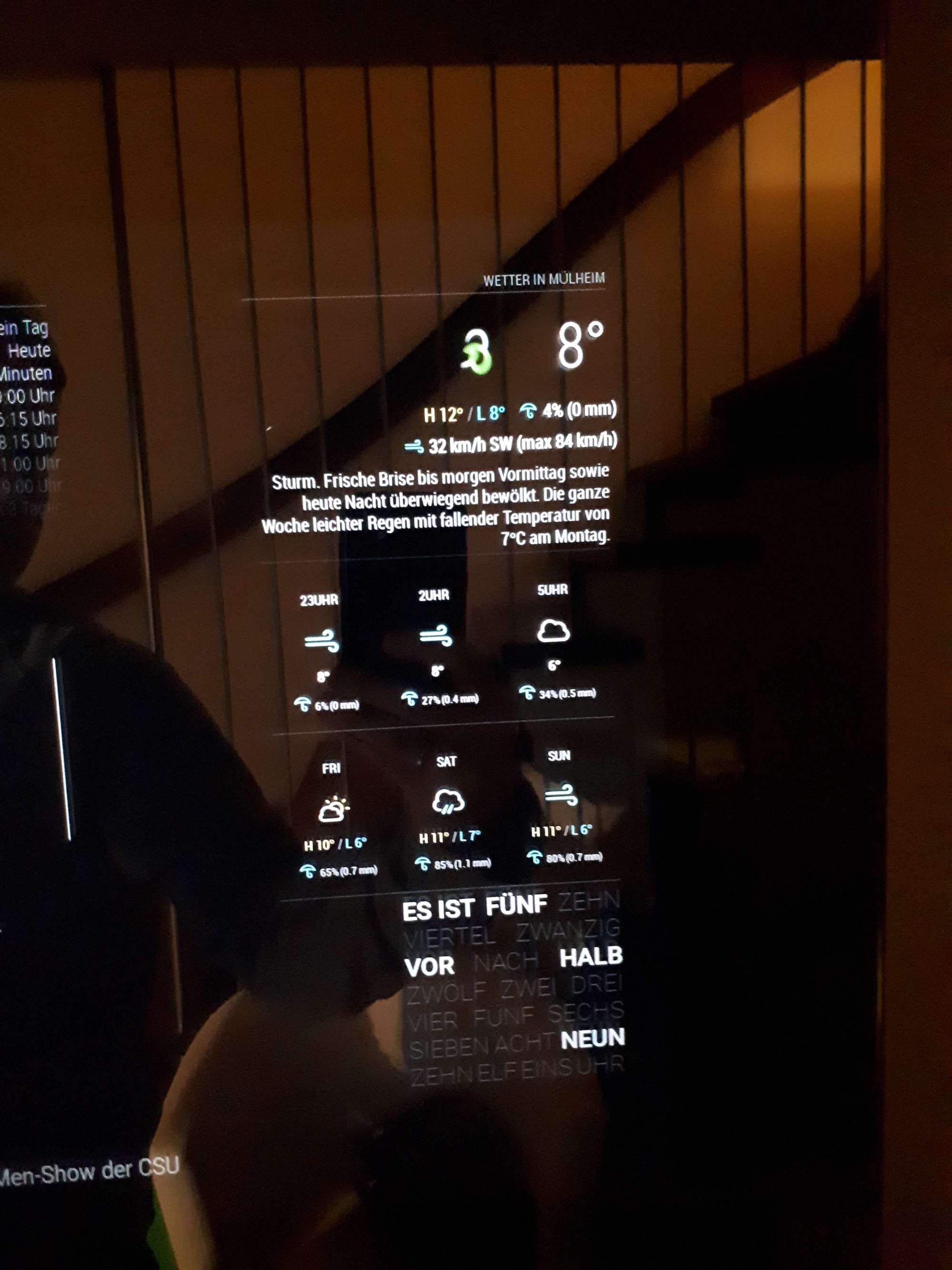
But I do not found out how to adjust the font size or position of the long forecast text… Do I have to do this in the custom.css?
This is my try in the custom.css - but seem not to work as expected…
}
.MMM-DarkSkyForecast .module-content {
width: 400px;
}.MMM-DarkSkyForecast .wrapper.tiled .forecast-container .forecast-item .wind-container,
.MMM-DarkSkyForecast .wrapper.table .forecast-container .forecast-item .precipitation-container,
.MMM-DarkSkyForecast .wrapper.table .forecast-container .forecast-item .wind-container {
display: none;
}
}
.MMM-DarkSkyForecast .wrapper.table .forecast-container .forecast-item > span,
.MMM-DarkSkyForecast .wrapper.table .forecast-container .header-row > span {
font-size: 4px;
}
}.MMM-DarkSkyForecast .attribution {
font-size: 10px;
line-height: 5px;
color: #333;
text-align: left;
} -
After several trials I think it’s o.k.
Thanks for the support.
Chris
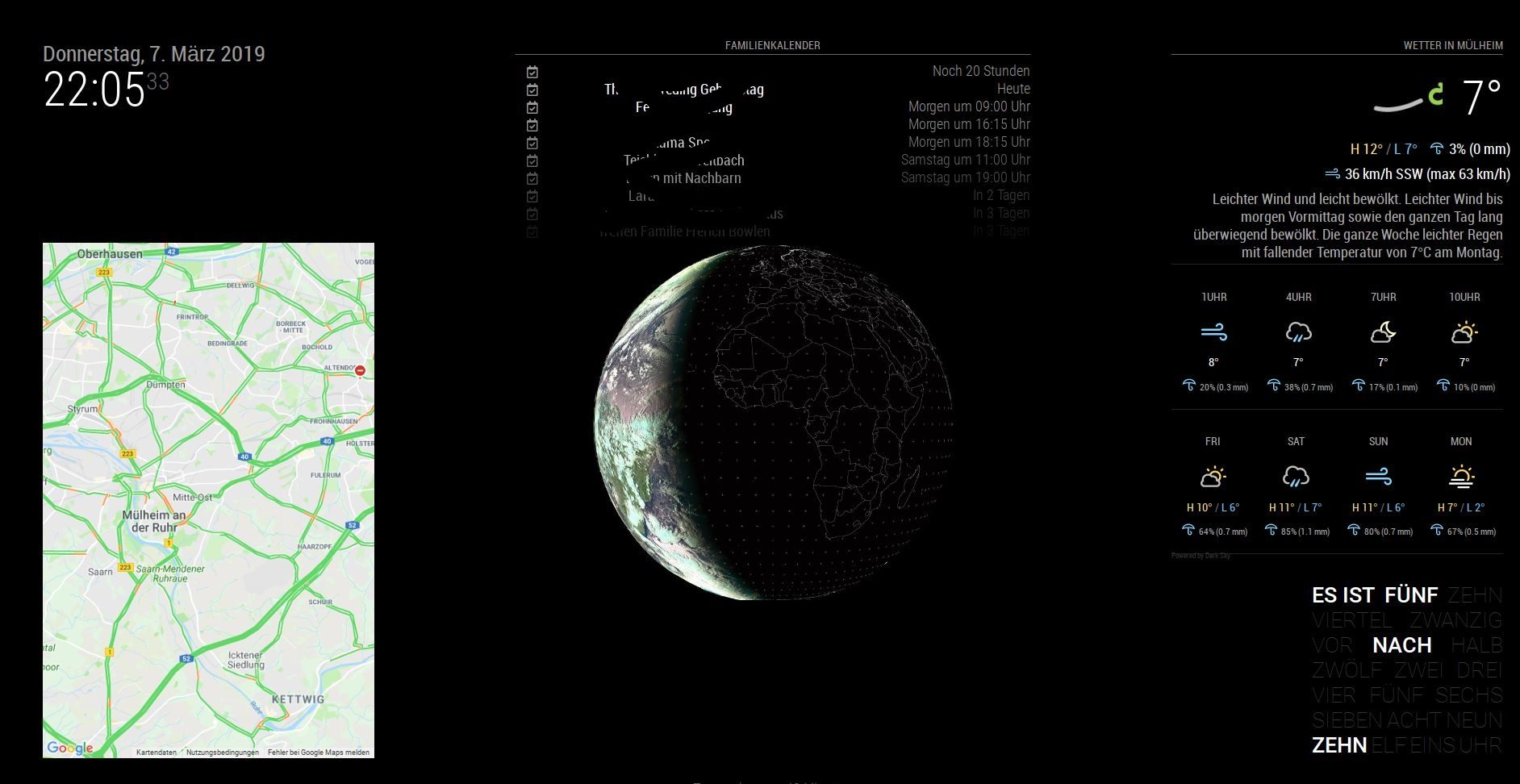
-
Good Morning all
First of all, thank you for the Herrvorrande weather module !!
Is it also possible to display different weather forecasts (two different locations)? For example, the locations alternate every 30 seconds.
-
@Cr4z33 said in MMM-DarkSkyForecast - Yet ANOTHER weather module:
Apart from that what shall I look to then once there’s an issue between your module and the one of someone else?
No idea :) But at least we’ll have a starting point as to where to look. Basically something is causing all of the modules to hide, and it has something to do with an interaction with mine. The only thing my module does to affect anything outside itself is to broadcast weather data whenever it updates to any other modules who want to use it. See if the module is reacting to the
DARK_SKY_FORECAST_WEATHER_UPDATEnotification. -
@CyruS1337 said in MMM-DarkSkyForecast - Yet ANOTHER weather module:
Is it also possible to display different weather forecasts (two different locations)? For example, the locations alternate every 30 seconds.
Not in a rotation, as I believe that is what you are asking for. However you can configure multiple instances of the module, so you could have two forecasts that way. Keep in mind that this doubles the number of requests to the Dark Sky API, so you’ll want to be mindful that you don’t exceed the daily maximum of 1000 requests. You can tune how frequently the module polls for data with the
updateIntervalconfiguration parameter. -
@chris1971 Did you run
npm installin theMMM-DarkSkyForecastdirectory? Otherwise, what is the behaviour you are seeing? -
@j-e-f-f That’s too bad. Thanks anyway for the quick answer
-
@j-e-f-f Yes I have executed npm install… everything is running smooth right now. Can you explain how I can set the font size of the forecast text?
It would be great if you could implement time for sunrise/ sunset and a moonphase… :-)Thanks for the great module!!! Chris
-
Hello,
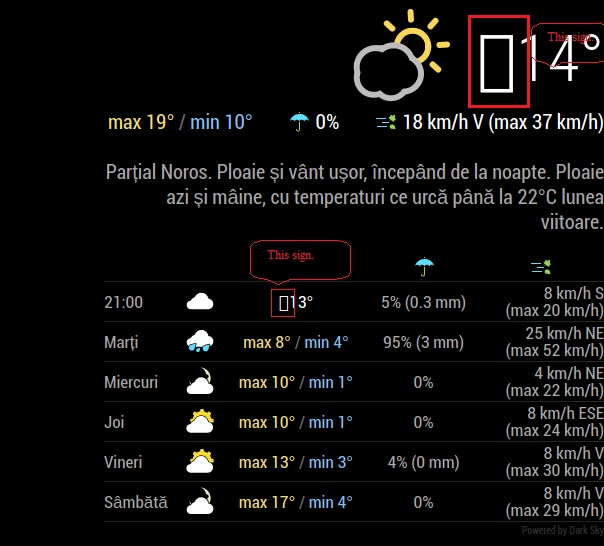
I’ve installed this weather module and I find it very nice but I have a little issue with it,a strange character like a rectangle appear in front of the temperature value. (marked with red in pic)
Does anybody knows what could be the cause ?
Had this issue on an old installation of raspbian + MagicMirror,also have it on a fresh reinstall of raspbian and magic mirror only the config file remained from old installation.
My config:<------><------>{ <------><------><------>module: 'MMM-DarkSkyForecast', <------><------><------>position: 'right', <------><------><------>classes: 'default everyone', <------><------><------>disabled: false, <------><------><------>config: { <------><------><------><------>apikey: "xxxxx......xxxx....", <------><------><------><------>latitude: "44.426765", <------><------><------><------>longitude: "26.102537", <------><------><------><------>iconset: "5c", <------><------><------><------>concise: false, <------><------><------><------>forecastLayout: "table", <------><------><------><------>showHourlyForecast: true, <------><------><------><------>hourlyForecastInterval: 12, <------><------><------><------>maxHourliesToShow: 1, <------><------><------><------>label_high: "max", <------><------><------><------>label_low: "min", <------><------><------><------>label_days: ["Duminica", "Luni", "Mar?i", "Miercuri", "Joi", "Vineri", "Sâmbata"], <------><------><------><------>showCurrentConditions: true, <------><------><------><------>showExtraCurrentConditions: true, <------><------><------><------>label_ordinals: ["N", "NNE", "NE", "ENE", "E", "ESE", "SE", "SSE", "S", "SSV", "SV", "VSV", "V", "VNV", "NV", "NNV"], <------><------><------><------>maxDailiesToShow: "5", <------><------><------><------>showSummary: true, <------><------><------><------>label_timeFormat: "kk:mm", <------><------><------><------>} <------><------>},Thank you.
-
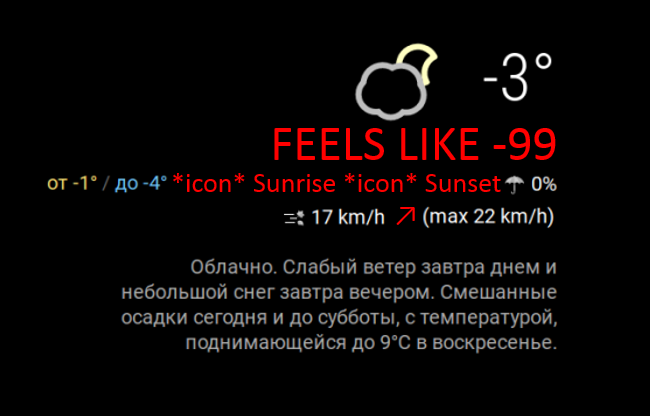
Great widget!
It just lacks 3 things:
- Sunrise & sunset data
- “Feels like”
- showWindDirectionAsArrow: true as in module: “currentweather”,
Made a sketch -
-
@mielu80 me too… no idea whats up other than that works great
-
@epi said in MMM-DarkSkyForecast - Yet ANOTHER weather module:
- “Feels like”
Indeed comes very handy to me when in Summer.
The weather here is usually very wet and in Summer ie. 35° C give a feeling of 42° C so I wish I could know it before getting out. :sun: :fire:
-
@mielu80 said in MMM-DarkSkyForecast - Yet ANOTHER weather module:
I’ve installed this weather module and I find it very nice but I have a little issue with it,a strange character like a rectangle appear in front of the temperature value.
I’ve just tried with your config and I can’t duplicate this problem. That said, when I inspect that part of the screen with the dev tools, it looks like there is an extra character there, but in my case it just appears as white space. But there’s nothing I can see in the markup where this is…
-
@Cr4z33 said in MMM-DarkSkyForecast - Yet ANOTHER weather module:
@epi said in MMM-DarkSkyForecast - Yet ANOTHER weather module:
- “Feels like”
Indeed comes very handy to me when in Summer.
The weather here is usually very wet and in Summer ie. 35° C give a feeling of 42° C so I wish I could know it before getting out. :sun: :fire:
Its the opposite in Latvia - due to cold weather and wind, taking into consideration that the sea is very close, even -1 Celsius might feel like -7.
-
Oh my god… everything was running and I have shoot the system…and try to install it again.
Now the module is not loading anymore. here is my config:
{
module: “MMM-DarkSkyForecast”,
header: “Wetter in Mülheim”,
position: “top_right”,
classes: “default everyone”,
disabled: false,
config: {
apikey: “xxxxxxxxxxxxxxxxxxxx”,
latitude: “51.4185682”,
longitude: “6.8845226”,
iconset: “3c”,
maxHourliesToShow: 4,
maxDailiesToShow: 4,
useAnimatedIcons: true,
label_timeFormat: “k[h]”,
concise: false,
forecastLayout: “table”
}
},Do you see any problems? I only see in the top right region “Weeter in Mülheim” and Loading… but the module isn’t running…
Please advise - Thanks, Chris
-
I implemented this fantastic Modus and it integrates almost seamlessly into our existing mirror layout. To make it perfect I need to reduce the gap between the time and the icon as wells between the day and the icon (yellow arrows). and also between the individual block’s (arrows in red)
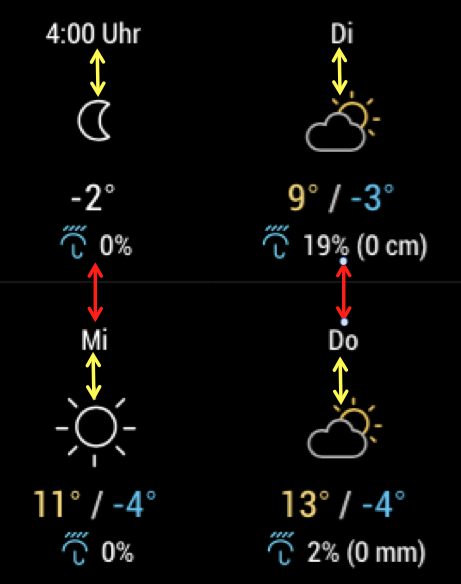
I know that I have to modify the .css file can someone give me a hint what would be the correct values to be changed?
Thanks




Hello! It looks like you're interested in this conversation, but you don't have an account yet.
Getting fed up of having to scroll through the same posts each visit? When you register for an account, you'll always come back to exactly where you were before, and choose to be notified of new replies (either via email, or push notification). You'll also be able to save bookmarks and upvote posts to show your appreciation to other community members.
With your input, this post could be even better 💗
Register Login