Read the statement by Michael Teeuw here.
MMM-DarkSkyForecast - Yet ANOTHER weather module
-
@chris1971 Did you run
npm installin theMMM-DarkSkyForecastdirectory? Otherwise, what is the behaviour you are seeing? -
@j-e-f-f That’s too bad. Thanks anyway for the quick answer
-
@j-e-f-f Yes I have executed npm install… everything is running smooth right now. Can you explain how I can set the font size of the forecast text?
It would be great if you could implement time for sunrise/ sunset and a moonphase… :-)Thanks for the great module!!! Chris
-
Hello,
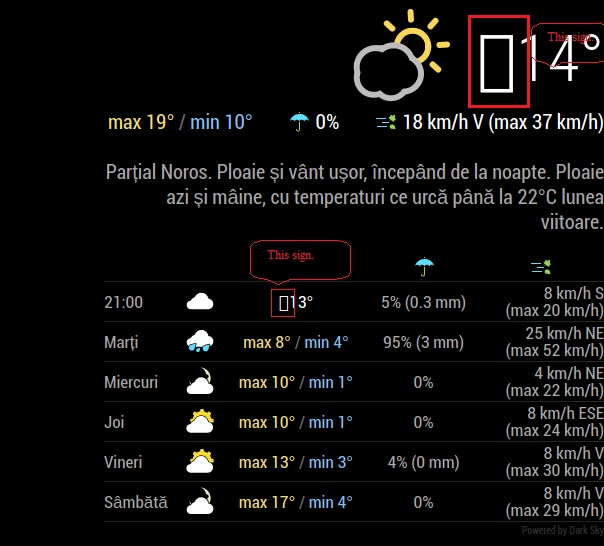
I’ve installed this weather module and I find it very nice but I have a little issue with it,a strange character like a rectangle appear in front of the temperature value. (marked with red in pic)
Does anybody knows what could be the cause ?
Had this issue on an old installation of raspbian + MagicMirror,also have it on a fresh reinstall of raspbian and magic mirror only the config file remained from old installation.
My config:<------><------>{ <------><------><------>module: 'MMM-DarkSkyForecast', <------><------><------>position: 'right', <------><------><------>classes: 'default everyone', <------><------><------>disabled: false, <------><------><------>config: { <------><------><------><------>apikey: "xxxxx......xxxx....", <------><------><------><------>latitude: "44.426765", <------><------><------><------>longitude: "26.102537", <------><------><------><------>iconset: "5c", <------><------><------><------>concise: false, <------><------><------><------>forecastLayout: "table", <------><------><------><------>showHourlyForecast: true, <------><------><------><------>hourlyForecastInterval: 12, <------><------><------><------>maxHourliesToShow: 1, <------><------><------><------>label_high: "max", <------><------><------><------>label_low: "min", <------><------><------><------>label_days: ["Duminica", "Luni", "Mar?i", "Miercuri", "Joi", "Vineri", "Sâmbata"], <------><------><------><------>showCurrentConditions: true, <------><------><------><------>showExtraCurrentConditions: true, <------><------><------><------>label_ordinals: ["N", "NNE", "NE", "ENE", "E", "ESE", "SE", "SSE", "S", "SSV", "SV", "VSV", "V", "VNV", "NV", "NNV"], <------><------><------><------>maxDailiesToShow: "5", <------><------><------><------>showSummary: true, <------><------><------><------>label_timeFormat: "kk:mm", <------><------><------><------>} <------><------>},Thank you.
-
Great widget!
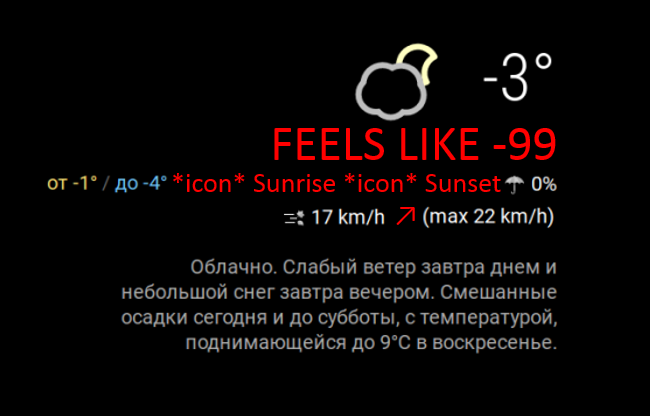
It just lacks 3 things:
- Sunrise & sunset data
- “Feels like”
- showWindDirectionAsArrow: true as in module: “currentweather”,
Made a sketch -
-
@mielu80 me too… no idea whats up other than that works great
-
@epi said in MMM-DarkSkyForecast - Yet ANOTHER weather module:
- “Feels like”
Indeed comes very handy to me when in Summer.
The weather here is usually very wet and in Summer ie. 35° C give a feeling of 42° C so I wish I could know it before getting out. :sun: :fire:
-
@mielu80 said in MMM-DarkSkyForecast - Yet ANOTHER weather module:
I’ve installed this weather module and I find it very nice but I have a little issue with it,a strange character like a rectangle appear in front of the temperature value.
I’ve just tried with your config and I can’t duplicate this problem. That said, when I inspect that part of the screen with the dev tools, it looks like there is an extra character there, but in my case it just appears as white space. But there’s nothing I can see in the markup where this is…
-
@Cr4z33 said in MMM-DarkSkyForecast - Yet ANOTHER weather module:
@epi said in MMM-DarkSkyForecast - Yet ANOTHER weather module:
- “Feels like”
Indeed comes very handy to me when in Summer.
The weather here is usually very wet and in Summer ie. 35° C give a feeling of 42° C so I wish I could know it before getting out. :sun: :fire:
Its the opposite in Latvia - due to cold weather and wind, taking into consideration that the sea is very close, even -1 Celsius might feel like -7.
-
Oh my god… everything was running and I have shoot the system…and try to install it again.
Now the module is not loading anymore. here is my config:
{
module: “MMM-DarkSkyForecast”,
header: “Wetter in Mülheim”,
position: “top_right”,
classes: “default everyone”,
disabled: false,
config: {
apikey: “xxxxxxxxxxxxxxxxxxxx”,
latitude: “51.4185682”,
longitude: “6.8845226”,
iconset: “3c”,
maxHourliesToShow: 4,
maxDailiesToShow: 4,
useAnimatedIcons: true,
label_timeFormat: “k[h]”,
concise: false,
forecastLayout: “table”
}
},Do you see any problems? I only see in the top right region “Weeter in Mülheim” and Loading… but the module isn’t running…
Please advise - Thanks, Chris
-
I implemented this fantastic Modus and it integrates almost seamlessly into our existing mirror layout. To make it perfect I need to reduce the gap between the time and the icon as wells between the day and the icon (yellow arrows). and also between the individual block’s (arrows in red)
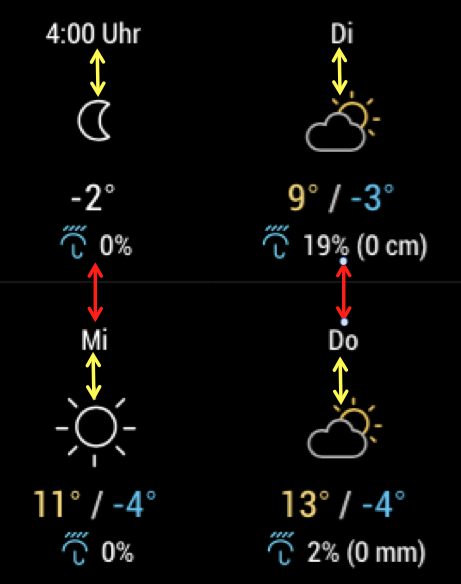
I know that I have to modify the .css file can someone give me a hint what would be the correct values to be changed?
Thanks -
@chris1971 maybe the API key has expired or has been blacklisted?
I had this issue 1 month ago and using another API key solved the issue. :)
-
@j-e-f-f
I’ve just tried with your config and I can’t duplicate this problem. That said, when I inspect that part of the screen with the dev tools, it looks like there is an extra character there, but in my case it just appears as white space. But there’s nothing I can see in the markup where this is…
Hello j.e.f.f,
Thank you for your update about this issue.
I did try another thing:
-I’ve commented out my whole config for DarkSkyForecast module
-copied the default config from module’s github and pasted it my config file from MM
-restarted MM
Unfortunately the result is the same,still had that odd character even with the default config for this module.Thank you very much for your effort.
-
@Cr4z33 - Thx - I tried a new API and the module is running. Does anybody know how to minimize the font size in the module. Especially in the tiled view?
-
Minimizing to font size should not be a big thing. If you open the module specific css file you an search for font and play with the values in that section. Note that you need to restart MM after saving the modified css file.
-
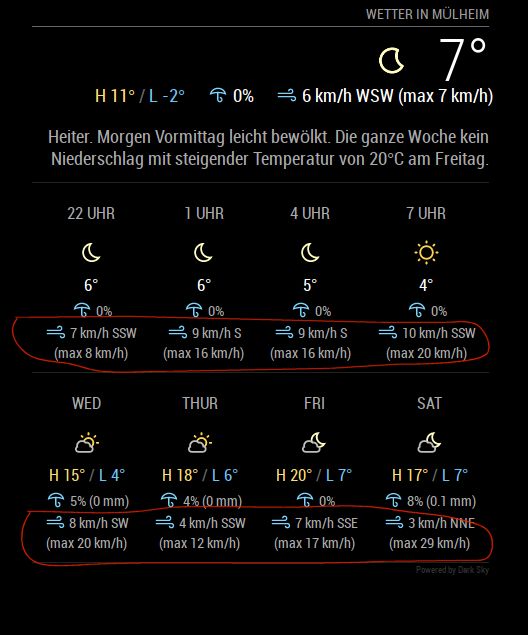
how can I delete the 2 lines in the forecast?
-
concise: true,Hello, Chris,
you can set concise: true. Then wind direction and speed are gone. Unfortunately also with the current weather.My wish would also be that wind direction and wind speed can only be displayed for the current weather. Does anyone know a solution for this?
Greetings
-
The crazy situation is, that I have done it before… after a crash I had to config the system again, but I do not know how I have done this in the past. My backup didn’t work and the file was corrupt… :-(
This is the design I would like to have again.
Hope that an expert can support…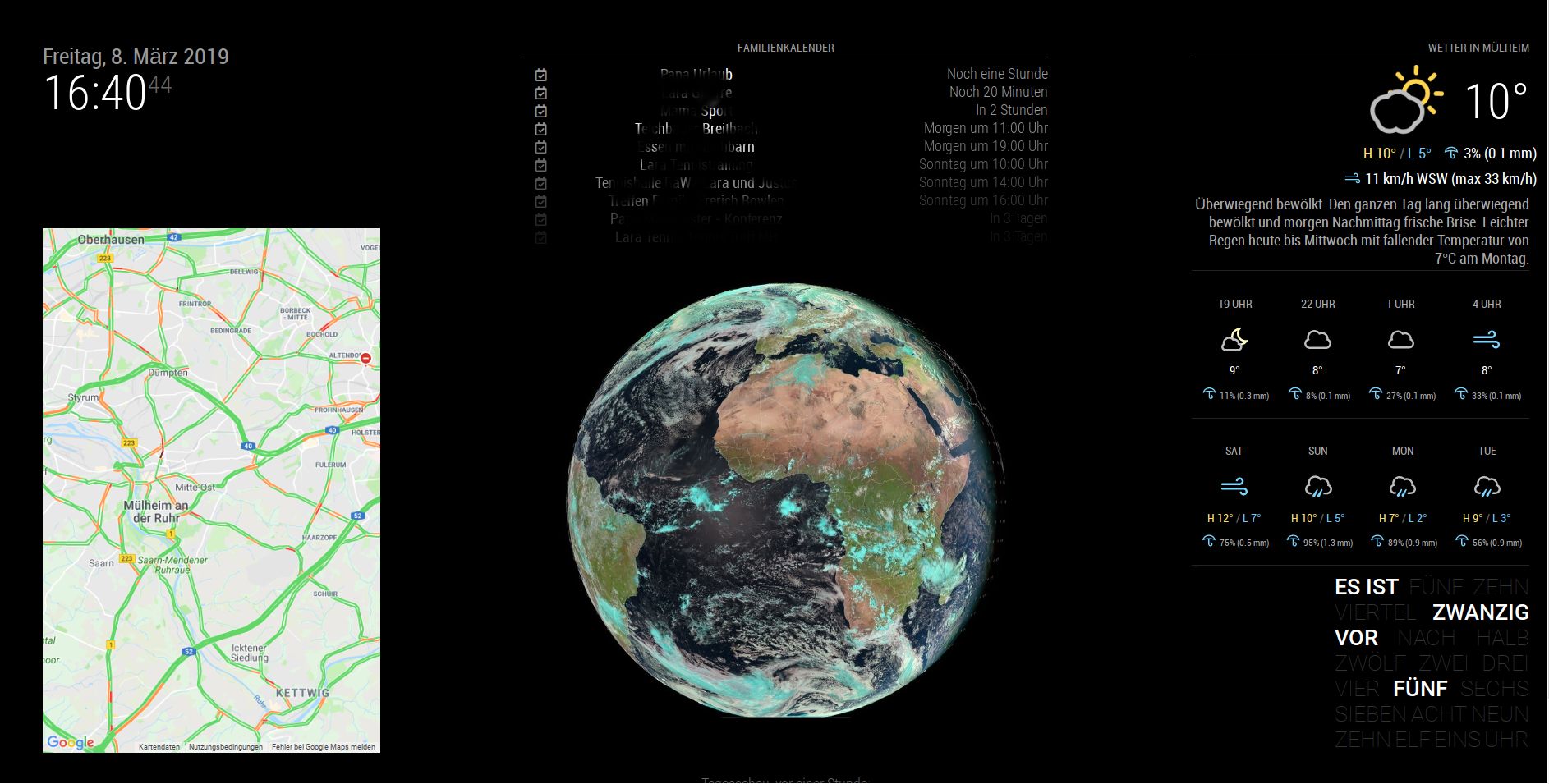
-
I hope so, too. Just like on your picture I would configure it for myself.
-
@chris1971
if you just wanna remove the wind in the forecast tile try to add that line in MMM_DarkSkyForecast.css.MMM-DarkSkyForecast .wrapper.tiled .forecast-container .forecast-item .wind-container{ display: none; }of course it makes sense to remove the existing line before
hope this helps



Hello! It looks like you're interested in this conversation, but you don't have an account yet.
Getting fed up of having to scroll through the same posts each visit? When you register for an account, you'll always come back to exactly where you were before, and choose to be notified of new replies (either via email, or push notification). You'll also be able to save bookmarks and upvote posts to show your appreciation to other community members.
With your input, this post could be even better 💗
Register Login