Read the statement by Michael Teeuw here.
MMM-SmartWebDisplay : display web contents (including YouTube) on your MM
-
@AgP42 said in MMM-SmartWebDisplay : display web contents (including YouTube) on your MM:
it is also possible to change it on the SWD module
I have made some work to make this happen.
See my pull request https://github.com/AgP42/MMM-SmartWebDisplay/pull/11/commits/38684b4349f073041983bd11bcfcbe151063fc6a -
@Serge
Thank you for your work, I just review it on Github and merge your code. It is now available for everyone ! -
Hi,
Has anyone tried to use MMM-SmartWebDisplay module configured in fullscreen-above region ?
I’ve made several tests and each time I try to use a fullscreen region it displays nothing.
I’ll be glad to run some test or other configuration if you’ve got any idea 🙂
Regards. -
Hey AgP42, awesome job on this. Is there any way to remove or block an element from the url referenced?
Edit: Nevermind. I don’t think it’s possible and just as easy to download the site, host it on the pi itself, then reference the site in the module.
-
I am trying to use this module but no matter what URL I use, nothing shows up on my MM and when looking at it from my browser it says the URL “refused to connect”. Any ideas?
-
@pdawg17 said in MMM-SmartWebDisplay : display web contents (including YouTube) on your MM:
when looking at it from my browser it says the URL “refused to connect”
what is ‘it’?? MM or the URL U are trying to view?
-
@sdetweil ‘It’ would be the MM setup from my browser: MM_IPaddress:8080. Thanks!
-
@pdawg17 in your config.js, more than likely u have
address: 'localhost',
ipwhiteList:[.......]
this means that ONLY apps INSIDE the mirror machine can access the mirror app (usually a mirror hangs on the wall and no-one accesses it (or should) )…
u need to allow outside access
address="0.0.0.0",
ipWhiteList:[],
allow anyone to access on any network interface (wifi or lan if both enabled)
-
@sdetweil said in MMM-SmartWebDisplay : display web contents (including YouTube) on your MM:
@pdawg17 in your config.js, more than likely u have
address: 'localhost',
ipwhiteList:[.......]
this means that ONLY apps INSIDE the mirror machine can access the mirror app (usually a mirror hangs on the wall and no-one accesses it (or should) )…
u need to allow outside access
address="0.0.0.0",
ipWhiteList:[],
allow anyone to access on any network interface (wifi or lan if both enabled)
Unfortunately, your solution is what I have already :(
-
@pdawg17 that doesn’t sound right…
MM_IPaddress:8080
that should bring up the MM interface
refused to connect”
could also mean wrong ip address
-
@sdetweil said in MMM-SmartWebDisplay : display web contents (including YouTube) on your MM:
@pdawg17 that doesn’t sound right…
MM_IPaddress:8080
that should bring up the MM interface
refused to connect”
could also mean wrong ip address
I’m sorry. What I mean is the MMM-SmartWebDisplay part of the Mirror gives that error. I can access the mirror from a browser just fine.
-
@pdawg17 ok, I don’t know the module, but I ‘think’ it displays ANOTHER web page ON the MM screen… (according to the readme)
MMM-SmartWebDisplay is a module for MagicMirror². It allow to display any web content to your MagicMirror and interact with it(the web content) through notifications or with MMM-TelegramBot.so, I’m not sure U access it via the MM web page url…
now, remote control is also not a web page access tool…
you can SEND it requests and it will do the action…
-
@sdetweil said in MMM-SmartWebDisplay : display web contents (including YouTube) on your MM:
@pdawg17 ok, I don’t know the module, but I ‘think’ it displays ANOTHER web page ON the MM screen… (according to the readme)
MMM-SmartWebDisplay is a module for MagicMirror². It allow to display any web content to your MagicMirror and interact with it(the web content) through notifications or with MMM-TelegramBot.so, I’m not sure U access it via the MM web page url…
now, remote control is also not a web page access tool…
you can SEND it requests and it will do the action…
Ok I’ve got it working but not with the website I want to use. I can get YouTube videos to work now but not this site:
-
So last night, I had this module running perfectly along with all my other modules. This morning, I’m getting errors on all the site images stating “This browser does not support svg”. No images display and they are a mixture of svgs and pngs.
I’d made a copy of an existing website using HTTrack and I’m hosting it locally using Apache2. I’m not familiar with how MagicMirror renders pages so I’m not really sure where to look or what to change to resolve this issue.
Edit: Not sure how, but the referring page was one level deeper and had to be referenced correctly. Fixed!
-
Hello everybody,
I am going crazy to find ways to disable audio from this module.
It’s possible?
If yes, how?Thank you.
-
hello,is there a way to resize iframe and still shows all of my camera’s screen area?If i resize iframe window using config it just crop my camera’s view.My cam’s screen is 640x480 and to view it all i have to set the iframe to 640x480 too.Thats to big for my mirror…
-
@Egnos said in MMM-SmartWebDisplay : display web contents (including YouTube) on your MM:
Hello everybody,
I am going crazy to find ways to disable audio from this module.
It’s possible?
If yes, how?
Thank you.Hello,
from the module itself : no it is not managed.
But it depend the kind of source you are playing, if it is YouTube, you just have to click on the “Mute” button on the YouTube interface ! -
@costascontis @AgP42 Same issue here. Adjusting any of the variables, either by percent or pixel, just seems to resize the window, but not the feed itself. It doesn’t zoom accordingly.
-
I display with MMM-SmartWebDisplay the maps of
‘http://maps.meteoradar.co.uk/’ with two different zooms. No problem with that.
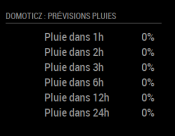
I also use the MMM-domoticz which shows me the rain forecast.
My question :
Is it possible when the% rain is less than 20%, for example, not to display the maps in SmartWebDisplay OR to display something else, for example.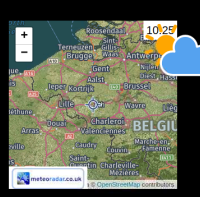
-
To do so, you can ask your domiticz system to send a new url request according to the humidity value.
See https://github.com/AgP42/MMM-SmartWebDisplay#change-the-url for the synthaxe of the request to be sent.But no, the module itself don’t have an input for any “logical” behavior.

Hello! It looks like you're interested in this conversation, but you don't have an account yet.
Getting fed up of having to scroll through the same posts each visit? When you register for an account, you'll always come back to exactly where you were before, and choose to be notified of new replies (either via email, or push notification). You'll also be able to save bookmarks and upvote posts to show your appreciation to other community members.
With your input, this post could be even better 💗
Register Login