Read the statement by Michael Teeuw here.
MMM-MyGarbage
-
@Chris62 can you post a picture and the config.js?
-
I have done everything as described but the module keeps on indicating Loading Loading, what am I doing wrong?
Regards, Marius
-
@werffje I’m sorry to hear that, but if it’a keep saying loading, than there is a configuration error. Can you post your config. js.
Further take a look at the java console in you browser if you can see an error. -
On my TEST System, I just did a fresh install of MM2 and after that a fresh install of MMM-MyGarbage. Copy and Paste the configuration as in the README.md into the config.js and no errors. MMM-MyGarbage displays 2 entries with the garbage_schedule.csv that is installed with the git clone…
@Chris62, @werffje, if you still expirience problems, than:
- add config.js into reply
- look at the javascript console if you see any errors in the Console tab
Open Javascript Console:
Press Command+Option+J (Mac) or Control+Shift+J (Windows, Linux, Chrome OS) to open the Console- any other information that maybe relevant
I’ll look at it and try to reproduce and/or correct the issue.
-
Hi,
Thanks for your reply. I have fixed it now. I loaded the csv file into excel to alter the dates but something was wrong with the formatting and I just couldn’t get it to work. Anyway, I loaded up MM into a Ubuntu virtual machine and changed the dates in notepad. I sorted out the config issue (I moved the position within the config file to make it easier to read but accidentally did copy rather than cut and paste so I had two loading), fired it up and it worked like a charm. I have now copied everything to my Pi and it now works there too.
Just a quick question, I only have two bins, blue and green, is it possible to remove the column for the other one without mucking it up, or should I just set all the values to zero?
Thanks
Chris
-
@Chris62 Good to hear it’s fixed.
You can do both- Remove the unused column entirly
- Fill the unused column with zero’s
As of version v1.2.0 you can also use you’re own column names, as long as they are color names. The garbage bin is showed in the color of the name of the column.
example
WeekStarting,Green,Brown
04/15/19,1,1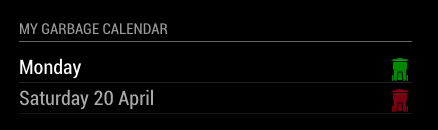
-
OMG I’m such a noob forgive me, I forgot the alert: 4 line in my config.js
It works great now, thanks !!
-
@werffje :thumbs_up_light_skin_tone:
-
best module ever :-)
-
@rvanuden :hugging_face: :thumbs_up_light_skin_tone:
-
Hi,
We have 4 garbage bins. (Green,Black, Bleu and Yellow), is it possible to use 4 types instead of 3?
-
@RdP
You can use this module by creating your own Garbage Schedule file with the name garbage_schedule.csv An example file garbage_schedule.csv is added.Create a CSV based on the following template:
WeekStarting,green,gray,blue
03/07/18,1,0,1
03/14/18,1,1,1
03/21/18,1,0,1
03/28/18,1,1,1Default there are 3 bins defined (green, gray and blue) If you need more garbage bins, simply add an extra column in the garbage_schedule.csv file. The name is the color you like the bin to have. In you case ‘yellow’.
Add lines for each garbage pickup date as needed. The date format needs to be specified as MM/DD/YY (e.g.: 05/28/18 for 28-May-2018)
Succes!
-
-
@RdP, great it worked out for you!
-
This is great! It’s since replaced MMM-MyWastePickup as that no longer works .
-
Hi guys i know this is an old topic but maybe i can get an answer anayway
i want 4 bins but just adding a color and and a 1 or 0 in the csv file does not work
-
ok got it to work now
-
Hello guys!
could anyone help and check what is wrong with my configuration of this module? Under the title I have only message: loading
My configuration looks like:
{
module: ‘MMM-MyGarbage’,
position: ‘bottom_left’,
header: ‘My Garbage Calendar’,
config: {
alert: 3,
weeksToDisplay: 2,
limitTo: 99,
fade: true,
dateFormat: “dddd”,
fadePoint: 0.25
}
}, -
Hey there,
Great work on this module. But you say you are not an experienced programmer? well, compared to me…
not to sound lazy, but any change you could convert from csv to json query like thingy?
as seen on the home automation sites, people query http://json.mijnafvalwijzer.nl/?method=postcodecheck&postcode=&street=&huisnummer=&toevoeging=&platform=phone&langs=nl&and get the results needed
(https://community.home-assistant.io/t/garbage-pickup-date-mijnafvalwijzer-nl-custom-component/34631/12)please be honest, no is also an answer and I would completely understand.
… but i thought you might like a challenge ;-) -
@htilburgs : thanks a lot for this module !
this is super useful and well done.I would like to change color for bins, i did the custom.css file and restarted MM2 but that does not change.
Do i have to do something else ?thanks a lot for your help.
Here you can file a translation for French if this could help :
{
“GARBAGEENTRIESLEFT”: “Il reste {entriesLeft} dates dans le calendrier des ordures”,
“REMEMBERADDINGPICKUPS”: “Veuillez ajouter de nouvelles dates pour l’utiliser”
}



Hello! It looks like you're interested in this conversation, but you don't have an account yet.
Getting fed up of having to scroll through the same posts each visit? When you register for an account, you'll always come back to exactly where you were before, and choose to be notified of new replies (either via email, or push notification). You'll also be able to save bookmarks and upvote posts to show your appreciation to other community members.
With your input, this post could be even better 💗
Register Login