MagicMirror Forum
    • Recent
    • Tags
    • Unsolved
    • Solved
    • MagicMirror² Repository
    • Documentation
    • 3rd-Party-Modules
    • Donate
    • Discord
    • Register
    • Login
    • Profile
    • Following 0
    • Followers 0
    • Topics 23
    • Posts 163
    • Groups 0
    1 Offline
    1. Home
    2. 1a2a3a
    3. Posts
    A New Chapter for MagicMirror: The Community Takes the Lead
    Read the statement by Michael Teeuw here.

    Posts

    Recent Best Controversial
    • RE: multiple error in magic mirror after update from 2.28.0 to 2.36.0

      @sdetweil my pm2 is currently not working at the moment.

      i then tried to pm2 start and ran into this error. Ok not exactly error, but the mirror just keep going to blackscreen and nothing then back to wall paper then blackscreen and keep looping this.

      (node:1971942) [DEP0044] DeprecationWarning: The `util.isArray` API is deprecated. Please use `Array.isArray()` instead.
      (Use `node --trace-deprecation ...` to show where the warning was created)
      
      posted in Troubleshooting
      1
      1a2a3a
    • RE: multiple error in magic mirror after update from 2.28.0 to 2.36.0

      @sdetweil it didnt show any module error.

      [2026-05-01 23:53:38.898] [LOG]   [app] All module helpers loaded.
      [2026-05-01 23:53:38.901] [LOG]   [server] Starting server on port 8080 ...
      [2026-05-01 23:53:38.911] [ERROR] [unknown] (node:1979206) [DEP0040] DeprecationWarning: The `punycode` module is deprecated. Please use a userland alternative instead.
      (Use `electron --trace-deprecation ...` to show where the warning was created)
      [2026-05-01 23:53:39.001] [LOG]   [app] Server started ...
      
      posted in Troubleshooting
      1
      1a2a3a
    • RE: multiple error in magic mirror after update from 2.28.0 to 2.36.0

      @sdetweil my mm.sh is currently -

      #!/bin/bash
      # This file is still here to keep PM2 working on older installations.
      cd ~/MagicMirror
      DISPLAY=:0 npm start
      

      should i change it to

      #!/bin/bash
      # This file is still here to keep PM2 working on older installations.
      cd ~/MagicMirror
      DISPLAY=:0 npm start:x11
      
      posted in Troubleshooting
      1
      1a2a3a
    • RE: multiple error in magic mirror after update from 2.28.0 to 2.36.0

      @sdetweil hi there old friend! its been a really long while and i hope all is fine on your end? anyway thanks for the prompt response!

      anyway i dont quite get what you mean.

      so i ran NODE_OPTIONS=–trace-deprecation npm run start:x11, MM run

      when i ran NODE_OPTIONS=–trace-deprecation npm run start:wayland, MM doesnt run…

      posted in Troubleshooting
      1
      1a2a3a
    • multiple error in magic mirror after update from 2.28.0 to 2.36.0

      uhm hi, its been awhile since i updated my MM.

      i ran sdetweil upgrade script and these were being upgrade.

      doing test run = false
      Node currently installed. Checking version number.
      Minimum Node version: v22.21.1
      Installed Node version: v20.9.0
      installing correct version of node and npm, please wait
      Check current Node installation ...
      Node currently installed. Checking version number.
      Minimum Node version: v22.21.1
      Installed Node version: v22.21.1
      No Node.js upgrade necessary.
      Check current NPM installation ...
      NPM currently installed. Checking version number.
      Minimum npm version: V10.9.4
      Installed npm version: V10.9.4
      No npm upgrade necessary.
      
      saving custom.css
      
      upgrading from version 2.28.0 to 2.36.0
      fetching latest revisions
      updating MagicMirror runtime, please wait
      
      > magicmirror@2.36.0 postinstall
      > git clean -df fonts vendor modules/default
      
      
      > magicmirror@2.36.0 prepare
      > [ -f node_modules/.bin/husky ] && husky || echo no husky installed.
      
      no husky installed.
      

      i then tried to pm2 start and ran into this error. Ok not exactly error, but the mirror just keep going to blackscreen and nothing then back to wall paper then blackscreen and keep looping this.

      (node:1971942) [DEP0044] DeprecationWarning: The `util.isArray` API is deprecated. Please use `Array.isArray()` instead.
      (Use `node --trace-deprecation ...` to show where the warning was created)
      

      then i ran npm start and get the punycode error

      [ERROR] [unknown] (node:1970698) [DEP0040] DeprecationWarning: The `punycode` module is deprecated. Please use a userland alternative instead.
      (Use `electron --trace-deprecation ...` to show where the warning was created)
      [1970698:0501/224750.044913:ERROR:ui/ozone/platform/wayland/host/wayland_connection.cc:202] Failed to connect to Wayland display: No such file or directory (2)
      [1970698:0501/224750.044978:ERROR:ui/ozone/platform/wayland/ozone_platform_wayland.cc:281] Failed to initialize Wayland platform
      [1970698:0501/224750.044995:ERROR:ui/aura/env.cc:246] The platform failed to initialize.  Exiting.
      /home/hsa/MagicMirror/node_modules/electron/dist/electron exited with signal SIGSEGV
      

      i then read in another thread to do npm run start:x11
      this works but the punycode still appear but mirror runs.

      feels like theres multiple item for me to fix and im kinda lost.

      can some kind soul help me out?

      posted in Troubleshooting
      1
      1a2a3a
    • MMM-SoccerLiveScore not updating

      anyone facing issue with the api not updating?
      in my mirror it is showing next api update is on 21 march 2026. current image showing epl data stats from late jan, meaning the recent matches data is not shown. like the games for yesterday is invisible as well.

      posted in Troubleshooting
      1
      1a2a3a
    • RE: MMM-JAST stopped updating a couple of days ago.

      Ok, after git pull, had to do a npm ci and that fixes it!

      posted in Troubleshooting
      1
      1a2a3a
    • RE: MMM-JAST stopped updating a couple of days ago.

      @KristjanESPERANTO hi, i have updated to the latest version but my modules is still stuck at loading. any idea?

      posted in Troubleshooting
      1
      1a2a3a
    • Mmm-OneDrive help

      Hi I managed to install and auth. I have put photo in my OneDrive album but log is showing :

      [ERROR] Error: HEIF image not found

      [ERROR] [ONEDRIVE] [node_helper] failed to refresh and send chunk:
      [2025-06-05 21:35:42.315] [ERROR] [ONEDRIVE] [node_helper] HEIF image not found

      I have both jpg and heic in the folder. What should I do here

      posted in Entertainment
      1
      1a2a3a
    • alternative to googlephoto?

      given the demise of g photo, does anyone has an alternative solution? that doesnt require local image? or are all the solution requires local storage?

      posted in Entertainment
      1
      1a2a3a
    • RE: MMM-GooglePhotos

      @sdetweil which option is the same as the previous ‘fullscreen’?

      posted in Entertainment
      1
      1a2a3a
    • RE: MMM-GooglePhotos

      Did something change here? I’m getting an invalid module position found for this configuration. My position is “fullscreen”. It used to be working fine…?

      posted in Entertainment
      1
      1a2a3a
    • RE: MM failed after updating

      @sdetweil i see. anyway, my calendar, stocks and google photo are not loading. it says check logs for details – where can i find the logs again?

      edit—

      its odd. when i run npm start dev, everything is working fine, everything loads.

      but when i run pm2 start MagicMirror - my cal, stocks and photos are not loading. am i suppose to let it sit there for awhile?

      posted in Troubleshooting
      1
      1a2a3a
    • RE: MM failed after updating

      @sdetweil thanks. still in the midst of transferring.

      why are you up so early? i recall you were some hours behind so when i posted this i figured i wouldnt get a response so soon hence my attempt of own answer.

      posted in Troubleshooting
      1
      1a2a3a
    • RE: MM failed after updating

      @sdetweil i cant. i deleted the entire folder. just installed using your script. now transferring the modules folder from backup to the pi.

      thats what i did actually, installing the electron but it keep throwing error like npm ERR! signal sigint
      npm ERR! code E404

      posted in Troubleshooting
      1
      1a2a3a
    • RE: MM failed after updating

      @sdetweil on pi 5. updated using your script. while attempting to google search for fixes, i seems to have broken more stuff. trying to rebuild again from scratch…using your script… to update again…

      posted in Troubleshooting
      1
      1a2a3a
    • MM failed after updating

      Hi, after updating my MM, when i try to start i get this error.

      node_modules/.bin/electron: not found"

      what should i do?

      posted in Troubleshooting
      1
      1a2a3a
    • OAuth clients must support granular consent, starting June 17, 2024.

      hi all

      not sure if you received the same from google relating to OAuth clients consent.

      Our records indicate that your app(s) has requested access to Google APIs and may be affected by an upcoming OAuth consent change. Starting June 17, 2024, Google will enable granular consent, which allows OAuth users to grant or deny Google account data permissions on a more granular level to third parties. We’ve provided more information below to help you through this change.

      What do you need to know?
      OAuth users will see a granular consent screen allowing them to grant or deny granular permissions to Google account data to your app(s) starting June 17, 2024.

      Note: Workspace Enterprise apps that are granted domain-wide delegation of authority or marked as Trusted will not be impacted by this change at this time.

      What do you need to do?
      We recommend that you test your app with granular consent and make any necessary updates to ensure an optimal user experience:

      Review our OAuth granular consent guide to learn about the requirements and best practices to handle granular consent.
      If needed, update your app to ensure it supports granular consent.
      If necessary, you may request a one-time extension, giving you until August 19, 2024, to support granular consent.
      Here is a list of your client ID(s) that may be affected by this change. If you have Google Cloud Platform (GCP) console login issues, the Google Cloud Support team can help. Please submit a ticket in the Support Hub.

      and it seems like the affect module will be googlephoto. im checking in to see if theres anything ill need to change/make? i have look through the permission but it doesnt seems like theres any option for me to change anything to ensure a seamless transition?
      posted in Troubleshooting
      1
      1a2a3a
    • RE: unable to git pull successfully

      @KristjanESPERANTO thanks, that fixed it now!

      posted in Troubleshooting
      1
      1a2a3a
    • RE: unable to git pull successfully

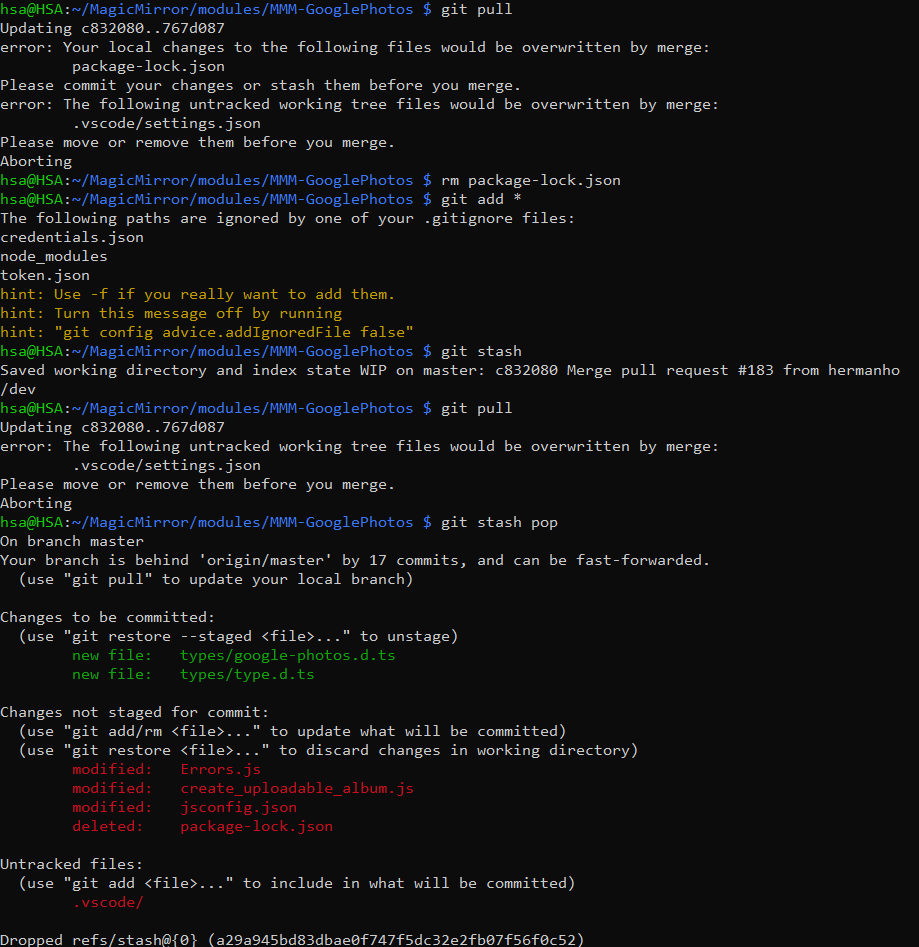
      @sdetweil did as per your mentioned but still stuck with .vscode/setting.json

      2f495b66-7df8-44b5-b210-8306a19e785e-image.png

      posted in Troubleshooting
      1
      1a2a3a
    • 1 / 1