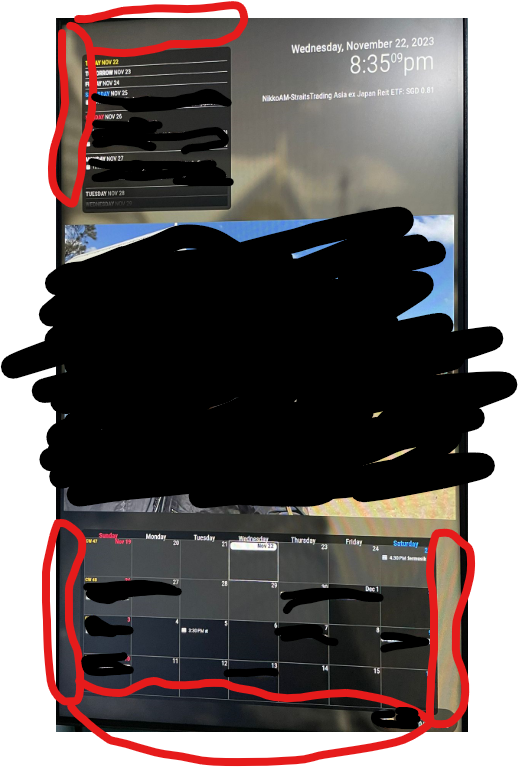
@MMRIZE singapore with english. i would want the general general data format to be dd mm yyyy and sunday is the start of the week.
so i tried setting in cx3 config locale = en-gb or en-sg, and nothing’s changed…
@MMRIZE singapore with english. i would want the general general data format to be dd mm yyyy and sunday is the start of the week.
so i tried setting in cx3 config locale = en-gb or en-sg, and nothing’s changed…
Hi all, need help changing the date format here please.
I’m running mmm calendarext3 ( with the default calendar hidden) and ext3agenda (with the default calendar showing holiday).
My date is currently November 30. Am trying to get it to show 30 November across the board.
I have tried changing time format to absolute and changing date format to desire but nothing works.
Next tried changing the locale to say FR, the date format changed but it’s in French.
Any ideas?
@MMRIZE I left my mirror on with the background. Will it auto reset on its own or down I have to disable the module and enable and restart the mirror tml? I assumed letting it sit there with a black background and let it auto refresh is fine?
When does scanning happen? When you start mirror in that instant? Suppose I’m editing css and I hit refresh, that refresh state will trigger a scanning?
I’m on a 30 sec interval, so 1 day it can show 2880 images right? Then when does call comes in?
How is it that I hit the quota so fast? Could it be the “refresh”?
hi all
my mmm google photo is not showing anything in the magicmirror.
this is the error code -
[26.11.2023 01:38.28.391] [ERROR] [GPHOTOS:CORE] response.data:
{“error”:{“code”:429,“message”:“Quota exceeded for quota metric ‘All requests’ and limit ‘All requests per day’ of service ‘photoslibrary.googleapis.com’ for consumer ‘project_number:524777145159’.”,“status”:“RESOURCE_EXHAUSTED”,“details”:[{“@type”:“type.googleapis.com/google.rpc.ErrorInfo",“reason”:“RATE_LIMIT_EXCEEDED”,“domain”:“googleapis.com”,“metadata”:{“quota_location”:“global”,“quota_limit_value”:“10000”,“quota_limit”:“ApiCallsPerProjectPerDay”,“consumer”:“projects/524777145159”,“service”:“photoslibrary.googleapis.com”,“quota_metric”:“photoslibrary.googleapis.com/all_requests”}},{“@type”:“type.googleapis.com/google.rpc.Help”,“links”:[{“description”:"Request a higher quota limit.”,“url”:“https://cloud.google.com/docs/quota#requesting_higher_quota”}]}]}}
seems like a quota thing? what do i need to do fix this?
@sdetweil thank you! that fix it. i needed quite a long time to remediate them haha
@sdetweil lol so dead. no idea what i changed in main.css and module css :(
@sdetweil hmmm, i have been editing in the module css instead of the custom css. any undesirable consequences? also, whats the button to press for refresh? i keep doing ctrl c and npm start for refresh.
THANK YOU both! the gap body code is exactly what i needed and bitvise helps a plenty!
Sam, do you mean i copy the code over from pi to pc > then simulate pc to run the mirror in dev mode and edit the css on the pc > then copy the css code from pc back to pi?
@MMRIZE thanks for that. It’s such a pain trying to figure out the css on the pi.
I’m currently in the midst of installing mm on my windows pc. And I will scp to copy all the modules and css to pc, then open dev and edit the css accordingly before using the pi and scp copy back the css file.
Is this the fastest and easiest way to go about doing this? If there’s a better route, do let me know.
@sdetweil perfect! Gona pre order a pi5 now.
Just to confirm, you are running pi4 with mmm google photo and mmm calext3 and smooth transition ya?
@MMRIZE got the ical through official manu website :)
the ext3 is on my bottom bar. how do i flush them against the screen? no matter what setting i do, theres like a bezel portion gap between the screen and the calendar border.
same goes for extagenda3. i position it on top left but its not flush against the corner.
@sdetweil i turned off marquee but my google photo transition is still laggy.
does your pi4 transit well with google photo?
Hi @Jalibu
how do i change the stock name color?
i have the module as static on my top right. how do i shift the entire thing to the screen right?
Hi, couple of questions-
how do I get the soccer team news fixture into the calendar?
is is possible to not marquee the long text wording but “wrap” inside the cell?
Hi, is anyone currently using mmm Google photo and mmm calendarext3 and can confirm with me that using pi4 or pi5, you are not facing any issue with sluggishness and stuttering lag with the calendar marquee animation and photo transition?
I’m on a pi3b+ and it lags like in the 90s whereby images and text transit as though they are appearing frame by frame rather than a smooth motion. Am wondering if it’s worth upgrade the pi to get better results.
Not sure if sd card as well? I’m using a Samsung 32gb evo plus with the number 1 inside a U (not sure what that means tho)
Thanks.
So now I’m facing kinda my own dilemma here. Having uncovered that mirror shall not have background images, my wife is asking for the dashboard version over the mirror because she wanted our baby daughter photo to be in.
I have bought the ikea Ribba glass version for the mirror. But since it’s going dashboard, my issue here is that the glass has to be the same exact size as the monitor. Previously I was working under the impression that if I hide the small lcd behind a bigger mirror that is fine. But if I were to do a dashboard, my glass and lcd has to be the same exact size. My assumption correct?
Actually for dashboard, do people just frame around the lcd or do they use a plastic/glass?
And if so, any advice what I should proceed with next? I’m stuck with the following item:
24 inch monitor
IKEA ribba glass 50x70
Few options came to my mind.
ignore ribba, mount monitor to wall and use monitor as dashboard and call it a day.
custom made a whole new frame and glass/plastic to fit the monitor.
buy a lcd panel that is 50*70 to fit ribba.
put the lcd panel into the ribba glass. The excess putter space cover it with films or use the white cut out that’s included in the ribba.
Hmmmm
@MMRIZE thanks will do. Last question, what’s the spec of the 2 way mirror I should be looking for if I were to buy one? 3mm with 50% reflection?