@sdetweil I have created a PR for the proposed calendar changes.
A
Offline
A New Chapter for MagicMirror: The Community Takes the Lead
Read the statement by Michael Teeuw here.
Read the statement by Michael Teeuw here.
Posts
-
RE: "absolute" does not mean absolute in default calendar module
-
RE: new boot rpi4 2 giga
@raf no, that’s not it. You need an Rpi4-specific image. Do like this:
- Find out where MagicMirror is installed. I’ll use ~/MagicMirror in the below. (~ is a shortcut to your home directory)
- Go to your home directory by entering the command:
cd - Make a full backup of you MagicMirror installation by entering the command:
tar czvf mmbackup.tgz MagicMirror
This will create a file call mmbackup.tgz - Copy the file mmbackup.tgz to another computer or usb stick. There are several ways to do that, google if you don’t know. The important thing is that you do NOT store it on the SD card. The easiest way is probably to use an USB stick. Insert the stick into the Rpi3 and Raspbian will normally automount it. I will assume that the stick is mounted as /mnt/usb. If so then copy the backup with the command:
cp -vi ~/mmbackup.tgz /mnt/usb - On you Windows computer, download a raspbian image for Rpi4.
- Insert your SD card and write the image to card using Etcher or similar program (The same as you did when creating the SD card for the Rpi3)
- Move the SD card to the Rpi4 and complete the install.
- Copy the file mmbackup.tgz from wherever you put it to your home directory (~). If you used an USB stick in step 4 above then you can use the command:
cp -vi /mnt/usb/mmbackup.tgz ~/ - Unpack the backup with the commands:
cd
tar xvzf mmbackup.tgz - Follow the instructions at https://docs.magicmirror.builders/getting-started/installation.html to complete the install. Skip step 2 as you have already installed MagicMirror.
-
RE: "absolute" does not mean absolute in default calendar module
@sdetweil I know. But I have already forked the MM master and made changes to use my Ipad 2. How do I make a new branch containing the latest MM development files? My plan was to wait until the new version was merged into Master and then do my Ipad2-related changes. Github won’t allow me to have multiple repositories with the same name.
-
RE: new boot rpi4 2 giga
@raf make a complete snapshot on the rpi3. Save that off the sd card, reimage the sdcard and install in rpi 4. Restore snapshot. All done.
-
RE: "absolute" does not mean absolute in default calendar module
@BKeyport well almost! I have this exact config but running events are still changed to “ends in xx min”! And all day events still shows as “today”
I’ve done a rewrite of the relevant section of calendar.js but can’t use my github clone repo to make a PR.
-
RE: "absolute" does not mean absolute in default calendar module
@hango correct, that’s all I did. But I changed it in all MM files. If I just knew exactly which files are executed in the browser I could have changed just those. As the iPads require a server (which can handle the latest ES) one only needs to change the browser-executed files.
-
RE: "absolute" does not mean absolute in default calendar module
@sdetweil the latest development version solved the offset problem for me. As far as the “absolute” problem I rewrote the relevant section of calendar.js. As I have already forked MagicMirror to make it run on my IOS 9.3.5 Ipads I can’t submit a PR (at least I don’t know exactly how to do that) but would be happy to send you the calendar.js file.
There is still a problem with full day recurring events.
I can PM you a link to a relevant public (but inofficial) calendar with the issues.
-
"absolute" does not mean absolute in default calendar module
Hi,
As I am affected by the time offset bug in master I have tried the latest development version of MagicMirror.There is a bug in the display logic in calendar.js. I want to display the date/time in absolute format, i.e. never change to relative. I have getRelative=0 and urgency=0 in my config. Even so, the display is wrong.
For Full Day Events it always shows “today”, “tomorrow” or “dayaftertomorrow” even if timeFormat=absolute. There seems to be a condition missing in calendar.js that takes timeFormat into account for full day events.
For normal events the display changes to “Ends in xx minutes” for ongoing events. Looking at the code it looks like the condition on line 328 always is true regardless of timeFormat.
How should I configure the module to ALWAYS use absolute as the format, i.e. under no circumstances change to relative?
-
RE: MMM-CalendarExtPlan
@Vauxdvihl you are missing a comma on the SOURCE line.
-
RE: MMM-ResRobot - Public transport information for Sweden
@Zapman You’re welcome. Do let me know if you see anything you want to add/change.
-
RE: MMM-ResRobot - Public transport information for Sweden
-
RE: MMM-ResRobot - Public transport information for Sweden
-
RE: MMM-ResRobot - Public transport information for Sweden
@Zapman said in MMM-ResRobot - Public transport information for Sweden:
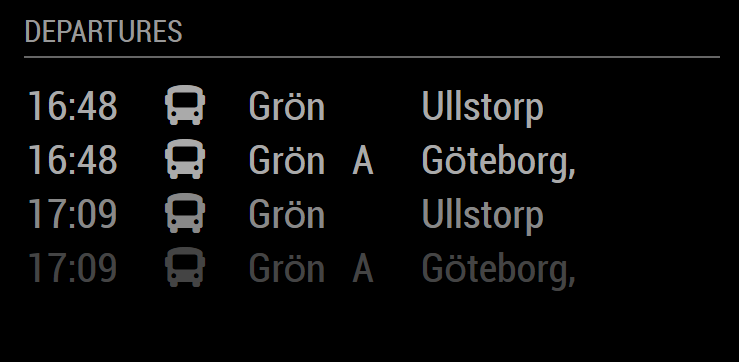
{ module: "MMM-ResRobot", position: "top_right", header: "Departures", config: { routes: [ // stations from: {from: "740015972", to: ""}, ], apiKey: "API-KEY-HERE" }, },@Zapman You can’t have a comment in the middle of the config. Remove the " // stations from: " and it should work.
This is what it looks like for me:
-
RE: MMM-ResRobot - Public transport information for Sweden
@Zapman I’ll have a look. Your config looks fine at a first look.
-
RE: MMM-ResRobot - Public transport information for Sweden
@sweup I just pushed a minor update with some new options. Feel free to try the new version out.
-
RE: MMM-ResRobot - Public transport information for Sweden
@sdetweil @sweup
My guess is that it is an unintended change probably caused by saving rather than exiting when viewing the file.
Anyway, package.json only contains information about the module and can without issue be replaced with a “git pull”.@sweup Great that you solved it. A small suggestion for the future: as most modules (and MagicMirror itself) uses Github you should read up on GIT and its basic commands. It will make life easier for you!
-
RE: MMM-ResRobot - Public transport information for Sweden
@sweup
git stash
git pull
npm install -
RE: MMM-ResRobot - Public transport information for Sweden
@sweup it seems you have changed the file package.json
Stash it away with “git stash” and try the update again.
-
RE: MMM-ResRobot - Public transport information for Sweden
@sweup did you restart the MagicMirror service after you updated?
-
MMM-Koket-by-Sodexo
A module (based on MMM-Skolmaten) to display school lunch menus from Köket by Sodexo (https://sodexo.mashie.com/public/app)
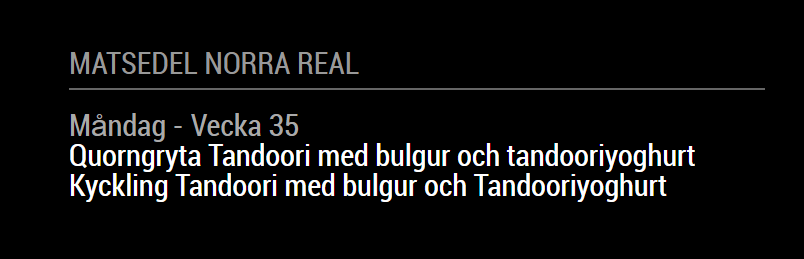
Get it here: https://github.com/Alvinger/MMM-Koket-by-Sodexo)