Great !! It works fine !
Thank you
B
Offline
A New Chapter for MagicMirror: The Community Takes the Lead
Read the statement by Michael Teeuw here.
Read the statement by Michael Teeuw here.
Posts
-
RE: Internet Monitor
Hi Ronny3050,
just installed your module and it works fine…Is their a way to change jauge scale from 100 to 10Mbits for example ?
I leave in a small village and my connection is up to 8M :)Thank you
-
RE: Developers running Windows 10.
Don’t worry, I don’t think you are forgetting me :)
-
RE: Chromium RPI-1 display strange
I would rather know how to uninstall Chromium and install a compliant brower following same how-to than modify code (that would be updated…)
-
Chromium RPI-1 display strange
Hi
tryed to display MM2 on a RPI 1 (the one that runs Magic Mirro 1 with chromium) from a server only RPI2
I just change url from/etc/xdg/lxsession/LXDE-pi/autostart
(which is user to launch MM1)options of autostart:
@lxpanel --profile LXDE-pi
@pcmanfm --desktop --profile LXDE-pi
@xscreensaver -no-splash
@xset s off
@xset -dpms
@xset s noblank
@chromium --kiosk --incognito http://192.168.92.57:8080
But I have a display issue:
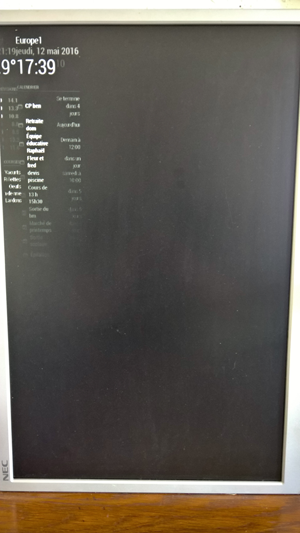
Everything is glued to left side !!
any idea ?
Thank you
Note from admin: Please use Markdown on code snippets so it is easier to read!
-
RE: Null displayed using Microsoft EDGE browser
yes, i just copy my message in the issue tab ?
-
Null displayed using Microsoft EDGE browser
Hi,
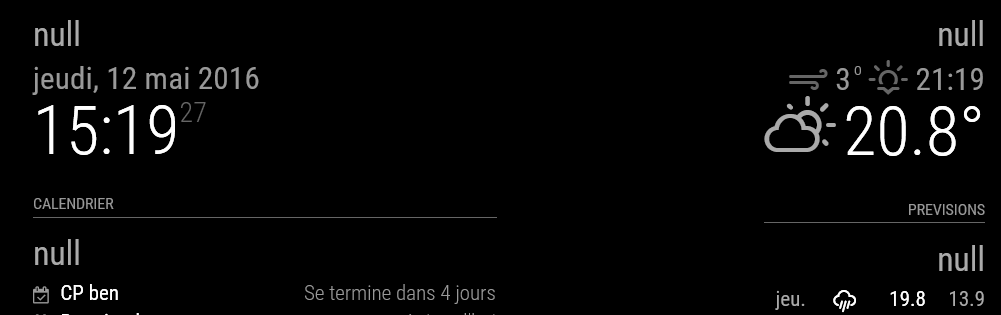
just to let you know that using Microsoft EDGE browser, some Null words are displayed in each module…
-
RE: Starting MagicMirror v2 beta
Hi there,
got it running using the serveronly feature… on my laptop, not with my “old” RPI1… (display is weired)
But on my laptop, got some NULL lines…I got also issues with calendar and news while Mirror v2-beta was using wifi connection, since i moved it to a wired connection, i got calendar and news… if that helps…
-
RE: Starting MagicMirror v2 beta
Still don’t have any news… from electron-quick-start, so still can’t use MagicMirror v2-beta :'(
-
RE: Starting MagicMirror v2 beta
I raised a ticket for m’y issue with electron-quick-start… hope it will be quick…
-
RE: Starting MagicMirror v2 beta
results is:
> electron-quick-start@1.0.0 start /home/pi/MagicMirror/electron-quick-start > electron main.js npm ERR! Linux 4.1.19-v7+ npm ERR! argv "/usr/local/bin/node" "/usr/local/bin/npm" "start" npm ERR! node v6.1.0 npm ERR! npm v3.8.6 npm ERR! code ELIFECYCLE npm ERR! electron-quick-start@1.0.0 start: `electron main.js` npm ERR! Exit status 1 npm ERR! npm ERR! Failed at the electron-quick-start@1.0.0 start script 'electron main.js'. npm ERR! Make sure you have the latest version of node.js and npm installed. npm ERR! If you do, this is most likely a problem with the electron-quick-start package, npm ERR! not with npm itself. npm ERR! Tell the author that this fails on your system: npm ERR! electron main.js npm ERR! You can get information on how to open an issue for this project with: npm ERR! npm bugs electron-quick-start npm ERR! Or if that isn't available, you can get their info via: npm ERR! npm owner ls electron-quick-start npm ERR! There is likely additional logging output above. npm ERR! Please include the following file with any support request: npm ERR! /home/pi/MagicMirror/electron-quick-start/npm-debug.log pi@mirror2:~/MagicMirror/electron-quick-start $ cat /home/pi/MagicMirror/electron-quick-start/npm-debug.log 0 info it worked if it ends with ok 1 verbose cli [ '/usr/local/bin/node', '/usr/local/bin/npm', 'start' ] 2 info using npm@3.8.6 3 info using node@v6.1.0 4 verbose run-script [ 'prestart', 'start', 'poststart' ] 5 info lifecycle electron-quick-start@1.0.0~prestart: electron-quick-start@1.0.0 6 silly lifecycle electron-quick-start@1.0.0~prestart: no script for prestart, continuing 7 info lifecycle electron-quick-start@1.0.0~start: electron-quick-start@1.0.0 8 verbose lifecycle electron-quick-start@1.0.0~start: unsafe-perm in lifecycle true 9 verbose lifecycle electron-quick-start@1.0.0~start: PATH: /usr/local/lib/node_modules/npm/bin/node-gyp-bin:/home/pi/MagicMirror/electron-quick-start/node_modules/.bin:/usr/local/bin:/usr/local/sbin:/usr/local/bin:/usr/sbin:/usr/bin:/sbin:/bin:/usr/local/games:/usr/games 10 verbose lifecycle electron-quick-start@1.0.0~start: CWD: /home/pi/MagicMirror/electron-quick-start 11 silly lifecycle electron-quick-start@1.0.0~start: Args: [ '-c', 'electron main.js' ] 12 silly lifecycle electron-quick-start@1.0.0~start: Returned: code: 1 signal: null 13 info lifecycle electron-quick-start@1.0.0~start: Failed to exec start script 14 verbose stack Error: electron-quick-start@1.0.0 start: `electron main.js` 14 verbose stack Exit status 1 14 verbose stack at EventEmitter.<anonymous> (/usr/local/lib/node_modules/npm/lib/utils/lifecycle.js:239:16) 14 verbose stack at emitTwo (events.js:106:13) 14 verbose stack at EventEmitter.emit (events.js:191:7) 14 verbose stack at ChildProcess.<anonymous> (/usr/local/lib/node_modules/npm/lib/utils/spawn.js:24:14) 14 verbose stack at emitTwo (events.js:106:13) 14 verbose stack at ChildProcess.emit (events.js:191:7) 14 verbose stack at maybeClose (internal/child_process.js:850:16) 14 verbose stack at Process.ChildProcess._handle.onexit (internal/child_process.js:215:5) 15 verbose pkgid electron-quick-start@1.0.0 16 verbose cwd /home/pi/MagicMirror/electron-quick-start 17 error Linux 4.1.19-v7+ 18 error argv "/usr/local/bin/node" "/usr/local/bin/npm" "start" 19 error node v6.1.0 20 error npm v3.8.6 21 error code ELIFECYCLE 22 error electron-quick-start@1.0.0 start: `electron main.js` 22 error Exit status 1 23 error Failed at the electron-quick-start@1.0.0 start script 'electron main.js'. 23 error Make sure you have the latest version of node.js and npm installed. 23 error If you do, this is most likely a problem with the electron-quick-start package, 23 error not with npm itself. 23 error Tell the author that this fails on your system: 23 error electron main.js 23 error You can get information on how to open an issue for this project with: 23 error npm bugs electron-quick-start 23 error Or if that isn't available, you can get their info via: 23 error npm owner ls electron-quick-start 23 error There is likely additional logging output above. 24 verbose exit [ 1, true ] -
RE: Starting MagicMirror v2 beta
@MichMich
Hi , version of m’y raspbian using lsb_release -a:Distributor ID: Raspbian
Description: Raspbian GNU/Linux 8.0 (jessie)
Release: 8.0
Codename: jessie -
Starting MagicMirror v2 beta
Hi all,
just installed on a Rasberry pi 2 - Raspbian the Magic Mirror v2 beta using automatic script.
I cannot manage to launch it through SSH nor directly, while launchingDISPLAY=:0 nohup npm start &orDISPLAY=:0 npm start, I have following errors:pi@mirror2:~/MagicMirror $ DISPLAY=:0 npm start magicmirror@2.0.0 start /home/pi/MagicMirror electron js/electron.js npm ERR! Linux 4.1.19-v7+ npm ERR! argv "/usr/local/bin/node" "/usr/local/bin/npm" "start" npm ERR! node v6.1.0 npm ERR! npm v3.8.6 npm ERR! code ELIFECYCLE npm ERR! magicmirror@2.0.0 start: `electron js/electron.js` npm ERR! Exit status 1 npm ERR! npm ERR! Failed at the magicmirror@2.0.0 start script 'electron js/electron.js'. npm ERR! Make sure you have the latest version of node.js and npm installed. npm ERR! If you do, this is most likely a problem with the magicmirror package, npm ERR! not with npm itself. npm ERR! Tell the author that this fails on your system: npm ERR! electron js/electron.js npm ERR! You can get information on how to open an issue for this project with: npm ERR! npm bugs magicmirror npm ERR! Or if that isn't available, you can get their info via: npm ERR! npm owner ls magicmirror npm ERR! There is likely additional logging output above. npm ERR! Please include the following file with any support request: npm ERR! /home/pi/MagicMirror/npm-debug.logFor info:
node.js v6.1.0
npm v3.8.6Thank hou for hou help
Benjee