MagicMirror Forum
    • Recent
    • Tags
    • Unsolved
    • Solved
    • MagicMirror² Repository
    • Documentation
    • 3rd-Party-Modules
    • Donate
    • Discord
    • Register
    • Login
    1. Home
    2. birdy
    3. Posts
    A New Chapter for MagicMirror: The Community Takes the Lead
    Read the statement by Michael Teeuw here.
    B
    Offline
    • Profile
    • Following 0
    • Followers 0
    • Topics 2
    • Posts 19
    • Groups 0

    Posts

    Recent Best Controversial
    • RE: MM & Google Maps Traffic

      @Mirrorolentia
      thanks for helping me and sorry for late reply.

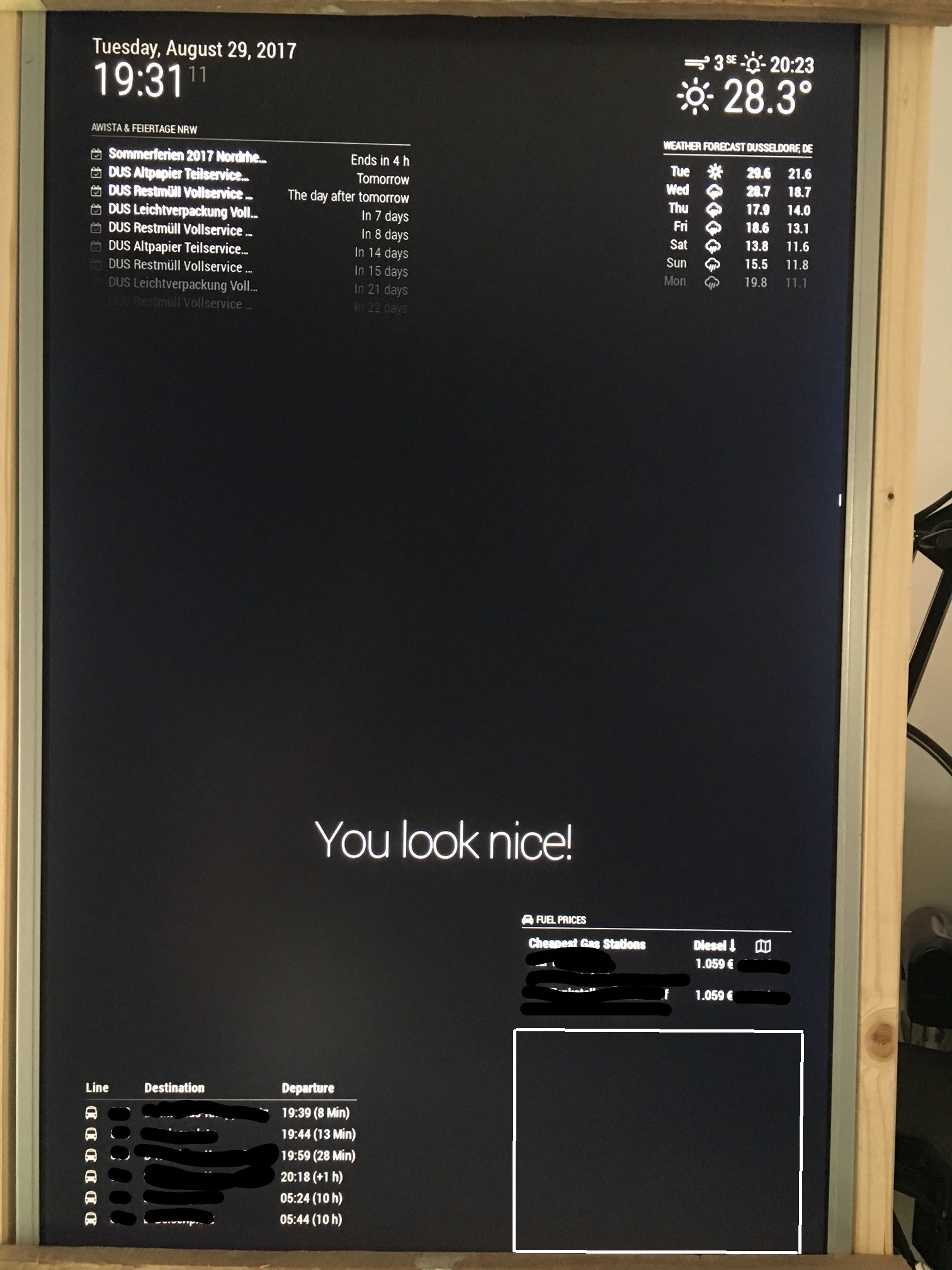
      Here comes the config:

      /* Magic Mirror Config Sample
       *
       * By Michael Teeuw http://michaelteeuw.nl
       * MIT Licensed.
       *
       * For more information how you can configurate this file
       * See https://github.com/MichMich/MagicMirror#configuration
       * 
       */
      
      var config = {
      	port: 8080,
      	ipWhitelist: ["127.0.0.1", "::ffff:127.0.0.1", "::1"], // Set [] to allow all IP addresses
      	                                                       // or add a specific IPv4 of 192.168.1.5 :
      	                                                       // ["127.0.0.1", "::ffff:127.0.0.1", "::1", "::ffff:192.168.1.5"],
      	                                                       // or IPv4 range of 192.168.3.0 --> 192.168.3.15 use CIDR format :
      	                                                       // ["127.0.0.1", "::ffff:127.0.0.1", "::1", "::ffff:192.168.3.0/28"],
      
      	language: "en",
      	timeFormat: 24,
      	units: "metric",
      
      	modules: [
      		{
      			module: "alert",
      		},
      		{
      			module: "updatenotification",
      			position: "top_bar"
      		},
      		{
      			module: "clock",
      			position: "top_left"
      		},
      		{
      			module: "calendar",
      			header: "AWISTA & Feiertage NRW",
      			position: "top_left",
      			config: {
      				calendars: [
      					{
      						symbol: "calendar-check-o ",
      						url: "https://calendar.google.com/calendar/ical/**********/public/basic.ics"
      					}
      				]
      			}
      		},
      		{
      			module: "compliments",
      			position: "lower_third"
      		},
      		{
      			module: "currentweather",
      			position: "top_right",
      			config: {
      				location: "Dusseldorf",
      				locationID: "2934246",  //ID from http://www.openweathermap.org/help/city_list.txt
      				appid: "************"
      			}
      		},
      		{
      			module: "weatherforecast",
      			position: "top_right",
      			header: "Weather Forecast",
      			config: {
      				location: "Dusseldorf",
      				locationID: "2934246",  //ID from http://www.openweathermap.org/help/city_list.txt
      				appid: "***********"
      			}
      		},
      		{
          			module: 'MMM-Vrr',
          			position: "bottom_left",
          			config: {
              			city: 'Düsseldorf',
              			station: '***********',
              			numberOfResults: 6,
              			displayTimeOption: 'time+countdown'
      		        }
      		},
      		{
      		    module: "MMM-Fuel",
      		    position: "bottom_right",
      		    config: {
      		        api_key: "************",
      		        lat: *********,
      		        lng: ************,
      		        types: ["diesel"],
      			radius: 1.4,
      			max: 2,
      			rotate: false,
      		    	}
      		},
      		{
      		module: 'MMM-Traffic',
      		position: 'bottom_right',
      		classes: 'dimmed medium', //optional, default is 'bright medium', only applies to commute info not route_name
      		config: {
      			api_key: '*********',
      			mode: 'driving',
      			origin: '******+Düsseldorf,+Deutschland',
      			destination: '**********+Essen,+Deutschland',
      			route_name: 'Home to Work',
      			changeColor: true,
      			showGreen: false,
      			limitYellow: 5, //Greater than 5% of journey time due to traffic
      			limitRed: 20, //Greater than 20% of journey time due to traffic
      			traffic_model: 'best_guess',
      			departure_time: 'now',
      			interval: 60000,
      			showWeekend: false,
      			allTime: true,
      	                width: '300px',
      	                height: '300px'
      			}		
      		},
      	]
      };
      
      /*************** DO NOT EDIT THE LINE BELOW ***************/
      if (typeof module !== "undefined") {module.exports = config;}


      and here is netstat:

      pi@raspberrypi:~ $ netstat -nalp | grep 8080
      (Es konnten nicht alle Prozesse identifiziert werden; Informationen über
      nicht-eigene Processe werden nicht angezeigt; Root kann sie anzeigen.)
      tcp6       0      0 :::8080                 :::*                    LISTEN      1119/electron.js
      tcp6       0      0 ::1:51608               ::1:8080                VERBUNDEN   1119/electron.js
      tcp6       0      0 ::1:8080                ::1:51610               VERBUNDEN   1119/electron.js
      tcp6       0      0 ::1:51606               ::1:8080                VERBUNDEN   1119/electron.js
      tcp6       0      0 ::1:51600               ::1:8080                VERBUNDEN   1119/electron.js
      tcp6       0      0 ::1:51610               ::1:8080                VERBUNDEN   1119/electron.js
      tcp6       0      0 ::1:51604               ::1:8080                VERBUNDEN   1119/electron.js
      tcp6       0      0 ::1:8080                ::1:51608               VERBUNDEN   1119/electron.js
      tcp6       0      0 ::1:8080                ::1:51598               VERBUNDEN   1119/electron.js
      tcp6       0      0 ::1:8080                ::1:51600               VERBUNDEN   1119/electron.js
      tcp6       0      0 ::1:51602               ::1:8080                VERBUNDEN   1119/electron.js
      tcp6       0      0 ::1:8080                ::1:51606               VERBUNDEN   1119/electron.js
      tcp6       0      0 ::1:8080                ::1:51604               VERBUNDEN   1119/electron.js
      tcp6       0      0 ::1:8080                ::1:51602               VERBUNDEN   1119/electron.js
      tcp6       0      0 ::1:51598               ::1:8080                VERBUNDEN   1119/electron.js
      pi@raspberrypi:~ $ 
      
      
      posted in Troubleshooting
      B
      birdy
    • RE: Old LCD PC monitor

      Dear all,

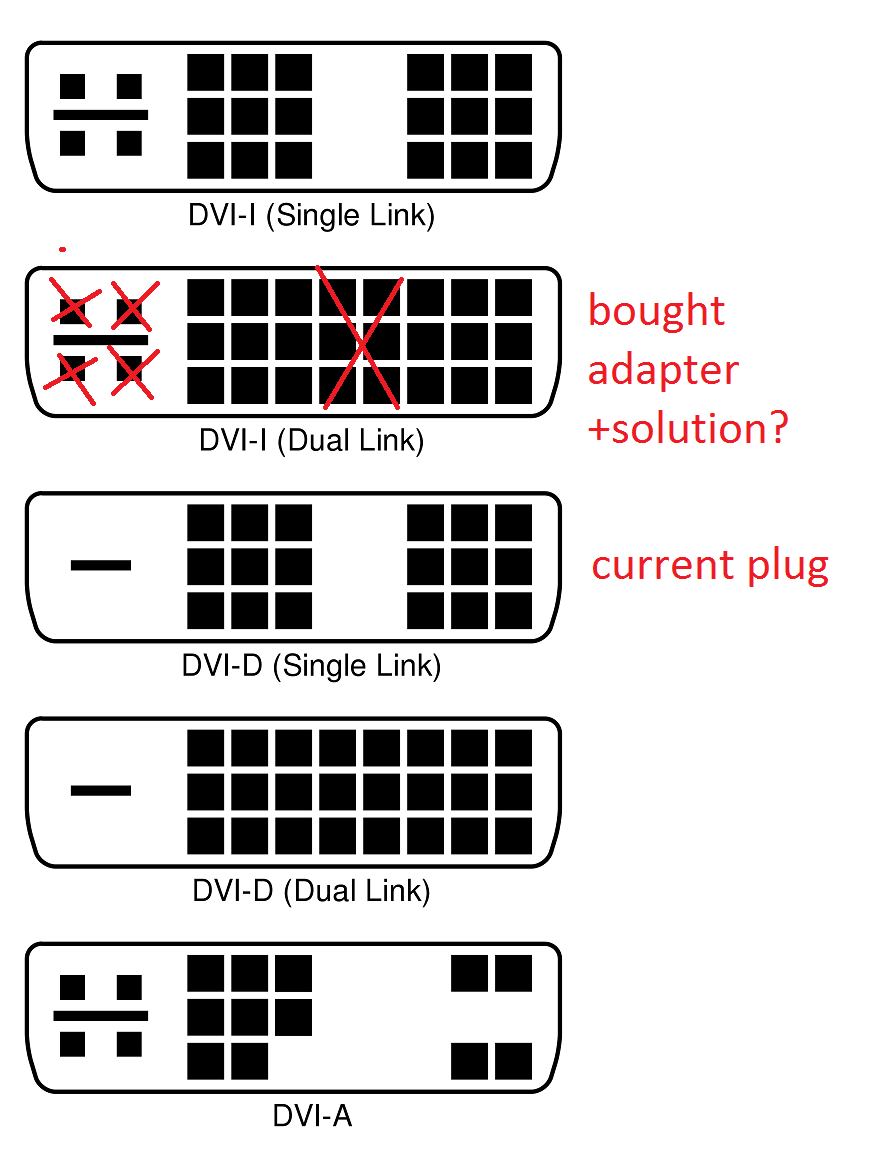
      next issue: to reduce the empty space behind the LCD panel, I bought a 90 degrees DVI adapter. But I have noticed, my plug was DVI-D and I bought DVI-I.

      Question: I don’t want to wait a week for a new one, can I remove few pins (esp. the 4 on the left) on my own? see picture below:
      0_1504603335463_2000px-DVI_Connector_Types.svg.png

      Thx for your help!
      Regards
      birdy

      posted in Hardware
      B
      birdy
    • RE: MM & Google Maps Traffic

      you mean like this:

      Connecting socket for: MMM-Traffic
      MMM-Traffic helper started ...
      Sockets connected & modules started ...
      
      Ready to go! Please point your browser to: http://localhost:8080
      Whoops! There was an uncaught exception...
      { Error: listen EADDRINUSE :::8080
          at Object.exports._errnoException (util.js:1020:11)
          at exports._exceptionWithHostPort (util.js:1043:20)
          at Server._listen2 (net.js:1258:14)
          at listen (net.js:1294:10)
          at net.js:1404:9
          at _combinedTickCallback (internal/process/next_tick.js:83:11)
          at process._tickCallback (internal/process/next_tick.js:104:9)
          at Module.runMain (module.js:606:11)
          at run (bootstrap_node.js:389:7)
          at startup (bootstrap_node.js:149:9)
        code: 'EADDRINUSE',
        errno: 'EADDRINUSE',
        syscall: 'listen',
        address: '::',
        port: 8080 }
      MagicMirror will not quit, but it might be a good idea to check why this happened. Maybe no internet connection?
      If you think this really is an issue, please open an issue on GitHub: https://github.com/MichMich/MagicMirror/issues
      
      
      posted in Troubleshooting
      B
      birdy
    • RE: MM & Google Maps Traffic

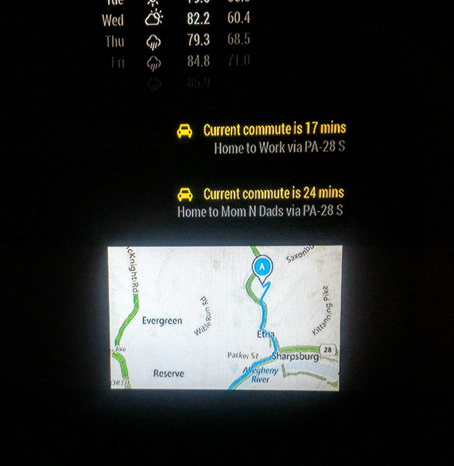
      somehow it’s not working:
      0_1504081238365_InkedIMG_1205_LI.jpg

      posted in Troubleshooting
      B
      birdy
    • RE: MM & Google Maps Traffic

      so, as a complete noobie, I just pasted the code (adding Google Api key) in both files.

      I can see, there is a gap in the corner (I hope for the map) and if I get you correctly, the map will load “soon”(?).

      Thank you one more time and will keep u posted.

      Cheers
      Birdy

      posted in Troubleshooting
      B
      birdy
    • RE: MM & Google Maps Traffic

      @Mirrorolentia - wow, thx!! I will test it later :) can’t await

      posted in Troubleshooting
      B
      birdy
    • MM & Google Maps Traffic

      Hi all,

      I was looking in the forum and internet, but couldn’t find a solution. Did anyone on you managed to show the google maps route (from A to B) and trafic?

      Like this (example from this forum):
      alt text.

      I (hope i did) intalled the module MMM-googlemaps. Sometimes I read I need an iFrame, sometimes: it won’t work with an iFrame.
      My code:

      //		{
      		   module: "MMM-googlemaps",
      		   position: 'bottom_right',
      		   config: {
      		       apikey: '*my API*',
      			origin: 'Köln,+Deutschland',
      			destination: 'Essen,+Deutschland',
      			mode: driving,
      		   }
      		},
      

      Thx for your support!
      Birdy

      posted in Troubleshooting
      B
      birdy
    • RE: MMM-DWD-WarnWeather - Wetterwarnungen

      Hi,

      so this module is showing only warnings. Can it show also the weather from DWD?

      Cheers
      birdy

      posted in Utilities
      B
      birdy
    • RE: Bring!

      I got yesterday an answer:

      Hallo birdy
      
      Danke für deine nette Email und das Interesse. Eine public API gibt es von Bring! nicht, aber ich leite deinen Vorschlag gerne mal weiter! 
      
      Beste Grüsse
      Lucia 
      

      Maybe if more people will send a request, they will finally do it :)

      posted in Requests
      B
      birdy
    • RE: Old LCD PC monitor

      So I got the MM up an running :)
      alt text

      back side:
      alt text

      Next steps:

      1. MM configuration & understanding how it works
      2. to shorten the wooden legs
      3. to order + build a frame
      4. put everything together :)

      BR
      birdy

      posted in Hardware
      B
      birdy
    • RE: Old LCD PC monitor

      one question, which is bothering me: the controller plate has spot for grounding (the plate was connected with the metal body before via this “grounding spot”). Do I need to ground it e.g. with power supply or similar or I can leave the plate ungrounded?

      posted in Hardware
      B
      birdy
    • RE: Old LCD PC monitor

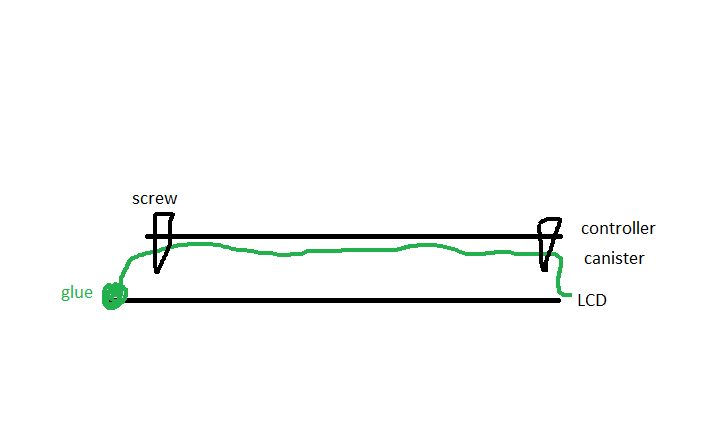
      so like this (side view)?
      0_1503314589067_build.png

      posted in Hardware
      B
      birdy
    • RE: Old LCD PC monitor

      you used a plastic water canister? In what manner?

      posted in Hardware
      B
      birdy
    • RE: Old LCD PC monitor

      Hi,

      there is also another challenge:
      alt text
      I would liek to get rid of these metal body. The side you can see shoud me glued to the plastic.

      What can I put between the curcuit and the plastic? Some small plastik tubes? Wood? Rubber? Should I then glue the boards or better (for the future) screw it to to the “legs”?

      How about grounding it? Needed?

      Cheers
      Birdy

      posted in Hardware
      B
      birdy
    • RE: Old LCD PC monitor

      Hi guys,

      the new cable is working!!!
      alt text

      Now the easiest part: coding ;)

      Next update, when I get a keyboard from somewhere :D

      posted in Hardware
      B
      birdy
    • RE: Old LCD PC monitor

      @tomyboy96 - I have no idea why did I write micro HDMI (maybe I was playing with the micro SD adapter). But thanks for your remark! Adapter ordered (hope it will work). Next update in few days :)

      posted in Hardware
      B
      birdy
    • RE: Old LCD PC monitor

      small update:
      I got the screen up and running (I forgot to switch over from the monitor body a small controll panel), unfortunatelly only via VGA. HDMI is definitely not working.

      Any idea:

      1. if I could connect RaPi to the monitor via DVI (micro HDMI DVI)?
      2. or is there a connector (micro HDMI VGA)?

      -> do I need a digital connection (hdmi) or analog (vga)?

      For me a good information for today is, I don’t have to buy a new 27 inch LCD panel :D

      Cheers
      birdy

      posted in Hardware
      B
      birdy
    • RE: Old LCD PC monitor

      Hi all,

      for the start, thanks a lot for you answers!

      Rasberry is there, so I wanted to test, if the screen is working. Ta-da! It’s not :(

      I had already problems with HDMI (my cat threw the screen down from the piano…) but VGA was always working. Now neither nor. I have Samsung SyncMaster T260HD.

      Any idea, what could be the problem? I alreday ordered the mirror (40x60 cm) so if I would like to buy a new screen, it will be expensive…

      alt text

      Cheers
      birdy

      posted in Hardware
      B
      birdy
    • Old LCD PC monitor

      Hi all,

      I’m starting my journey with the mirror. For the start I have dismantled my old PC monitor and have a question: can I use it? The controller is quite big, so maybe I can remove the steel or should I buy a new controller (if possible)?
      alt text

      Controller:alt text

      Plugs: alt text

      Thx for your support!

      BR
      birdy

      posted in Hardware
      B
      birdy
    • 1 / 1