I can’t figure out how to have MMM-EmbedURL to center the embedded item on fullscreen_above.
Can someone help out?
EmbedURL is apparently going full width.
I can’t figure out how to have MMM-EmbedURL to center the embedded item on fullscreen_above.
Can someone help out?
EmbedURL is apparently going full width.
… and following those recommendations allows you to learn better code and improve!
@Klinge You either have some logs that have exploded in size, or a corrupting SD card. Either way, I’d recommend a reformat and/or a new SD card.
In any case, resetting the origin URL fixed it, so we have that in our toolbelt.
I must have manually installed MM originally, rather than using your scripts - cloning it via SSH rather than HTTPS.
@sdetweil I think I had an error with my SSH keys and had to reset them. It’s cascading through my system. Basically, some idiot forgot he already had SSH on his system and set it up for another project. LOL
$ git remote set-url origin https://github.com/MagicMirrorOrg/MagicMirror.git
$ git remote set-url --push origin https://github.com/MagicMirrorOrg/MagicMirror.git
For reference if seen again.
It has to do with SSH. I’m failing out on SSH, but if I force it over to HTTPS it worked.
@sdetweil said in Magic Mirror Scripts - "Unable to determine upstream":
cd ~/MagicMirror
git branch
git remote -v
bkey1970@mirrorserv:~ $ cd ~/MagicMirror
git branch
git remote -v
_fix_clipping
* master
origin git@github.com:MagicMirrorOrg/MagicMirror.git (fetch)
origin git@github.com:MagicMirrorOrg/MagicMirror.git (push)
bkey1970@mirrorserv:~ $ bash -c "$(curl -sL https://raw.githubusercontent.com/sdetweil/MagicMirror_scripts/master/upgrade-script.sh)" apply
update log will be in /home/bkey1970/MagicMirror/installers/upgrade.log
doing test run = false
Node currently installed. Checking version number.
Minimum Node version: v22.21.1
Installed Node version: v22.18.0
installing correct version of node and npm, please wait
Check current Node installation ...
Node currently installed. Checking version number.
Minimum Node version: v22.21.1
Installed Node version: v22.21.1
No Node.js upgrade necessary.
Check current NPM installation ...
NPM currently installed. Checking version number.
Minimum npm version: V10.9.4
Installed npm version: V10.9.4
No npm upgrade necessary.
want /var/swap=512MByte, checking existing: keeping it
saving custom.css
Unable to determine upstream git repository
Upgrade started - Fri Jan 2 13:41:18 PST 2026
system is Linux mirrorserv 6.12.47+rpt-rpi-2712 #1 SMP PREEMPT Debian 1:6.12.47-1+rpt1~bookworm (2025-09-16) aarch64 GNU/Linux
user requested to apply changes
doing test run = false
the os is PRETTY_NAME="Debian GNU/Linux 12 (bookworm)" NAME="Debian GNU/Linux" VERSION_ID="12" VERSION="12 (bookworm)" VERSION_CODENAME=bookworm ID=deb>
architecture from dpkg is
^[[0mNode currently installed. Checking version number.^[[0m
^[[0mMinimum Node version: ^[[1mv22.21.1^[[0m
^[[0mInstalled Node version: ^[[1mv22.18.0^[[0m
^[[96minstalling correct version of node and npm, please wait^[[0m
installing : node-v22.21.1
mkdir : /usr/local/n/versions/node/22.21.1
fetch : https://nodejs.org/dist/v22.21.1/node-v22.21.1-linux-arm64.tar.xz
copying : node/22.21.1
installed : v22.21.1 (with npm 10.9.4)
^[[0mNo npm engines section specified in package.json, using default=V10.9.4 ...^[[0m
^[[96mCheck current Node installation ...^[[0m
^[[0mNode currently installed. Checking version number.
^[[0mMinimum Node version: ^[[1mv22.21.1^[[0m
^[[0mInstalled Node version: ^[[1mv22.21.1^[[0m
^[[92mNo Node.js upgrade necessary.^[[0m
^[[96mCheck current NPM installation ...^[[0m
^[[0mNPM currently installed. Checking version number.
^[[0mMinimum npm version: ^[[1mV10.9.4^[[0m
^[[0mInstalled npm version: ^[[1mV10.9.4^[[0m
^[[92mNo npm upgrade necessary.^[[0m
increasing swap space
saving custom.css
Unable to determine upstream git repository
Upgrade ended - Fri Jan 2 13:41:45 PST 2026
What’s going on?
what’s with the microupdates? I’ve updated three times today. 🤣
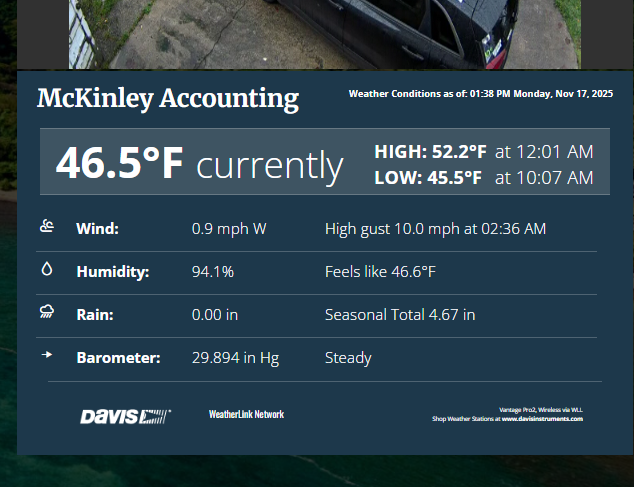
@Jose1701 what I ended up doing with my Davis weatherstation was use their web display interface with MMM-EmbedURL to just show their full screen weather display on the mirror.

@bill63 The entire visual appearance is controlled by CSS, max-width in conjunction with the regions is how it would be handled. Please review the MMM-Multimonth.css file, copy over what you need into the custom.css master file, and change to your needs.
CSS tutorials are available if you’re not comfortable with it.
Even though the project is effectively mothballed due to my time constraints, there is another maintainer on the project who may or may not update the project, so please don’t modify the project files directly.
if you have any questions, feel free to ask, I’m still kinda active on here, as well as our resident experts are always lurking.
– Brendan (author)
@benhmin for once, ChatGPT put you on the right path.
We’ve had this conversation before- the result is that it’s better to leave it CSS than overload the config.
cheers
@lif I’m not sure on that, @wishmaster270 (Tom) would know more.
@tonyarogers Time to update your hardware and/or create a new SD Card for it.
@lif It’s requiring tools no longer available, so dead module. Use something else.
https://github.com/Tom-Hirschberger/MMM-Temperature is what I used when I had a module hooked up to it.
@ub3rdud3 Interesting… very niche, but oddly, I could use this.
@alex2 Could just need a refresh of the core - sometimes over many updates things will stick just because the OS, NPM, node.js and/or Magicmirror have updated so many times and they just get confused.
I generally rebuild my system with every major OS release that supports my PIs. Copy off the config files and start fresh.
@karsten13 No mention of our desktop enviroments in the main release, so I guess it’s up to RPF to what they’re gonna do.