A New Chapter for MagicMirror: The Community Takes the Lead
Read the statement by Michael Teeuw here.
Read the statement by Michael Teeuw here.
 Offline
Posts
-
RE: MMM-newsfeedtouch - News so hot you wanna touch it
@cowboysdude the headline is what is clickable, are you using the latest version of MM? 2.1.1?
Is it just the newsfeed you can’t click?
-
RE: Problem Getting IP Address for Remote Control Module
@twosix this all depends on your router make and modell, google it.
-
RE: Module to show an PDF document on the MM2
@reneSwiss do note chrome and chromium is not exatly the same however.
Most normal browsers have a built in viewer for pdf, but if you are trying to display it on MM2 that is made on electron that uses chromium I’m fairly certain it doesn’t display pdf documents. Byt I could be wrong, can’t test it since I’m not at home.
Edit, looks like electron 1.6.4 and above have support for pdf viewing. https://github.com/electron/electron/releases/tag/v1.6.4
-
RE: Module to show an PDF document on the MM2
@reneSwiss I don’t think chromium has support to view a pdf.
Simplest route to take would be to convert the pdf to a jpeg image. And then display the jpeg on the mirror.
-
RE: Super nooby question- How to configure the downloaded modules and weather wont show up
@ghaal this line
cp config.js.sample config.js
Copys the sample config to the config.js file and should only be done once. If you do this everytime you start your mirror you will keep replacing your config.j s file with the sample config. -
RE: Newbie MM Network Scanner Problems!! Installations & Syntax Error
@michael_klatt You are missing a comma after
updateInterval: 5it should be
updateInterval: 5, -
RE: Button / modul
@Marko aahh okey. To be able to click on anything on the 2.1.0 and prevoius versions you need to change the fullcreen region property.
So either update to 2.1.1 or add
.region.fullscreen {
  pointer-events: none;
}
.region.fullscreen * {
  pointer-events: auto;
}
To your custom.css file
-
RE: Button / modul
@Marko well, you really can’t open links in that manner inside the MM, either you have to open a seperate browser or maybe if it’s possible to run google within an iframe (can’t remember the latest verdict on this subject).
And, what version of the mirror are you running?
-
RE: Button / modul
@Marko it’s better if you don’t alter the index.html file and instead write a module to display the button. Use the default hello world module as a base.
-
RE: Mirror Proposal
@dvbit if it’s these :
http://scandinavia.saint-gobain-glass.com/product/1939/sgg-antelio#tabs-2I would say no, the reflection numbers are quite low to act as a mirror.
as light transmissions go I would say the Bronze one with 22% light transmission is the best of the ones listed. (any higher and you will most likely see the monitor behind the glass).See if you can get a sample. Should be easier to decide then.
-
RE: Recommended mirror specs
@pauabaer yeah a couple of kg, but not overwhelmingly heavy :)
-
RE: Recommended mirror specs
@pauabaer yeah basically,
I would probably go with a thicker mirror if making a large one piece mirror. (mine is 120x60cm and 6mm thick) -
RE: Recommended mirror specs
@pauabaer the thickness does not change anything (the reflective coating is usually only applied to one side of the glass).
-
RE: Recommended mirror specs
I took a picture of the mirror running, light and dark
Notice the thin text at the top, that’s the standard text-size of the MagicMirror.
The clock and weather forecast are in a bolder font.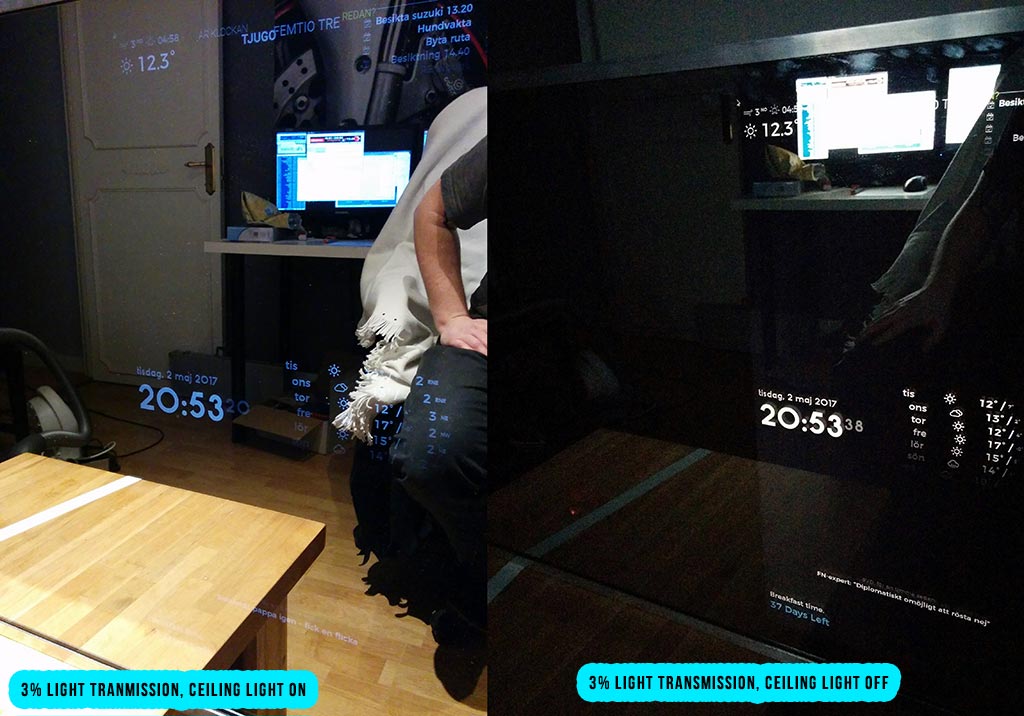
-
RE: Recommended mirror specs
@pauabaer one ceiling light, no windows.
It’s visible, but not really good enough, you have to use a big text size to see it clearly.It works good with minimal light (i.e dark room with only monitors to light it up).
-
RE: Compliments are not shown on Mirror
@dboa the time is different on the mirror, do you have put the compliments in the “anytime” section or the afternoon/evening section?
-
RE: Recommended mirror specs
@pauabaer 3% is to little, I know, mine is 3%. I would suggest minimum 10% light transmission.
-
RE: How to get Panel to show
@PhilsterM9 not in the css file, your config.js file.