pi@MagicMirror:~ $ node -v
v20.17.0
pi@MagicMirror:~ $
Read the statement by Michael Teeuw here.
Posts
-
RE: After update 2.29.0 PM2 does not work
-
RE: After update 2.29.0 PM2 does not work
I am in the same boat with you. After update to 2.29.0, the ~/.pm2/logs/MagicMirror-error.log has this block of messages continually repeating:
[ERROR] TypeError: Cannot read properties of undefined (reading 'disableHardwareAcceleration') at Object.<anonymous> (/home/pi/MagicMirror/js/electron.js:15:6) at Module._compile (node:internal/modules/cjs/loader:1469:14) at Module._extensions..js (node:internal/modules/cjs/loader:1548:10) at Module.load (node:internal/modules/cjs/loader:1288:32) at Module._load (node:internal/modules/cjs/loader:1104:12) at Object.<anonymous> (/usr/lib/node_modules/pm2/lib/ProcessContainerFork.js:33:23) at Module._compile (node:internal/modules/cjs/loader:1469:14) at Module._extensions..js (node:internal/modules/cjs/loader:1548:10) at Module.load (node:internal/modules/cjs/loader:1288:32) at Module._load (node:internal/modules/cjs/loader:1104:12) at Function.executeUserEntryPoint [as runMain] (node:internal/modules/run_main:174:12) at node:internal/main/run_main_module:28:49I made a backup of the MagicMirror directory before updating to the new version. To return to the old version, I deleted the updated MagicMirror directory and restored the backup MM directory but the error persists with V2.28.0. Something outside of the MM directory must have been updated.
I tried restarting the system but the error continues.
Butch
-
RE: MagicMirror Failing on Raspberry Pi Zero W Rev 1.1
@davidgagne The Pi Zero has 512KB memory, the default swapfile size setting is 100KB, and the swapfile is located on the SDcard which is not very fast.
I would suggest changing the swapfile size to 2048KB by editing /etc/dphys-swapfile and changing CONF_SWAPSIZE=100 to CONF_SWAPSIZE=2048.
You might consider moving from the SDcard to an SSD which will provide quicker data access and improved security against SDcard failure.
Lastly, you might consider changing from a Pi Zero to a Pi Zero 2 or something with more processing power. I use a Pi 3 Model A+ with a USB attached SSD and 2048GB swapfile size.
Butch
-
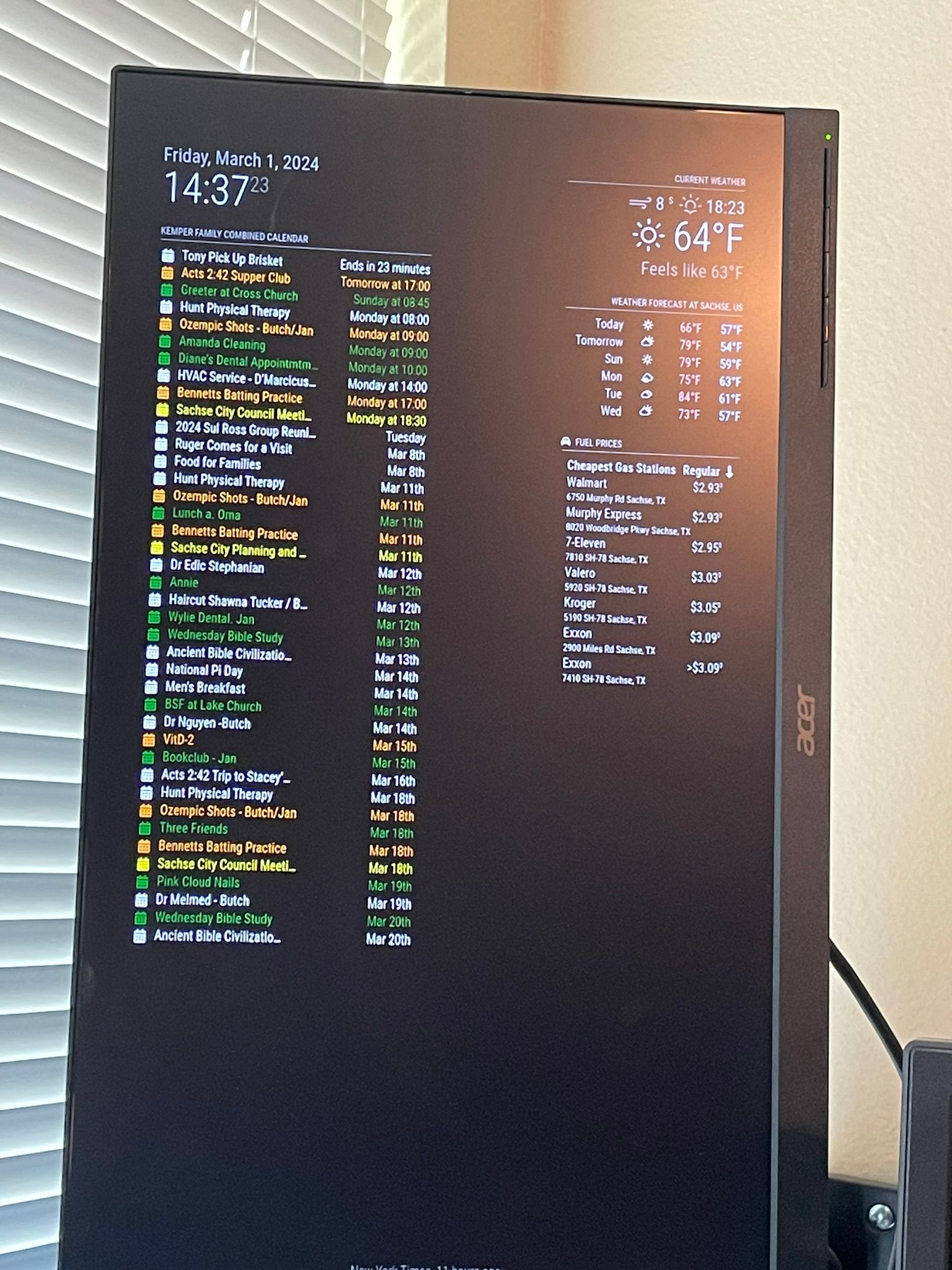
My MagicMirror Display
Here is my MagicMirror, not a mirror but a display. The hardware is:
- Raspberry Pi 3 Model A Plus Rev 1.0
- WEme USB 3.0 to SATA Converter Adapter for 2.5 3.5 Inch Hard Drive Disk SSD
- 128GB 2.5 Inch SSD
- ACER 21.5 Inch Monitor 1920x1080
- RPios Bullseye
The software is:
- MagicMirror V 2.26.0 with the following modules:
- Clock - Standard date and time display.
- Calendar - Combines multiple Apple and Google calendar into a single display.
- Weather - Local current and forecast weather.
- MMM-Fuel - Local Gasbuddy fuel prices displayed for lowest price offerings at stations in town.
- Newsfeed - Standard Newsfeed display with headlines displayed at screen bottom.

(Not the best possible image but you get the idea)
It is the combined calendar display that get the most attention and was the most challenging to configure.
I had some problems getting RPios software to operate in portrait orientation. Actually, I never was successful to get portrait mode until the Xwindows system started and was instructed to use portrait mode.
One thing I had to do was increase the RPios swap space from the default 100MB to 2GB. Otherwise the system would get stuck in page thrashing as it got busy and swap space filled up.
Thanks to @sdetweil for his assistance solving some issues.
Butch
-
RE: Disable GPU? MESA-LOADER failure on fresh manual install
In the file MagicMirror/package.json, in the first liine of the “scripts” section, update the “start” line to be “start”: “DISPLAY="${DISPLAY:=:0}" ./node_modules/.bin/electron --disable-gpu js/electron.js”.
Butch
-
RE: New Setup - Log Filled with "CreatePlatformSocket() failed: Address family not supported by protocol (97)"
Sam,
I built a new SDcard for Raspios and installed MM using your scripts. Started MM and the problem did not occur.
Next, I rebuilt the SSD with Raspios and installed MM. Started MM and the problem did not occur at startup and I waited while tailing the logs but nothing happened.
Next, I move my MM configuration changes, modules, and updates to the SSD. The problem did not occur at startup or after tailing the logs for a time.
I am declaring a victory for me. But we all know, in the end, that the computer demons won.
Butch
-
RE: Upgrade Strecht to Debian 10 doesn't work
Sorry to be the bearer of bad news but there is no official upgrade path from one release to another. There is lots of good assistance on the Raspberry Pi Fourm.
Butch
-
RE: New Setup - Log Filled with "CreatePlatformSocket() failed: Address family not supported by protocol (97)"
Sam,
I did a complete new MM install using your automated scripts and found the error message is still issued.
I found the error messages correlate to modules making network requests for data updates.
My next step is to build a SDcard and see what happens.
Thank you for your assistance.
Butch
-
RE: New Setup - Log Filled with "CreatePlatformSocket() failed: Address family not supported by protocol (97)"
@sdetweil said in New Setup - Log Filled with "CreatePlatformSocket() failed: Address family not supported by protocol (97)":
@butchkemper can u tell me what OS instance you are running?
output of
lsb_release -a
and
uname -aand node -v, npm -v
will help
and how did you install MM? manual method or my automated scripts?
also, can u tell me the address:
value in ~/MagicMirror/config/config.jsThe OS was built using this image: 2023-05-03-raspios-bullseye-armhf.img.xz.
The Raspberry Pi is a Model 3 A+ not a 3B+.
The output of the commands you requested is:
lsb_release -a
No LSB modules are available.
Distributor ID: Raspbian
Description: Raspbian GNU/Linux 11 (bullseye)
Release: 11
Codename: bullseyeuname -a
Linux MagicMirror 6.1.21-v7+ #1642 SMP Mon Apr 3 17:20:52 BST 2023 armv7l GNU/Linuxnode -v
v16.20.0npm -v
8.19.4the address: value in ~/MagicMirror/config/config.js: localhost
Installation was the Manual Method.
Thank you for your help.
Butch
-
RE: New Setup - Log Filled with "CreatePlatformSocket() failed: Address family not supported by protocol (97)"
Thank you for your response. I am delayed in responding because La Jefecita had other priorities for me that did not include my computers. :)
I have a typo in the original post as the computer is a Raspberry Pi Model 3 A+ Rev 1.0
The Raspios was built with the image:
2023-05-03-raspios-bullseye-armhf.img.xzThe output from the commands are:
uname -a
pi@MagicMirror:~$ uname -a
Linux MagicMirror 6.1.21-v7+ #1642 SMP Mon Apr 3 17:20:52 BST 2023 armv7l GNU/Linuxlsb_release -a
No LSB modules are available.
Distributor ID: Raspbian
Description: Raspbian GNU/Linux 11 (bullseye)
Release: 11
Codename: bullseyenode -v
v16.20.0npm -v
8.19.4I used the Manual Installation method as described in MagicMirror² Documentation Installation & Usage.
Address value in ~/MagicMirror/config/config.js is localhost
I have also included the config file below.
Thank you for your assistance.
Butch
/* MagicMirror² Config Sample * * By Michael Teeuw https://michaelteeuw.nl * MIT Licensed. * * For more information on how you can configure this file * see https://docs.magicmirror.builders/configuration/introduction.html * and https://docs.magicmirror.builders/modules/configuration.html */ let config = { address: "localhost", // Address to listen on, can be: // - "localhost", "127.0.0.1", "::1" to listen on loopback interface // - another specific IPv4/6 to listen on a specific interface // - "0.0.0.0", "::" to listen on any interface // Default, when address config is left out or empty, is "localhost" port: 8080, basePath: "/", // The URL path where MagicMirror² is hosted. If you are using a Reverse proxy // you must set the sub path here. basePath must end with a / ipWhitelist: ["127.0.0.1", "192.168.1.0/24"], // Set [] to allow all IP addresses // or add a specific IPv4 of 192.168.1.5 : // ["127.0.0.1", "::ffff:127.0.0.1", "::1", "::ffff:192.168.1.5"], // or IPv4 range of 192.168.3.0 --> 192.168.3.15 use CIDR format : // ["127.0.0.1", "::ffff:127.0.0.1", "::1", "::ffff:192.168.3.0/28"], useHttps: false, // Support HTTPS or not, default "false" will use HTTP httpsPrivateKey: "", // HTTPS private key path, only require when useHttps is true httpsCertificate: "", // HTTPS Certificate path, only require when useHttps is true language: "en", locale: "en-US", logLevel: ["INFO", "LOG", "WARN", "ERROR"], // Add "DEBUG" for even more logging timeFormat: 24, units: "imperial", // serverOnly: true/false/"local" , // local for armv6l processors, default // starts serveronly and then starts chrome browser // false, default for all NON-armv6l devices // true, force serveronly mode, because you want to.. no UI on this device modules: [ { module: "alert", }, { module: "MMM-LogExt", config: {} }, { module: "updatenotification", position: "top_bar" }, { module: "clock", position: "top_left", config: { timeFormat: 24, }, }, { module: "calendar", header: "Kemper Family Combined", position: "top_left", config: { coloredText: true, timeFormat: 24, fade: false, fadePoint: 1, maximumEntries: 20, maximumNumberOfDays: 21, fetchInterval: 300000, calendars: [ { // Butch url: 'http://localhost:8080/modules/calendars/xxxxxxxxxxxxxxxxxxxxxxxxxxxxxxxxxxxxxx.ics', name: "Butch", symbol: "calendar", color: '#FF0000' }, { // Jan url: 'http://localhost:8080/modules/calendars/xxxxxxxxxxxxxxxxxxxxxxxxxxxxxxxxxxxxxxxxxxxxxxxxxxxxxxxxxxxxxxxxx.ics', name: "Jan", symbol: "calendar", color: '#008000' }, { // Family 1 url: 'http://localhost:8080/modules/calendars/xxxxxxxxxxxxxxxxxxxxxxxxxxxxxxxxxxxx.ics', name: "Family 1", symbol: "calendar", color: '#FFFF00' }, { // Family 2 url: 'http://localhost:8080/modules/calendars/xxxxxxxxxxxxxxxxxxxxxxxxxxxxxxxxxxxxx.ics', name: "Family 2", symbol: "calendar", color: '#00FF00' }, { // Kids url: 'http://localhost:8080/modules/calendars/xxxxxxxxxxxxxxxxxxxxxxxxxxxxxxxxxxxxxx.ics', name: "Kids", symbol: "calendar", color: '#0000FF' }, { // City Council url: 'http://localhost:8080/modules/calendars/xxxxxxxxxxxxxxxxxxxxxxxxxxxxxxxxxxxxxxxx.ics', name: "City Council", symbol: "calendar", color: '#FFA500' } ] } }, // { // module: "compliments", // position: "lower_third" // }, { module: "weather", position: "top_right", header: "Current Weather", config: { weatherProvider: "openweathermap", type: "current", units: "imperial", tempUnits: "imperial", roundTemp: true, timeFormat: 24, appendLocationNameToHeader: true, onlyTemp: false, showSun: true, fade: false, fadePoint: 1, colored: true, updateInterval: 900000, maxEntries: 7, degreeLabel: true, lang: "en", location: "Sachse,Texas", locationID: "4724564", //ID from http://bulk.openweathermap.org/sample/city.list.json.gz; apiKey: "xxxxxxxxxxxxxxxxxxxxxxxxxxxxxxxxxxx" } }, { module: "weather", position: "top_right", header: "Weather Forecast at", config: { initialLoadDelay: 5000, weatherProvider: "openweathermap", type: "forecast", units: "imperial", tempUnits: "imperial", roundTemp: true, timeFormat: 24, appendLocationNameToHeader: true, fade: false, fadePoint: 1, colored: true, updateInterval: 900000, maxEntries: 10, maxNumberOfDays: 10, ignoreToday: false, degreeLabel: true, lang: "en", location: "Sachse,Texas", locationID: "4724564", //ID from http://bulk.openweathermap.org/sample/city.list.json.gz; apiKey: "xxxxxxxxxxxxxxxxxxxxxxxxxxxxxxxxxxx" } }, { module: "MMM-Fuel", position: "top_right", config: { provider: "gasbuddy", zip: "75048", types: ["regular"], sortBy: "regular", max: 7, showDistance: false, fade: false, updateInterval: 30000, rotate: false, rotateInterval: 15000 } }, { module: "newsfeed", position: "bottom_bar", config: { feeds: [ { title: "New York Times", url: "https://rss.nytimes.com/services/xml/rss/nyt/HomePage.xml" } ], showSourceTitle: true, showPublishDate: true, broadcastNewsFeeds: true, broadcastNewsUpdates: true } }, ] }; /*************** DO NOT EDIT THE LINE BELOW ***************/ if (typeof module !== "undefined") {module.exports = config;} -

New Setup - Log Filled with "CreatePlatformSocket() failed: Address family not supported by protocol (97)"
I have created a MagicMirror on a RPi 3B+ and it is running but with some issues.
I am working to clean up the PM2 error log which is filled with this message: “[14606:0606/134932.852666:ERROR:socket_posix.cc(93)] CreatePlatformSocket() failed: Address family not supported by protocol (97”
Where should I begin looking for the problem?
Thanks.
Butch
-
RE: MMM-TomTomTrafficIncidents funktioniert nicht...
I noticed when comparing your configuration to the one posted below:
- The “disabled: false” parameter is not included,
- The “traffic: absolute” parameter is not included,
- The “height: “300x”” should be “300px”"
Butch