@sdetweil Yes, done and merged now!
C
Offline
A New Chapter for MagicMirror: The Community Takes the Lead
Read the statement by Michael Teeuw here.
Read the statement by Michael Teeuw here.
Posts
-
RE: Swedish Weather provider SMHI has deprecated their API and replaced it
-
Swedish Weather provider SMHI has deprecated their API and replaced it
Heads up for anyone using the Swedish SMHI weather provider in MagicMirror²!
As of March 31, 2026, SMHI has deprecated their PMP3gv2 forecast API. It now returns HTTP 404.
I noticed this, this week when my MM suddenly were empty of weather reports.
The replacement is SNOW1gv1, hosted on the same domain but with a different data structure.
What changed in the API
- URL path:
pmp3g/version/2→snow1g/version/1 - Time key:
validTime→time - Data structure: The nested
parameters[]array is replaced by a flatdataobject (e.g.entry.data.air_temperatureinstead ofentry.parameters.find(p => p.name === 't').values[0]) - Parameter names: Short codes replaced by human-readable names (
t→air_temperature,ws→wind_speed,Wsymb2→symbol_code, etc.) - Coordinates: Response now returns flat
[lon, lat]instead of nested[[lon, lat]] approvedtime.jsonendpoint: Removed entirely — usereferenceTimefrom the data response instead
Weather symbol codes (1–27) remain unchanged, so icon mapping still works as before.
Updated provider
I’ve updated the
smhi.jsprovider to work with SNOW1gv1. Key changes:- New API URL
- Rewritten data parser for the flat
dataobject structure - All parameter names mapped to their new equivalents
- Coordinate parsing updated for the new format
- Added missing value handling (SMHI uses
9999as sentinel) - Added support for precipitation type
11(drizzle, new in SNOW1gv1) - Backward compatible — existing
config.jssettings (includingprecipitationValue) work without changes
Tested and confirmed working with
type: "daily"on a Raspberry Pi. The SNOW1gv1 API responds correctly and the weather module displays data as expected.Code:
const Log = require("logger"); const { getSunTimes, isDayTime, validateCoordinates } = require("../provider-utils"); const HTTPFetcher = require("#http_fetcher"); /** * Server-side weather provider for SMHI (Swedish Meteorological and Hydrological Institute) * Sweden only, metric system * * API: SNOW1gv1 — https://opendata.smhi.se/metfcst/snow1gv1 * Migrated from PMP3gv2 (deprecated 2026-03-31, returns HTTP 404) * * Version: 2.0.1 (2026-04-02) * * Key differences from PMP3gv2: * - URL: snow1g/version/1 (was pmp3g/version/2) * - Time key: "time" (was "validTime") * - Data structure: flat object entry.data.X (was parameters[].find().values[0]) * - Parameter names: human-readable (air_temperature, wind_speed, etc.) * - Coordinates: flat [lon, lat] (was nested [[lon, lat]]) * - Precipitation types: different value mapping (1=rain, not snow) */ /** * Maps user-facing config precipitationValue to SNOW1gv1 parameter names. * Maintains backward compatibility with existing MagicMirror configs. */ const PRECIP_VALUE_MAP = { pmin: "precipitation_amount_min", pmean: "precipitation_amount_mean", pmedian: "precipitation_amount_median", pmax: "precipitation_amount_max" }; class SMHIProvider { constructor (config) { this.config = { lat: 0, lon: 0, precipitationValue: "pmedian", // pmin, pmean, pmedian, pmax type: "current", updateInterval: 5 * 60 * 1000, ...config }; // Validate precipitationValue if (!Object.keys(PRECIP_VALUE_MAP).includes(this.config.precipitationValue)) { Log.warn(`[smhi] Invalid precipitationValue: ${this.config.precipitationValue}, using pmedian`); this.config.precipitationValue = "pmedian"; } this.fetcher = null; this.onDataCallback = null; this.onErrorCallback = null; } initialize () { try { // SMHI requires max 6 decimal places validateCoordinates(this.config, 6); this.#initializeFetcher(); } catch (error) { Log.error("[smhi] Initialization failed:", error); if (this.onErrorCallback) { this.onErrorCallback({ message: error.message, translationKey: "MODULE_ERROR_UNSPECIFIED" }); } } } setCallbacks (onData, onError) { this.onDataCallback = onData; this.onErrorCallback = onError; } start () { if (this.fetcher) { this.fetcher.startPeriodicFetch(); } } stop () { if (this.fetcher) { this.fetcher.clearTimer(); } } #initializeFetcher () { const url = this.#getUrl(); this.fetcher = new HTTPFetcher(url, { reloadInterval: this.config.updateInterval, logContext: "weatherprovider.smhi" }); this.fetcher.on("response", async (response) => { try { const data = await response.json(); this.#handleResponse(data); } catch (error) { Log.error("[smhi] Failed to parse JSON:", error); if (this.onErrorCallback) { this.onErrorCallback({ message: "Failed to parse API response", translationKey: "MODULE_ERROR_UNSPECIFIED" }); } } }); this.fetcher.on("error", (errorInfo) => { if (this.onErrorCallback) { this.onErrorCallback(errorInfo); } }); } #handleResponse (data) { try { if (!data.timeSeries || !Array.isArray(data.timeSeries)) { throw new Error("Invalid weather data"); } const coordinates = this.#resolveCoordinates(data); let weatherData; switch (this.config.type) { case "current": weatherData = this.#generateCurrentWeather(data.timeSeries, coordinates); break; case "forecast": case "daily": weatherData = this.#generateForecast(data.timeSeries, coordinates); break; case "hourly": weatherData = this.#generateHourly(data.timeSeries, coordinates); break; default: Log.error(`[smhi] Unknown weather type: ${this.config.type}`); if (this.onErrorCallback) { this.onErrorCallback({ message: `Unknown weather type: ${this.config.type}`, translationKey: "MODULE_ERROR_UNSPECIFIED" }); } return; } if (this.onDataCallback) { this.onDataCallback(weatherData); } } catch (error) { Log.error("[smhi] Error processing weather data:", error); if (this.onErrorCallback) { this.onErrorCallback({ message: error.message, translationKey: "MODULE_ERROR_UNSPECIFIED" }); } } } #generateCurrentWeather (timeSeries, coordinates) { const closest = this.#getClosestToCurrentTime(timeSeries); return this.#convertWeatherDataToObject(closest, coordinates); } #generateForecast (timeSeries, coordinates) { const filled = this.#fillInGaps(timeSeries); return this.#convertWeatherDataGroupedBy(filled, coordinates, "day"); } #generateHourly (timeSeries, coordinates) { const filled = this.#fillInGaps(timeSeries); return this.#convertWeatherDataGroupedBy(filled, coordinates, "hour"); } /** * Find the time series entry closest to the current time. * SNOW1gv1 uses "time" instead of PMP3gv2's "validTime". */ #getClosestToCurrentTime (times) { const now = new Date(); let minDiff = null; let closest = times[0]; for (const time of times) { const entryTime = new Date(time.time); const diff = Math.abs(entryTime - now); if (minDiff === null || diff < minDiff) { minDiff = diff; closest = time; } } return closest; } /** * Convert a single SNOW1gv1 time series entry to MagicMirror weather object. * * SNOW1gv1 data structure: entry.data.parameter_name (flat object) * PMP3gv2 used: entry.parameters[{name, values}] (array of objects) */ #convertWeatherDataToObject (weatherData, coordinates) { const date = new Date(weatherData.time); const { sunrise, sunset } = getSunTimes(date, coordinates.lat, coordinates.lon); const isDay = isDayTime(date, sunrise, sunset); const current = { date: date, humidity: this.#paramValue(weatherData, "relative_humidity"), temperature: this.#paramValue(weatherData, "air_temperature"), windSpeed: this.#paramValue(weatherData, "wind_speed"), windFromDirection: this.#paramValue(weatherData, "wind_from_direction"), weatherType: this.#convertWeatherType(this.#paramValue(weatherData, "symbol_code"), isDay), feelsLikeTemp: this.#calculateApparentTemperature(weatherData), sunrise: sunrise, sunset: sunset, snow: 0, rain: 0, precipitationAmount: 0 }; // Map user config (pmedian/pmean/pmin/pmax) to SNOW1gv1 parameter name const precipParamName = PRECIP_VALUE_MAP[this.config.precipitationValue]; const precipitationValue = this.#paramValue(weatherData, precipParamName); const pcat = this.#paramValue(weatherData, "predominant_precipitation_type_at_surface"); // SNOW1gv1 precipitation type mapping (differs from PMP3gv2!): // 0 = no precipitation // 1 = rain // 2 = sleet (snow + rain mix) // 5 = snow / freezing rain // 6 = freezing mixed precipitation // 11 = drizzle / light rain switch (pcat) { case 1: // Rain case 11: // Drizzle / light rain current.rain = precipitationValue; current.precipitationAmount = precipitationValue; break; case 2: // Sleet / mixed rain and snow current.snow = precipitationValue / 2; current.rain = precipitationValue / 2; current.precipitationAmount = precipitationValue; break; case 5: // Snow / freezing rain case 6: // Freezing mixed precipitation current.snow = precipitationValue; current.precipitationAmount = precipitationValue; break; case 0: default: break; } return current; } #convertWeatherDataGroupedBy (allWeatherData, coordinates, groupBy = "day") { const result = []; let currentWeather = null; let dayWeatherTypes = []; const allWeatherObjects = allWeatherData.map((data) => this.#convertWeatherDataToObject(data, coordinates)); for (const weatherObject of allWeatherObjects) { const objDate = new Date(weatherObject.date); // Check if we need a new group (day or hour change) const needNewGroup = !currentWeather || !this.#isSamePeriod(currentWeather.date, objDate, groupBy); if (needNewGroup) { currentWeather = { date: objDate, temperature: weatherObject.temperature, minTemperature: Infinity, maxTemperature: -Infinity, snow: 0, rain: 0, precipitationAmount: 0, sunrise: weatherObject.sunrise, sunset: weatherObject.sunset }; dayWeatherTypes = []; result.push(currentWeather); } // Track weather types during daytime const { sunrise: daySunrise, sunset: daySunset } = getSunTimes(objDate, coordinates.lat, coordinates.lon); const isDay = isDayTime(objDate, daySunrise, daySunset); if (isDay) { dayWeatherTypes.push(weatherObject.weatherType); } // Use median weather type from daytime hours if (dayWeatherTypes.length > 0) { currentWeather.weatherType = dayWeatherTypes[Math.floor(dayWeatherTypes.length / 2)]; } else { currentWeather.weatherType = weatherObject.weatherType; } // Aggregate min/max and precipitation currentWeather.minTemperature = Math.min(currentWeather.minTemperature, weatherObject.temperature); currentWeather.maxTemperature = Math.max(currentWeather.maxTemperature, weatherObject.temperature); currentWeather.snow += weatherObject.snow; currentWeather.rain += weatherObject.rain; currentWeather.precipitationAmount += weatherObject.precipitationAmount; } return result; } #isSamePeriod (date1, date2, groupBy) { if (groupBy === "hour") { return date1.getFullYear() === date2.getFullYear() && date1.getMonth() === date2.getMonth() && date1.getDate() === date2.getDate() && date1.getHours() === date2.getHours(); } else { // day return date1.getFullYear() === date2.getFullYear() && date1.getMonth() === date2.getMonth() && date1.getDate() === date2.getDate(); } } /** * Fill gaps in time series data for forecast/hourly grouping. * SNOW1gv1 has variable time steps: 1h (0-48h), 2h (49-72h), 6h (73-132h), 12h (133h+). * Uses "time" key instead of PMP3gv2's "validTime". */ #fillInGaps (data) { if (data.length === 0) return []; const result = []; result.push(data[0]); for (let i = 1; i < data.length; i++) { const from = new Date(data[i - 1].time); const to = new Date(data[i].time); const hours = Math.floor((to - from) / (1000 * 60 * 60)); // Fill gaps with previous data point (start at j=1 since j=0 is already pushed) for (let j = 1; j < hours; j++) { const current = { ...data[i - 1] }; const newTime = new Date(from); newTime.setHours(from.getHours() + j); current.time = newTime.toISOString(); result.push(current); } // Push original data point result.push(data[i]); } return result; } /** * Extract coordinates from SNOW1gv1 response. * SNOW1gv1 returns flat GeoJSON Point: { coordinates: [lon, lat] } * PMP3gv2 returned nested: { coordinates: [[lon, lat]] } */ #resolveCoordinates (data) { const coords = data?.geometry?.coordinates; if (Array.isArray(coords) && coords.length >= 2 && typeof coords[0] === "number") { // SNOW1gv1 flat format: [lon, lat] return { lat: coords[1], lon: coords[0] }; } Log.warn("[smhi] Invalid coordinate structure in response, using config values"); return { lat: this.config.lat, lon: this.config.lon }; } /** * Calculate apparent (feels-like) temperature using humidity and wind. * Uses SNOW1gv1 parameter names. */ #calculateApparentTemperature (weatherData) { const Ta = this.#paramValue(weatherData, "air_temperature"); const rh = this.#paramValue(weatherData, "relative_humidity"); const ws = this.#paramValue(weatherData, "wind_speed"); if (Ta === null || rh === null || ws === null) { return Ta; // Fallback to raw temperature if data missing } const p = (rh / 100) * 6.105 * Math.exp((17.27 * Ta) / (237.7 + Ta)); return Ta + 0.33 * p - 0.7 * ws - 4; } /** * Get parameter value from SNOW1gv1 flat data structure. * SNOW1gv1: weatherData.data.parameter_name (direct property access) * PMP3gv2 used: weatherData.parameters.find(p => p.name === name).values[0] * * Returns null if parameter missing or equals SMHI missing value (9999). */ #paramValue (weatherData, name) { const value = weatherData.data?.[name]; if (value === undefined || value === null) { return null; } // SMHI uses 9999 as missing value sentinel for all parameters if (value === 9999) { return null; } return value; } /** * Convert SMHI symbol_code (1-27) to MagicMirror weather icon names. * Symbol codes are identical between PMP3gv2 and SNOW1gv1. */ #convertWeatherType (input, isDayTime) { switch (input) { case 1: return isDayTime ? "day-sunny" : "night-clear"; // Clear sky case 2: return isDayTime ? "day-sunny-overcast" : "night-partly-cloudy"; // Nearly clear sky case 3: case 4: return isDayTime ? "day-cloudy" : "night-cloudy"; // Variable/halfclear cloudiness case 5: case 6: return "cloudy"; // Cloudy/overcast case 7: return "fog"; case 8: case 9: case 10: return "showers"; // Light/moderate/heavy rain showers case 11: case 21: return "thunderstorm"; case 12: case 13: case 14: case 22: case 23: case 24: return "sleet"; // Light/moderate/heavy sleet (showers) case 15: case 16: case 17: case 25: case 26: case 27: return "snow"; // Light/moderate/heavy snow (showers/fall) case 18: case 19: case 20: return "rain"; // Light/moderate/heavy rain default: return null; } } /** * Build SNOW1gv1 forecast URL. * Changed from: pmp3g/version/2 * Changed to: snow1g/version/1 */ #getUrl () { const lon = this.config.lon.toFixed(6); const lat = this.config.lat.toFixed(6); return `https://opendata-download-metfcst.smhi.se/api/category/snow1g/version/1/geotype/point/lon/${lon}/lat/${lat}/data.json`; } } module.exports = SMHIProvider; - URL path:
-
RE: Made a birthday module
@plainbroke Yes, that might do the trick! If MagicMirror manages to keep the two settings in sync.
-
RE: Made a birthday module
@xIExodusIx Hi!
First, the green debug code was displayed because I forgot to set it to “false” by default. You can change this in config.js, but I’ll update the default setting so it only appears when the user wants it (ie when setting “true” in config.js).
Second, the module still has some quirks in its startup behavior—it requires a full cycle before everything runs smoothly. I’m working on it, but to be honest, it’s a low-priority fix since it’s a fringe case. Typically, the module will be running continuously, so birthday initialization should trigger when the mirror is already active. That’s probably why you’re not seeing the confetti right away.
Third, regarding the different versions of Fireworks—absolutely! The reason there are multiple versions is simply that I left them in from my experiments. I didn’t originally plan to include that functionality, but once the core features are fully ironed out, I’d be happy to refine and expand on it.
As for positioning, the module is currently designed to use the entire screen. I might look into allowing more customization in the future, but for now, it just places the message in the center and then launches confetti and fireworks.
When you say it “ignores the page,” are you referring to the page cycling?
I’ve also attached my test config.js. It has three pages, and after cycling through them to align the timings, the expected behavior should be:
Page 1 – Normal modules
Page 2 – Birthday celebration with dimming
Page 3 – Birthday celebration without dimming
Test config.js (which needs MMM-page-indicator). I’ve let this run for about an hour now, and everything (apart from weather module because its not part of the test) works as intended:
/* MagicMirror² Config for testing MMM-Birthday-Paged with immersiveMode */ let config = { address: "localhost", port: 8080, basePath: "/", ipWhitelist: ["127.0.0.1", "::ffff:127.0.0.1", "::1"], useHttps: false, httpsPrivateKey: "", httpsCertificate: "", language: "en", locale: "en-US", logLevel: ["INFO", "LOG", "WARN", "ERROR", "DEBUG"], timeFormat: 24, units: "metric", modules: [ { module: "alert", }, { module: "clock", position: "top_left", classes: "page1 page3" // Show on page 1 and 3 }, { module: "calendar", header: "Holidays", position: "top_left", classes: "page1 page3", // Show on page 1 and 3 config: { calendars: [ { symbol: "calendar-check", url: "webcal://www.calendarlabs.com/ical-calendar/ics/76/US_Holidays.ics" } ] } }, { module: "weather", position: "top_right", classes: "page1 page3", // Show on page 1 and 3 config: { weatherProvider: "yr", type: "current", location: "Stockholm", locationID: "2673730", // Stockholm's ID roundTemp: true } }, { module: "compliments", position: "lower_third", classes: "page1 page3", // Show on page 1 and 3 }, // MMM-Birthday-Paged with immersiveMode = true (dims modules) { module: "MMM-Birthday-Paged", position: "middle_center", classes: "page2", // Show on page 2 config: { birthdays: [ // Today's date (March 16, 2025) with name John { name: "John", date: "03-16" } ], fireworkDuration: "infinite", confettiDuration: "infinite", immersiveMode: true, // Dims other modules debug: true, startupDelay: 500 // Shorter startup delay for testing } }, // MMM-Birthday-Paged with immersiveMode = false (original module behavior) { module: "MMM-Birthday-Paged", position: "middle_center", classes: "page3", // Show on page 3 config: { birthdays: [ // Today's date (March 16, 2025) with name John { name: "John", date: "03-16" } ], fireworkDuration: "infinite", confettiDuration: "infinite", immersiveMode: false, // Does NOT dim other modules debug: true, startupDelay: 500 // Shorter startup delay for testing } }, // Page indicator to see which page is showing { module: "MMM-page-indicator", position: "bottom_bar", config: { pages: 3 } }, // MMM-pages for page switching { module: "MMM-pages", config: { modules: [ ["page1"], // Page 1 - Normal modules ["page2"], // Page 2 - Birthday celebration with dimming ["page3"] // Page 3 - Birthday celebration without dimming ], fixed: ["alert", "MMM-page-indicator"], rotationTime: 15000, // 15 seconds between page changes rotationDelay: 15000, animationTime: 1000 } } ] }; /*************** DO NOT EDIT THE LINE BELOW ***************/ if (typeof module !== "undefined") {module.exports = config;} -
RE: Made a birthday module
@xIExodusIx I believe I’ve solved the issue where MMM-Birthday-Pages was taking over the entire screen when active. There’s now a new toggle, immersiveMode, which can be set to either “true” or “false”.
"false" allows the birthday celebration to overlay existing modules while keeping them visible.
"true" means only the birthday celebration is displayed, hiding everything else.
This also means you can have different behaviors on different Pages.
That said, I’ve only had time for a quick test, and it worked as expected on my Linux Mint installation. To be safe, I’ve uploaded it to a separate test repository. If it proves to be stable, I’ll merge it into the main one (I’m sure there are easier ways to do this, but I suck at Git). Repo URL:
https://github.com/cgillinger/mmm-Birthday-paged-test (and please note that you need to rename the folder to “mmm-Birthday-paged” after cloning)So, give it a try and let me know how it goes!
-
RE: Let it snow now Magic Mirror
@sdetweil Yes, I understand, but it’s not the cost itself that’s the issue (although it would have been a problem if there was a cost). The concern is having to provide my credit card details. It’s not that I distrust OpenWeather, but I prefer not to share them unnecessarily. You never know, for example, if they might get hacked.
-
RE: Let it snow now Magic Mirror
Hey @Sebi76-0! I’m not sure what’s causing the issue. Could you share any error messages you’re seeing? Also, which version are you using?
Just so you know, this module has gone through a couple of transformations—first evolving into Dynamic Snow (available at: https://github.com/cgillinger/MMM-DynamicSnow), and later into Weather Effects (which you can find here: https://github.com/cgillinger/MMM-WeatherEffects).
I don’t personally use OpenWeather, and from what I understand, they now require a credit card for access. So, I don’t think I’ll be getting an API key anytime soon.
-
RE: Let it snow now Magic Mirror
@det I actually did add rain: https://github.com/cgillinger/MMM-WeatherEffects
Cheers,
C -
RE: Made a birthday module
@xIExodusIx said in Made a birthday module:
I’m using a Raspberry Pi 4B 4GB with RaspiOS Bookworm
MM Version is 2.30,
npm Version is 10.9.2,
node Version is 23.6.1.I think RaspiOS is missing the font. It might be solved by issuing:
sudo apt update
sudo apt upgrade -y
sudo apt install -y fonts-noto-color-emoji fonts-symbola ttf-ancient-fonts
and then rebuild font cache
sudo fc-cache -f -vThen restarting Magic Mirror and/or Pi.
And if I get the time, Ill look into a more elegant solution.
-
RE: Made a birthday module
@xIExodusIx On the first issue, that is, currently, by design as I outline in my previous post. I’m looking into if there is a method to fix it, but Im not there yet.
On the second issue that sounds like a font problem. What system are you on?
-
RE: Made a birthday module
I THINK I’ve solved it. At least, it works on my test installation MagicMirror running on Linux Mint. I’ve tested it with MMM-Pages and MMM-Carousel, and now the transitions are working. However, there are a few things to note:
It looks really weird when you first start MagicMirror. The reason is that the system starts up, immediately detects that a birthday is happening, and then triggers an untimed startup where the module isn’t fully initialized yet. It sorts itself out after the first transition, and since it’s somewhat of an edge case to start from scratch, I haven’t spent time fine-tuning it. A more reasonable scenario is that MagicMirror runs continuously, the day changes, and then the birthday event occurs—where everything works as expected.
I wasn’t able to make the module overlay existing modules while dimming them slightly, as it did in my first version. This is due to the fact that my initial solution aggressively took control over the display. To make it work with Pages and Carousel while respecting their handling of module visibility, I had to take a different approach. This means that the module now displays on its own. Im going to look into how this might be solved next, I’d really like for it to show above the other modules of that page. Because of this, I had to rename it and treat it as a completely separate module, now called “MMM-Birthday-Paged”. I’ll also mark the original module so that users who rely on module switchers don’t accidentally pick the wrong one.
As a bonus, after all my tweaking, I ended up with several different fireworks effects, so I left them in a separate subfolder. If you want to test them, just copy the existing “fireworks.js” from the root directory.
Give it a try, and I hope it works for you too!
-
RE: Made a birthday module
@plainbroke Working on it! The plain and simple truth is I took a few shortcuts with the behaviour of the module, and that came back to bite me. I’m working on it, but its in my spare time and right now I have precious little of it. But as soon as I get it fixed, I’ll post here.
-
RE: Made a birthday module
@xIExodusIx Yes, there is an issue with it working alongside MMM-Pages. It seems that the methods I use to make it display interfere with MMM-Pages. MMM-Birthday doesn’t play well with others and tends to do its own thing, which doesn’t work with MMM-Pages. I’m working on a solution, but I haven’t had much time to spare lately.
-
RE: Made a birthday module
@plainbroke said in Made a birthday module:
@cgillinger
Works on the fireworks, but not on the MESSAGE part, It stays on the screen.
The fireworks came and went with the page it was supposed to.This annoys the hell out of me, if I get the time, I’ll try to set up a MM with MMM-Pages to test it here.
But to be clear:
The fireworks (and confetti?) works
But the message a) doesn’t show or b) shows, but does not get removed when MMM-Pages initiate page change? -
RE: Made a birthday module
@sdetweil said in Made a birthday module:
@cgillinger the other thing you can do is add support for the
suspend(){}
and resume{}methods in your modulename.js
suspend means being hidden
resume means being shown
Done, but haven’t tried it with MMM-Pages yet, a bit to busy at work to install and try it that way. But its in the repo now.
-
RE: Made a birthday module
After looking at MMM-pages I think the issue is that MMM-Birthday uses special positioning to ensure its celebrations are always visible (it needs to be on top of everything else to work properly). However, this means it doesn’t play nicely with MMM-Pages’ normal way of showing and hiding modules.
First suggestion: Add MMM-Birthday to MMM-Pages’ fixed modules:
config: {
fixed: [“MMM-page-indicator”, “MMM-Birthday”]
}This should tell MMM-Pages to leave MMM-Birthday alone and let it handle its own visibility, which should resolve the issue while maintaining all the celebration effects.
-
RE: Made a birthday module
@plainbroke Question: Have you tried running it without MMM-Pages? Im not familiar with the functionality of that module (but I’ll look into it)
-
RE: Made a birthday module
@plainbroke Im running Linux Mint and this is my config from config.js:
 {
   module: "MMM-Birthday",
      position: "middle_center",
      config: {
          birthdays: [
              { name: "Eric", date: "01-26" },
              { name: "Lisa", date: "07-01" },
              { name: "Sigrid", date: "07-15" },
              { name: "Lars", date: "07-17" },
              { name: "Firas", date: "11-26" }
          ],
          fireworkDuration: "infinite",
          confettiDuration: "infinite"
      }
    },
This works for me. Mind sharing your config.js, to see if something is up there? Have you run npm install?
And you dont pick messages, the module picks for you (or you can just edit the correct language json and enter the same message. This is for instance the en.json for english:
{
“MESSAGES”: [
“🎉 Happy Birthday, {name}! 🎂”,
“🎈 Best wishes on your special day, {name}! 🎁”,
“🌟 Have a fantastic birthday, {name}! 🎊”,
“✨ Wishing you a wonderful birthday, {name}! 🎈”,
“🎊 May your day be filled with joy, {name}! 🌟”
]
}And to be clear: The module only activates on birthdays. Otherwise it just sits invisble.
-
Made a birthday module
I got inspired by MMM-Fireworks and decided to make a birthday module with fireworks and confetti. Its not a “birthday reminder” module, rather it sits quietly, and only erupts when someone has a birthday:
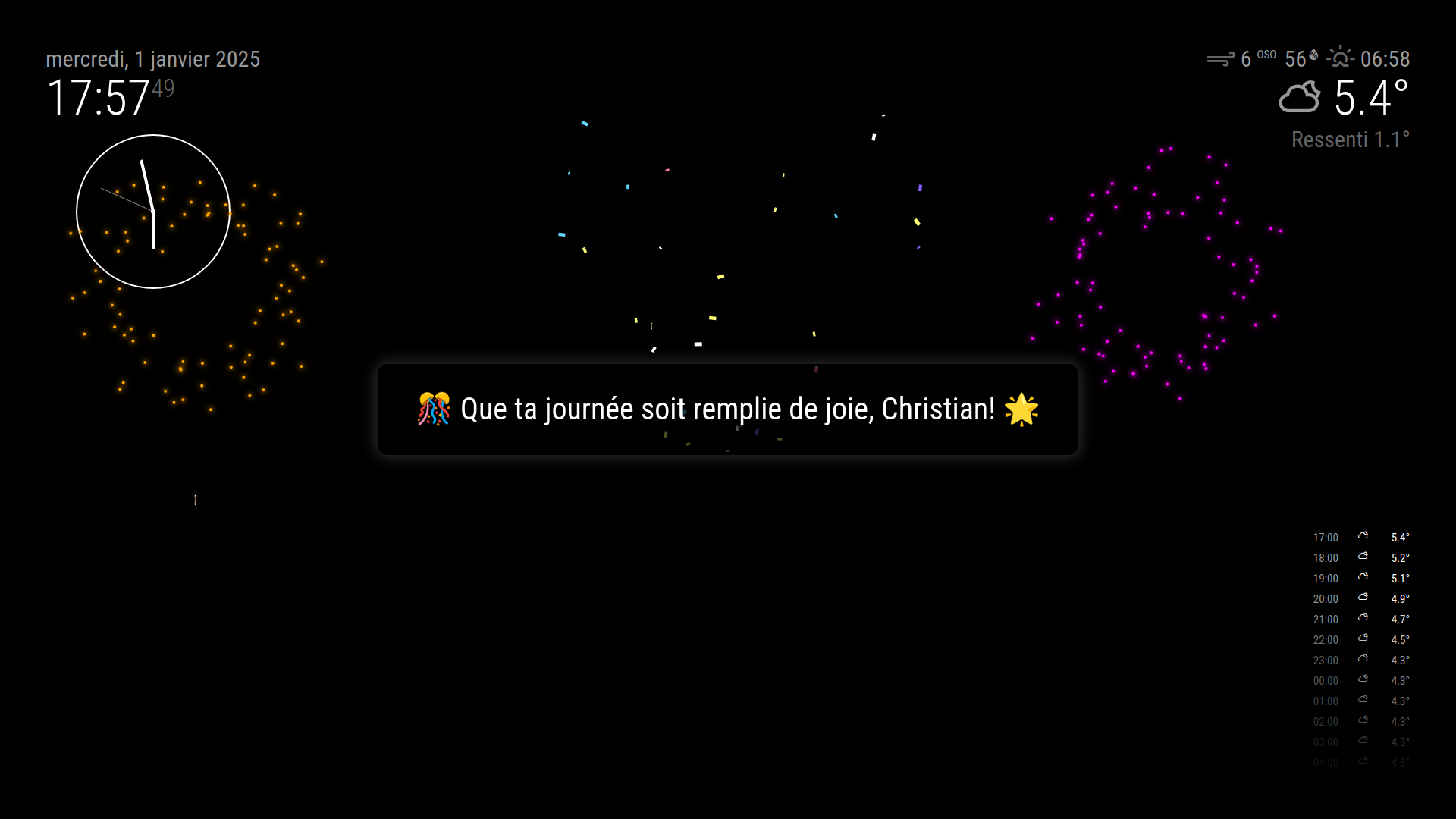
At that time a message is presented in the middle of the screen, fireworks and confetti is displayed.
Its somewhat multilingual (machine translated) and has a few different messages to pick from.
Things I haven’t solved: Currently there is a timer, that is per default set to “infinite” - because its of no use if its invisible. It would probably make sense to make some sortof “off button”, but my main display has no touch or input. So as of now it is as default showed until the day ends.
Here it is: https://github.com/cgillinger/MMM-Birthday