Did you enter the proper module name for the calendar?
Try to comment calendar out to see if it works without.
C
Offline
A New Chapter for MagicMirror: The Community Takes the Lead
Read the statement by Michael Teeuw here.
Read the statement by Michael Teeuw here.
Posts
-
RE: MM modules not displaying or no longer refresh after restart
-
RE: MMM-crypto-portfolio
@amDDJunkie I have just added the logos
If someone else needs a logo added please send the logo size 50x50 pixels in colour and in white.
-
RE: MMM-Domiticz
Today added total actual usage of Watts.
Please add ‘usage’ to your showItems in your config.js -
RE: MMM-Domiticz
@jaminben Thanks I will arrange them in my Dashboard as well.
-
RE: MMM-Domiticz
I already tried before to reorder the data. In the description of API/JSON for Domoticz it says you can order by Name. (Line 37 in my code)
That is the documentation, but in reality you can’t order anything. If I look in the json coming from the request file there are no objects that would follow the order in your webapplication.
It could be done my making an array where all sensors are switches are in, but it would be a hassle if you add a new device you would also need to add to your modules config.
Lets wait what the next version of Domoticz brings and if I am able to implement it.
-
RE: MMM-Domiticz
Yes they are all the same sensor. I will try in the coming days if I am able to get those properly.
Just made it. if you pull the upgrade it is there
-
RE: MMM-Domiticz
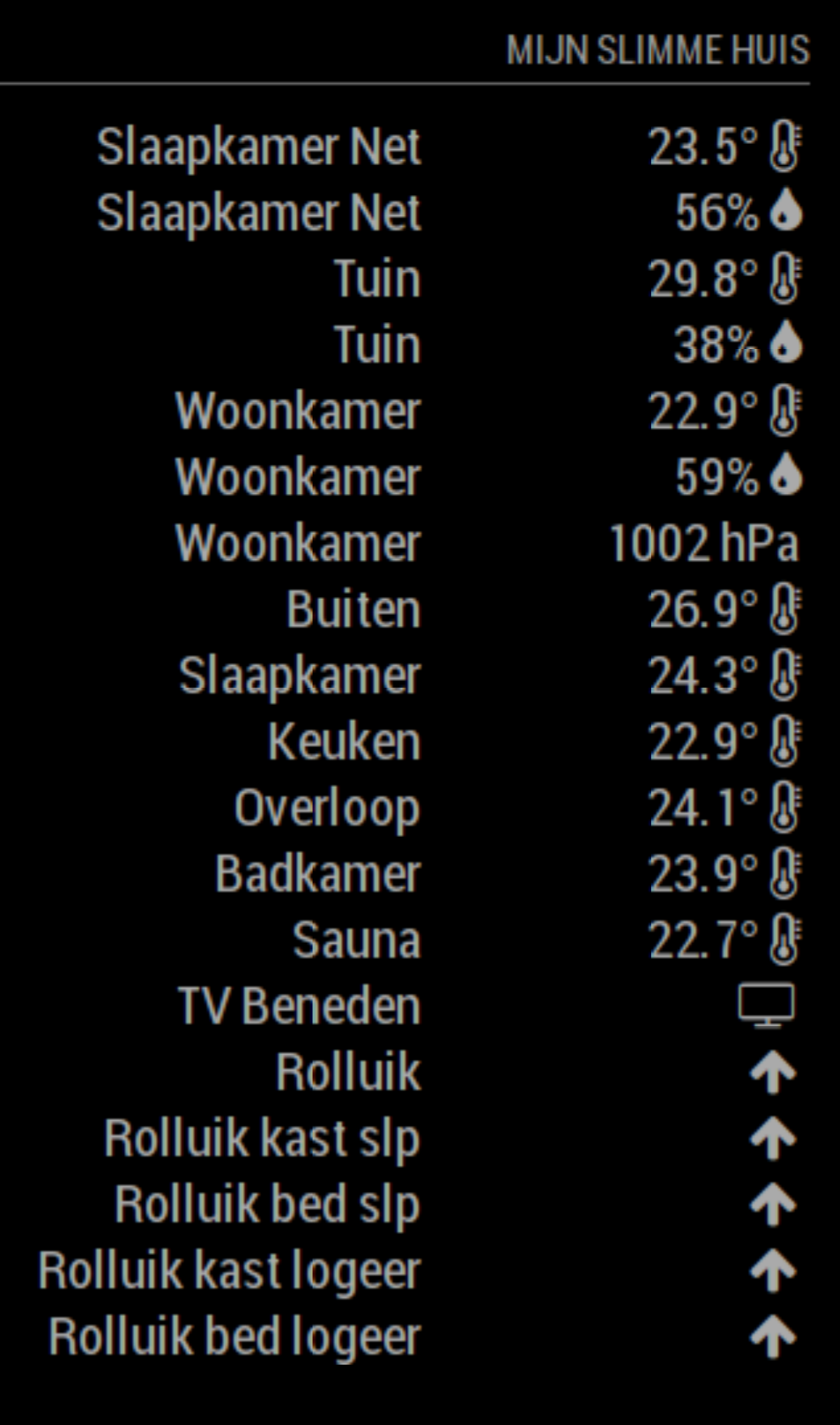
You need to add humidity and baro to the showItems part in config.js
to see all options (someone asked in PM to block humidity)showItems: ['temperature','energy','battery','co', 'blinds','humidity','baro']It will now show the way you like it
-
RE: MMM-Domiticz
@jaminben Thanks for the thank you, i am still working on it to make it better.
You can add more in your config.js settings
showItems: ['temperature','energy','battery','co', 'blinds','humidity','baro'], // possible items temperature, energy, battery, co, blinds, humidity, baroCould you please reply with your config settings for this module .(delete any personal information ip,username or password)
I think I misread your question, however all sensors data are grouped in the newest version.
-
RE: Other options to hanging the mirror on a wall
My mirror is hanging over an electric outlet. With a proper drill you can drill a hole in concrete.
-
RE: MMM-Domiticz
Updated today with Humidity and the possibility to not show the subMenus.
I choose not to add the Barometric Pressure and Sound Levels from Netatmo because my screen would be high enough in portrait mode.
-
RE: MMM-cryptocurrency
I have made an updated extended version of MMM-cryptocurrency it is based on Mattelo’s work
-
RE: Vera Edge Gateway
I am not using Vera, but checked what is possible
http://wiki.mios.com/index.php/Luup_Control#Getting_the_list_of_UPnP_devices_you_can_control
-
RE: MMM-PIR-Sensor problems
What you could do is put a 10k Resistor between GPIO 22 and GND. if the PIR disconnects your PIN is pulled LOW.
PIRs may give different signals my PIR only gives a high (3v3)
-
RE: MMM-PIR-Sensor problems
You could try to use a pull-up resistor maybe the PIR output is 5V
Check this website. Otherwise your PIR is broken. If you are in the Netherlands i can post by snailmail another one to you that works for sure,
-
RE: MMM-PIR-Sensor problems
As I wrote in my previous message check if the GPIO is low when you disconnect the PIR
I always check all parts with an Arduino Nano or Uno to see if it works and if it needs settings it is easily done before installing.
This evening I will not be online any much longer. -
RE: MMM-PIR-Sensor problems
Maybe your PIR is always HIGH
thats is why you should check with a resistor if it works.
Or disconnect the OUT pin to see in the screen stays off. -
RE: MMM-Domiticz
Hello Peter,
There are two different things. One is Domoticz and the other is MagicMirror.
The module requests data from Domoticz. It is a reply in json.
This comes from my shutter.{ "AddjMulti" : 1.0, "AddjMulti2" : 1.0, "AddjValue" : 0.0, "AddjValue2" : 0.0, "BatteryLevel" : 255, "CustomImage" : 0, "Data" : "Open", "Description" : "", "DimmerType" : "abs", "Favorite" : 0, "HardwareID" : 7, "HardwareName" : "ZwaveUSB", "HardwareType" : "OpenZWave USB", "HardwareTypeVal" : 21, "HaveDimmer" : true, "HaveGroupCmd" : true, "HaveTimeout" : false, "ID" : "00000501", "Image" : "Light", "IsSubDevice" : false, "LastUpdate" : "2018-04-16 08:37:09", "Level" : 255, "LevelInt" : 255, "MaxDimLevel" : 100, "Name" : "Rolluik", "Notifications" : "false", "PlanID" : "7", "PlanIDs" : [ 7 ], "Protected" : false, "ShowNotifications" : true, "SignalLevel" : "-", "Status" : "Open", "StrParam1" : "", "StrParam2" : "", "SubType" : "Switch", "SwitchType" : "Blinds Inverted", "SwitchTypeVal" : 6, "Timers" : "true", "Type" : "Light/Switch", "TypeImg" : "blinds", "Unit" : 1, "Used" : 1, "UsedByCamera" : false, "XOffset" : "698", "YOffset" : "1168", "idx" : "31" },The Image in this record is not the image in the MagicMirror. The MagicMirror Icons are from Fontawesome version 4.7 there is now a version 5 available but doesn’t like to work along 4.7 in MagicMirror.
The icons you see in my module are based on the type of device retrieved with the json file from Domoticz. See the lines in my code from 55 to line 71
There are no icons for shutters/shades or similar in fontawesome. That is why I use the status text from Domoticz. (In the Netherlands the webinterface is in Dutch but you will see that the status of the blinds are in English)
Hope this clarifies the icon issue.
-
RE: MMM-PIR-Sensor problems
You could try if you are using the right GPIO by pulling the pin Up.
Take a 10k Resistor one side on 5V and the other side tap the GPIO pin that is what the PIR would do. Then you can check if you use the proper pin.
-
RE: MMM-Domiticz
I have added colour yellow to closed Blinds/shutters.
There is no added colour to lights, outlets because the are not visible when they are inactive.
However if you like to add a colour you can change the code in line 72
make sure you have a space between small and yellow just before the i-element for the icons -
RE: MMM-Domiticz
@Peter What colours would you like and for what state (On, Off, Open Close)