I want to thank @Sean publicly for having helped me privately into solving the issue! :clapping_hands_medium-light_skin_tone: :thumbs_up_medium-light_skin_tone:
 C
Offline
C
Offline
A New Chapter for MagicMirror: The Community Takes the Lead
Read the statement by Michael Teeuw here.
Read the statement by Michael Teeuw here.
Posts
-
RE: MMM-AssistantMk2
-
RE: MMM-AssistantMk2
@Sean
If I usenullI get a black MMM screen.If I use
hw:0,0I get the config.js message.Finally if I use
"hw:0,0"(with quotes) I get a black MM screen again.:smiling_face_with_open_mouth_cold_sweat:
-
RE: MMM-NewsFeedTicker
@justjim1220
That did the trick thanks. :thumbs_up_medium-light_skin_tone: -
RE: MMM-AssistantMk2
@sgopala Thanks for pointing this out. ;)
@sean I keep getting either a black MM screen or the ‘config.js’ message.
At this point I prefer to work with a config with MMM-AssistantMk2 only and no other modules until everything is working 100%.
If you could help me by giving please a look at the below config? :)
Please note that I am trying to use0:0as device Id.
-
RE: MMM-AssistantMk2
@sean
So after following the installation instructions I ran a test by using the ‘Very simple version but limited’ module.As a result all I get now from MM is a black empty screen (no config.js message and no trace of other modules can be seen).
-
RE: MMM-AssistantMk2
@sean
Again I made a noob error… I ran both commands at once lol! :smiling_face_with_open_mouth_cold_sweat:Running them separately worked like a charm! :thumbs_up_medium-light_skin_tone:
I am going now to retry with the module addition.
-
RE: MMM-AssistantMk2
@sean said in MMM-AssistantMk2 & MMM-GAction:
cat ~/.asoundrcTell me the result.
How you can setup previously? (I think you purchased that device for Google AIY project. Was there any instructions?)
pi@raspberrypi:~ $ cat ~/.asoundrc
cat: /home/pi/.asoundrc: File or directory does not exist
It’s the so- called Google Voice Kit AIY (https://aiyprojects.withgoogle.com/voice-v1/).
I used a ready meal Raspbian image made by Google.
Apart from creating the JSON file everything else consists of ready scripts (i.e assistant_library_demo.py is a script to runs and uses Google Assistant):
https://github.com/google/aiyprojects-raspbian/tree/voicekit -
RE: MMM-AssistantMk2
@sean
Nope. :pensive_face:arecord -t 5 -D hw:0,0 test.wav arecord: main:574: unrecognized file format 5 -
RE: MMM-AssistantMk2
@sean
I get an error and please note that I’ve tried to translate to English. :winking_face:arecord -t 5 test.wav & aplay test.wav [1] 2911 arecord: main:574: unrecognized file format 5 test.wav: File or directory does not exist [1]+ Output 1 arecord -t 5 test.wav -
RE: MMM-AssistantMk2
@sean
Thanks for helping a (Raspberry) noob here hehe.I got a different result:
$ arecord --list-devices
**** List of CAPTURE Hardware Devices ****
card 0: sndrpigooglevoi [snd_rpi_googlevoicehat_soundcar], device 0: Google voiceHAT SoundCard HiFi voicehat-hifi-0 []
  Subdevices: 0/1
  Subdevice #0: subdevice #0
Therefore would my recording device still be hw:0,0?
aplay gave me this:
aplay --list-devices
**** List of PLAYBACK Hardware Devices ****
card 0: sndrpigooglevoi [snd_rpi_googlevoicehat_soundcar], device 0: Google voiceHAT SoundCard HiFi voicehat-hifi-0 []
  Subdevices: 0/1
  Subdevice #0: subdevice #0
I believe it’s the same ID like above right?
-
RE: MMM-AssistantMk2
@sean hmm it is to my understanding that a device ID is mandatory right?
Do you have any idea if the Raspberry Voice HAT can be used with your model?
And if yes how can I find out the device id then? :thinking_face: -
RE: MMM-AssistantMk2
@sean
HURRAY! :man_dancing_medium-light_skin_tone:
Going to implement it right now! -
RE: MMM-NewsFeedTicker
Although I am using the UTF-8 encoding for ALL of my newsfeeds accented letters (i.e é, à, etc.) and currency symbols (i.e €) are not displayed properly.
Any idea why?
		{
			module: "MMM-NewsFeedTicker",
			position: "bottom_bar",
			disabled: false,
			//classes: "day_scheduler"
			config: {
			    feeds: [
					{
						title: "Hardware Upgrade",
						url: "https://feeds.hwupgrade.it/rss_hwup.xml",
						encoding: "UTF-8", //ISO-8859-1
						className: "myClass",
						defaultLogo : ""
					}
			    	    ]
				}
		    }
-
RE: MMM-NewsFeedTicker
OK, thanks.
Update:
When not using a background then overall performance improves! :thumbs_up_medium-light_skin_tone: -
RE: MMM-Darksky-hourly - change icons
To the funny guy that marked my previous post as spam (preventing me from further edits): GTFO. :winking_face:
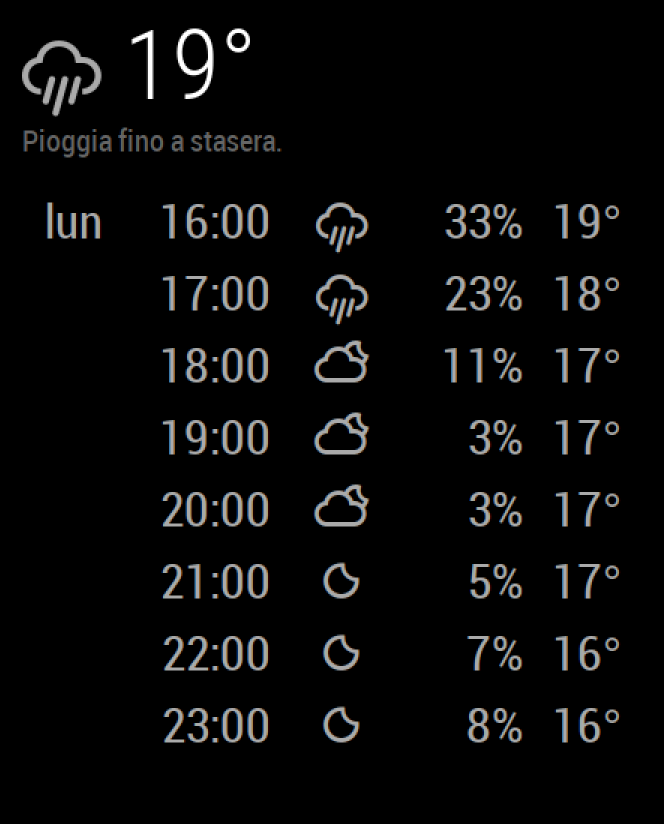
Back in topic… @Maros this is how it looks right now.
-
RE: MMM-Darksky-hourly - change icons
@maros said in MMM-Darksky-hourly - change icons:
what i’ve done :
- download icons from : https://www.amcharts.com/free-animated-svg-weather-icons/
- put icons in folder MagicMirror/css/icons (if it’s not there create it)
- edit custom.css in MagicMirror/css and add :
.MMM-darksky-hourly { } .MMM-darksky-hourly .big-icon { font-size: 70%; line-height: 65px; display: inline-block; -ms-transform: translate(0, -3px); /* IE 9 */ -webkit-transform: translate(0, -3px); /* Safari */ transform: translate(0, -3px); width: 140px; } .MMM-darksky-hourly .summary { width: 400px; } .MMM-darksky-hourly .forecast { text-align: left; min-width: 400px; margin-top: 0.05ex; } .MMM-darksky-hourly .forecast-row { } .MMM-darksky-hourly .forecast-row>span { display: table-cell; width: 60px; } .MMM-darksky-hourly .forecast-row .forecast-day { text-align: center; padding-right: 0.5em; } .MMM-darksky-hourly .forecast-row .forecast-hour { text-align: right; padding-right: 0.6em; } .MMM-darksky-hourly .forecast-row .weathericon { text-align: center; padding-right: 0.5em; } .MMM-darksky-hourly .forecast-bar { display: table; overflow: hidden; } .MMM-darksky-hourly .forecast-bar>span { display: table-cell; text-align: left; } .MMM-darksky-hourly .forecast-bar .bar { background-color: #aaa; line-height: 0.1em; border-radius: 0.1em; border: 0.5ex transparent solid; background-clip: padding-box; color: black; } .small.MMM-darksky-hourly .forecast { min-width: 200px; max-width: 300px; } .small.MMM-darksky-hourly .summary { width: 300px; } .MMM-darksky-hourly .wi-day-sunny { content: url("/css/icons/day.svg"); } .MMM-darksky-hourly .wi-day-cloudy { content: url("/css/icons/cloudy-day-1.svg"); } .MMM-darksky-hourly .wi-rain { content: url("/css/icons/rainy-6.svg"); } .MMM-darksky-hourly .wi-night-clear { content: url("/css/icons/night.svg"); } .MMM-darksky-hourly .wi-night-alt-cloudy { content: url("/css/icons/cloudy-night-2.svg"); } .MMM-darksky-hourly .wi-cloudy { content: url("/css/icons/cloudy.svg"); } .MMM-darksky-hourly .wi-hail { content: url("/css/icons/rainy-7.svg"); } .MMM-darksky-hourly .wi-thunderstorm { content: url("/css/icons/thunder.svg"); } .MMM-darksky-hourly .wi-snow { content: url("/css/icons/snowy-6.svg"); } .MMM-darksky-hourly .wi-cloudy-gusts { content: url("/css/icons/cloudy-day-3.svg"); } .MMM-darksky-hourly .wi-fog { content: url("/css/icons/cloudy.svg"); }- edit main.css change line 12, 14, 15 (this will change how far from borders other modules will be) (line 14 and 15 are 2x bigger than line 12)
if you change to 40px line 12 line 14 and 15 will be 100% - 80px
12 margin: 30px; 14 height: calc(100% - 60px); 15 width: calc(100% - 60px);- restart mm (pm2 restart mm)
maybe this will help someone :)
I followed your instructions, but for some reason the module keeps loading the default white icons…
Also there’s no forecast for the next days (despite what you show in the screenshot).Any thoughts? :thinking_face:
-
RE: MMM-NewsFeedTicker
Sorry @justjim1220 I noticed only now that you removed the newsfeed ticker background in your latest screenshots.
I would like to try that out and see if performance improves. :)
How do you do that? -
RE: MMM-AssistantMk2
@sean said in MMM-AssistantMk2 & MMM-GAction:
@citizendevpi @Cr4z33
Still got problem?
I’m making whole new update. It will be more stable and easy to install & use. I’ll release this new update in this week. Plz wait a few days.Fortunately I was busy at getting to work two LED strips so OK I will wait with pleasure hehe.
Thanks for letting me know. :thumbs_up_medium-light_skin_tone: