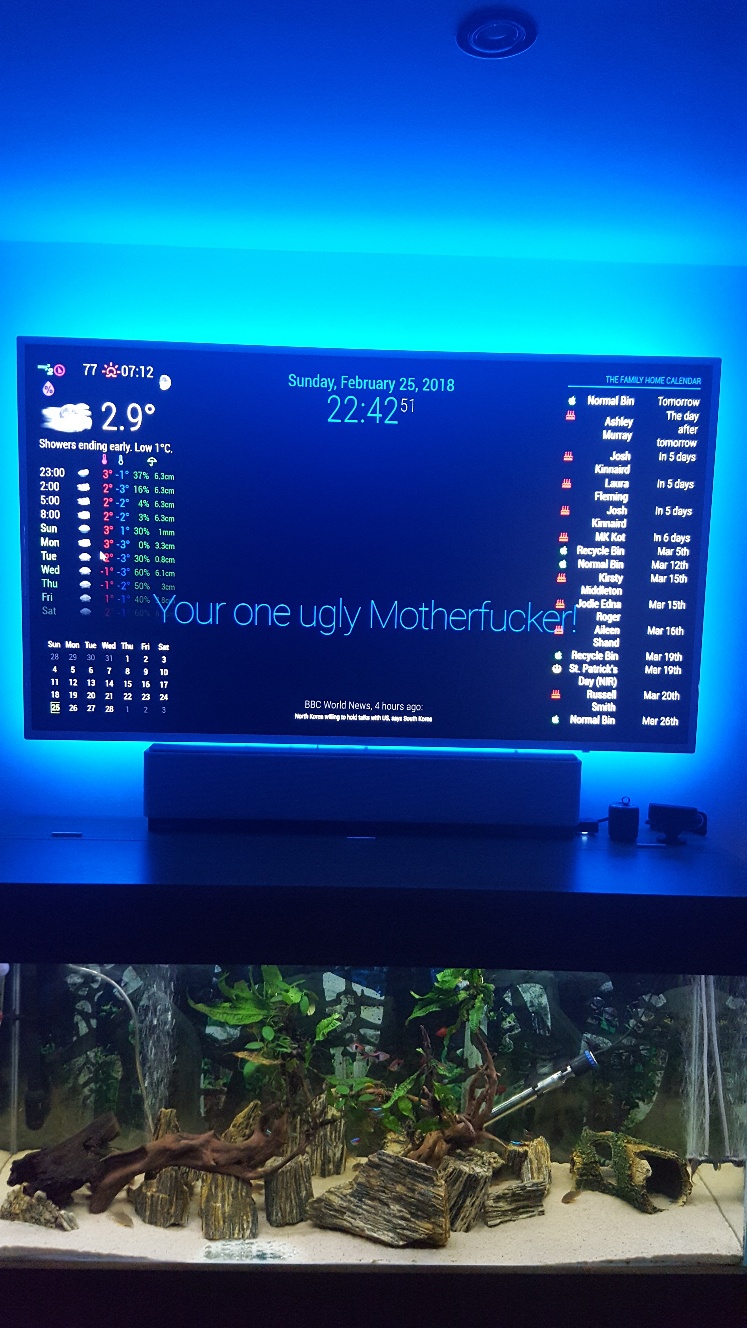
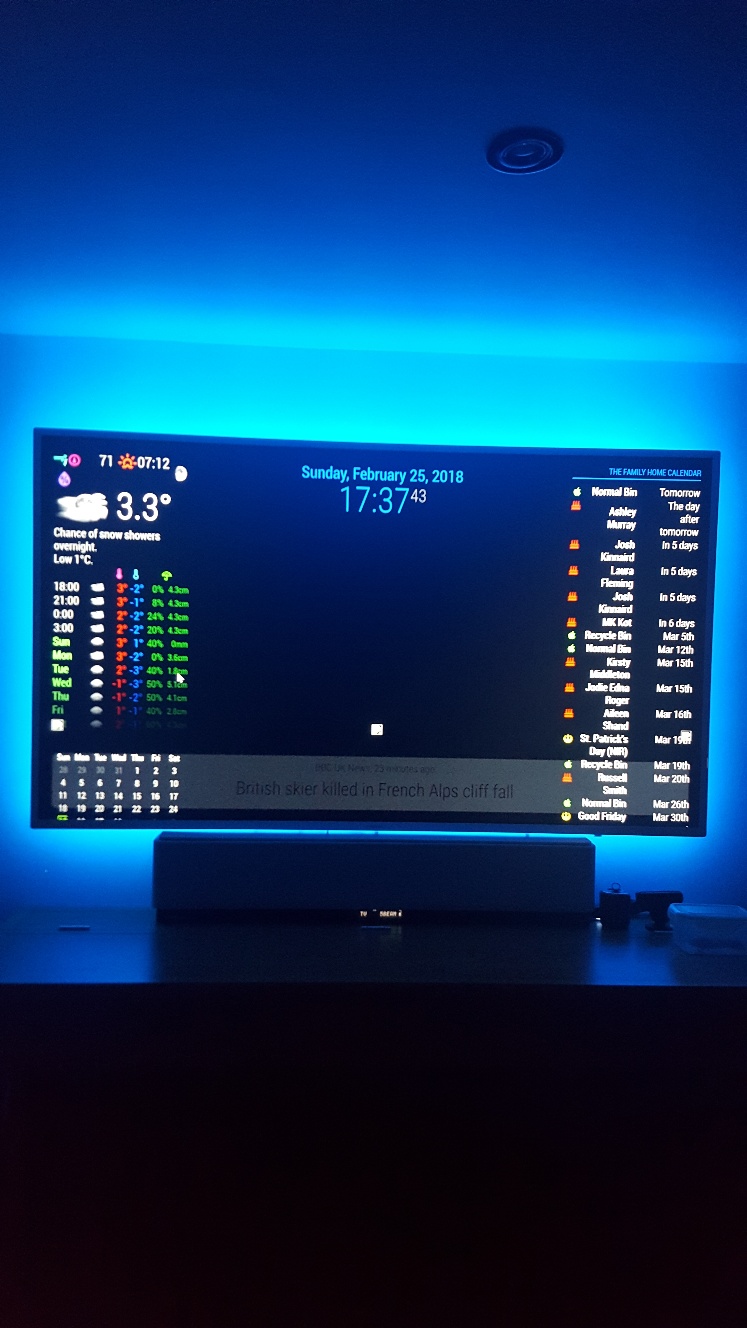
Thanks will try that out when keyboard recharges, I have run battery flat with all the things I have tried 😮
D
Offline
A New Chapter for MagicMirror: The Community Takes the Lead
Read the statement by Michael Teeuw here.
Read the statement by Michael Teeuw here.
Posts
-
RE: Updating MM on a PC?
-
RE: Messed up CSS between Portrait and Landscape monitors
Thanks, but do I download something onto the Pc to view? How do i inspect the element? There is nothing on that page to download, so how does the Dom inspector work?
-
RE: Updating MM on a PC?
$ git init
Initialized empty git repository in C:/users/Damian/MagicMirror/.git/
$ git pull
fatal: no remote repository specified. Please, specify either a url or a remote name from which new revisions should be fetched. -
RE: Messed up CSS between Portrait and Landscape monitors
Nope, that never worked either😣
I cannot fathom out what is going on, even when I first loaded up the default MM it all looked too big. Thats why I then added in my config.js and CSS stuff from my Pi foders to see if they would help minimise things any.
-
RE: Updating MM on a PC?
@cowboysdude said in Updating MM on a PC?:
try:
git pull origin master
If you’re still having problems do this:
sudo apt-get install git-all
Then retry ‘git pull’…
From ~MagicMirror
$ git pull origin master
fatal: Not a git repository (or any of the parent directories): .git$ sudo apt-get install git-all
bash: sudo: command not found -
RE: Messed up CSS between Portrait and Landscape monitors
Unfortunatley not ☹
I am now at a loss as to what to try now as this is first time trying MM on Landscape, and I am not liking it at all because I am unsure how to minimise the modules… a simple Zoom out would be perfect as my screen looks like its 100% zoomed in.😣 -
RE: Updating MM on a PC?
‘’’
Damian@KitchenComputer ~/MagicMirror
$ git pullFatal: not a git repository (or any of the parent firectories): .git
‘’’ -
Updating MM on a PC?
Hello, yeah I may be sounding thick, but how does one update all on MM running on a PC? The MM itself, and all modules?
I tried the usual Pi commands, but they are surely different?
cd MagicMirror -then git pull -then npm install
sudo apt-get updateor even tried
cd MagicMirror > cd modules > cd MMM-WuderGround then type in git pull or
In terminal, ~/MagicMirror/modules/MMM-WunderGround $
and type git pullThanks
-
RE: Messed up CSS between Portrait and Landscape monitors
Thanks for the input guys, I have managed to reduce the news feed, which now looks more in keeping with screen size, but I cannot make compliments any slimmer - more central and not spreading over my weather and calendars?
I have just removed simple logo as that was just impossible to place anywhere.
The weather, calendar monthly, on left, and home calendar on right, goes weird with any alteration to font sizing, half of calendar goes off screen to right, and weather icons drop from grouping, meaning the temp now goes under the cloud instead of being close together.
I understand what you mean by having more flexibility when using in portrait, but I would have thought that there was some way of reducing say the weather sizing as a whole, same as calendars? By shrinking the zone/padding or whatever constraints they work under?
Portrait seems really easy and straight forward, but surely there must be another set of rules for landscape users of calendar and wunderground?
I wanted to sort all this out perfect before I started on MMM. Lucy, so I can fit the image in there somehow, but looks like I have my work cut out to re-arrange and minimise what I have now, first.
Edit. Even if there was a way to shrink Compliments, for now that would be acceptable until I get more time to play around trying to shrink wunderground, calendar monthly, and my family calendar. It just takes up whole width of screen and looks horrible 😯
-
RE: Messed up CSS between Portrait and Landscape monitors
I have been playing about with the font sizes and line height for the last 2 hours, but all I am doing is messing things up worse, and reverting back again to try other things, but really not sure what to try.
Is this a simple case of making the zones smaller so everything fits accordingly? if so, can someone point me where to alter those to try? Thanks
-
Messed up CSS between Portrait and Landscape monitors
Hello,
In order to use Mykle1 MMM.Lucy, on my spare PC, I thought to save a lot of time by simply adding all the files from my Pi folder which is connected to a portrait monitor, that I have obviously altered CSS to suit that, and my PC Monitor being Landscape, makes MM squashed using the same CSS files for the several modules - Wunderground, Simple Logo, Calendar monthly, Compliments, News feed.I have only needed to perform these changes once, and that was over a year ago, so obviously I cannot remember what I done/altered, and what the defaults were, so I could get things looking perfect on the Landscape, as they do on the portrait.
Can anyone please push me towards how/what I can change in the CSS so that it looks right? I will include the files from each Module if you want to see them all?
I am not sure if the padding needs altered back, as that was altered last year to maximise screen width for the portrait mirror, so unsure if that same padding will be okay on Landscape?As you can see from image, it looks like the bottom half has overlaid on top half, so I removed simple logos so you can see better, and also waited until news feed faded, and compliments faded, to let you see how odd things are, although I am happy enough with clock date size.
Many thanks for all pointers given
-
RE: Hello-Lucy
I bought a micro USB one last year when I tried to put alexa on the Pi, and when testing at about 1 foot away, I sounded as if I were 10 feet away with cotton wool in my mouth. Also had problems of latency using Alexa, so I abandoned both, having spent way too much time trying just about every combination of settings I read up to try, and ask about.
I always read reviews on the likes of Amazon, and have read of a few that really only work great when really close up to the Mic, and so far I have not came across any review that has mentioned a Mic that has worked from a decent distance, seeing as Mic’s are usually always used up close.
The PS3 Eye was the only one where I seen a reviewer state that he used his from about 3M away and was heard perfectly on Skype, but alas, not from a Pi, and not using it for voice control.
As you have noted, the USB mic works perfect for normal usage, and it only becomes a problem when using Lucy… Like my previous problem when using Alexa, so therein may be the problem? I was about to add the limitations of the Pi as an additional factor, but you also noted the same problem on your powerfull i7, so I am of the opinion that USB mic’s for Voice control are not a good combination? for whatever techy reason that I know nothing about.
The only sure way of sourcing a suitable Mic, for the purpose of long range use, is to read from someone that is actually using one that has worked from a decent distance, on the same project - Lucy.
@pepebc offered up the PS3 Eye, which sounds and looks great, and works for him, but he is not using it for Lucy, so there is no telling if it will work or not, with Lucy :-(
You may have been very lucky in your random choice of 3.5 Mic, as if you chose another, it may have only worked at very close quarters? but seeing as your one actualy works at a decent distance with Lucy, then that is worth a hundred reviews, imho ;-) as I would be hard pushed to find a reviewer on Amazon that is reviewing a Mic for the purposes of using Lucy from a decent distance away, from a MM. ;-)
I will find a UK supplier of the same one you have used, as that has proven to work within a decent range, that users of MM/Lucy would want.
I will see if I can remove the long stem from the Mic though, to make it easier to hide from sight.Thanks again.
-
RE: Hello-Lucy
@Mykle1
Thanks I will just try and find a similar 3.5 Mic to your tried and tested one, here on Amazon uk. At least I know that will work since you have it working well :-) -
RE: Hello-Lucy
Thanks, I was under the impression that you used a mini PC… with Windows OS, and that you installed MM on top of it, and that the Mic was going through the Windows Soundcard, which needed a Driver… but now realise you are using a Mini PC with only Linux loaded on, and therefore do not need drivers.
The PC I intended trying the Eye on, has Win 7 on it, with MM on top, so not the same set up as yours, and therefore unsure if results would match yours?
I would have liked to have heard that it works on a Pi, with Lucy, but, I will take @Mykle1 findings, and give the USB Mic’s a miss, as I only wanted one to use solely/reliably, with Lucy, both on my House Pi MM, and on my PC Win/linux MM, and on the basis of Mykle1’s findings, the USB does not work so good with Lucy, so will go for a similar Mic to what he has tried and tested… but thanks for mentioning the Eye.
-
RE: Hello-Lucy
@pepebc
Thanks, So you are working it on a PC? Are you using Lucy with it?Is your one the old Flat lens or newer curved lens?
Did you find the PC drivers easily, and if so, from where? and which OS are you using with it - 7, 8, 10 ? -
RE: Hello-Lucy
I remember a few posts from a while back of folks using this PS3 Eye and seem to recall mixed reviews… Problems with getting the Mic set up as there was a flaff with ALSA and PulseAudio… The latter being what the Eye seemed to like best, albeit with some flaffing about setting it up. Which I think coincides with @Mykle1 findings about the USB Mic on the Pi.
The Eye also works on a PC, but you need to source out the drivers for it, and from the brief, few reviews I have read from PC users using the Eye, for PC uses, seem good, and one Amazon reviewer even states that he used the Mic from 3M and was heard very clearly…
https://www.amazon.co.uk/Sony-PlayStation-Eye-Camera-EyeCreate/dp/B000W3YQ1Y
but, using it for MM on a PC, to use Lucy, may still require some tweeking somewhere?
Sure it ticks all the boxes for the things we do on MM, and being small is a big bonus, as who wants a Dalek type microphone spoiling the aesthetics of the MM?
But, it is a bit pricey to buy just for Lucy, and for it not to work through MM… either through the PI usb ( as Mykle1 has already pointed out ) although @pepebc states it works perfectly? - or - On a PC, using MM… also what @Mykle1 pointed out that did not work through USB… and, would it work if used with a USB to 3,5 adapter/crossover/splitter?
Which does open up a pandora’s box of questions regarding USB microphones… Do they work great on MM for just recording voice ect, and only ever hit a problem when using with Alexa / Lucy type modules? Or is it just the make/brand/spec of Microphones? or even just how the ALSA and PulseAudio work, and we need to simply go through trial and error?
tbh… my head hurts trying to work out the why’s and wherefores regarding why, in this senario, a USB mic is crap … when the simplest, working solution is to use a 3.5 Mic ( or USB to 3.5)… but, is the common denominator here, the Pi/Linux, or MM? seeing as @Mykle1 found the usb problem on a PC too, using Linux/MM? ---- Mykle1, can I ask if you tried the usb MIC on your PC for normal PC stuff, and found the same problem?
https://me.m01.eu/blog/2014/07/an-asoundrc-alsa-config-for-the-ps3-eye/
https://renatocunha.com/blog/2012/04/playstation-eye-audio-linux/
(Now, If there was a way of getting the Amazon Dot/Ech to IFTTT the commands over to the MM / Lucy… . ;-p )
-
RE: Hello-Lucy
Thanks, I did get confused for a second by thinking Omnidirectional was similar to far field, so will continue my search for one that will be far field - of sorts… although I feel those will cost a bit more? But, 50 inches (Max) does seem pretty damn good, as I was more concerned that I would need to be about 12 - 20 inches max, with slight raised voice, as a lot of these type are used within that distance, so they are not really catering for distance, and for the likes of MM and Lucy, needs to be a bit farther eh?
Thanks anyway for that info, as it has gave me a great head start on what to filter my search by.
-
RE: Hello-Lucy
Can I ask a question or two about the microphone?
I’m looking at a couple of small ones, obviously not wanting the long ones that sit on a desktop as I want to be able to at least conceal this out of direct sight as much as possible, without muffling it of course.I had my eye on the “clip on type” because its small and has no long stem like desktop ones have, but here’s the thing - unless a reviewer specifically states distance from mic to mouth, there does not seem to be a way of telling how much a distance range these work at? How close do you really need to be to the MM/Mic in order for voice to be picked up?
I have, in the past, used the cheap desktop types, and the user, on average, is about 7 to 12 inches away from it so it picks up a clear voice that can be understood on recording and voip ect… but, is this the same clarity that Lucy needs for her commands?
When looking at descriptions of models, there are the Mono and Stereo types… and a whole plethora of other specs that are way over my head, and prices to match :-)
I don’t mind paying £8 - £10 for one that will only ever be used when communicating with Lucy, if it will pick up voice from at least 1M, that she will respond to, as I do not want to have to have my face pressed right up close to it before it will hear me, which is not very smart :-(
Did you do any digging/research on my points above before you settled for the one you used, or, if it is just a basic desktop one you have, are you happy enough with how far it can pick up commands?
Thanks
Long stem -
https://www.maplin.co.uk/p/wired-pc-microphone-hw70m
Side mount -
https://www.maplin.co.uk/p/mini-compact-wired-pc-microphone-a84cg
Double mic -
Clip on -