MagicMirror Forum
    • Recent
    • Tags
    • Unsolved
    • Solved
    • MagicMirror² Repository
    • Documentation
    • 3rd-Party-Modules
    • Donate
    • Discord
    • Register
    • Login
    1. Home
    2. dankerthrone
    3. Posts
    A New Chapter for MagicMirror: The Community Takes the Lead
    Read the statement by Michael Teeuw here.
    D
    Offline
    • Profile
    • Following 0
    • Followers 0
    • Topics 2
    • Posts 14
    • Groups 0

    Posts

    Recent Best Controversial
    • RE: MMM-Bose-Soundtouch

      Nevermind, @Charley , I think I just needed a restart. It’s fine now, mostly, but I’d like to run several instances. How would I go about doing that? My parents have three different SoundTouch devices and ideally, none would show up if nothing’s playing and all of them would show if all three were playing different tunes.

      Unfortunately, this is what I end up with if only one of them is playing anything:
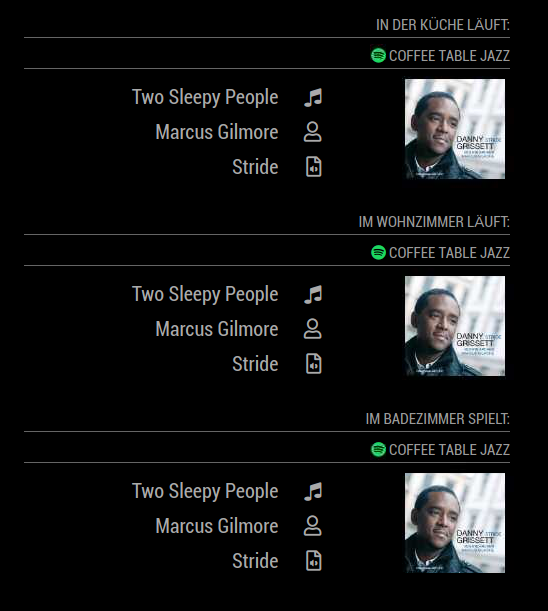
      0_1576874929765_72b01e89-f774-41b3-bb43-57945d802219-grafik.png

      My config.js:

      {
      			module: "MMM-Bose-Soundtouch",
      			header: "In der Küche läuft:",
      			position: "bottom_right",   // see mirror setting for options
      			config: {          
      				updateInterval: 5, // every 5 seconds
      				apiBase: '192.168.178.74',
      					}
      		},
      		{
      			module: "MMM-Bose-Soundtouch",
      			header: "Im Wohnzimmer läuft:",
      			position: "bottom_right",   // see mirror setting for options
      			config: {          
      				updateInterval: 5, // every 5 seconds
      				apiBase: '192.168.178.29',
      					}
      		},
      		{
      			module: "MMM-Bose-Soundtouch",
      			header: "Im Badezimmer spielt:",
      			position: "bottom_right",   // see mirror setting for options
      			config: {          
      				updateInterval: 5, // every 5 seconds
      				apiBase: '192.168.178.21',
      					}
      		},
      

      Apparently, distinct IP addresses are not the only key to success here? :)

      posted in Entertainment
      D
      dankerthrone
    • RE: MMM-Bose-Soundtouch

      @Charley: thank you for the development of this module. Unfortunately, when I started it up, it told me to tell you the results of http://192.168.1.51:8090/now_playing. This is what I’m getting:

      < nowPlaying deviceID="689E1XXXXXXX" source="SPOTIFY" sourceAccount="">
      < ContentItem source="SPOTIFY" type="resume" location ="spotify:user:spotify:playlist:37i9dQZF1DWVqfgj8NZEp1" sourceAccount="" isPresetable="false">
      < itemName>Coffee Table Jazz</itemName>
      < /ContentItem>
      < track>After All</track>
      < artist>Yuri Honing Acoustic Quartet</artist>
      < album>After All</album>
      < stationName/>
      < art artImageStatus="IMAGE_PRESENT">
      http://i.scdn.co/image/ab67616d0000b273461df9176cfef57f0e4ff150
      < /art>
      < time total="322">3</time>
      < skipEnabled/>
      < playStatus>PLAY_STATE</playStatus>
      < shuffleSetting>SHUFFLE_ON</shuffleSetting>
      < repeatSetting>REPEAT_OFF</repeatSetting>
      < skipPreviousEnabled/>
      < streamType>TRACK_ONDEMAND</streamType>
      < trackID>spotify:track:2r3dQilQpgjPbRomN7GAvD</trackID>
      < /nowPlaying>
      

      NB: I had to insert spaces into the tags for forum formatting.

      posted in Entertainment
      D
      dankerthrone
    • RE: MMM-News

      Hey, I’m getting this error message:

      [NEWS] Error :  https://newsapi.org/v2/top-headlines?pageSize=20&apiKey=XXX result.code:Required parameters are missing. Please set any of the following parameters and try again: sources, q, language, country, category.


      although I think have that configured correctly:

      {
      			module: "MMM-News",
      			position: "bottom_right",
      			config: {
      					apiKey : "XXX",
      					type: "vertical",
      					query : [
      						  {
      							language: "de"
      						  }
      						  ],
      					items: 20,
      					timeFormat: "relative",
      					endpoint :  "https://newsapi.org/v2/top-headlines",
      					scanInterval: 1000*60*10, // This will be automatically recalculated by number of queries to avoid query quota limit. This could be minimum interval.
      					templateFile: "template.html"
      					
      					}
      		},
      

      Any help is greatly appreciated :)

      posted in Utilities
      D
      dankerthrone
    • martinkooij/MMM-MyWeather: error message about appid

      Hi all,
      I installed and configured @martinkooij 's module correctly (I think):

      {
      			module: "MMM-MyWeather",
      			position: "bottom_left",
      			config: {
      				apiKey: "xxxxxxxxxxxxxxxxxxxxxxx",
      				lat: "xx.03586",
      				lon: "x.06379",
      				coloricon: true,
      				hourly: '1',
      				fctext: '0',
      				fcdaycount: "5",
      				fcdaystart: "0",
      				hourlyinterval: "3",
      				hourlycount: "3",
      				alerttime: 10000,
      				alerttruncatestring: "english:",
      				roundTmpDecs: 1,
      				UseCardinals: 0,
      				layout: "vertical",
      				fadePoint: 0.8,
      				windunits: "kph"
      				
      			}
      

      All I’m seeing, though, is this weird error message from a previous fork, I think:

      Please set the correct openweather *appid* in the config for
      module: MMM-MyWeather. 
      

      The module’s config, however, refers to weatherbit.io as its apibase. My apiKey seems to work there: I manually tested it and it does record “calls made” under my apikey, so that should check out. What am I missing?

      posted in Troubleshooting
      D
      dankerthrone
    • RE: mmm-suncalc - Text only display of sunrise, sunset and other sun events

      Thanks. I think in general people know to cd to the module folder to be installed and then run

      npm install
      

      but I didn’t get that from the readme, thus ran the install command from the ~/MagicMirror folder and as a result never installed anything. No wonder the thing doesn’t run :D

      It does now, though, so thanks again!

      posted in Utilities
      D
      dankerthrone
    • RE: MMM-Sunrise-Sunset

      @sdetweil
      finding jquery as you suggested returns

      pi@raspberrypi:~/MagicMirror $ find . | grep jquery\.js
      ./node_modules/nwmatcher/src/modules/nwmatcher-jquery.js
      
      
      posted in Utilities
      D
      dankerthrone
    • RE: MMM-Sunrise-Sunset

      after rebooting, the black screen of MagicMirror now shows this in the developer console:

      Starting module: MMM-Sunrise-Sunset
      MMM-Sunrise-Sunset.js:50 Uncaught ReferenceError: $ is not defined
          at Class.updateSun (MMM-Sunrise-Sunset.js:50)
          at Class.start (MMM-Sunrise-Sunset.js:12)
          at startModules (loader.js:55)
          at loader.js:40
          at HTMLLinkElement.stylesheet.onload (loader.js:200)
      DailyXKCD.js:77 https://imgs.xkcd.com/comics/hotel_room_party.png
      7
      DailyXKCD.js:177 Uncaught TypeError: Cannot read property 'naturalHeight' of null
          at Class.scrollComic (DailyXKCD.js:177)
          at DailyXKCD.js:51
      6
      DailyXKCD.js:177 Uncaught TypeError: Cannot read property 'naturalHeight' of null
          at Class.scrollComic (DailyXKCD.js:177)
          at DailyXKCD.js:51
      

      I’m really starting to think I do something stupid everytime I install/clone a module from github. I do follow each readme.md for installation, but somehow keep messing up :-/

      posted in Utilities
      D
      dankerthrone
    • RE: MMM-Sunrise-Sunset

      @sdetweil

      pi@raspberrypi:~/MagicMirror/modules/MMM-Sunrise-Sunset $ ls node_modules -laF
      ls: cannot access 'node_modules': No such file or directory


      … I’m starting to wonder if I messed up something bigger in the beginning since almost any change I apply to config.js results in weird errors.

      posted in Utilities
      D
      dankerthrone
    • RE: Magic Mirror show Pitch Black Screen

      @sdetweil YES! Thank you!

      posted in Troubleshooting
      D
      dankerthrone
    • RE: Black Screen: "cannot find module 'node_helper'"

      So I feel slightly stupid, but for anyone in a similar situation, @sdetweil helped @JorickJuh in this thread with the same problem. I don’t know how to hotlink replies, so for anyone wondering, @sdetweil suggested that, as is evident from the log, node_helper is missing. So, for me, this did the trick:

      cd ~/MagicMirror
      git checkout modules/node_modules/node_helper/index.js
      

      EDIT: you beat me to it :D - thanks again!

      posted in Troubleshooting
      D
      dankerthrone
    • Black Screen: "cannot find module 'node_helper'"

      Hey everyone,

      I did a fresh, clean install using the automated script and on first time startup, MM worked with the default modules. Then I tried adding MMM-DailyXKCD and on restarting, I found that something went wrong. I’m only presented with a fullscreen black window titled “electron”, but apart from that, nothing ever happens. This is the terminal output when launching from there:

      pi@raspberrypi:~/MagicMirror $ DISPLAY=:0 npm start
      
      > magicmirror@2.9.0 start /home/pi/MagicMirror
      > sh run-start.sh
      
      Starting MagicMirror: v2.9.0
      Loading config ...
      Loading module helpers ...
      WARNING! Could not load config file. Starting with default configuration. Error found: Error: Cannot find module 'node_helper'
      Loading module helpers ...
      App threw an error during load
      Error: Cannot find module 'node_helper'
          at Module._resolveFilename (internal/modules/cjs/loader.js:602:15)
          at Function.Module._resolveFilename (/home/pi/MagicMirror/node_modules/electron/dist/resources/electron.asar/common/reset-search-paths.js:35:12)
          at Function.Module._load (internal/modules/cjs/loader.js:528:25)
          at Module.require (internal/modules/cjs/loader.js:658:17)
          at require (internal/modules/cjs/helpers.js:20:18)
          at Object.<anonymous> (/home/pi/MagicMirror/modules/DailyXKCD/node_helper.js:2:18)
          at Object.<anonymous> (/home/pi/MagicMirror/modules/DailyXKCD/node_helper.js:50:3)
          at Module._compile (internal/modules/cjs/loader.js:711:30)
          at Object.Module._extensions..js (internal/modules/cjs/loader.js:722:10)
          at Module.load (internal/modules/cjs/loader.js:620:32)
      Whoops! There was an uncaught exception...
      { Error: Cannot find module 'node_helper'
          at Module._resolveFilename (internal/modules/cjs/loader.js:602:15)
          at Function.Module._resolveFilename (/home/pi/MagicMirror/node_modules/electron/dist/resources/electron.asar/common/reset-search-paths.js:35:12)
          at Function.Module._load (internal/modules/cjs/loader.js:528:25)
          at Module.require (internal/modules/cjs/loader.js:658:17)
          at require (internal/modules/cjs/helpers.js:20:18)
          at Object.<anonymous> (/home/pi/MagicMirror/modules/DailyXKCD/node_helper.js:2:18)
          at Object.<anonymous> (/home/pi/MagicMirror/modules/DailyXKCD/node_helper.js:50:3)
          at Module._compile (internal/modules/cjs/loader.js:711:30)
          at Object.Module._extensions..js (internal/modules/cjs/loader.js:722:10)
          at Module.load (internal/modules/cjs/loader.js:620:32) code: 'MODULE_NOT_FOUND' }
      MagicMirror will not quit, but it might be a good idea to check why this happened. Maybe no internet connection?
      If you think this really is an issue, please open an issue on GitHub: https://github.com/MichMich/MagicMirror/issues
      Launching application.


      Any ideas as to what’s happening here?

      posted in Troubleshooting
      D
      dankerthrone
    • RE: MMM-Sunrise-Sunset

      That seems to have been a copy/paste-error. My terminal history shows it with the underscore. To make sure, I tried it once again, but still get

      pi@raspberrypi:~/MagicMirror/modules/MMM-Sunrise-Sunset $ cp node_modules/jquery/dist/jquery.js .
      cp: cannot stat 'node_modules/jquery/dist/jquery.js': No such file or directory
      
      posted in Utilities
      D
      dankerthrone
    • RE: MMM-Sunrise-Sunset

      @sdetweil: Thank you so much for your help here. I’m having the exact same problem as @pugsly did, but unfortunately your suggestions seem to not do the trick. I was wondering if you could help me out, too. So far I got:

                              {
      			module: "MMM-Sunrise-Sunset",
      			position: "bottom_bar",
      			config: {
      				apiKey: "xxx", 				
      				latitude: "xx.03586",
      				longitude: "xx.06379",
      				timezone: "Europe/Berlin",
      				layout: "inline"
      				}
      		},
      

      My screen stays black, though, and the developer console is giving me this:

      Uncaught ReferenceError: $ is not defined
      at Class.updateSun (MMM-Sunrise-Sunset.js:33)
      at Class.start (MMM-Sunrise-Sunset.js:12)
      at startModules (loader.js:55)
      at loader.js:40
      at HTMLLinkElement.stylesheet.onload (loader.js:200)
      

      I even tried executing your suggestions as root, thinking that I must’ve done something wrong, but I got the same error messages as before:

      root@raspberrypi:/home/pi/MagicMirror/modules/MMM-Sunrise-Sunset# npm install jquery
      npm WARN saveError ENOENT: no such file or directory, open '/home/pi/MagicMirror/modules/package.json'
      npm WARN enoent ENOENT: no such file or directory, open '/home/pi/MagicMirror/modules/package.json'
      npm WARN modules No description
      npm WARN modules No repository field.
      npm WARN modules No README data
      npm WARN modules No license field.
      
      + jquery@3.4.1
      removed 1 package, updated 1 package and audited 1 package in 4.09s
      found 0 vulnerabilities
      
      root@raspberrypi:/home/pi/MagicMirror/modules/MMM-Sunrise-Sunset# cp node/modules/jquery/dist/jquery.js .
      cp: cannot stat 'node/modules/jquery/dist/jquery.js': No such file or directory
      

      What am I missing here?

      posted in Utilities
      D
      dankerthrone
    • RE: mmm-suncalc - Text only display of sunrise, sunset and other sun events

      Hey, total newbie to everything coding- and mirror-related here. I tried to get suncalc to work while also trying @retroflex 's suggested layout, but whatever I do, nothing ever show’s up on my MM screen. The module just doesn’t do anything. Do I need to also clone the original suncalc repository? Where to, if so?

      So far, what I got is this:

      {
      			module: 'mmm-suncalc',
      			position: "lower_third",
      			//classes: "default everyone small dimmed",
      			header: "Sonne",
      			config: {
      				latitude: 51.03586,
      				longitude: 7.06379,
      				text: "Aufgang: <dawn> - <sunrise>. Untergang: <sunset> - <dusk>"
      				//'<table>' + 
      				//'<tr><td>&#9728;</td><td>Går upp:</td><td><dawn> - <sunrise></td></tr>' +
      				//'<tr><td>&#9790;</td><td>Går ner:</td><td><sunset> - <dusk></td></tr>' +
      				//'</table>'
      				},
      		},
      

      Does that look alright?

      posted in Utilities
      D
      dankerthrone
    • 1 / 1