Do you have to install both forks?
D
Offline
A New Chapter for MagicMirror: The Community Takes the Lead
Read the statement by Michael Teeuw here.
Read the statement by Michael Teeuw here.
Posts
-
Bathroom MagicMirror
Hi anyone with a bathroom MagicMirror installed silica in there mirror to stop moisture inside the mirror internals?
-
What are you using to back the mirror?
Hi, what are you using to back the two way glass in my case. I have been looking at black vinyl wrap to obscure the two way glass and cut out access for the screen, this is going in a bathroom application. Please share what you’ve done I’m nearing completion of parts just ordered a 5volt 10A power supply as I have a small over clock of 14300 on the B+ with an SSD for booting up/OS and a PlayStation eye3 camera which I would love to implement as a movement device but not seen any modules that do that.
-
RE: MMM-Hue-Lights - new module for your Philips Hue lights!
@michael5r said in MMM-Hue-Lights - new module for your Philips Hue lights!:
@dazza120 said in MMM-Hue-Lights - new module for your Philips Hue lights!:
Hi is it possible to do a hide light or group that you don’t want to be seen rather than adding all the ones you have? As my hue stuff is in its infancy and it’s always having more bulbs added I would rather that it populated new bulbs rather than input the name in the model, I don’t even know if this is possible with your module? But it’s staying on my mirror thanks again for a beautiful module 👌🏾
There wasn’t the option to do so previously, but there is now.
If you pull the latest version of the module, you’ll find a new setting called
hideFilter. It works exactly the same way as thedisplayFiltersetting, but in reverse - any names you add tohideFilterwill be hidden on your mirror.Like this:
hideFilter: ['living room'],Any lights or light groups named
living roomwill now be hidden.Check it out and see if it works for you.
Works brilliantly i missed the brackets [ ] as i thought it didn’t need it, but put them in and boom works like a dream now home-away mode won’t bug me lol. Thanks again
-
RE: MMM-Nest-Status - New module for your Nest thermostats and protect smoke detectors!
@phideltdexter said in MMM-Nest-Status - New module for your Nest thermostats and protect smoke detectors!:
Love the screenshots, its exactly what I am looking for for a dashboard. However I cannot get it to load. I have gone through as much troubleshooting as I can think of, including starting over from scratch with a new RPi image.
I go through the steps for setup and enter the numbers necessary from my Nest Developer account, PIN etc. It gives me the attached response with a token.
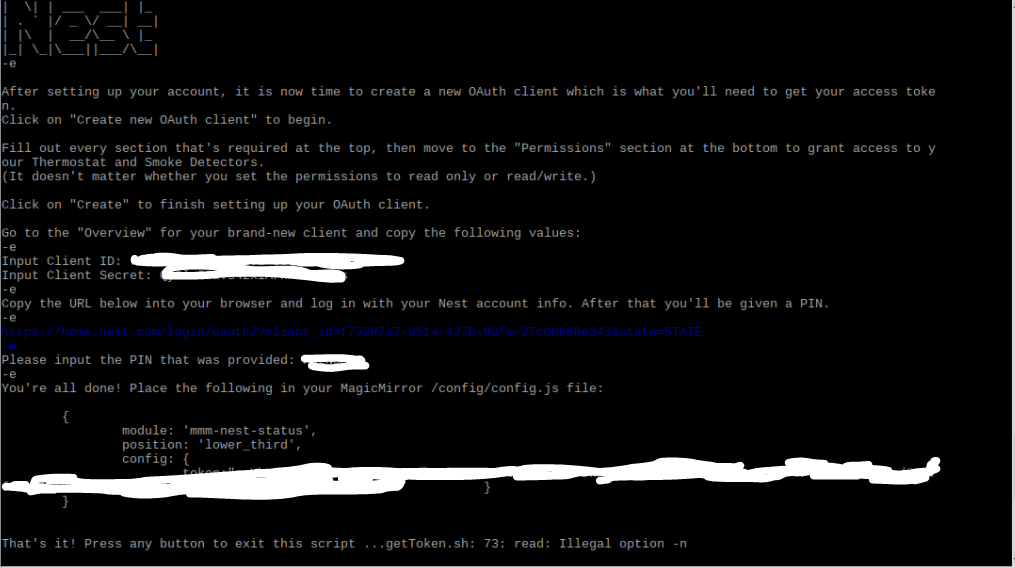
The issues that the token comes across as
token:"c.Ythenabunchofletters
thoseletterscontinue }
}
So my question is - is the "c. part of the token? I have tried copying the whole thing and it throws an error when reloading MM.
module: "mmm-nest-status",
position: "lower_third",
config:  {
               token:"c.Yblah
moreletters           }
}
I have tried copying the "c.yblah without an end quote and add a , and it throws an error.
token:"c.Yblah,When I run config:check in MagicMirror folder it says there are no syntax errors but when I reload MM it throws an error.
I have tried adding a " to the end and a , and MM loads, but my icon looks like this:
token:"c.Yblah",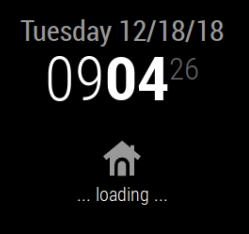
The README shows as an int for the type so I should not need the " ", but thats the only way to make MM load.I have also tried all of the above steps without the c. and it still shows the loading icon.
I apologize if this is something very simple that I just cannot figure out, so any help would be appreciated.
So yours is like this try belows config just put in your token number
{
module: ‘mmm-nest-status’,
position: ‘bottom_left’, // pick whichever position you want
config: {
token: “c.XXXXXXXXXXXXXXXXXXXXXXXXXXXXXXXXXXXXXXXXXXXXXXXXXXXXXXXXXXXXXXXXXXXXXXXXXXXXXXXXXXXXXXXXXXXXXXXXXXXXXXXXXXXXXXXXXXXXXXXXXXX”,
displayMode: ‘all’,
displayType: ‘list’,
thermostatsToShow: ‘all’,
units: ‘metric’,
thermostatSize: ‘small’,
alignment: ‘left’,
// … and whatever else configuration options you want to use
}
}, -
RE: PM2 error
I Had Similar i have just moved the pi to boot from sd to SSD that i had and for the life of me a fresh mirror 2.50 version wouldn’t run auto boot for love nor money i used this link in the end and its working well without having to kill everything and start again https://github.com/MichMich/MagicMirror/wiki/Auto-Starting-MagicMirror Hope this helps someone else
Install PM2 using NPM:
sudo npm install -g pm2
Starting PM2 on Boot
To make sure PM2 can do it’s job when (re)booting your operating system, it needs to be started on boot. Luckily, PM2 has a handy helper for this.pm2 startup
PM2 will now show you a command you need to execute.
Make a MagicMirror start script.
To use PM2 in combination with MagicMirror, we need to make a simple shell script. Preferable, we put this script outside the MagicMirror folder to make sure it won’t give us any issues if we want to upgrade the mirror.cd ~
nano mm.shAdd the following lines:
cd ~/MagicMirror
DISPLAY=:0 npm startSave and close, using the commands CTRL-O and CTRL-X. Now make sure the shell script is executable bij performing the following command:
chmod +x mm.sh
You are now ready to the MagicMirror using this script using PM2.
Starting your MagicMirror with PM2
Simply start your mirror with the following command:pm2 start mm.sh
You mirror should now boot up and appear on your screen after a few seconds.
Enable restarting of the MagicMirror script.
To make sure the MagicMirror restarts after rebooting, you need to save the current state of all scripts running via PM2. To do this, execute the following command:pm2 save
And that’s all there is! You MagicMirror should now reboot after start, and restart after any failure.
Controlling you MagicMirror via PM2.
With your MagicMirror running via PM2, you have some handy tools at hand:Restarting your MagicMirror:
pm2 restart mm
Stopping your MagicMirror:
pm2 stop mm
Show the MagicMirror logs:
pm2 logs mm
Show the MagicMirror process information:
pm2 show mm
-
RE: MMM-Hue-Lights - new module for your Philips Hue lights!
Hi is it possible to do a hide light or group that you don’t want to be seen rather than adding all the ones you have? As my hue stuff is in its infancy and it’s always having more bulbs added I would rather that it populated new bulbs rather than input the name in the model, I don’t even know if this is possible with your module? But it’s staying on my mirror thanks again for a beautiful module 👌🏾
-
RE: MMM-Hue-Lights - new module for your Philips Hue lights!
@michael5r Thanks for sharing :)
-
RE: MMM-Hue-Lights - new module for your Philips Hue lights!
@michael5r ohhhhhh! ***** now your showing off, your making me get all your modules lol, that looks good that will compliment your nest muddle perfectly! Thank you Sir!!!
-
RE: Help Me To Get Lucy Working
@mykle1 yep got that in the module itself after the return wrap and in Lucy’s array yep I’ll look at the traffic one and dupe it, thanks for your help, it has been much appreciated.
-
RE: Is Raspberry Pi 3 Model A+ suitable to run MagicMirror?
@balassy after how long does it freeze? I’ve got a pi 3b+ and that locks about every 2 days but now I’ve setup a cron job to restart pm2 every 2 days at 12 o’clock
-
RE: Help Me To Get Lucy Working
@mykle1 thank you very much! At the bottom google traffic bit in the mmm-voice.js folder can I just add new modules underneath it? PS that looks good, it’s not a pi then lol, thanks for your help :)
-
RE: Help Me To Get Lucy Working
@mykle1 said in Help Me To Get Lucy Working:
else if (notification === ‘HIDE_TRAFFIC’) {
this.sendNotification(‘HIDE_TRAFFIC’);
}
else if (notification === ‘SHOW_TRAFFIC’) {
this.sendNotification(‘SHOW_TRAFFIC’);
}Hi as soon as i add those lines i’m no longer able to see the mic and lucy stops working i used an online json editor and it says line 429 is } else if AND 431 is MM.getModules ive tried every blank space here but it just breaks everytime, done all the other bits which seem ok as its not broken the voice module just adding the lines above seems to kill it. If i add the default lucy clock and calendar i can’t get them to appear and dissapear at will, i can hide ALL modules or show all modules only :(
this.sendNotification('SHOW_LOTTERY'); this.sendNotification('SHOW_CLOCK'); this.sendNotification('SHOW_EARTH'); this.sendNotification('SHOW_EYECANDY'); this.sendNotification('SHOW_LICE'); this.sendNotification('SHOW_COWBOY'); this.sendNotification('SHOW_TIDES'); this.sendNotification('SHOW_VOICE'); } else if (notification === 'HIDE_PAGE_ONE') { MM.getModules().enumerate((module) => { module.hide(1000); }); -
RE: Help Me To Get Lucy Working
@mykle1 thanks, MMM-GoogleMapsTraffic please once I know how to do it I can take care of the other modules I have 😊 thanks I appreciate your help
-
RE: How do all of you controle (/interact with) your MagicMirror modules?
@mykle1 done thanks I’ve added it to here I’m in the UK and it’s getting late so I’ll have to do what ever you tell me tomorrow after work lol the link is https://forum.magicmirror.builders/topic/9249/help-me-to-get-lucy-working thanks in advance for your help
-
Help Me To Get Lucy Working
I’m looking for some help with Lucy I’ve got MMM-voice working, I’ve installed the three Lucy files but I really can’t figure out how to do Pages and add Modules to appear and disappear. Help would be much appreciated, Lucy is taxing my tiny brain 🧠 😂
-
RE: MMM-Nest-Status - New module for your Nest thermostats and protect smoke detectors!
@michael5r no freaking way! You’ve made another module I have to have lol 😂
-
RE: Which type of mirror to use
@radokristof yep also the location, bathroom get the glass when the bathroom steams up it won’t scratch as easy as the acrylic, I’ve gone for pilkington mirrorview 50/50
-
RE: How do all of you controle (/interact with) your MagicMirror modules?
@mykle1 does it sound good it sounds great! The farthest that I got was install the three new files in the MMM-voice folder. The other stuff like adding the pages and modules blow my tiny mind. Help would be much appreciated