MagicMirror Forum
    • Recent
    • Tags
    • Unsolved
    • Solved
    • MagicMirror² Repository
    • Documentation
    • 3rd-Party-Modules
    • Donate
    • Discord
    • Register
    • Login
    1. Home
    2. doubleT
    3. Posts
    A New Chapter for MagicMirror: The Community Takes the Lead
    Read the statement by Michael Teeuw here.
    D Offline
    • Profile
    • Following 0
    • Followers 4
    • Topics 4
    • Posts 176
    • Groups 1

    Posts

    Recent Best Controversial
    • RE: MMM-OralB / Bluetooth equipped toothbrush integration

      This topic came up again (https://forum.magicmirror.builders/topic/6073/integration-of-the-oral-b-toothbrush-data) so I thought I’d share my thoughts:

      Without a brush to test, the info from the thread and the documentation got me thinking: You’re only checking the on/off status of the brush right now. How about:
      A) Having a small dedicated Android device running the SDK to grab and forward the data?
      B) Using the Oral-B App on your phone would save your data in their cloud, right? And you can access that API, right? So to me it seems like you could get the data from the cloud – provided the app is running on your phone, forwarding the data.

      posted in Development
      D
      doubleT
    • RE: Integration of the Oral B toothbrush data

      In short: Not the way you think it could work. The app is receiving the bluetooth data and forwarding it to the Oral-B server. There’s no way (that I can think of) to get the data from the app directly to the mirror. That’d be a very bad app. ;)

      But Oral-B seems to have a dev programm where you can access the API with your data.
      Maybe you could even add Bluetooth to the Raspberry Pi and get the data directly from the brush - but I’m not Sure about that.

      https://developer.oralb.com/documentation

      posted in Requests
      D
      doubleT
    • RE: Font Help Info

      When you close the browser, MM is still running as a server/process in the background. If you stop and start it or directly restart it, there is no need to restart the Pi. What restarting the Pi does is just a very complicated way to stop the MM process. ;)
      Do you use PM2 to start MM on boot? Use

      pm2 restart mm
      

      See here: https://github.com/MichMich/MagicMirror/wiki/Auto-Starting-MagicMirror

      Or with npm, stop the package and start it again.

      Btw.: what text box? The console?

      posted in General Discussion
      D
      doubleT
    • RE: MMM-Podcast don't show/load the latest video

      No internet connection? ;)

      posted in Troubleshooting
      D
      doubleT
    • RE: Font Help Info

      You don’t have to reboot the Pi everytime you change the config.js. Restarting MM should do it.

      posted in General Discussion
      D
      doubleT
    • RE: Failure of v2.2.0

      “Crashed” like in not responding? Any error messages?

      posted in Troubleshooting
      D
      doubleT
    • RE: How to add modules. For absolute beginners.

      By the way, if you start the mirror with npm start dev instead of just npm start, it’ll start up with a console at the side where it will show you errors that often point you to the line of code that has an error.

      For example, if I remove one of the commas between the { settings objects }, it’ll show:

      Uncaught SyntaxError: Unexpected token {      config.js:68
      

      The opening bracket in line 68 of config.js is unexpected because a comma after the closing bracket in line 67 is missing. (This is just an example, it’s probably a different line in your code.)

      EDIT
      I think this thread should have stayed clean and we should have done this in your already existing thread about these same issues.

      But to bring some more value to this helpful thread, here’s a good and easy text on objects and arrays in JavaScript (that’s what the setting in config.js is made of): https://eloquentjavascript.net/04_data.html
      Please consider reading and consulting this before moving on or asking the same question in yet another thread.

      posted in Troubleshooting
      D
      doubleT
    • RE: How to add modules. For absolute beginners.

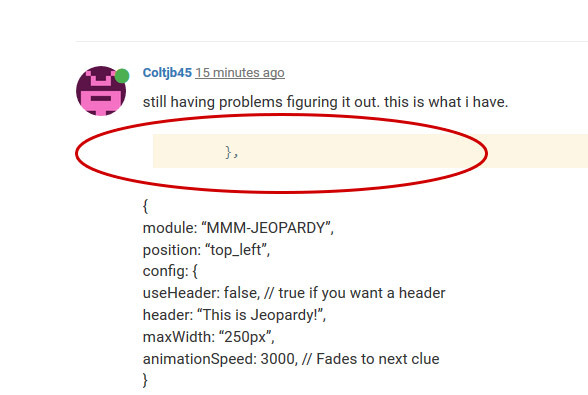
      This looks like a copy&paste error
      ^ This looks like you only pasted one line into the code block instead of the whole code.
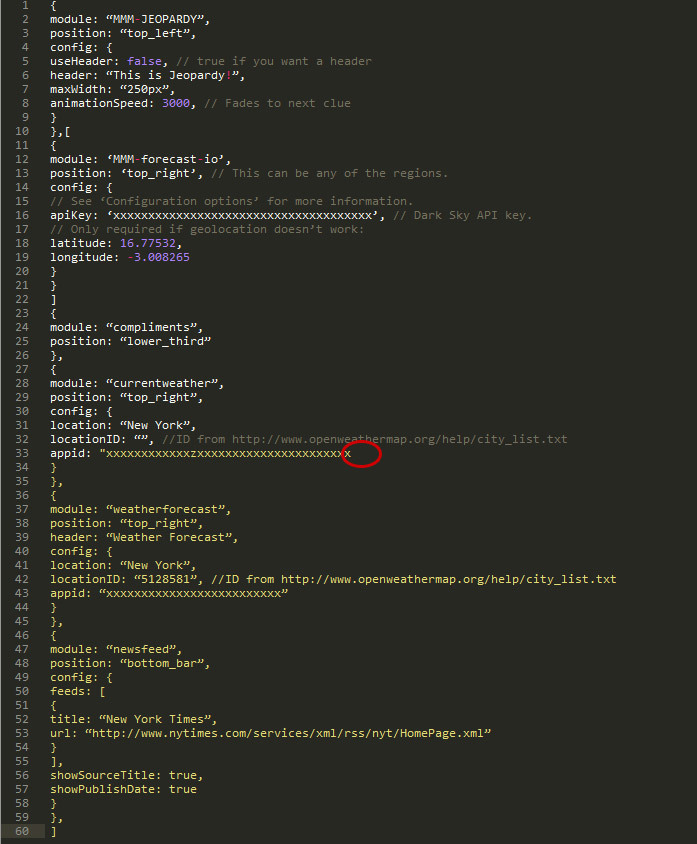
      Some editors can show you where your code is wrong
      ^ There are editors that can show you where your code is wrong while you type, for example, here you can point out where a closing quote is missing. You can edit in the standard windows/mac text editor, but it’ll give you a hard time. There are good editors like Sublime Text, Notepad++, Atom …

      Do you mind telling us what you’re using?

      With indentation (the original files have that, but pasting the code here destroys indentation) you can also easily count opening and closing brackets and spot the one bracket that is too much or the missing comma.
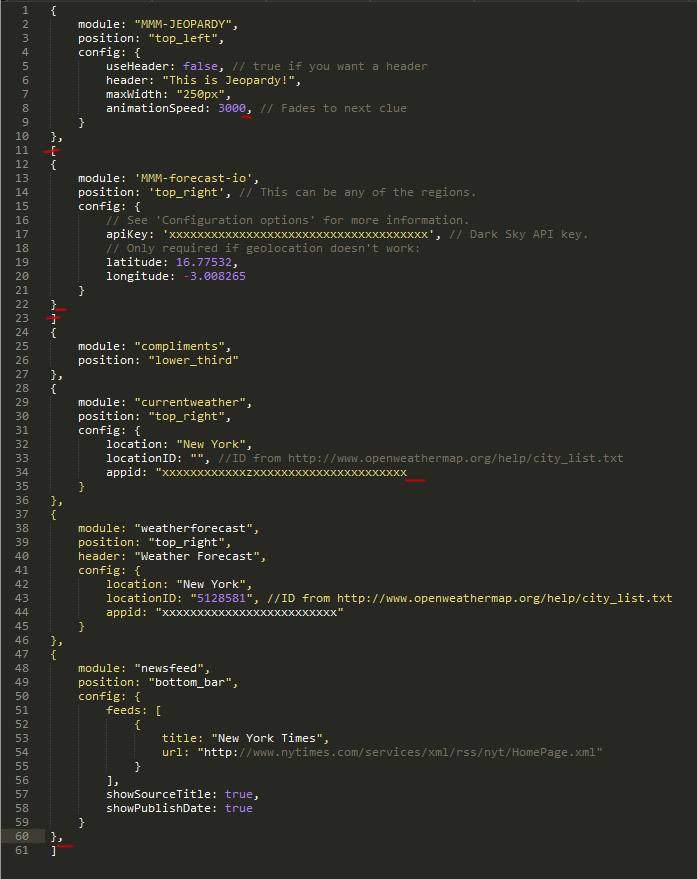
      No commas after the last property value of an object or array.
      The last property value of an object or array is not followed by a comma – although that shouldn’t give you any errors. What is probably causing an error is
      a) the missing comma after the second object (before the compliments module) and
      b) the square brackets around the second object.

      And you should check the quotes. Maybe a language and editor problem, but to me, all the quotes looked wrong. And you should only use one version of quotes, it’s not wise to mix > " < double quotation marks and > ’ < single quotation marks.

      This should work:

      modules: [
          {
              module: "MMM-JEOPARDY",
              position: "top_left",
              config: {
                  useHeader: false, // true if you want a header
                  header: "This is Jeopardy!",
                  maxWidth: "250px",
                  animationSpeed: 3000 // Fades to next clue
              }
          },
          {
              module: "MMM-forecast-io",
              position: "top_right", // This can be any of the regions.
              config: {
                  // See "Configuration options" for more information.
                  apiKey: "xxxxxxxxxxxxxxxxxxxxxxxxxxxxxxxxxxxxx", // Dark Sky API key.
                  // Only required if geolocation doesn"t work:
                  latitude: 16.77532,
                  longitude: -3.008265
              }
          },
          {
              module: "compliments",
              position: "lower_third"
          },
          {
              module: "currentweather",
              position: "top_right",
              config: {
      	        location: "New York",
      	        locationID: "", //ID from http://www.openweathermap.org/help/city_list.txt
      	        appid: "xxxxxxxxxxxxzxxxxxxxxxxxxxxxxxxxxxx"
      	    }
          },
          {
              module: "weatherforecast",
              position: "top_right",
              header: "Weather Forecast",
              config: {
                  location: "New York",
                  locationID: "5128581", //ID from http://www.openweathermap.org/help/city_list.txt
                  appid: "xxxxxxxxxxxxxxxxxxxxxxxxx"
              }
          },
          {
              module: "newsfeed",
              position: "bottom_bar",
              config: {
                  feeds: [
                      {
                          title: "New York Times",
                          url: "http://www.nytimes.com/services/xml/rss/nyt/HomePage.xml"
                      }
                  ],
                  showSourceTitle: true,
                  showPublishDate: true
              }
          }
      ]
      
      posted in Troubleshooting
      D
      doubleT
    • RE: How to add modules. For absolute beginners.

      It looks like you made an error pasting the code into the </> code block with only one line inside.

      Beside the open bracket I also see missing quotes.
      (On a side note, it would be nice to see everything with tabs/indentation.) What editor do you use?

      posted in Troubleshooting
      D
      doubleT
    • RE: My First Mirror... until now ^^

      I really like how you integrated the motion sensor! The rest is a little bit too much “screen” (as opposed to mirror) for me, but I can see the appeal. I like it.

      posted in Show your Mirror
      D
      doubleT
    • RE: Anyone make an elliptical magic mirror?

      Should work but keep two things in mind:

      • The area outside of the monitor has to be covered from behind with something dark or you will be able to see through it, if there’s even a little bit of light behind it.
      • The screen’s shape itself might still be visible because, unless you have an expensive LED screen where black means black, since there will always be some backlighting or clouding.

      A good screen might have a good enough contrast so that you could use some tinted wrap on the whole backside of the mirror (or just on the screen) to counter that backlighting.

      posted in Hardware
      D
      doubleT
    • RE: work in progress

      @cornusandu said in work in progress:

      the raspberry will be running continuous until it will die i guess.

      @cornusandu said in work in progress:

      Any advice on raspberry power? Should I cut electricity 12 hours a night with a smart plug? Or run it 24/7? Which is better for longer life?

      As everyone else said, leave it running, don’t cut the power without shutting the RasPi down safely first. Two advices I would give you:

      1. When everything is set up and running, and everytime you add a new feature/module, make an image of your sd card as backup!
      2. Think about a UPS, Uninterruptible Power Supply. There are some add ons that combine a batterie that provides power for a few minutes and a circuit that will detect the power outage and initiate a safe shutdown. And when the power goes back on, it will go back to normal.

      I learned both the hard way, but I’m still not done finding/setting up a good UPS solution.

      posted in Show your Mirror
      D
      doubleT
    • RE: call API (no CORS), used to do it with php proxy

      Sorry, but that doesn’t work. (It throws response.statusCode = 403, forbidden.) And it’s not surprising. As I said, the API source server doesn’t allow CORS and is not serving JSONP. So JavaScript calls are blocked.

      There are a lot of fine tools for specific jobs, XMLHttpRequest, fetch, request, fs, …, and they work if CORS is set up correctly on the server, allowing you access, or it’s giving you JSONP to handle, but PHP’s file_get_contents is the hammer in your toolbox. If everything else fails, you still can throw this at your problem (provided you have allow_url_fopen).

      And I know, it’s not always wise to use (or even throw) a hammer, access might be forbidden (to scripts) for a reason. But if you can read it in your browser, PHP can read, stringify and proxy it to your JS.

      posted in Development
      D
      doubleT
    • RE: Entryway Mirror

      Nice, that looks really good! Hidden cables are the best! ;)

      Love the floorplan, I’m working on something like that, too.

      posted in Show your Mirror
      D
      doubleT
    • RE: call API (no CORS), used to do it with php proxy

      The API doesn’t allow CORS, so JS can’t get to it.

      posted in Development
      D
      doubleT
    • RE: Hamburg (HVV) public transportation module - using realtime data

      I’m from Hamburg, too. Cool module. Can’t really use it right now as I’m rarely using the HVV, but I might check it out and maybe play around with it a little.

      posted in Transport
      D
      doubleT
    • RE: Modules won't show up on mirror?

      (and nested objects and arrays). The last property never gets a comma, these are only separators.

      That’s probably it. The developer console would probably have hinted at that, saying something like the next thing after the comma was expected to be something else.

      While you’re removing the last comma in the clock module’s settings, also remove the three empty lines that follow.

      {
           module: "clock",
           position: "top_left" // no comma
      },
      

      another example:

      {
           module: "clock",
           position: "top_left", // comma, because "config" follows
           config: {
                displayType: "digital" // no comma
           } // no comma
      },
      
      posted in Troubleshooting
      D
      doubleT
    • RE: Modules won't show up on mirror?

      Can you edit that and put the tags for code around it?

      posted in Troubleshooting
      D
      doubleT
    • RE: Calender module shows the wrong local time

      Might be the calendar’s settings, then. Google calendar?

      posted in Troubleshooting
      D
      doubleT
    • RE: Module displaying over another

      That’s not how it works. The order in the config doesn’t matter, except for the order in wich they are loaded (within milliseconds). But all the modules have a “position” value as you noticed: “top_left” or “middle_center” That attached a class to the module and by that class, positions are dealt with.

      These positions are set in the css/main.css but don’t change that file. If it’s not already there, set up a file named “custom.css” and edit it with a text editor. When you want to move “middle_center”, find it in the main.css, not it’s value and change it in the custom.css. You can copy and paste it.

      .region.middle.center {
        top: 50%;
      }
      

      That means it’s positioned 50% down from the top of the screen, halfway in the middle. Play around with the percentage until it fits.

      But you said “send it back” so I’m wondering if something changed its original position, maybe another module has some weird css settings that influences these settings or some changes happened before that messed up the original settings? If that’s the case it’s better to find out and change it back then to add new changes on top.

      posted in Troubleshooting
      D
      doubleT
    • 1
    • 2
    • 5
    • 6
    • 7
    • 8
    • 9
    • 8 / 9