MagicMirror Forum
    • Recent
    • Tags
    • Unsolved
    • Solved
    • MagicMirror² Repository
    • Documentation
    • 3rd-Party-Modules
    • Donate
    • Discord
    • Register
    • Login
    1. Home
    2. E3V3A
    3. Posts
    A New Chapter for MagicMirror: The Community Takes the Lead
    Read the statement by Michael Teeuw here.
    E
    Offline
    • Profile
    • Following 3
    • Followers 1
    • Topics 29
    • Posts 217
    • Groups 0

    Posts

    Recent Best Controversial
    • RE: Google Calendar events do not show up since calendar update

      @tbanzato Hi! It’s impossible to know what you’re doing. There are dozens of calendar modules out there.

      • Which one are you using?
      • What is your configuration file?
      • What is your hardware?

      It says something like the Browser does not support JavaScript and…

      • Who says?
      • Why do you run curl and not a module or HTML iFrame?
      • What is your curl command?
      posted in Troubleshooting
      E
      E3V3A
    • RE: MMM-PublicTransportHafas – Public transport information for all stations known to Deutsche Bahn

      @djsunrise19 Is that on Android? We can reverse the app… or use a VPN based sniffer, such as NetGuard to find the exact URL’s its using.

      posted in Transport
      E
      E3V3A
    • RE: Small 'Picture frame' MagicMirror (first attempt)

      Wow, beautiful inside!
      How did you make the cables stay so nicely squared? With hot-glue?

      posted in Show your Mirror
      E
      E3V3A
    • RE: What other factors are affecting the updateInterval?

      @strawberry-3.141 That worked like charm! Spot on. Thank you! Just have to remember for long timers, the following clients need to wait for the first to timeout, before getting any data.

      posted in Development
      E
      E3V3A
    • RE: Why are people doing this: var self = this?

      @ninjabreadman Great Find! Exactly what I needed. That it seem a great lesson on this.

      In the reference…

      To fix the problem with using this inside the anonymous function passed to the "forEach" 
      method, we use a common practice in JavaScript and set the this value to another 
      variable before we enter the "forEach" method.
      
      posted in Development
      E
      E3V3A
    • RE: Why are people doing this: var self = this?

      @doubleT Hi, yeah I figured that much. But in the cases where I have seen it, it is not obvious what would change it outside that function. In the example, from above, was taken from the MMM-Remote-Control, where it’s done all over the place. So if you are that paranoid that it can change that easily, it could as well change in between function calls, before even setting var self=this? Leading to the question of:

      • What is the exact scope of this?
      • Does the core MM change it or use it as well?
      posted in Development
      E
      E3V3A
    • Why are people doing this: var self = this?

      I keep seeing modules doing the following:

      socketNotificationReceived: function(notification, payload) {
          var self = this;
          if (notification === "CURRENT_STATUS") {
      ...
      
      • Can someone explain why they do this?
      • What make this change so that you need to save it?
      posted in Development
      E
      E3V3A
    • RE: How to Troubleshoot

      While trying to debug modules, I’ve been given quite mixed feedback regarding what to use to print messages to console, on either local system or in remote browser DevTools.

      So far, I have found the only reliable way that always seem to print something in the browser, is using console.error(). The others have varied. I’m on MM v2.2.2 (master).

      posted in Troubleshooting
      E
      E3V3A
    • RE: What other factors are affecting the updateInterval?

      Yep, just confirmed. Running 1 instance with serveronlygives the correct updateInterval. Connecting more, messes that up. How would you guys deal with this?

      posted in Development
      E
      E3V3A
    • What other factors are affecting the updateInterval?

      I’m running with a config updateInterval set to 60 seconds, but for some reason it get’s updated every 30 seconds! Any idea what’s going on?

      Here is the only place using this:

          socketNotificationReceived: function (notification, payload) {
              if (notification === "START_RADAR") {
                  //console.log("Received START_RADAR");
                  this.config = payload;
                  this.radarPing();
                  setInterval(() => {
                      this.radarPing();
                  }, this.config.updateInterval * 1000 );
              }
          }
      

      I should mention that I was measuring on the second server instance. Can it be that the time interval doubles/halfs, for every client connected?

      posted in Development
      E
      E3V3A
    • RE: [MMM-FlightsAbove] Problem receiving and seing JSON from node_helper

      The module is now working and alive!! Thank you all for all your patience!!

      posted in Development
      E
      E3V3A
    • RE: module develop help!

      Did you ever get your module to work?

      posted in Development
      E
      E3V3A
    • RE: [MMM-FlightsAbove] Problem receiving and seing JSON from node_helper

      @yawns BTW. The console.log from main module didn’t want to work in my Firefox (Dev Tools), but console.error() do. It could be a browser issue…

      posted in Development
      E
      E3V3A
    • RE: [MMM-FlightsAbove] Problem receiving and seing JSON from node_helper

      @raywo OMG!! I missed your post by not updating my open tabs. Now I found it and it bloody hell it works! I got so excited I fell off my chair!

      I have no idea why the eeek I have been trying to over-engineer this thing. I guess I’m simply not familiar enough with the JS/node notations, and constantly get bogged down with beginners conceptual trivialities.

      Thank you! Tomorrow it will be party!

      posted in Development
      E
      E3V3A
    • RE: [MMM-FlightsAbove] Problem receiving and seing JSON from node_helper

      @yawns That’s yet another one! (And it didn’t give any output.) So far I have seen:

      Log.log()
      Log.info()
      console.log()
      console.error()
      

      Then I have seen more general node ones like:
      console.dir()…

      How can we know where they can be used (and where the output goes)?

      posted in Development
      E
      E3V3A
    • RE: [MMM-FlightsAbove] Problem receiving and seing JSON from node_helper

      @raywo

      It returns an array of Javascript objects.

      Thanks! That is certainly important to know! :) But I don’t see how that help me here… :(

      As for the rest of the test code above, it’s probably not very helpful in my case, but it could be great for another module though. In my code I already have (according to console.log the right output to be fed.) But somehow my feed mechanism is not working and I’m not able to check it.

      For example, another dummy question:
      Why doesn’t the following console.log’s print anything?

          // This comes from YOUR module, usually "node_helper.js"
          socketNotificationReceived: function(notification, payload) {
              console.log("=====> " + this.name + " received a socket notification: " + notification); //+ " - Payload: " + payload);
              switch (notification) {
                  case "NEW_DATA":
                      console.log("-----> FlightsAbove: NEW_DATA received!"); // Why doesn't this show?
                      let ping = payload;
                      console.log("-- PING!\n");
                      console.log(ping);
                      //console.log("-- PING DATA:\n", ping);
      
                      this.loaded = true;
                      this.setTableData(payload);
                      break;
                  default:
                      console.log("Did not match the Notification: ", notification);
              }
          },
      

      Similarly, here in node_helper.js. Everything before the //WTF comments prints, but the rest is never seen! ???

      
          radarPing: function() {
              console.log("ENTER (inside)");
              Promise.all([
                  //radar(-8.20917,114.62177,-9.28715,115.71243)  // "PDS" (Bali Airport)
                  radar(53.05959,12.52388,51.98161,14.29552) // (Berlin)
                  ]).then(function(results) {
                      var ping = JSON.stringify(results);
      
                      console.log("Sending NEW_DATA:");
                      console.log(ping);
      
                      // WTF! This below is never shown!
                      this.sendSocketNotification("NEW_DATA", ping); //self?
                      console.log("Sent NEW_DATA!");
                      console.log("NEW_DATA is: %O", ping);
                      console.dir(ping, {depth: null, colors: true});
      
                      //return ping;
                  }).then(function(error) {
                      //console.log("ERROR:")
                      console.log(error);
                  });
              console.log("EXIT (inside)");
      },
      

      So at the end of the day, I have no idea if the NEW_DATA socket notification was actually sent, nor what was the payload, nor if it was received.
      posted in Development
      E
      E3V3A
    • RE: [MMM-FlightsAbove] Problem receiving and seing JSON from node_helper

      I just want to clarify that the JSON from the API is not broken, but just doesn’t conform to standard. The difference is like this:

      # cat dirty.json
      
        { id: '1',
          somenumber: 112233,
          somestring: 'ABCD',
          somenull: null 
        },
        { id: '2',
          somenumber: 445566,
          somestring: 'EFGH',
          somenull: null
        }
      
      
      # cat clean.json
      
        { "id": "1",
          "somenumber": 112233,
          "somestring": "ABCD",
          "somenull": null
        },
        { "id": "2",
          "somenumber": 445566,
          "somestring": "EFGH",
          "somenull": null
        }
      
      posted in Development
      E
      E3V3A
    • [MMM-FlightsAbove] Problem receiving and seing JSON from node_helper

      Dear Fellow MM Developers,

      I’ve been trying to complete my new module called MMM-FlightsAbove for days. But I have not been able to see or get the JSON displayed in any way.

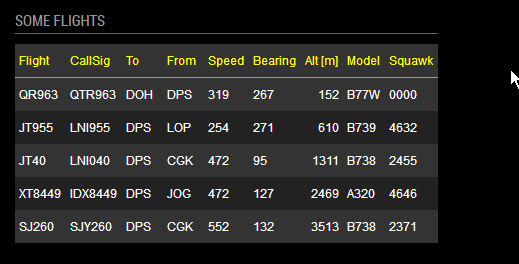
      One day I hope it will look something like this:
      0_1519747240852_mmm-tabulator_server_ff.png

      I did get some useful pointers by @tbbear but I was not able to fix it even with that info. I have now uploaded the code in hope that someone can find some hints to what the problem is, apart from me.

      A few things that I have noticed so far.

      • The flightradar24-client API is returning improper JSON that need to be fixed [EDIT: A JS Array of objects ], I tried with a function and also with JSON.stringify(). Now what appears to be sent from node_helper.js seem ok. However, I cannot see it or verify it.
      • The result from the API is a Promise and I guess that is the core of the troubles. I simply don’t have the skills to deal with that yet. (I’ve been reading a lot about that lately, but the examples provided are not helping my case.)
      • The JSON shown in the console.log now seem to have 2 square brackets, instead of one, I don’t know how to remove it or if that has any effect.
      • I use the word seem above, as I no longer trust what come out of console.log, since it seem to have some built-in formatting, depending on what it is. (For example, this works: console.log(obj), while this doesn’t: console.log("anystring" + obj))
      • Tabulate is running and waiting (in vain?) for data.
      • The code is using my MMM-Tabulate demo module as a template, and is working fine there, when using a JSON file as input.

      Could someone please have a look at my code and see if there is something obvious that sticks out? (And if you see something, please say something here or in the issue tracker.)

      https://github.com/E3V3A/MMM-FlightsAbove

      Many humble thanks in advance,
      E:V:A

      posted in Development promise async json
      E
      E3V3A
    • RE: MMM-PublicTransportHafas – Public transport information for all stations known to Deutsche Bahn

      @raywo Great Looking module, very professional!

      posted in Transport
      E
      E3V3A
    • RE: How to best process an [object Promise]?

      I’ve got a partially working function, but it’s a bit funny. For some reason the call to cleanup the JSON is not liked, because it seem that the actual result is not returned, but the Promise .

      This is the code snippet:

      radarPing: function() {
          console.log("ENTER (inside)");
          Promise.all([
              radar(-8.20917,114.62177,-9.28715,115.71243)
              ]).then(function(results) {
                  var ping = results;
                  console.log("PING1:");
                  console.log(ping);
                  var cleanData = jZen(ping);
                  console.log("PING2: ", cleanData);
                  self.sendSocketNotification("NEW_DATA", ping); //"PING"
                  return cleanData; //ping;
              });
          console.log("EXIT (inside)");
      },
      
          readData: function() {
              //const myfile = 'modules/MMM-FlightsAbove/demo.json'; // The demo API use improper JSON
              var radarData = "";
              radarData = this.radarPing();
              console.log("The DATA:\n", radarData);
      
      /*        if ( radarData === "" ) {
              }
      */        //let cleanData = jZen(data);
              //let cleanData = jZen(radarData);
              let cleanData = radarData;
              if (isJSON(cleanData) ) {
                  this.sendSocketNotification("NEW_DATA", cleanData);
              } else {
                  // So WTF is it?
                  console.log("- JSON: false");
                  console.log("- isAO(dirty): " + isAO(radarData));
                  console.log("- isAO(clean): " + isAO(cleanData));
                  console.log("- Data:\n", radarData);
              }
          },
      ...
      });
      
      // To check if something is JSON
      function isJSON(str) {
          try { return (JSON.parse(str) && !!str); }
          catch (e) { return false; }
      }
      
      // To check if something is an Array or Object (parsed JSON)
      function isAO(val) {
          return val instanceof Array || val instanceof Object ? true : false;
      }
      
      // --------------------------------------------------------------------------
      // What:  A dirt simple JSON cleanup function that also compactifies the data
      // NOTE:  - Only use on flat and trustworthy ASCII JSON data!
      //        - Cannot handle any characters outside [A-Za-z0-9_\-]. (e.g. UTF-8)
      //        - Using remote data without further sanitation is a security risk!
      // --------------------------------------------------------------------------
      const re1 = /([A-Za-z0-9_\-]+):/gm;  // use const to make sure it is compiled
      function jZen(juice) {
          //let re1 = /([A-Za-z0-9_\-]+):/gm; // Find all ASCII words $1 before an ":"
          //let data = juice;
          let str = "";
          str = juice.replace(/\s/gm, '');     // Remove all white-space
          str = str.replace(/\'/gm, '\"');    // Replace all ' with "
          str = str.replace(re1, '\"$1\":');  // Replace $1: with "$1":
          //console.log("Dirty JSON is:\n" + data.toString() );
          //console.log("Clean JSON is:\n" + str);
          return str;
      }
      

      The output is:

      ...
      ENTER (inside)
      EXIT (inside)
      The DATA:
       undefined
      - JSON: false
      - isAO(dirty): false
      - isAO(clean): false
      - Data:
       undefined
      PING1:
      [ [ { id: '108be389',
            timestamp: 1519647028,
            registration: 'PK-GQL',
            flight: 'QG8816',
            callsign: 'CTV8816',
      ...
      

      As you can see, PING2 never happens…

      posted in Development
      E
      E3V3A
    • 1
    • 2
    • 6
    • 7
    • 8
    • 9
    • 10
    • 11
    • 8 / 11