
MagicMirror Forum
    • Recent
    • Tags
    • Unsolved
    • Solved
    • MagicMirror² Repository
    • Documentation
    • 3rd-Party-Modules
    • Donate
    • Discord
    • Register
    • Login
    1. Home
    2. evroom
    3. Posts
    A New Chapter for MagicMirror: The Community Takes the Lead
    Read the statement by Michael Teeuw here.
    evroomE Offline
    • Profile
    • Following 0
    • Followers 2
    • Topics 18
    • Posts 499
    • Groups 1

    Posts

    Recent Best Controversial
    • RE: Opening hours for stores/places thru Google API

      Rebooted.
      No change.

      I do get this error:

      0|mm  | [5:13:03 PM] - MMM-OpeningHours : Starting helper:  MMM-OpeningHours
      0|mm  | Sockets connected & modules started ...
      0|mm  | Launching application.
      0|mm  | (node:2342) UnhandledPromiseRejectionWarning: Unhandled promise rejection (rejection id: 1): TypeError: Cannot read property 'refs' of undefined
      0|mm  | (node:2342) [DEP0018] DeprecationWarning: Unhandled promise rejections are deprecated. In the future, promise rejections that are not handled will terminate the Node.js process with a non-zero exit code.
      

      I suppose the API key is right, as it finds the (street)name.
      And it increases the usage counter for Google Places for my account.

      But no opening times.
      On Google Maps opening times are visible for this ID.

      0|mm  |   json:
      0|mm  |    { html_attributions: [],
      0|mm  |      result: { name: 'Laufamholzstraße 76' },
      0|mm  |      status: 'OK' },
      0|mm  |   requestUrl: 'https://maps.googleapis.com/maps/api/place/details/json?fields=name%2Copening_hours&language=en&placeid=ChIJ9SpsbxZYn0cRhBEv4PE_Tvs&key=<key>',
      0|mm  |   query:
      0|mm  |    { fields: 'name,opening_hours',
      0|mm  |      language: 'en',
      0|mm  |      placeid: 'ChIJ9SpsbxZYn0cRhBEv4PE_Tvs',
      0|mm  |      key: '<key>' } }
      

      And I do not see a mapping between place id, street name and the name of the place.
      posted in Requests
      evroomE
      evroom
    • RE: Opening hours for stores/places thru Google API

      @Menturan said in Opening hours for stores/places thru Google API:

      What do you think?

      Hi,

      Wanted to give it a try.
      By coincidence went to a place that was closed and this module could have saved me the trip.

      My first thought was: really ?

      1. yarn install
      

      But I know it is under development and you do this voluntary, so I cannot really complain (never submitted a single module myself).
      I do like Mich’s General Advise.
      https://github.com/MichMich/MagicMirror/tree/master/modules

      Most if not all modules use git clone and an occasional npm install

      $ git clone https://github.com/Menturan/MMM-OpeningHours.git
      $ npm install
      

      I was so stubborn to install it this way, as I do not want to find out how yarn works.
      I got it running to the point where on the MM I see:
      Loading opening hours ...
      The pm2 logs does not give an error or warning or so.
      I see it converted my place id to a real address, so it means that my Google API key is okay.

      I will try it again with the debug parameter on, but can you tell me what I should see when the opening times are fetched (in pm2 logs) ?
      And perhaps really need yarn ?
      But then an explanation is needed; a plain yarn install won’t do.

      So, thanks for the module, but would be nice to get it working.

      posted in Requests
      evroomE
      evroom
    • RE: [MMM-RTSPStream] - Video Streaming from Live Feeds & Security Cameras

      @jngo said in [MMM-RTSPStream] - Video Streaming from Live Feeds & Security Cameras:

      tried to comment out the W & H, it still did the same issue.

      Actually I was interested in the --win coordinates from the pm2 log in this case.
      If the same, then it means that uncommented is right and the values are being taken from the config.js parameters.
      It looks it can be uncommented.

      One last suggestion:

      Either in the MM-RTSPStream.css or your /home/pi/MagicMirror/css/custom.css:

      .MMM-RTSPStream .innerWrapper {
        position: relative;
        width: 468px; /* Video width + 18px
        height: 253px;
        border-style: none;
        display: inline-block;
        text-align: center;
      }
      

      Regarding

      How do I increase the size of the fonts used in the MM?
      you will have to ask this in a separate topic.
      Best is to change things in the custom.css.
      I only made changes regarding the width of some regions.

      posted in Utilities
      evroomE
      evroom
    • RE: [MMM-RTSPStream] - Video Streaming from Live Feeds & Security Cameras

      @jngo
      So if the video area matches the module area (the red border in this moment) then it is okay for you?

      Could you still till try this?

      „Could you briefly test it with width and height commented out ?“

      posted in Utilities
      evroomE
      evroom
    • RE: Cronjob

      @CyruS1337 said in Cronjob:

      I have always used the command sudo crontab -e and with this it did not work.

      Just to clarify.

      Normally you are user pi: $ who am I

      So crontab -e will work for the pi user.
      Using sudo crontab -e will change the crontab for the root user.

      Now how can you tell what is what ?

      For the user pi:
      $ sudo crontab -l -u pi
      which is the same as
      $ crontab -l
      For the user root:
      $ sudo crontab -l -u root

      Furthermore, when you have activated the root crontab, then the command will run as root, in the root (/) directory.
      In this case pm2 reload command will search for the mm.sh script under / and will not find it.
      Whereas when activated the pi crontab, the mm.sh script will be searched in the /home/pi directory, where it should be, and it will work.

      Use pm2 show mmto show the details on mm under pm2.
      Then you will understand it better.

      Cron messages normally are directed to /var/log/cron.log, but on my system it is not directed:

      $ grep cron /etc/rsyslog.conf
      #cron.*				/var/log/cron.log
      

      To see the cron messages, when not in cron.log:

      $ tail -F /var/log/syslog | grep CRON
      

      [ On my system I see CRON messages for root, although I do not have root crontab entries. There is a crond running that runs alongside $ systemctl status cron.]

      Have fun :-)

      posted in Troubleshooting
      evroomE
      evroom
    • RE: [MMM-RTSPStream] - Video Streaming from Live Feeds & Security Cameras

      @jngo said in [MMM-RTSPStream] - Video Streaming from Live Feeds & Security Cameras:

      Any idea how I can move the video feed to fit the red border frame and, do not cover the complimentary wordings?

      I would try this:

      Change the config.js:

      :
      :
      moduleWidth: 468,
      moduleHeight: 253,
      :
      :
              width: 450,
              height: 253,
      

      Change the MMM-RTSPStream.css:

      width: 468px; /* Video width + 2*border + 2*padding */
      height: 253px;
      
      posted in Utilities
      evroomE
      evroom
    • RE: [MMM-RTSPStream] - Video Streaming from Live Feeds & Security Cameras

      @jngo said in [MMM-RTSPStream] - Video Streaming from Live Feeds & Security Cameras:

      the “-win” is now “1127, 512, 1767, 872”

      Could you briefly test it with width and height commented out ?

      //  width: 352px; /* Video width + 2*border + 2*padding */
      //  height: 242px;
      

      Just to see what is happening then.

      posted in Utilities
      evroomE
      evroom
    • RE: [MMM-RTSPStream] - Video Streaming from Live Feeds & Security Cameras

      @costascontis said in [MMM-RTSPStream] - Video Streaming from Live Feeds & Security Cameras:

      how can i test with omxplayer that my camera link is playing ok?

      You can test it standalone with:

      $ omxplayer --avdict rtsp_transport:tcp --live --video_queue 4 --fps 30 --win "0 0 640 360" rtsp://[rrtsp_uri]
      

      PS

      Now the coordinates confuse me, but make sense (X-axis, Y-axis)

      —win x1,   y1 , x2,   y2
      —win 0,    0,   640,  360
      
      Size of video stream:
      (x2 - x1) x (y2 - y1) =  640 x 360
      
      posted in Utilities
      evroomE
      evroom
    • RE: [MMM-RTSPStream] - Video Streaming from Live Feeds & Security Cameras

      If you edit your custom.css file and restart MM then you can see the module position better:

      $ vi /home/pi/MagicMirror/css/custom.css
      :
      :
      .MMM-RTSPStream .innerWrapper {
        //border-style: none;
        border: 1px solid red;
      }
      

      You can use the editor of your liking of course.

      Btw, I see (wrong ??) fixed values MMM-RTSPStream.css:

      $ cat /home/pi/MagicMirror/modules/MMM-RTSPStream/MMM-RTSPStream.css
      :
      :
      .MMM-RTSPStream .innerWrapper {
        position: relative;
        width: 352px; /* Video width + 2*border + 2*padding */
        height: 242px;
        border: 1px solid white;
        /*float: left;*/
        display: inline-block;
        text-align: center;
        margin: 2px;
      }
      

      So, whatever your settings are in config.js, the result will be the same.
      I would try to change it to:

      width: 658px; /* Video width + 2*border + 2*padding */
      height: 360px;
      

      And then check pm2 logs for the --win settings it results to.
      Or even comment it out and see what happens:

      //  width: 352px; /* Video width + 2*border + 2*padding */
      //  height: 242px;
      

      Let me know the result and the pm2 log output (–win part).

      posted in Utilities
      evroomE
      evroom
    • RE: [MMM-RTSPStream] - Video Streaming from Live Feeds & Security Cameras

      @jngo
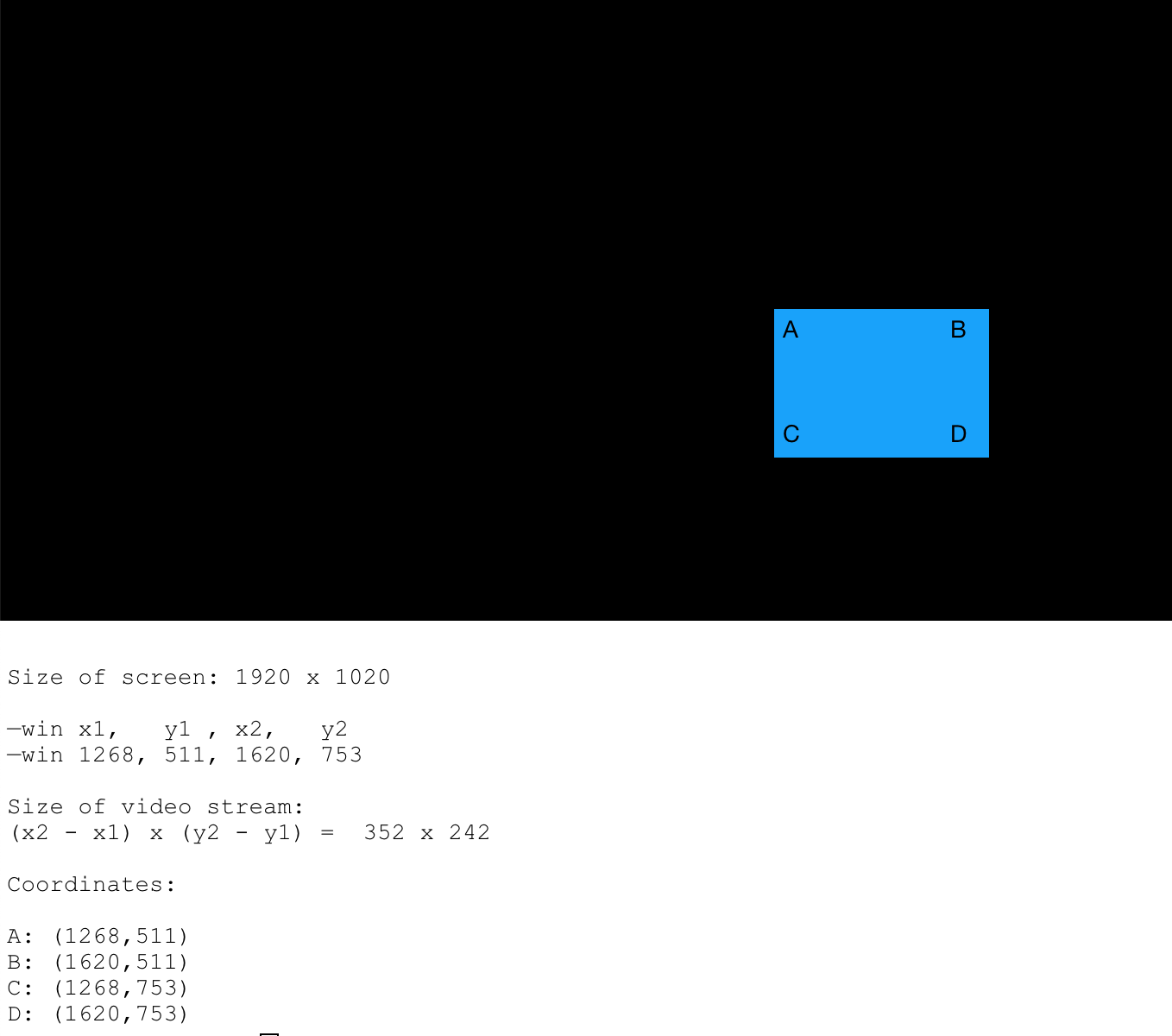
      If I understand omxplayer correct and did the calculations right, then this is what you see.

      Basically you are seeing a streaming window of just 334x242.
      I do not know where the model window is, but I suppose it is on the same location.

      0_1552939990312_omxplayer_coordinates_01.png

      posted in Utilities
      evroomE
      evroom
    • RE: [MMM-RTSPStream] - Video Streaming from Live Feeds & Security Cameras

      @jngo
      One more question: what is the size of your display in pixels ?

      posted in Utilities
      evroomE
      evroom
    • RE: [MMM-RTSPStream] - Video Streaming from Live Feeds & Security Cameras

      @jngo said in [MMM-RTSPStream] - Video Streaming from Live Feeds & Security Cameras:

      Is this you are looking for?

      Yes, but cannot promise anything :-)

      Cannot get the module to run on my MM.
      Most probably a new install will work miracles, but I do not want to spend too much time /effort on it.

      posted in Utilities
      evroomE
      evroom
    • RE: [MMM-RTSPStream] - Video Streaming from Live Feeds & Security Cameras

      And from your config.js the moduleWidth, moduleHeight and the width and height from the stream, please.

      posted in Utilities
      evroomE
      evroom
    • RE: [MMM-RTSPStream] - Video Streaming from Live Feeds & Security Cameras

      Just to make it clear, I am not using any module anymore that uses omxplayer.
      For me MMM-RTSPStream stopped to work for my install and use a while ago (reason unknown) and for MMM-Dreambox I do not have place on my screen (but a nice module nevertheless).
      I have kept my MagicMirror pretty simple and static, just 5 modules and a video stream from my outdoor IP-camera.
      No fancy things with rotating, voice commands, gesture commands, etc.
      Everything that really matters in one view.

      As an alternative for MMM-RTSPStream, I just use pm2 for my video stream.
      The omxplayer is an overlay in all uses anyway, so I just ‘overlay’ it on top of the MM modules.
      I left space on the left side of the MagicMirror by only using top and bottom positions.
      pm2 controls the processes, like with MM (I enabled it using the same commands for MM, except that I used axis iso mm).

      That being said, I can try activating MMM-RTSPStream again to be able support a bit.

      pi@MagicPi:~ $ pwd
      /home/pi
      pi@MagicPi:~ $ cat axis.sh
      #!/bin/bash
      echo "Starting Axis stream ..."
      
      # No rotation
      #omxplayer --avdict rtsp_transport:tcp --live --video_queue 4 --fps 30 --win "0 625 590 957" rtsp://axisviewer:Trosknurt12@192.168.178.56/axis-media/media.amp?resolution=640x360
      
      # Rotate to match custom.css rotation
      # 640x360 == --win 'x1 y1 x2 y2' == "600 300 960 940" == x2 - x1 & y2 - y1
      omxplayer --avdict rtsp_transport:tcp --orientation 270 --live --video_queue 4 --fps 30 --win "600 300 960 940" rtsp://user:password@192.168.178.56/axis-media/media.amp?resolution=640x360
      pi@MagicPi:~ $ pm2 list
      ┌──────────┬────┬─────────┬──────┬───────┬────────┬─────────┬────────┬─────┬────────────┬──────┬──────────┐
      │ App name │ id │ version │ mode │ pid   │ status │ restart │ uptime │ cpu │ mem        │ user │ watching │
      ├──────────┼────┼─────────┼──────┼───────┼────────┼─────────┼────────┼─────┼────────────┼──────┼──────────┤
      │ axis     │ 1  │ 2.5.0   │ fork │ 11127 │ online │ 1066    │ 2h     │ 0%  │ 220.0 KB   │ pi   │ disabled │
      │ mm       │ 0  │ 2.5.0   │ fork │ 4658  │ online │ 41      │ 14D    │ 0%  │ 12.0 KB    │ pi   │ disabled │
      
      posted in Utilities
      evroomE
      evroom
    • RE: [MMM-RTSPStream] - Video Streaming from Live Feeds & Security Cameras

      @jngo
      Can you post the moduleWidth, moduleHeight and the width and height from the stream?

      And if you see it in the pm2 logs, this info:

      Starting stream stream1 with args: [
          "--avdict",
          "rtsp_transport:tcp",
          "--win",
          "738, 63, 1090, 305",
      
      posted in Utilities
      evroomE
      evroom
    • RE: MMM-Soccer - Standings, Schedules and Top Scorers

      Hi,

      Did you not just forget the starting { ?
      Like this:

      { 
        module: "MMM-soccer",
        position: "top_right",
        disabled: false,
        config: {
          api_key: 'My API-key',
          colored: false,
          show: 'GERMANY',
          focus_on: false,
          max_teams: false,
          logos: false,
          leagues: {
            "GERMANY": "BL1",
          }
        }
      },
      

      Did you run:

      cd ~/MagicMirror; npm run config:check
      

      ??

      posted in Sport
      evroomE
      evroom
    • RE: HomeKit or HomeBridge integration to readout room temperatures

      @sdetweil said in HomeKit or HomeBridge integration to readout room temperatures:

      can u mark this solved? 3 dots to the right of topic…

      It is the topic of @Kuhlemann , so he needs to try if the solution that worked for me will work for him.

      posted in Requests
      evroomE
      evroom
    • RE: HomeKit or HomeBridge integration to readout room temperatures

      Okay, got it working.

      In ioBroker I needed to activate the "Build-in Simple-API in web.0.

      Then this works:

      http://[ioBroker_IP]:8082/help
      

      And this works:

      http://[ioBroker_IP]:8082/getPlainValue/hm-rpc.0.xxxxxxxxx.1.ACTUAL_TEMPERATURE
      
      posted in Requests
      evroomE
      evroom
    • RE: HomeKit or HomeBridge integration to readout room temperatures

      @sdetweil
      I was hoping the module would take care of this.
      I do not know how a ioBroker URI should look like.
      I configured MMM-ioBroker using the IP and port of my ioBroker host and the ID’s that I used in ioBroker vis to display temperature and humidity of my Homematic IP devices.

      What would be the syntax of a GET call ?

      posted in Requests
      evroomE
      evroom
    • RE: HomeKit or HomeBridge integration to readout room temperatures

      Hi,

      Because of this post I tried to get Homematic IP readings that I successfully integrated in ioBroker.
      I have a separate host for ioBroker and use port 8082.
      I also cannot get MMM-ioBroker to read the temperature and humidity readings.

      My pm2 logsshows:

      0|mm  | Connecting socket for: MMM-ioBroker
      :
      :
      0|mm  | Request Failed.
      0|mm  |  Status Code: 404
      0|mm  | Request Failed.
      0|mm  |  Status Code: 404
      :
      :
      

      What do you see in the log ?

      posted in Requests
      evroomE
      evroom
    • 1
    • 2
    • 15
    • 16
    • 17
    • 18
    • 19
    • 24
    • 25
    • 17 / 25