
MagicMirror Forum
    • Recent
    • Tags
    • Unsolved
    • Solved
    • MagicMirror² Repository
    • Documentation
    • 3rd-Party-Modules
    • Donate
    • Discord
    • Register
    • Login
    1. Home
    2. evroom
    3. Posts
    A New Chapter for MagicMirror: The Community Takes the Lead
    Read the statement by Michael Teeuw here.
    evroomE Offline
    • Profile
    • Following 0
    • Followers 2
    • Topics 18
    • Posts 499
    • Groups 1

    Posts

    Recent Best Controversial
    • RE: Soccer Noob needs help!

      @Peter

      I have MMM-SoccerLiveScore running now and it is looking nice.
      It has all logos present already and the table is already present (just listed on alphabetic order as one would expect pre round 1).
      Give it a try.

      I now remember why I use(d) MMM-soccer.
      MMM-SoccerLiveScore shows the scores by default and the standings can be turned off.
      But I do not want to know the scores as it spoils watching Studio Sport and/or die Sportschau.
      MMM-soccer just show the standings, nothing more (and even this spoils it some times).

      If MMM-SoccerLiveScore would have an option like “showScores: false”, it would be perfect.
      posted in Troubleshooting
      evroomE
      evroom
    • RE: MMM-Soccer - Standings, Schedules and Top Scorers

      Hi MMM-soccer users,

      Perhaps some of you experience the same issue as me and the Magic Mirror shows “Loading”.

      The problem most likely it is caused due to the fact that round 1 for most competitions still needs to be played.
      For example for de Eredivisie I get this using a test script:

      Response:\n{"filters":{},"competition":{"id":2003,"area":{"id":2163,"name":"Netherlands"},"name":"Eredivisie","code":"DED","plan":"TIER_ONE","lastUpdated":"2019-05-28T23:44:43Z"},"season":{"id":481,"startDate":"2019-08-09","endDate":"2020-05-25","currentMatchday":1,"winner":null},"standings":[]}
      

      As the standings array is empty, the module is struggling.
      Perhaps better if it would show “No standings available” in this case, but for the moment is will show what it shows.

      I have sent a mail to the football-org developer, if it would be possible to send a round 0 standing / table, with the clubs in alphabetic order.

      posted in Sport
      evroomE
      evroom
    • RE: Soccer Noob needs help!
      }, // end of last module
      { // start of MMM-soccer module
        module: 'MMM-soccer',
        disabled: false,
        position: 'top_right',
        config: {
           api_key: 'your_api_key',
           colored: true,
           show: 'NETHERLANDS',
           focus_on: {
             "NETHERLANDS": "AFC Ajax",
           },
           max_teams: 9,
           logos: true,
           leagues: {
              NETHERLANDS: 'DED',
              EUROPE: 'CL',
           }
        }
      }, // end of MMM-soccer module 
      { // start of next module, if any.
      

      To check:

      cd ~/MagicMirror; npm run config:check
      
      posted in Troubleshooting
      evroomE
      evroom
    • RE: Soccer Noob needs help!

      @Peter

      This is my config for de Eredivisie.
      It shows the first 9 teams from the standings and focuses on one team.

      {
        module: 'MMM-soccer',
        disabled: false,
        position: 'top_right',
        config: {
           api_key: 'your_api_key',
           colored: true,
           show: 'NETHERLANDS',
           focus_on: {
             "NETHERLANDS": "AFC Ajax",
           },
           max_teams: 9,
           logos: true,
           leagues: {
              NETHERLANDS: 'DED',
              EUROPE: 'CL',
           }
        }
      

      There are no logos for de Eredivisie included, so you will have to collect them yourself.
      They need to be placed under:

      /home/pi/MagicMirror/modules/MMM-soccer/public
      
      posted in Troubleshooting
      evroomE
      evroom
    • RE: Soccer Noob needs help!

      Peter,

      Personally I am using MMM-soccer for Eredivisie.
      Champions League should be free too…
      If needed can help you with the config.

      posted in Troubleshooting
      evroomE
      evroom
    • RE: MMM-Soccer - Standings, Schedules and Top Scorers

      @zdenek

      Unfortunately for you: no

      See this list for free and paid competitions:
      https://www.football-data.org/coverage

      posted in Sport
      evroomE
      evroom
    • RE: show info from a webpage

      Probably there are better and possible simpler ways to get it done, but I do something similar using a Perl script and this module:
      https://github.com/eouia/MMM-HTMLBox
      The Perl script reads values and builds a HTML page.
      The module displays it on the Magic Mirror.
      A cron job makes it semi-static as it runs the script regularly.

      posted in Troubleshooting
      evroomE
      evroom
    • RE: Tilting the display by a couple of degrees to make it straight

      @alborzs
      I rotated my screen from landscape to portrait using custom.css.
      Cannot find the topic in this forum, but this is the body in my custom.css file:

      body {
        margin: 0;
        position: absolute;
        transform: rotate(-90deg);
        transform-origin: top left;
        width: 100vh;
        height: 100vw;
      
        object-fit: cover;
        top: 100vh;
              visibility: visible;
       }
      

      Perhaps you give it a try with different degrees in the rotate() parameter.

      posted in Troubleshooting
      evroomE
      evroom
    • RE: At my Wits end! Overscan/Underscan. Nothing changes

      @JonoGee

      Did you ever touch the /boot/config.txtfile ?
      Or only did the config using $ sudo raspi-config or via the GUI ?
      It can be you selected Overscan there.

      Can you also show the output of this command ?

      $ cat /boot/config.txt | grep -v '^#' | egrep 'overscan|framebuffer|hdmi|dtoverlay'
      
      posted in Troubleshooting
      evroomE
      evroom
    • RE: At my Wits end! Overscan/Underscan. Nothing changes

      @JonoGee said in At my Wits end! Overscan/Underscan. Nothing changes:

      I am not sure where i should be putting…

      They are not config entries.
      Just execute those commands from the command-line.

      The config file entries in your first post, are they yours or just an example ?

      Let’s start with the tvservice commands.
      Please post the output, then we take it from there.

      $ tvservice -m CEA
      $ tvservice -m DMT
      $ tvservice -s
      

      Not an expert on the topic, but who knows we straighten this out together :-)

      posted in Troubleshooting
      evroomE
      evroom
    • RE: At my Wits end! Overscan/Underscan. Nothing changes

      @JonoGee

      See these URLs for details, if not known already:
      https://www.raspberrypi.org/documentation/configuration/hdmi-config.md
      https://www.raspberrypi.org/documentation/configuration/config-txt/video.md

      Can you try this ?

      $ tvservice -m CEA
      $ tvservice -m DMT
      

      This will give you the hdmi_group that can be used and the preferred hdmi_mode.

      hdmi_group=1
      hdmi_mode=16
      

      This means CEA 1080p @60Hz.

      And what happens when you comment out disable_overscan and the overscan settings ?

      posted in Troubleshooting
      evroomE
      evroom
    • RE: [MMM-Dreambox] to connect a Dreambox or a Enigma2 Receiver (like VU or VU+) to MagicMirror and stream stations via omxplayer

      Hi,

      What does pm2 log say?

      And do you see omxplayer in the process list ?

      $ ps -eaf | grep omxplayer | grep -v grep
      

      Finally, can you see if omxplayer works standalone ?

      $ omxplayer --vol -6000 --win "0 0 720 576" --live http://192.168.1.50:8001/1:0:19:2B66:3F3:1:C00000:0:0:0:
      
      posted in Entertainment
      evroomE
      evroom
    • RE: [MMM-RTSPStream] - Video Streaming from Live Feeds & Security Cameras

      @twosquirrels

      Can you try this ?

      $ omxplayer --avdict rtsp_transport:tcp --live --video_queue 4 --fps 30 --win "0 0 480 320" rtsp://USER:PASSWORD@ADDRESS/live
      

      To see if it works standalone.

      I forgot if a license is needed for the camera stream, but to know if a license is present:

      $ vcgencmd codec_enabled MPG2
      
      posted in Utilities
      evroomE
      evroom
    • RE: MMM-Soccer - Standings, Schedules and Top Scorers

      Btw,

      Not all leagues are for free:

      https://www.football-data.org/coverage

      So, for example DFB and BL2 will not work.
      You might need to remove those or comment them (with //).

      And you might need this entry:

      show: 'GERMANY',
      

      But I am not sure what the connection is between this and the leagues entries.

      posted in Sport
      evroomE
      evroom
    • RE: MMM-Soccer - Standings, Schedules and Top Scorers

      @mrSnatz said in MMM-Soccer - Soccer Standings:

      Do you have any tip

      Hi,

      Try this:

      {
          module: 'MMM-soccer',
          position: 'bottom_right',
          config: {
              api_key: 'XXXX129ce6f9XXXXXXXXXXXXXXXXX',
              colored: true,
              logos: true,
              leagues: {
                GERMANY: 'BL1',
                GERMANY: 'DFB',
                GERMANY: 'BL2',
                EUROPE: 'CL',
                WORLD: 'WC',
              },
          }
      },
      
      posted in Sport
      evroomE
      evroom
    • RE: MMM-GoogleMapsTraffic: Pricing / cost of usage

      Hi,

      It is my understanding that for $200 you get 28.000 calls (hence monthly $200 credit equivalent free usage).
      As you get a monthly free credit of $200, you get those for free.
      There is a price calculator link on the site where you can calculate things.
      You can put a quota to make sure you will not go over the ‘free’ amount.
      The statistics provided are very detailed, so you can monitor your usage very easily.

      posted in Troubleshooting
      evroomE
      evroom
    • RE: force_s3tc_enable overridden by environment.

      Sorry, no idea.
      You could disable all modules (disabled: true,) and then enable them one by one (disabled: false,) until the issue appears.

      But also run cd ~/MagicMirror; npm run config:check to be sure you do not have a config issue.
      Perhaps the ATTENTION is not related to the config.

      posted in Troubleshooting
      evroomE
      evroom
    • RE: force_s3tc_enable overridden by environment.

      I get the warning too, but MM does start.
      There are several hits using google.
      Seems to be a Chromium and HTML syntax issue.

      posted in Troubleshooting
      evroomE
      evroom
    • RE: Opening hours for stores/places thru Google API

      Just FYI
      Simple test if both API key and place ID are okay using curl.

      This returns both name & opening_hours (as it should be):

      $ curl "https://maps.googleapis.com/maps/api/place/details/json?fields=name,opening_hours&language=en&placeid=ChIJl7ycbxZYn0cRqZwkVTJ3Rzw&key="API_KEY"
      

      In my case, it returned only the name:

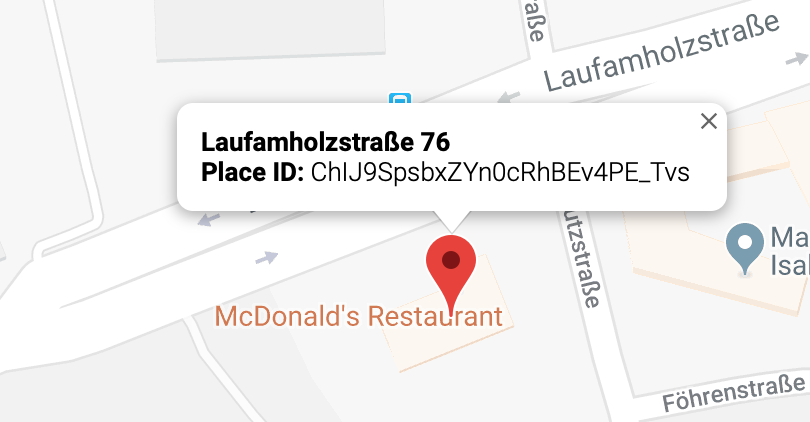
      $ curl "https://maps.googleapis.com/maps/api/place/details/json?fields=name,opening_hours&language=en&placeid=ChIJ9SpsbxZYn0cRhBEv4PE_Tvs&key="API_KEY"
      

      Still confused why the place ID from Place Finder seems a bit off.

      posted in Requests
      evroomE
      evroom
    • RE: Opening hours for stores/places thru Google API

      @htilly said in Opening hours for stores/places thru Google API:

      Try this ID instead:

      Thanks for spending time on it.

      Strange, but it works.
      The Place finder really says “ChIJ9SpsbxZYn0cRhBEv4PE_Tvs”, how did you find “ChIJl7ycbxZYn0cRqZwkVTJ3Rzw” ??

      0_1553893557312_Screenshot 2019-03-29 at 22.04.51.png

      posted in Requests
      evroomE
      evroom
    • 1 / 1