@sdetweil Darned, that’s really sad, it seems logical to make a notification that says done setting up, and running. Oh well, always room for improvement in the code :-)
Read the statement by Michael Teeuw here.
Posts
-
RE: MagicMirror isn't publishing 'user_presence' on start up?
-
RE: MagicMirror isn't publishing 'user_presence' on start up?
@sdetweil Ok, yes, I used your script.
So it just says
# This file is still here to keep PM2 working on older installations. cd ~/MagicMirror DISPLAY=:0 npm startSo I guess that just launches it, but it’s not actually ready at that point, thus the MMM-MQTTbridge is also not ready to receive the ‘hdmi off’ command.
Aren’t there some sort of notification that says ‘done, ready for running’ when it starts, I could put that notification in the MMM-MQTTbridge so that would also launch the ‘SCREENON’ back to MQTT. -
RE: MagicMirror isn't publishing 'user_presence' on start up?
@sdetweil Ok, I found the mosqitto_pub command, so I can publish with that to MQTT, which startup script is it, and can I make sure it’s done loading before running the command?
-
RE: MagicMirror isn't publishing 'user_presence' on start up?
@sdetweil Not sure how to do that to the MQTT channel, but can I send a notification when it’s started up? That would be picked up by the MQTT mirror addon?
-
MagicMirror isn't publishing 'user_presence' on start up?
I’ve started rebooting my mirror once a day due to the problem with the newsreader mentioned elsewhere.
This made another bug apparent.
I’m turning the HDMI on and off depending on presence, and I also report the state to MQTT.
But it seems that if the HDMI is turned off, and then a reboot is done the HDMI is turned on, but the change in USER_PRESENCE isn’t sent in notifications, so the MQTT shows the monitor as turned off (if it was turned off before the reboot). -
RE: MMM-MyCommute module shows up a bit random
@fribse I wonder if this:
https://forum.magicmirror.builders/topic/14835/calendar-only-all-day-events-showing-moment-timezone-issue
is the same problem that I see here.
If I remove all time/day restrictions on MMM-MyCommute then it works, but if I try to limit the time it is active, it shows up on weird hours (I’m CET). -
RE: Some sort of JSON interpretation problem in newsfeed module
@sdetweil Hey Sam
I only wrote the thing with the quotes as the internal config seems to be a bit more leniant.
No tabs, the ONLY thing I did to make it work, was add an extra space :-)
My config is so old by now, that every time I look at it, I have to rethink everything to get to the same result :-D -
Some sort of JSON interpretation problem in newsfeed module
I’ve been struggling with an external compliments file for some time, and after another user posted his on gist, I took the liberty to use that as a test, and then compared the two.
I couldn’t get mine to work at all, but the other worked fine.
By changing the indentation to three spaces, it worked. It was two spaces.
This is a really odd problem, there is no standard to my knowledge for JSON that sets it at specific three spaces?So this didn’t work:
{ "anytime" : [ "Jeg beundrer,\nat du altid er helt dig selv", "Man bliver så glad af\nat være sammen med dig", ...But this does
{ "anytime" : [ "Jeg beundrer,\nat du altid er helt dig selv", "Man bliver så glad af\nat være sammen med dig", ...I think that is really odd.
Furthermore I had to remember the quotes around the key, which isn’t needed in the internal list, but if I read it right, it must have quotes in a proper json file.
-
RE: Home Assistant Toggle?
@bendonahue I’ve set it up here with MQTT.
I wrote a small guide on the HA forum:
https://community.home-assistant.io/t/magicmirror-integration-into-home-assistant-with-mqtt/177246/15 -
RE: Newsfeeder is going way to fast when showing news
@sdetweil Ok, I finally got it tested again.
If I go to my computer and open the webpage via remote it shows the right interval (this was what I did earlier), and the news cycles slowly as it should.
But on the raspberry pi, it still races through the news.
I haven’t restarted the Rpi just to keep the problem, but for me it’s not an easy test on the RPi itself, as the RPi is of course behind the mirror and headless. -
RE: Newsfeeder is going way to fast when showing news
Yup, I saw it again this morning, odd.
-
RE: Newsfeeder is going way to fast when showing news
@sdetweil Currently it shows the news in a proper speed, not sure what starts the problem?
-
RE: Newsfeeder is going way to fast when showing news
Like this:

?pi@bathmirror:~ $ npm --version
7.6.3 -
MMM-MyCommute module shows up a bit random
I’m not sure what is going on. I see the mmm-mycommute show the distance sometimes, and other times not.
To save on API calls I’ve limited the showing of the module to mornings on workdays.{ module: "MMM-MyCommute", position: "bottom_right", classes: "xsmall", config: { apiKey: "xxx", startTime: "05:00", endTime: "12:00", hideDays: [0,6], origin: "My road 1, 2670 Greve", destinations: [ { destination: "Borgergade 14, 1300 Koebenhavn K", label: "Motorvej", mode: "driving", color: "#82E5AA" }, { destination: "Borgergade 14, 1300 København K", label: "Landevej", mode: "driving", color: "#82E5AA", avoid: "highways" } ] } },Sometimes it shows up, other times it doesn’t, I can figure out the pattern.
Is it a timezone problem (so it’s not in local time, or is there an error somehow I don’t understand it. -
RE: Newsfeeder is going way to fast when showing news
@sdetweil Interesting
My config looks like this
{ module: "newsfeed", position: "bottom_bar", classes: "day_schedule", config: { feeds: [ { title: "Ekstra Bladet", url: "https://ekstrabladet.dk/rssfeed/all/" }, { title: "DR nyheder", url: "https://www.dr.dk/nyheder/service/feeds/allenyheder" }, { title: "BT", url: "https://www.bt.dk/bt/seneste/rss" }, { title: "Berlingske.dk", url: "https://www.berlingske.dk/content/3/rss" }, { title: "TV2 Øst", url: "https://www.tv2east.dk/rss" } ], updateInterval: 30000, showSourceTitle: true, showPublishDate: true, broadcastNewsFeeds: true, broadcastNewsUpdates: true } },And it hasn’t changed for years.
animationSpeed, isn’t that for the transition?
That’s not what’s happening here, it goes through all the news in a minute or so. -
Newsfeeder is going way to fast when showing news
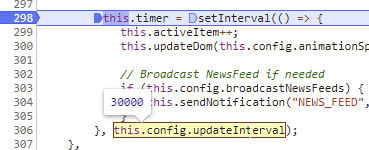
I’ve set up the delay to 30000, so it should take it’s time between rolling the news.
It’s the original news module, with an added QR code module.
It fetches news from some RSS feeds.
I’ve tried rebooting the pi, and also just restarting MM.
It has about 12 GB available space, so that’s not the problem.
What on earth is suddenly going on? This has worked for at least a year?
Everything is fully updated on the modules and core. -
RE: MMM-News-QR doesn't ACTUALLY work.
@j0539h That sounds odd, I know that saying so is about as constructive as your post, but it works fine here.
My config looks like this:
{ module: "newsfeed", position: "bottom_bar", classes: "day_schedule", config: { feeds: [ { title: "Ekstra Bladet", url: "https://ekstrabladet.dk/rssfeed/all/" }, { title: "DR nyheder", url: "https://www.dr.dk/nyheder/service/feeds/allenyheder" }, { title: "BT", url: "https://www.bt.dk/bt/seneste/rss" }, { title: "Berlingske.dk", url: "https://www.berlingske.dk/content/3/rss" }, { title: "TV2 Øst", url: "https://www.tv2east.dk/rss" } ], updateInterval: 30000, showSourceTitle: true, showPublishDate: true, broadcastNewsFeeds: true, broadcastNewsUpdates: true } }, { module: "MMM-News-QR", position: "bottom_bar", classes: "day_schedule", config: { updateType : "push", animationSpeed: 2500, colorDark: "#fff", colorLight: "#000", imageSize: 100 } }, -
I can't get screencast to show up longer?
Not sure what the h… happened here.
My MMM-Screencast doesn’t show up in the Youtube app any longer.I did a reinstall with
git clone https://github.com/kevinatown/MMM-Screencast.git cd MMM-Screencast npm installConfig looks like this
{ module: "MMM-Screencast", position: "bottom_right", config: { castName: "Spejl", position: "bottomCenter", height: 600, width: 800, } },Just to be sure that I had the latest, but nothing shows up.
Is there a special trick for this?Looking in the logs, I did find something, but I don’t understand the meaning, except that it says it’s already listening?
0|MagicMir | [24.04.2021 17:30.32.266] [ERROR] Error [ERR_SERVER_ALREADY_LISTEN]: Listen method has been called more than once without clo sing. 0|MagicMir | at Server.listen (net.js:1386:11) 0|MagicMir | at DialServer.start (/home/pi/MagicMirror/modules/MMM-Screencast/DialServer.js:123:17) 0|MagicMir | at Class.socketNotificationReceived (/home/pi/MagicMirror/modules/MMM-Screencast/node_helper.js:22:21) 0|MagicMir | at Socket.<anonymous> (/home/pi/MagicMirror/js/node_helper.js:109:11) 0|MagicMir | at Socket.emit (events.js:210:5) 0|MagicMir | at /home/pi/MagicMirror/node_modules/socket.io/dist/socket.js:434:28 0|MagicMir | at processTicksAndRejections (internal/process/task_queues.js:75:11) { 0|MagicMir | code: 'ERR_SERVER_ALREADY_LISTEN' 0|MagicMir | }I looked a bit with
sudo netstat -tulpn | grep LISTEN
And without MagicMirror running it showstcp 0 0 0.0.0.0:22 0.0.0.0:* LISTEN 490/sshd tcp6 0 0 :::22 :::* LISTEN 490/sshdwith MagicMirror it shows
tcp 0 0 0.0.0.0:22 0.0.0.0:* LISTEN 490/sshd tcp 0 0 0.0.0.0:8080 0.0.0.0:* LISTEN 5754/electron.js tcp6 0 0 :::22 :::* LISTEN 490/sshd tcp6 0 0 :::8569 :::* LISTEN 5754/electron.jsSo the port 8569, isn’t that screencast? If I uncomment the screencast config, it doesn’t show the port as opened…
So why doesn’t it show up in the app? -
RE: weather module just shows loading?
Ok, I found out what was wrong, despite the confusion with the ’ or " use.
It’s the appid, it’s called apiKey in the weather module.
So after changing that (and also changing all ’ to " in the config), removing quotes around numbers, only have the locationID instead of both location and locationID and other cleanup stuff, it is shows properly :-)So I replaced both my currentweather and YrThen modules with two weather modules:
{ module: "weather", position: "top_right", classes: "day_schedule", config: { weatherProvider: "openweathermap", type: "current", units: "metric", timeFormat: 24, decimalSymbol: ",", initialLoadDelay: 0, onlyTemp: false, locationID: 2621215, apiKey: "xxx" } }, { module: "weather", position: "top_right", classes: "day_schedule", config: { weatherProvider: "openweathermap", type: "forecast", units: "metric", timeFormat: 24, decimalSymbol: ",", initialLoadDelay: 0, onlyTemp: true, maxNumberOfDays: 7, colored: true, appendLocationNameToHeader: false, locationID: 2621215, apiKey: "xxx" } },Looks very nice indeed

-
weather module just shows loading?
I just noticed that the ‘currentweather’ module I’ve set up a long time ago, is now deprecated, and I should use weather instead.
So I tried setting it up, but it just shows ‘loading’.
The config I’ve built looks like this:{ module: 'weather', position: 'top_right', classes: 'day_schedule', config: { weatherProvider: 'openweathermap', type: "current", units: 'metric', timeFormat: '24', decimalSymbol: ',', initialLoadDelay: '0', onlyTemp: 'true', location: 'Greve', locationID: '2621215', appid: 'xxx' } },I then tried stripping it to the example:
{ module: "weather", position: "top_right", config: { // See 'Configuration options' for more information. type: 'current' } },Still just shows loading…