@lhops Try to log your temperature, the reboot sounds like a temp issue.
It would also suit the PiR that registers a rising temperature.
A New Chapter for MagicMirror: The Community Takes the Lead
Read the statement by Michael Teeuw here.
Read the statement by Michael Teeuw here.
F
Offline
Posts
-
RE: My Mirror reboots for no reason
-
MMM-Mycommute - has anybody gotten the time start and end, and hidedays to work?
I live in CEST timezone, and I fear that is part of the problem.
I have a config like this for the module:{ module: "MMM-MyCommute", position: "bottom_right", classes: "xsmall", header: "Trafik", config: { apiKey: "xxx", startTime: "05:00", endTime: "12:00", hideDays: [0,6], origin: "Home", destinations: [ { destination: "Address1", label: "Company1", mode: "driving", color: "#82E5AA" }, { destination: "Address2", label: "Company2", mode: "driving", color: "#82E5AA" } ] } },My hope was that it would be active between 5 in the morning and midday, and not show up in weekends.
But this morning (tuesday) it diedn’t show up at around 8.Has anybody else gotten this to work, and is there a trick to it?
-
RE: Just upgraded to 2.18, runs, but no display
@fribse Nope, just removed it and booted the mirror, still seeing those…
-
RE: Just upgraded to 2.18, runs, but no display
@sdetweil Glad to show you something new :rolling_on_the_floor_laughing:
I wonder if it’s thegpu_mem=128in boot/config.txt
?Well, after doing a reinstall, module for module, it’s working with everything except that the Screencast module interferes with the remote module for the Home Assistant Integration (which uses the remote module).
So a success for now, and then I hope the integration to HA will get working.
Thans @sdetweil and @bugsounet ! -
RE: Electron Security Issues
@karsten13 I would normally agreee, but this is only to satisfy weird demands on SSL, not for any form of security and the mirror is not externally available.
-
RE: Just upgraded to 2.18, runs, but no display
@fribse Ok, so the black screen has nothing to do with the error:
0|MagicMirror  | [1554:0213/183501.650842:ERROR:viz_main_impl.cc(161)] Exiting GPU process due to errors during initialization
0|MagicMirror  | [1601:0213/183503.081619:ERROR:viz_main_impl.cc(161)] Exiting GPU process due to errors during initialization
0|MagicMirror  | [1621:0213/183503.548717:ERROR:sandbox_linux.cc(376)] InitializeSandbox() called with multiple threads in process gpu-process.
As that is still shown when I start the software…
-
RE: Just upgraded to 2.18, runs, but no display
@bugsounet Ha ha ha, no, I’m not blaiming anybody except myself. :beaming_face_with_smiling_eyes:
How do I
“So: Just use node v14.x”@sdetweil I just did a reinstall, and now it displays stuff on the screen.
I do see this in the logs repeated over and over (as I said, fresh install):0|MagicMirror | [6213:0213/182653.081807:ERROR:socket_posix.cc(96)] CreatePlatformSocket() failed: Adressefamilien er ikke understøttet af protokollen (97)Now I’ll try to add modules from my old config to see if it keeps working.
-
RE: Just upgraded to 2.18, runs, but no display
@sdetweil Can I attempt a reinstall by just renaming the MagicMirror folder?
I’ve also lost my most appreciated module, MMM-MQTTBridge, so I would love to just go back to the 2.17.1 if possible at all and the node.js and npm to be on an older (working) version :-( -
RE: Just upgraded to 2.18, runs, but no display
@sdetweil I used your script (of course :smiling_face_with_halo: )
It’s a Raspberry Pi 3 Model B Rev 1.2
According to /sys/firmware/devicetree/base/modelnode -v v16.14.0 npm -v 8.3.1I’ve now tried to only load the clock module, same result.
No message in the debug console, except the happy ones.
Btw. release shows:
/etc/*release
PRETTY_NAME=“Raspbian GNU/Linux 10 (buster)”
NAME=“Raspbian GNU/Linux”
VERSION_ID=“10”
VERSION=“10 (buster)”
VERSION_CODENAME=buster
ID=raspbian
ID_LIKE=debian
HOME_URL=“http://www.raspbian.org/”
SUPPORT_URL=“http://www.raspbian.org/RaspbianForums”
BUG_REPORT_URL=“http://www.raspbian.org/RaspbianBugs” -
Just upgraded to 2.18, runs, but no display
Hi all
One more to the list of people having problems after 2.18.
I’m running a RPi to show the magicmirror.
I can see on ‘http://mirror:8080’ that it renders the page.
But nothing is shown on the monitor
By now in my debugging I only have these modules activated:
“compliments”
“alert”
“updatenotification”
“clock”
“calendar”
“weather”
“newsfeed”
As far as I know, all core modules.
I see this in the logfile:0|MagicMir | [974:0213/131905.747644:ERROR:viz_main_impl.cc(161)] Exiting GPU process due to errors during initialization 0|MagicMir | [1014:0213/131907.005140:ERROR:viz_main_impl.cc(161)] Exiting GPU process due to errors during initialization 0|MagicMir | [1036:0213/131907.699933:ERROR:sandbox_linux.cc(376)] InitializeSandbox() called with multiple threads in process gpu-process. -
RE: Electron Security Issues
So a LetsEncrypt wildcard certificate could help here (if you have a domain that is). But does MM even support running with a cert out of the box, or do you need to recode stuff?
-
Calendar module fails to fetch data and discards old data, leaving nothing
So I see this every morning:
0|MagicMirror  | [13.02.2022 12:34.28.850] [ERROR]
0|MagicMirror  | Calendar Error. Could not fetch calendar:  http://p01-calendarws.icloud.com/ca/subscribe/1/IsLh6fUURb4n_nA6vhWYUmlEe98rz2BN8BhioUPzrC2HVohwJIUCbGuGeTwczZWvXjTqU7vicBATXHojb1p5fn8ub3RCBUwKfHm3jXJDzFE Error: Service Unavailable
0|MagicMirror  |     at NodeHelper.checkFetchStatus (/home/pi/MagicMirror/js/node_helper.js:121:9)
0|MagicMirror  |     at processTicksAndRejections (node:internal/process/task_queues:96:5)
Which gives this result in the mirror:

Later in the day, the calendar days are fetched, and then updated on the screen.
Why does the module discard the existing days when it can’t get the new download?
My guess is that the calendar is somehow throttled, and thus rejects requests when there are too many, so how do I make the calendar module keep the old data until it can get new data? -
RE: Fun for halloween
@alextveit Well, I’m controlling it through Home Assistant, and HA is then integrated to Google.
So in Home Assistant I have a switch that launches a script on the raspberry pi that plays back the video.
I’m using omxplayer -o alsa XXX.mp4 as the command to play it back through an external USB soundcard. -
RE: Fun for halloween
@ray I bought it from atmosfx, they have a bunch of these videos.
-
Fun for halloween
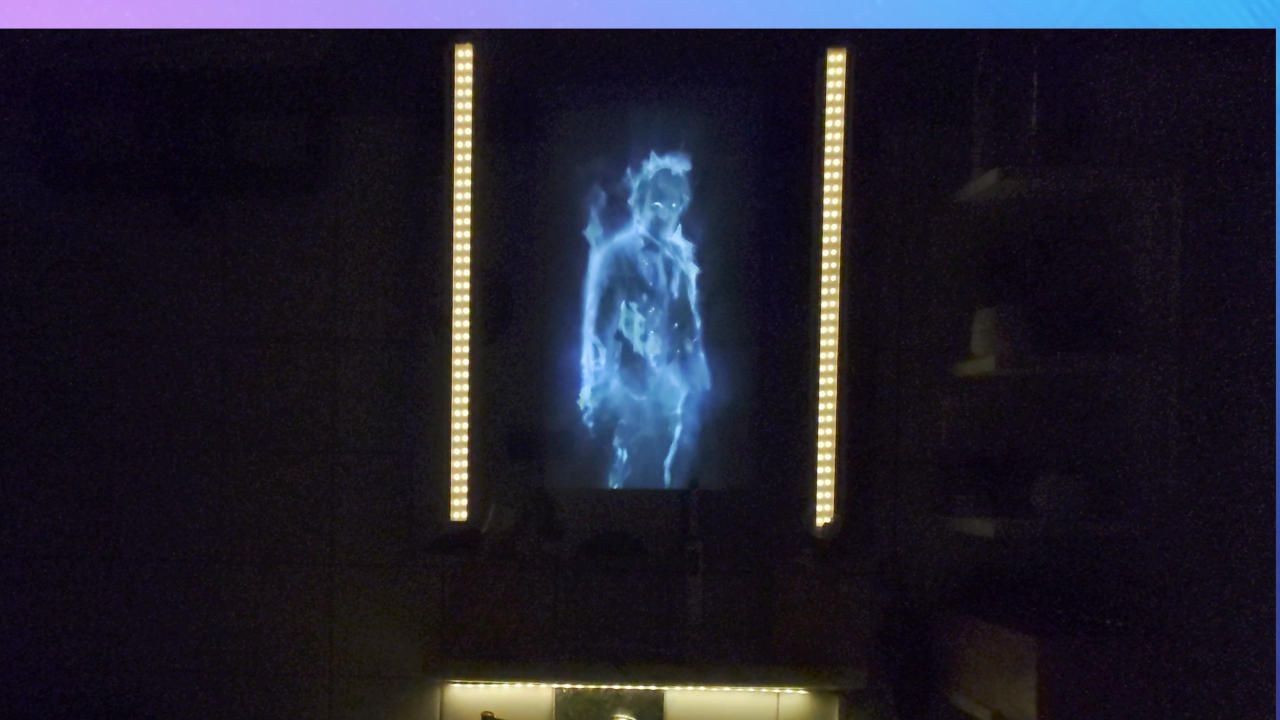
So we have our Magic Mirror set up in the bathroom.
At halloween it is going to show an extra surprise.We control everything here with Home Assistant, so 15s after the light is turned on in the bathroom, the light will go out, some will start flickering, and the buttons for controlling the light will not work.
This is how it’s going to look like:
-
Can I execute shell script from MQTT?
Hi All
I have the MQTTBridge module set up, and it works very very well.
I can restart MM, reboot, turn the HDMI on and off and everything.
What I would like was to add a way to run a shell script.
I looked into the Remote Control module, and it has some customcommands, but I think that is just for already defined commands.
So what else can I do?
The ideal would be to just set a MQTT topic, and it starts a shell script I’ve made. -
RE: Newsfeeder is going way to fast when showing news
@jalibu Weeheee, sounds great! Good work on such an tough problem.
-
RE: New 2-way mirror supplier - low prices and lead times
@ivanov_d Hey Ivanov
That sounds very interesting, how much do you think shipping to Denmark would be, and what is the minimum price, I mean 299 €/m2, if I only get a 50cmx50cm it’s only 1/4 of that, so is there a minimum price for smaller mirrors?
And where do they ship from inside/outside of EU? -
RE: MagicMirror isn't publishing 'user_presence' on start up?
@sdetweil Ahh, yes, and there I do see the
sendNotification("ALL_MODULES_STARTED");Going out, hmm, it seems that it’s main sending it out, I wonder if that is supposed to be payload Value, and notiId is supposed to be something like main? Hmm, I hope sergge1 or @bugsounet knows that.
-
RE: MagicMirror isn't publishing 'user_presence' on start up?
@sdetweil Hey Sam, sorry you lost me, “filter field”?
@bugsounet If you are still around, do you have any idea about the notification format in notiDictionary.js?