I got it through the ‘community order’ on this page.
The reflectance is very good, it’s a real mirror.
My only problem with it, is that the chroma of it is a bit brown, so it requires quite a lot of light in the room.
A New Chapter for MagicMirror: The Community Takes the Lead
Read the statement by Michael Teeuw here.
Read the statement by Michael Teeuw here.
F
Offline
Posts
-
RE: I would love to show the finished mirror, but I'm waiting for the glass :-) This is the project so far...
-
RE: Having problems scanning qr codes from MMM-News-QR
@fribse Hmm, weird, I had changed the color coding for colorDark to ‘#000’ and colorLight to ‘#fff’, when reverting them to the example, then it worked with the scanning, that’s really interesting’.
Now it scans it every single time. -
Having problems scanning qr codes from MMM-News-QR
Hi All
I just wanted to hear if others can actually scan the QR codes? I can’t figure out what is going wrong, I have news showing up, I have the QR code show up (both handling it via push, very nice).
But for some reason my phone won’t scan the code, it keeps attempting to, but noooo. -
RE: MMM-HomeAssistant-Sensors (Development) - Show your HA Sensors on your Mirror
@Snille Looks very nice, good job!
-
RE: I would love to show the finished mirror, but I'm waiting for the glass :-) This is the project so far...
While recovering from Covid-19, I just wanted to post an image of the mirror in it’s place.
Still waiting for some extra light in the bathroom, as the tinted mirror makes it rather dark to look at.
The light strips in the mirror works quite well.
I still need to buff up the mirror :-D
But I like that the mirror is hanging only by the small hinges, so it kind of floats on the wall.
I’ve set it to turn on the monitor together with the powerfull light above the mirror, so the light from the monitor will not be that visible.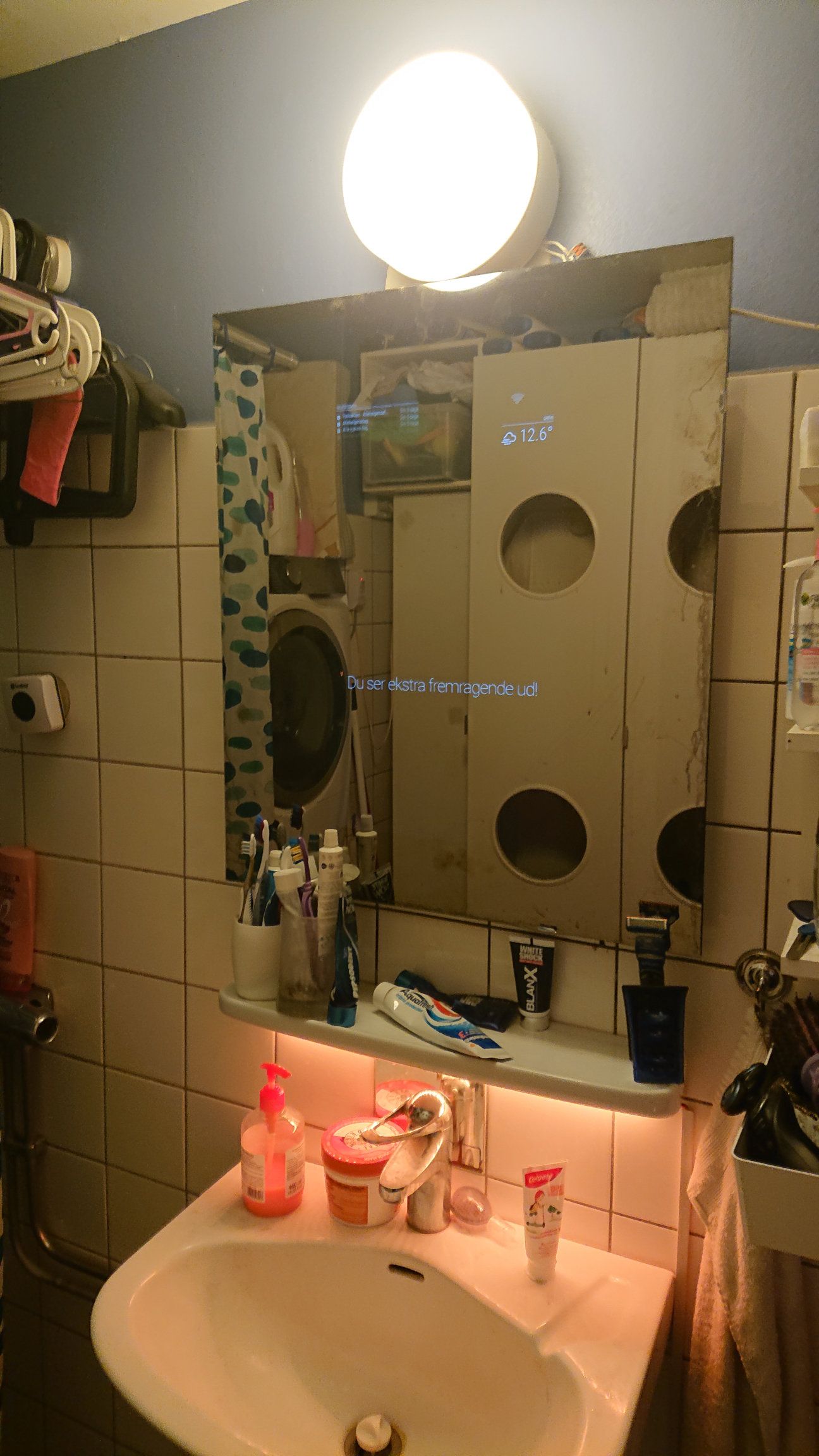
-
Can I start a script from MMM-Remote-Control or something else?
I have finally gotten most of it working.
I’m almost ready for halloween :-)
I’m going to create a scene that will make the light flicker, and then I want to start a movie playback via a MQTT command.
I’ve made a script that will random select a clip and play it back, and it shows up as it should, on top of the MM.
But how can I get that done?
I tried using the ‘MMM-Remote-Control’ and add a command with customcommand, but it seems that I can not just add a random command, I can only redefine the already set up commands???The MQTTBridge sends out perfect NOTI’s, so anything that can react to this would work? Any ideas?
-
RE: Notification issued from MMM-MQTTbridge but nothing happens
And again, Serge sharp eyes found the errors. I was somply trying to hard to add quotes and stuff so it got messed up.
The working config for receiving commands from Home Assistant looks like this now:var mqttHook = [ { mqttTopic: "cmnd/bathroom/mirror", mqttPayload: [ { payloadValue: "MONITOROFF", mqttNotiCmd: ["MONITOROFF"] }, { payloadValue: "MONITORON", mqttNotiCmd: ["MONITORON"] }, { payloadValue: "UNDIM", mqttNotiCmd: ["UNDIM"] }, { payloadValue: "DIM", mqttNotiCmd: ["DIM"] }, ], }, ]; var mqttNotiCommands = [ { commandId: "MONITOROFF", notiID: 'REMOTE_ACTION', notiPayload: {action: 'MONITOROFF'} }, { commandId: "MONITORON", notiID: 'REMOTE_ACTION', notiPayload: {action: 'MONITORON'} }, { commandId: "DIM", notiID: 'REMOTE_ACTION', notiPayload: {action: 'BRIGHTNESS', value: '50'} }, { commandId: "UNDIM", notiID: 'REMOTE_ACTION', notiPayload: {action: 'BRIGHTNESS', value: '255'} }, ]; module.exports = { mqttHook, mqttNotiCommands}; -
RE: MMM-MQTTbridge doesn't seem to report USER_PRESENCE correctly?
The config that works looks like this:
var notiHook = [
  {
    notiId: "USER_PRESENCE",
    notiPayload: [
      {
        payloadValue: '1',
        notiMqttCmd: ["SCREENON"]
      },
      {
        payloadValue: '0',
        notiMqttCmd: ["SCREENOFF"]
      }
    ]
  }
];
var notiMqttCommands = [
  {
    commandId: "SCREENOFF",
    mqttTopic: "state/bathroom/mirror/monitor",
    mqttMsgPayload: "OFF"
  },
  {
    commandId: "SCREENON",
    mqttTopic: "state/bathroom/mirror/monitor",
    mqttMsgPayload: "ON"
  }
];

module.exports = { notiHook, notiMqttCommands };
Thankyou again for your excellent help and sharp eyes Serge!. :flexed_biceps: :heart_suit:
-
MMM-MQTTbridge doesn't seem to report USER_PRESENCE correctly?
I can see that MMM-Remote-Control set’s the USER_PRESENCE depending on the state of the monitor.
I try to interpret that to update the status of the switch in HomeAssistant by having it set up in the notiDictionaryThe config looks like this:
var notiHook = [
  {
    notiId: "USER_PRESENCE",
    notiPayload: [
      {
        payloadValue: true,
        notiMqttCmd: ["SCREENON"]
      },
      {
        payloadValue: false,
        notiMqttCmd: ["SCREENOFF"]
      },
    ],
  },
];
var notiMqttCommands = [
  {
    commandId: "SCREENOFF",
    mqttTopic: "bathroom/mirror/monitor",
    mqttMsgPayload: "{'state':'OFF'}"
  },
  {
    commandId: "SCREENON",
    mqttTopic: "bathroom/mirror/monitor",
    mqttMsgPayload: "{'state':'ON'}"
  },
];

module.exports = { notiHook, notiMqttCommands };
The logs looks like this:
0|mm     | [2020-10-16 09:44:34.089] [LOG]
0|mm     | [MQTT bridge] NOTI->MQTT. Topic: bathroom/mirror/monitor, payload: false
0|mm     | [2020-10-16 09:44:34.101] [LOG]
0|mm     | Powering off HDMI
0|mm     | [2020-10-16 09:44:34.102] [LOG]
0|mm     | [2020-10-16 09:44:36.936] [LOG]
0|mm     | [MQTT bridge] NOTI->MQTT. Topic: bathroom/mirror/monitor, payload: {"state":"ON"}
0|mm     | [2020-10-16 09:44:37.793] [LOG]
0|mm     | Powering on HDMI with preferred settings
0|mm     | [2020-10-16 09:44:37.795] [LOG]
So when it turns off, it doesn’t report state: off it just reports ‘false’ and it only reports state:on when it’s on.
I do see the messages appear in the MQTT, but as they are incorrectly formatted, HA doesn’t update it properly.
-
Notification issued from MMM-MQTTbridge but nothing happens
As I posted elsewhere, after find the logs, I could get the errors removed, so now it posts the notification to REMOTE_ACTION, but nothing happens:
It does receive the MQTT command, but nothing happens on the NOTI:
0|mm     | [MQTT bridge] MQTT message received. Topic: bathroom/mirror, message: MONITOROFF
0|mm     | [2020-10-16 09:23:53.728] [LOG]
0|mm     | [MQTT bridge] MQTT -> NOTI issued: 'REMOTE_ACTION', payload: {action: 'MONITOROFF' }
Same thing happens for MONITORON, DIM and UNDIM.
The mqttdictionary file looks like this now:
var mqttHook = [
    {
      mqttTopic: "bathroom/mirror",
      mqttPayload: [
        {
          payloadValue: "MONITOROFF",
          mqttNotiCmd: ["MONITOROFF"]
        },
        {
          payloadValue: "MONITORON",
          mqttNotiCmd: ["MONITORON"]
        },
        {
          payloadValue: "UNDIM",
          mqttNotiCmd: ["UNDIM"]
        },
        {
          payloadValue: "DIM",
          mqttNotiCmd: ["DIM"]
        },
      ],
    },
  ];
var mqttNotiCommands = [
    {
      commandId: "MONITOROFF",
      notiID: "'REMOTE_ACTION'",
      notiPayload: "{action: 'MONITOROFF' }"
    },
    {
      commandId: "MONITORON",
      notiID: "'REMOTE_ACTION'",
      notiPayload: "{action: 'MONITORON' }"
    },
    {
      commandId: "DIM",
      notiID: "'REMOTE_ACTION'",
      notiPayload: "{action: 'BRIGHTNESS', value: '50')"
    },
    {
      commandId: "UNDIM",
      notiID: "'REMOTE_ACTION'",
      notiPayload: "action: 'BRIGHTNESS', value: '255'}"
    },
  ];

  module.exports = { mqttHook,  mqttNotiCommands};
And the notification looks just like the one here in the documentation example here:
this.sendNotification('REMOTE_ACTION', {action: 'RESTART'});The ipWhitelisting has been both tried with [(“127.0.0.1”,“localhost”,“my.ip.range.0/24”)] and also with just [].
I can issue the commands MONITOROFF/MONITORON directly in the Remote-Control menu at /remote.htmlAny input from the developers on this? @Serge , @Bugsounet, @Jopyth :-)
Is it a MMM-MQTTbridge problem or a MMM-Remote-Control problem?
-
RE: I'm trying to get MMM-MQTTbridge to work, but where do I find the debug log to see notifications etc?
Ahh, and the second you post this, you actually find it mentioned in a sentence on the forum :-D
So if I issue
pm2 logsI see the logs I need!
I’m going to break this post off, and make a seperate about the problem with nothing happening now.
-
I'm trying to get MMM-MQTTbridge to work, but where do I find the debug log to see notifications etc?
Hi All
I had this up and running before the latest updates to MM and to the MMM-MQTTbridge. But now it doesn’t.
I need to find out what is going on, but where do I find the debug log on the latest MM?
I can see in my old posts when I originally tried to set this up I could get nice long logs that detailed what was going on, but I can’t find the logs now.I need to have the MMM-MQTTbridge report status of monitor (to update the switch in HomeAssistant), to receive monitoron/off (which is sent from a homebuilt PIR in the bathroom) and to execute a custom command (for halloween scary stuff :-D ).
-
RE: I would love to show the finished mirror, but I'm waiting for the glass :-) This is the project so far...
So it’s assembled, just need to protect the wood from moisture.
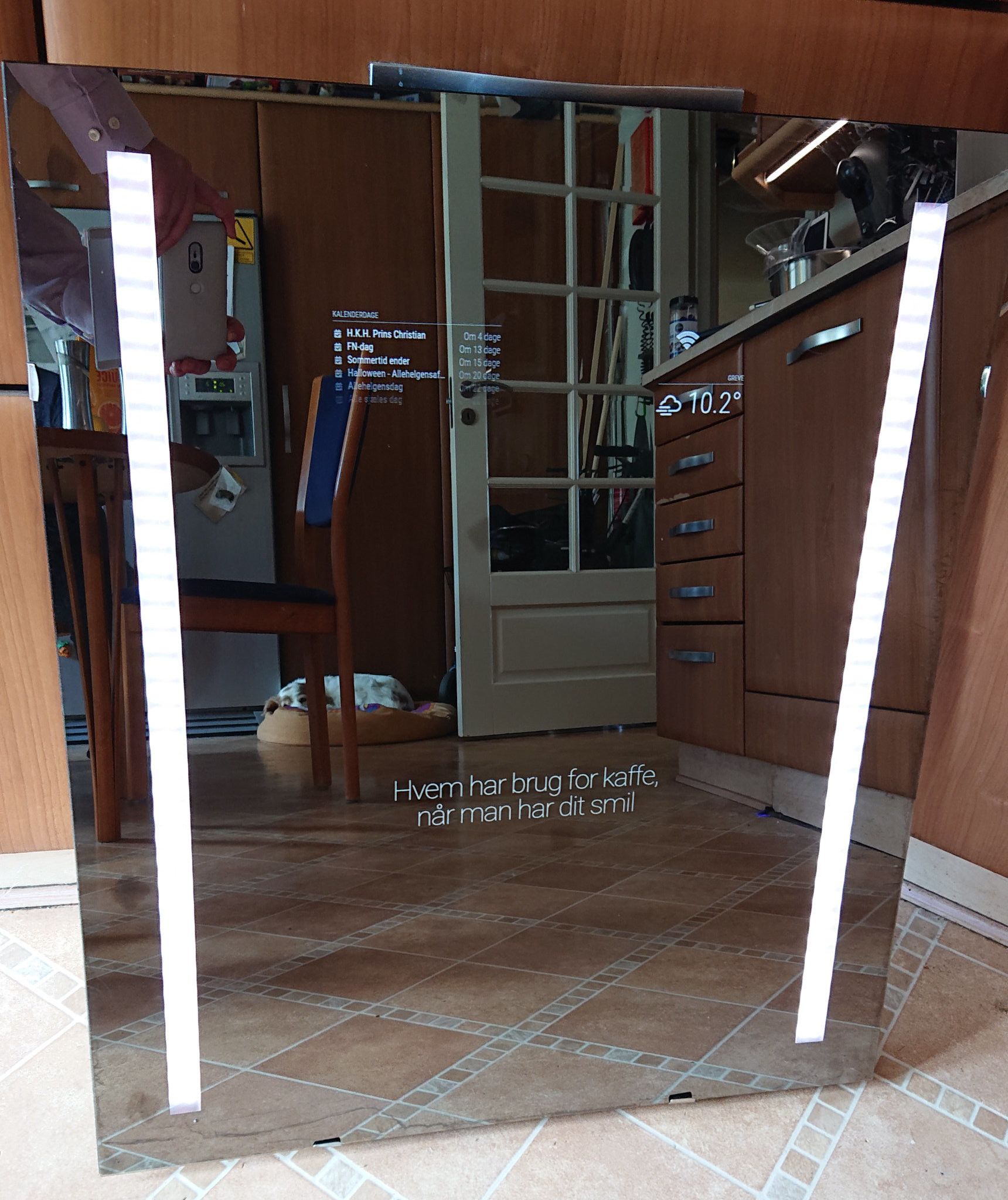
The ‘behind the mirror’ lights are working nicely, it’s based on WLED, the LED’s inside are SK6812, so it has very nice white, as well as RGB.
And then I off course need to polish the mirror :-)
It’s going to be set up before halloween, and I already have videos of ghosts ready and tested ;-) -
RE: What's the best way to block out area of mirror that doesn't have a monitor behind it?
I sent the oracal back (very expensive stuff) as I could get much cheaper and darker stuff from our local hardware store.
So I got the back covered with it, and then cut holes in it for the LED lights and monitor, it seems to work very well. -
RE: I would love to show the finished mirror, but I'm waiting for the glass :-) This is the project so far...
So, things are shaping up, I’ve gotten the mirror rebuilt, I had to swap the monitor, it was getting too hot.
The new one is much cooler.
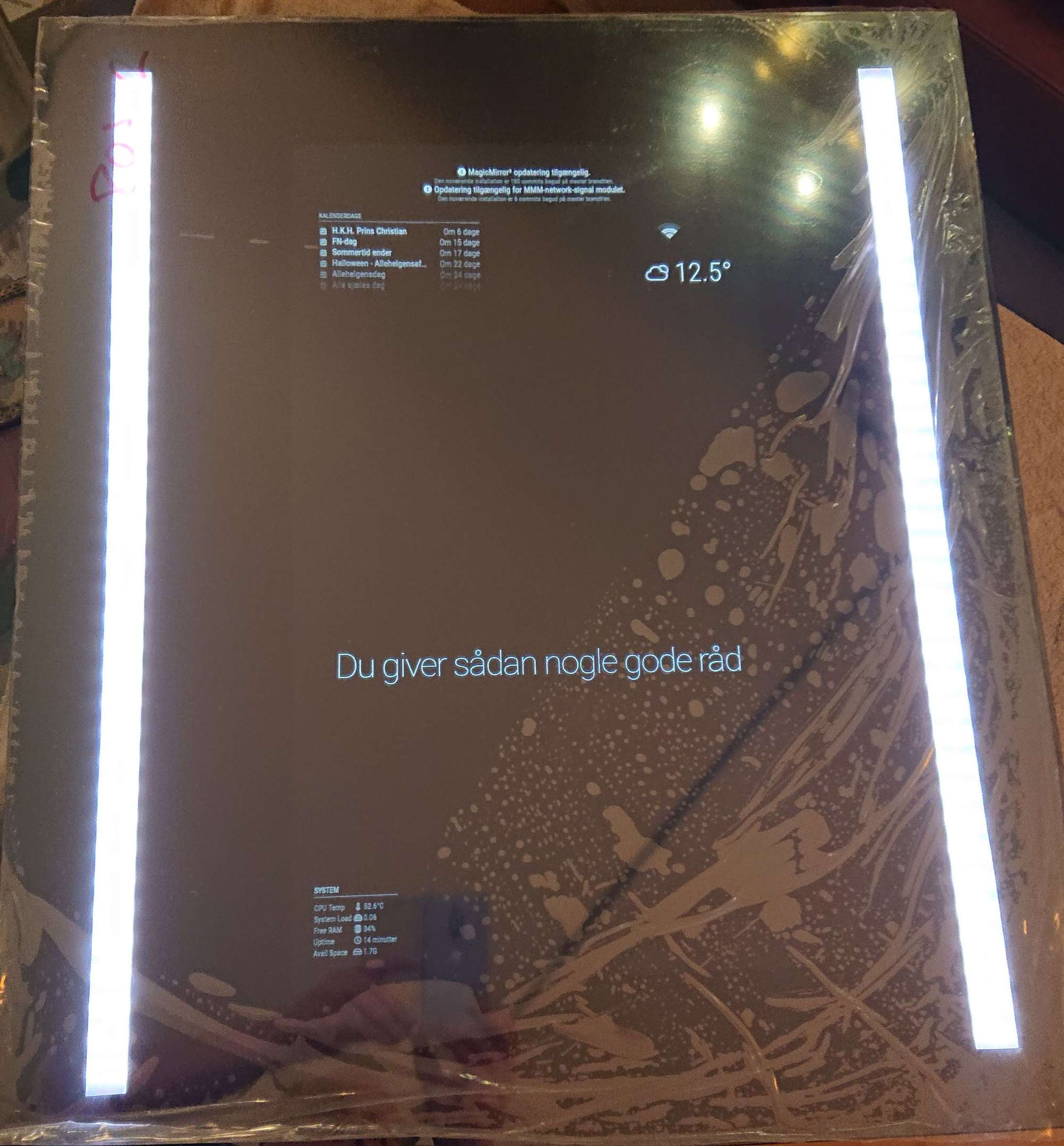
I also got the lights mounted, it’s a mixture of fun and serious, it will give light for usage, but it’s also RGB, so it can do effects if we want to :-)
This image shows the lights turned to it’s lowest (apart from being off, of course. The foil is still on, until I get the mirror properly fixed to the frame, it has the foil on.
-
RE: Best Film for Mirror
Go to the community order on this page, that’s proper mirrors, and they are very good quality. They cost a bit more than a bendy acryllic sheet, or a film, but they are well worth it :-)
-
RE: Two way mirror shop in Netherlands (near Leiden)
Go to the community order on this page, the mirrrors he is offering is real mirrors, and the best I’ve found.
-
RE: What's the best way to block out area of mirror that doesn't have a monitor behind it?
Ahh, ok, then I know exactly what it is :-)
I got some oracal651 as suggested by @Hubschra01 , but that was slightly more transparent than the one I already had. So I’m going to stick with the cheap stuff I already had, and return the oracal651.
@Goldjunge_Chriz is it correct that I can foil the back of the mirror and then cut through the foil without ruining the ‘mirror foil’ as that is applied to the front of the glass in your variant?