@KristjanESPERANTO thank you. Worked for me - because the repository was set to private 🙄 must be the heat…
H
Offline
A New Chapter for MagicMirror: The Community Takes the Lead
Read the statement by Michael Teeuw here.
Read the statement by Michael Teeuw here.
Posts
-
RE: MMM-LibraryMonitor
-
MMM-LibraryMonitor
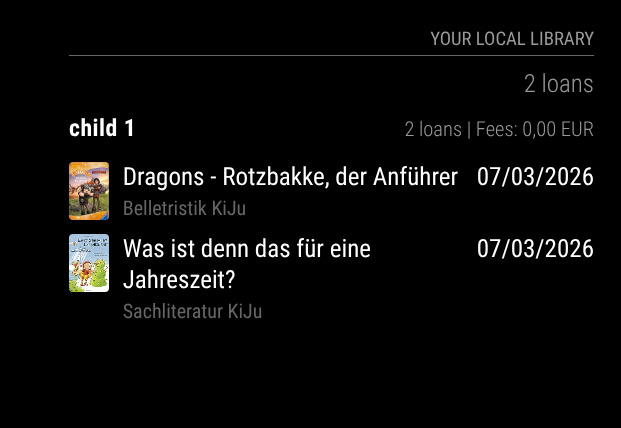
I just released MMM-LibraryMonitor, a MagicMirror module that shows your library account status directly on your mirror. It can display borrowed items, due dates, renewals, and account messages, depending on your library setup. (testet with a library which uses “OPEN-OPAC” - which is by any means NOT open…) Feedback, testing, and pull requests are welcome.!
-
RE: MMM-Webuntis
Hallo Julian,
derzeit ist es nicht möglich und von mir auch nicht geplant zu unterstützen:
- mir fehlen die API Endpunkte
- ich habe keine Testmöglichkeit also auch keine Supportmöglichkeit
- das Modul soll keine Konkurrenz zu den kommerziellen Interessen des Herstellers der Software sein. Ich habe keine Ahnung welche Features in welcher Art an die Schulen lizenziert werden. Mein primäres Ziel ist es die Schüler / Eltern Perspektive anzuzeigen.
Dahingegen steht es dir frei, das Modul zu forken und selbst mit deinen Möglichkeiten daran zu arbeiten - es ist kein Hexenwerk. Ich kann dir dafür auch gerne Tipps geben.
Viele Grüße
Heiko -
RE: MMM-Webuntis
e ich, allerdings wird er einmal beim Start geladen und updatet sich nicht
Einen QR-Code gibt es an der beschriebenen Stelle leider auch nicht
Fehlermeldung:
Webuntis Server Error (http 500) for “title” This is temporary Retrying automatically…Ich schreib Dir mal eine PN
Danke - das hilft mir schon mal weiter.
Die Fehlermeldung sagt, dass für den Schüler “title” die Daten nicht geladen werden konnten. Da du kein Schüler bist, hast du auch keine studentID und die API läuft auf Fehler.
Ich habe jetzt für die Rolle “TEACHER” die Schülerbezogenen APIs abgeklemmt. Also Hausaufgaben, Fehlzeiten und Klassenarbeiten bekommst du jetzt keine mehr angezeigt.
Kannst du einmal das Modul bitte updaten? und mir Rückmeldung geben, ob es jetzt funktioniert?
-
RE: MMM-Webuntis
@DerHerrB
Was sagt die Fehlermeldung denn?
Du kannst deinen Stundplan sehen? Weil dann ist die Fehlermeldung vermutlich zuviel ;-)Den Qrcode gibts auf der Einstellungen Seite (links unten auf den Benutzernamen gehen und dann den Tab „Freigaben“ ansteuern.
Lehreraccounts sind für mich leider nicht testbar.
-
RE: MagicMirror Module Sandbox
@angeldeejay that looks great! I will test it and maybe use it instead of or together with my DevContainer https://github.com/HeikoGr/MMM-DevContainer
-
RE: Default Calendar Not Loading Events After New MM Update
i filed an issue: https://github.com/jens-maus/node-ical/issues/495
it could be an edge case on my side.
@inteeraymee by any chance: did you use emClient anytime in the past?only workaround for my setup is to pin to v2.34.0 .
Updating the calendars might be the best solution for me… -
RE: Default Calendar Not Loading Events After New MM Update
I have the same issue after updating from MagicMirror 2.34.0 to 2.35.0.
In my case this is not a general calendar config problem and not an auth/fetch problem either. Some calendars still load fine, others fail right after the update, which pointed me to a parser regression.
What I found:
MagicMirror 2.34.0 used node-ical 0.22.1
MagicMirror 2.35.0 uses node-ical 0.25.6
The affected calendars are fetched successfully with HTTP 200
The failure happens during ICS parsing
These are the two of the log lines I get:[ERROR] [calendar] https://<server>/remote.php/dav/calendars/xx1/?export - iCal parsing failed: Cannot parse: 1-01-15T12:00:00Z [DEBUG] [calendar] Parsed iCal data from https://<server>/remote.php/dav/calendars/xx2/?export with 130 entries.The important detail in the broken ICS files is this VTIMEZONE block:
BEGIN:VTIMEZONE
TZID:W. Europe Standard Time
BEGIN:DAYLIGHT
DTSTART:00010325T020000
TZOFFSETFROM:+0100
TZOFFSETTO:+0200
RRULE:FREQ=YEARLY;BYDAY=-1SU;BYMONTH=3
END:DAYLIGHT
BEGIN:STANDARD
DTSTART:00011028T030000
TZOFFSETFROM:+0200
TZOFFSETTO:+0100
RRULE:FREQ=YEARLY;BYDAY=-1SU;BYMONTH=10
END:STANDARD
END:VTIMEZONE
I tested the exact same ICS file with both node-ical versions:
node-ical 0.22.1: parses successfully
node-ical 0.25.6: fails with Cannot parse: 1-01-15T12:00:00Z
I also verified that if I remove only that W. Europe Standard Time VTIMEZONE block from the failing ICS, the file parses again with node-ical 0.25.6.So the problem seems to be a regression in node-ical 0.25.x when resolving VTIMEZONE definitions with year 0001 in DTSTART. The calendar fetch itself succeeds; the crash happens while parsing timezone metadata.
This may especially affect calendars coming from Outlook/Exchange/Nextcloud imports, because W. Europe Standard Time looks like a Microsoft-style timezone definition.
-
RE: MMM-Webuntis
@meralith Danke für die Rückmeldung. Ich habe node.js in der Version 20.18.1 jetzt mal als Bedingung in der Readme formuliert.
Falls du noch irgendwoe Probleme, Fragen oder Anregungen hast - einfach melden!
-
RE: MMM-Webuntis
@meralith die Fehler:
0|mm | [2839:0309/111715.890708:ERROR:gbm_wrapper.cc(79)] Failed to get fd for plane.: Datei oder Verzeichnis nicht gefunden (2)
0|mm | [2839:0309/111715.891030:ERROR:gbm_wrapper.cc(262)] Failed to export buffer to dma_buf: Datei oder Verzeichnis nicht gefunden (2)
kommen sicher nicht vom MMM-Webuntis Modul sondern vom Chrome / Electon und sind vermutlich harmlos.
- Welches Version von Node.js läuft bei dir (
node -v)? - Hast du
npm ci --omit=dev(odernpm installausgeführt?) - Hast du Sonderzeichen im Anmeldenamen?
Alternativ kannst du mal den qrcode login ausprobieren.
- Welches Version von Node.js läuft bei dir (
-
RE: MMM-Webuntis
@magicghost our school doesn’t offer this untis feature for us, so i can’t implement and test it. youcan add this feature if you want/can do it
-
RE: MMM-Webuntis
i recently messed up the github repository.
If your last update was ~2 weeks ago you should be fine.
Otherwise your update may fail.You can get the most recent versions in this way:
There was no new feature in the last days. Only a more robust session management (hopefully) and internal changes.cd ~/MagicMirror/modules/MMM-Webuntis # Reset to match the remote repository git fetch origin git reset --hard origin/master npm ci --omit=devI’m sorry for any inconvenience!
-
RE: MMM-Webuntis
you can change the encoding in winscp to utf-8 then it should work again
-
RE: MMM-Webuntis
@magicghost yes, just define two modules. or maybe there are some fancy css hacks possible? i choose the first option for my two kids.
-
RE: MMM-Webuntis
this should work as minimum working example for your requirements.
{ module: "MMM-Webuntis", position: "top_right", config: { displayMode: 'grid', grid: { nextDays: 1, // today plus tomorrow = 2 days maxLessons: 0, // max lessons per day (0 = no limit) }, students: [ { title: "NAME", qrcode: "untis://setschool?...", //your qrcode }, ], } }, -
RE: obsession with modul checker
@htilburgs it‘s the original script. My script only tries to run this script locally on demand
-
RE: obsession with modul checker
@htilburgs i guess your modules are missing the minimal requirements for MagicMirror modules in the packages.json file.
I managed to lower the requirements…
-
RE: obsession with modul checker
@htilburgs the script looks if it is under an magicmirror/modules folder and takes this as root folder for modules.
otherwise it will take/opt/magic_mirror/modulesif your setup is different you need to adapt the script.
the script itself can be placed independently
-
RE: obsession with modul checker
@htilburgs now it should work for all installed modules
-
RE: obsession with modul checker
@htilburgs my main objection was to support the module development. so yes, at the moment it’s a per module check,