MagicMirror Forum
    • Recent
    • Tags
    • Unsolved
    • Solved
    • MagicMirror² Repository
    • Documentation
    • 3rd-Party-Modules
    • Donate
    • Discord
    • Register
    • Login
    1. Home
    2. j.e.f.f
    3. Posts
    A New Chapter for MagicMirror: The Community Takes the Lead
    Read the statement by Michael Teeuw here.
    J
    Offline
    • Profile
    • Following 0
    • Followers 22
    • Topics 27
    • Posts 681
    • Groups 2

    Posts

    Recent Best Controversial
    • RE: TESTERS WANTED - Multi-sport Scoreboard module

      @nhl Yeah I’m planning on adding some size configuration parameters (i.e.: compact mode) to deal with this specifically. I wanted to make sure I got the data pull mechanism rock solid first, but it’s definitely in the works!

      Meanwhile, if you don’t want to wait, you can try your hand at CSS. Just put a bunch of rules in your custom.css file to reformat any way you like. The elements are absolutely positioned, so you have quite a bit of freedom to move things around.

      posted in Development
      J
      j.e.f.f
    • RE: TESTERS WANTED - Multi-sport Scoreboard module

      @nhl Thanks for catching that! There were a few other logos that weren’t quite right too. I’ve just pushed an update. Do a git pull and let me know if it fixes things for you.

      posted in Development
      J
      j.e.f.f
    • RE: MMM-MyCommute

      @joela85 I just did a quick test on my laptop by changing the clock to mover forward a day at a time, and I had the module disappear and reappear consistently. I’ve set my config to startTime: '06:00' and endTime: '09:00' and I’ll let it run overnight to see if I can recreate your issue.

      I also like the Mon-Fri idea, as well as the individual time windows per destination. Will work on them over the next few days.

      posted in Transport
      J
      j.e.f.f
    • RE: TESTERS WANTED - Multi-sport Scoreboard module

      @number1dan I’ll admit I don’t know much about eSports, but it looks like there is a JSON feed, so it should be doable. How do you see it fitting into the display template I’m using?

      Would the score be number of victories? Looks like most matches are best of three, so a score of 1-0 would be one victory for team A to zero for team B. Are the teams normal league teams i.e.: can I have a set of known team logos? Or do the teams in the league change all the time? What would you expect to see for status before, during and after matches? Where would I get the logos from?

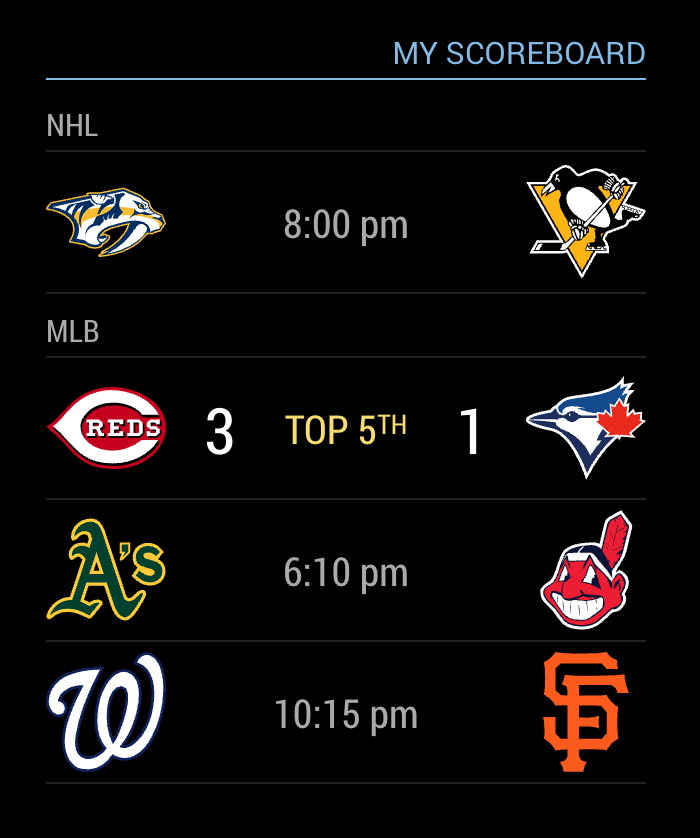
      To give you some context of how I’ve set up this module, each league consists of its own set of team logos in SVG format, and a js file that takes care of building the URL for the data feed, and formatting the JSON response into a normalized object that is used by the dom generator. So it needs to be able to fit into the template as you see in the screenshot for this to work.
      posted in Development
      J
      j.e.f.f
    • RE: TESTERS WANTED - Multi-sport Scoreboard module

      Here’s a screenshot of the module in action:

      0_1496254148698_Screen Shot 2017-05-31 at 2.06.39 PM.png

      posted in Development
      J
      j.e.f.f
    • TESTERS WANTED - Multi-sport Scoreboard module

      I’ve just finished creating a first pass at a module that displays multiple sports with the leagues and teams you wish to follow. Currently it supports NHL, NBA, and MLB, but I have plans to add NFL, CFL, and MLS. Architecture is modular so adding sports is fairly straightforward.

      Could I ask a bunch of you guys to give it a whirl and let me know if you find any bugs and if you have any feedback?

      You can clone it from here:
      https://github.com/jclarke0000/MMM-MyScoreboard

      Some notes on my goals for this:

      • This meant to show today’s games only. I don’t have plans to make this show multiple days worth of games. I also wanted an at-a-glance view, so information is minimal. You won’t see an inning break-down for baseball for example, or a summary of Runs, Hits and Errors. My thinking is I’d rather spend time watching my TV, not my mirror. So it’s really just enough information to consume in the 30 seconds I might spend looking at the mirror.
      • While there already exist modules for all of the sports I want to follow, I wanted a standardized display and behaviour across all of the sports I am interested in. So the presentation of all sports is the same – two team logos, scores, game status.
      • The start times you see for games that are not yet underway should be presented in your local time.
      • If there are no games today that match your league and teams list, then the module should hide itself altogether.

      Still to do:

      • Add more sports
      • Display configuration options to keep longer lists from taking up too much space (e.g. a “compact” mode)
      • Carousel to cycle through x pages of y games

      Thanks in advance!
      -Jeff

      posted in Development
      J
      j.e.f.f
    • RE: My display so far...

      @Chiumanfu I haven’t tried to do that. This is a fork of MMM-WunderGround, and the data pull mechanism is unchanged. My changes are only in the formatting. I suspect that the two instances are sharing a single node-helper module, and as such, you’ll see the same data for both.

      Can you try a test for me? Configure one instance using MMM-MyWeather, and the second using MMM-WunderGround. If you get different data sets for the two, then there’s likely a way to address this. Otherwise, what might be happening is the API recognizes two requests from the same machine, and isn’t allowing multiple locations. Might be a limitation of the free API.

      posted in Showcase
      J
      j.e.f.f
    • RE: MMM-MyCommute

      @jon11a Fair warning: this module was also the result of me wanting to change a thing or two to suit my own needs ;). Before I knew I had something completely new! It shares little resemblance with the module I originally forked from mrx-work-traffic.

      Have fun. I can’t wait to see how it evolves!

      -Jeff

      posted in Transport
      J
      j.e.f.f
    • RE: MMM-MyCommute

      @jon11a It’s certainly possible. But it takes up considerably more space to render “1h 30 min” than it does to render “90 min”. The space that the travel time uses takes away from the space used for the text to its left. That is why I chose to render it that way. Even an extremely long commute of over 2 hours would only take up an extra 8 pixels or so. By doing it this way, it should be more or less the same width for everyone, with less chance of truncating the label.

      If you want to change this yourself, it’s a fairly trivial change to the formatTime function in MMM-MyCommute.js. Google returns the travel time in the number of seconds. I’ve just done a simple division by 60 to get the number of minutes. You can just do a little more math and re-jig the formatting as you’d like.

      Happy to hear that you like the module!

      -Jeff

      posted in Transport
      J
      j.e.f.f
    • RE: MMM-MyCommute

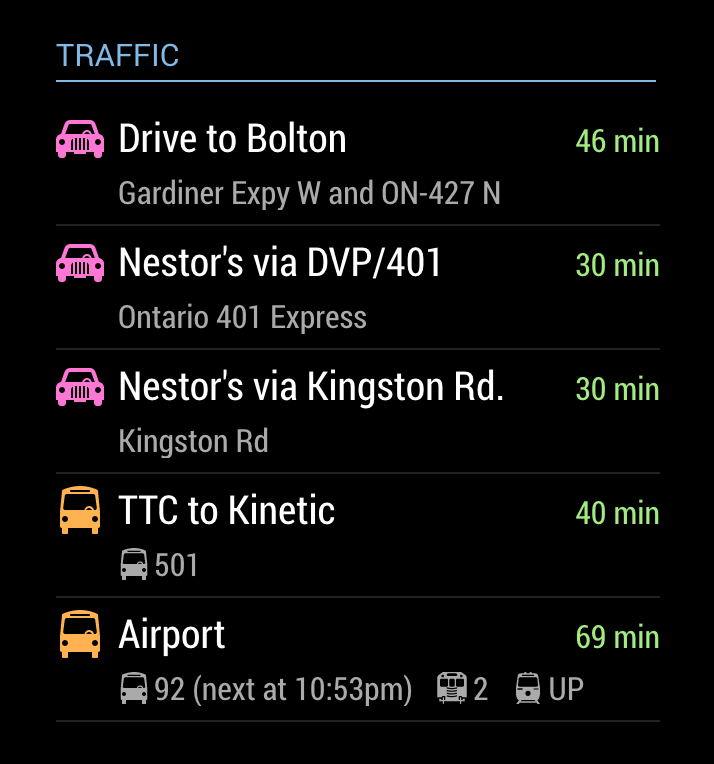
      @tidus5 I’ve added a param showNextVehicleDeparture that you can specify for destinations with mode:'transit'. This will show you the next available vehicle factoring your walking time to the stop. It will only show the departure time for the first vehicle on your route to save summary space (and really once you’ve departed, you’ll either make your connections on time or you won’t. So the departure time is kind of moot.) My thinking is that you’ll want to know of you have enough to walk to the stop to catch the next vehicle.

      There is a limit of 2500 requests per day to the Google API using the free service. Since each entry in your destinations list requires its own request, I’ve kept the poll frequency to a conservative 10 minute interval to avoid hitting this limit. As such, it is possible that you’ll see a next vehicle time that is unrealistic to walk to in time, or in some cases, the next vehicle time will be in the past. Keep it in mind that the next vehicle time may be a bit stale.

      The time is shown as follows (see the last entry labelled “Airport”):
      0_1496111951237_Screen Shot 2017-05-29 at 10.38.02 PM.png

      posted in Transport
      J
      j.e.f.f
    • 1 / 1