well done!
J
Offline
A New Chapter for MagicMirror: The Community Takes the Lead
Read the statement by Michael Teeuw here.
Read the statement by Michael Teeuw here.
Posts
-
RE: Bathroom mirror: "Frameless, thin, gesture and voice controlled"
@Robert_K
Really nice build !!!
Working on more or less the same mirror concept, but I won’t be able to get it on 3,6 cm, will be somewhere 4,8. -
RE: install MM2.18 on win10 pc
@sdetweil - using virtual machine - don’t have any expierience on that or how to activate.
Let me do following: I clean up and remove the Ubuntu & Debian app I installed.
Then I’m going to look up some youtube vids on how to install Ubuntu with virtual box or virtual machine active.I’ll come back later when that is done properly -
thanks for your support so far.
-
RE: install MM2.18 on win10 pc
@sdetweil , yes lsw2 that is how I installed it. So that is not good? How do I then make a proper installation on a windows PC? Do you have a link-guide to follow?
-
RE: install MM2.18 on win10 pc
@sdetweil I have the icon under windows and when I start, Ubuntu it starts with the user I created during installation.
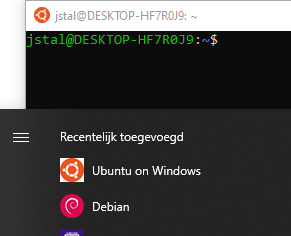
So I guess this is my normal user?
I installed node & MM from jstal@DESKTOP-HF7R0J9 As I think this is correct - or not?
-
RE: install MM2.18 on win10 pc
@sdetweil I don’t seem to find such a file in the root directory.
-
RE: install MM2.18 on win10 pc
@sdetweil Sorry but i’m new on Linux, where to find install log?
-
RE: install MM2.18 on win10 pc
@sdetweil On Ubuntu I used node 16.14.2 and npm 8.5.5 while on Debian I used node 17.7.2 and npm 8.5.2. And both seems to give me the same error message
-
RE: install MM2.18 on win10 pc
I also installed MM on Ubuntu V20.4 and I have exactly the same message as I get on Debian.
-
RE: install MM2.18 on win10 pc
@sdetweil said in install MM2.18 on win10 pc:
because u posted screenshots and not text I can’t show more
Do you want the content of the package.json file?
{ "name": "magicmirror", "version": "2.18.0", "description": "The open source modular smart mirror platform.", "main": "js/electron.js", "scripts": { "start": "node_modules\\.bin\\electron js\\electron.js", "start:dev": "DISPLAY=\"${DISPLAY:=:0}\" ./node_modules/.bin/electron js/electron.js dev", "server": "node ./serveronly", "install": "echo \"Installing vendor files ...\n\" && cd vendor && npm install --loglevel=error", "install-fonts": "echo \"Installing fonts ...\n\" && cd fonts && npm install --loglevel=error", "postinstall": "npm run install-fonts && echo \"MagicMirror installation finished successfully! \n\"", "test": "NODE_ENV=test jest -i --forceExit", "test:coverage": "NODE_ENV=test nyc --reporter=lcov --reporter=text jest -i --forceExit", "test:electron": "NODE_ENV=test jest --selectProjects electron -i --forceExit", "test:e2e": "NODE_ENV=test jest --selectProjects e2e -i --forceExit", "test:unit": "NODE_ENV=test jest --selectProjects unit -i --forceExit", "test:prettier": "prettier . --check", "test:js": "eslint 'js/**/*.js' 'modules/default/**/*.js' 'clientonly/*.js' 'serveronly/*.js' 'translations/*.js' 'vendor/*.js' 'tests/**/*.js' 'config/*' --config .eslintrc.json", "test:css": "stylelint 'css/main.css' 'fonts/*.css' 'modules/default/**/*.css' 'vendor/*.css' --config .stylelintrc.json", "test:calendar": "node ./modules/default/calendar/debug.js", "config:check": "node js/check_config.js", "lint:prettier": "prettier . --write", "lint:js": "eslint 'js/**/*.js' 'modules/default/**/*.js' 'clientonly/*.js' 'serveronly/*.js' 'translations/*.js' 'vendor/*.js' 'tests/**/*.js' 'config/*' --config .eslintrc.json --fix", "lint:css": "stylelint 'css/main.css' 'fonts/*.css' 'modules/default/**/*.css' 'vendor/*.css' --config .stylelintrc.json --fix", "lint:staged": "pretty-quick --staged", "prepare": "[ -f node_modules/.bin/husky ] && husky install || echo no husky installed." }, -
RE: install MM2.18 on win10 pc
npm is version 8.5.2
node = 17.7.2 -
RE: install MM2.18 on win10 pc
I got MM working under Win10 and most of the apps are working.
but in the end I prefere more the linux, so I installed debian, git, nodejs, and MM.
When to start the MM i get following message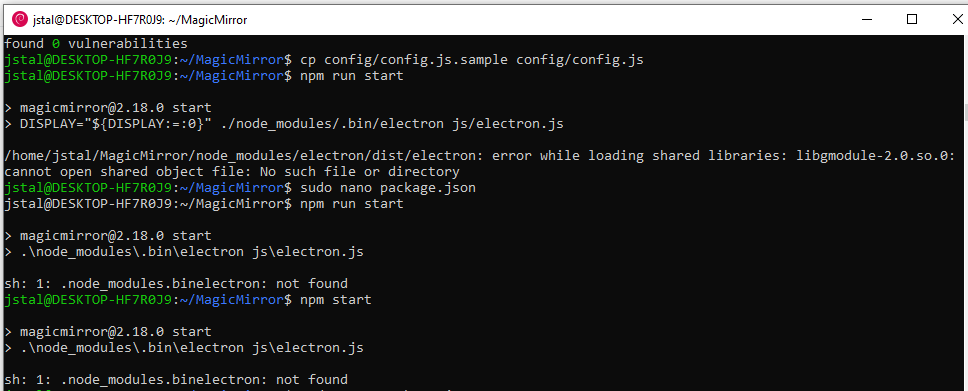
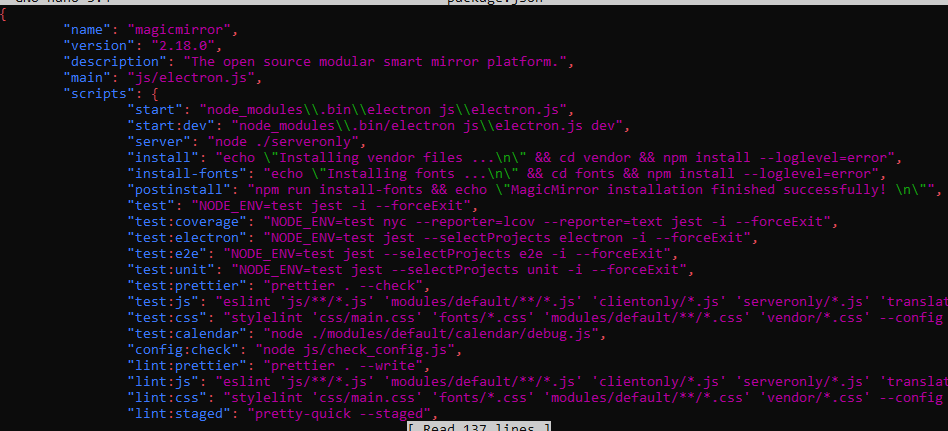
Although I updated the package.json file and corrected accoring the instructions, I still get an error message.What else is missing?
-
RE: install MM2.18 on win10 pc
@sdetweil - thanks for the info. now it is working fine .
-
install MM2.18 on win10 pc
Re: Installing Magic mirror on windows 10
Hi, trying to run MM on a win10 PC - followed the instructions from Mykle1
but when I run npm start I get following message
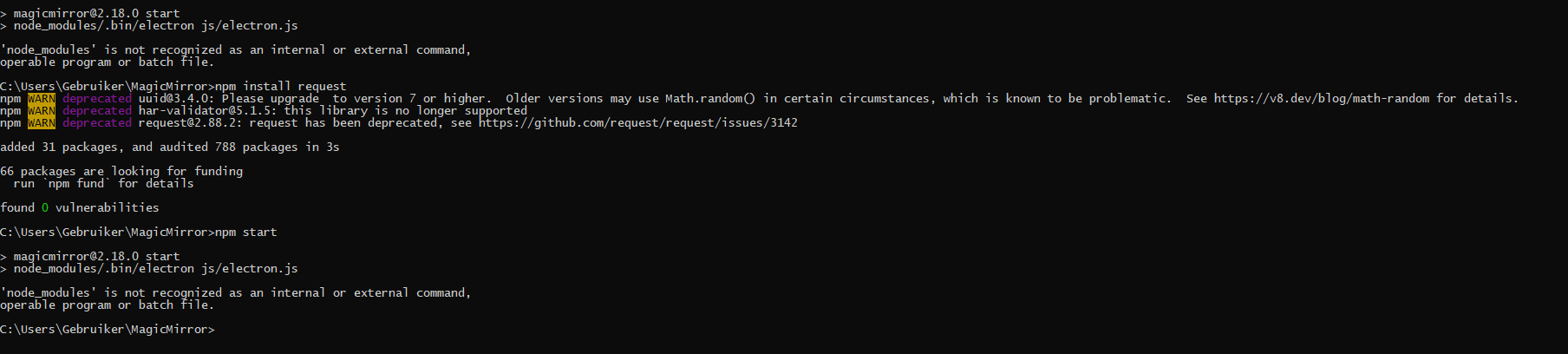 image url)
(I already removed DISPLAY… from Package.json)
how to fix this?
-
RE: MirroPane Frameless Mounting?
@bkost - maybe ask this to the provider of the glass what is the best mounting material (special silicone/tape…)
-
RE: MM-MyWastePickup - is it possible to change icons?
I had the same issue solved it as follows as I’m not able to modify the ‘icon_sprite.svg’ image
So I deleted that file and modified the css file. That’s working good for me. Finally I would like to pick the images from a local directory but do not know how to do that in css - so for now i used these links - see below
.MMM-MyWastePickup .pickup-container .waste-pickup-icon-container .waste-pickup-icon.recycle { background-image:url('https://www.svgrepo.com/show/205771/money-bag.svg'); } .MMM-MyWastePickup .pickup-container .waste-pickup-icon-container .waste-pickup-icon.compost { background-image:url('https://www.svgrepo.com/show/286795/bin-trash.svg'); } .MMM-MyWastePickup .pickup-container .waste-pickup-icon-container .waste-pickup-icon.garbage { background-image:url('https://www.svgrepo.com/show/43224/bin.svg'); } .MMM-MyWastePickup .pickup-container .waste-pickup-icon-container .waste-pickup-icon.yard_waste { background-image:url('https://www.svgrepo.com/show/198530/alcoholic-drink-bottle.svg'); } .MMM-MyWastePickup .pickup-container .waste-pickup-icon-container .waste-pickup-icon.christmas_tree { background-image:url('https://www.svgrepo.com/show/221576/paper-sheet.svg'); } -
RE: Error in DNews (copy of PNews)
@mumblebaj said in Error in DNews (copy of PNews):
@johans Have a look at this thread.
https://forum.magicmirror.builders/topic/15778/fix-for-black-screen-in-2-16-and-later/11Your error
Error: Cannot find module 'xml2js'Thank you - now it’s working again.
-
RE: New Bathroom-Mirror
@kwaeksler : Nice looking mirror.
could you give me more details on the buttons you’ve used for controlling? and how to connect & configure them.
thnaks
-
Error in DNews (copy of PNews)
Re: MMM-Pnews
Hi, long time ago you made this DNews module so I could see some local news. (it was copy from your PNews module.
Now I re-installed the mirror after upgraded to an RPI4-4GB and this module gives me an error.
Would you mind have a look at this.I would like to see this RSS feed on my mirror again :
http://www.nieuwsblad.be/rss/section/c1e533dc-ff1c-40fc-b48c-77ee686d54d4?intro=1",I installed the PNews but unfortunately it works with an API key (which I have) but my news source isn’t available.
I have the MMM-NewsFeed to display the regular new but this module can not have 2 instances. So I would like to continue using the DNews module next to it (as it was in the past)
Hope you can help.this is the error:
[04.12.2021 10:42.09.832] [ERROR] Whoops! There was an uncaught exception...
[04.12.2021 10:42.09.837] [ERROR] Error: Cannot find module 'xml2js'
Require stack:

/home/pi/MagicMirror/modules/MMM-DNews/node_helper.js
/home/pi/MagicMirror/js/app.js
/home/pi/MagicMirror/js/electron.js
/home/pi/MagicMirror/node_modules/electron/dist/resources/default_app.asar/main.js
at Module._resolveFilename (internal/modules/cjs/loader.js:887:15)
at Function.n._resolveFilename (electron/js2c/browser_init.js:257:1128)
at Function.Module._resolveFilename (/home/pi/MagicMirror/node_modules/module-alias/index.js:49:29)
at Module._load (internal/modules/cjs/loader.js:732:27)
at Function.f._load (electron/js2c/asar_bundle.js:5:12913)
at Module.require (internal/modules/cjs/loader.js:959:19)
at require (internal/modules/cjs/helpers.js:88:18)
at Object. (/home/pi/MagicMirror/modules/MMM-DNews/node_helper.js:9:16)
at Module._compile (internal/modules/cjs/loader.js:1078:30)
at Object.Module._extensions..js (internal/modules/cjs/loader.js:1108:10)
at Module.load (internal/modules/cjs/loader.js:935:32)
at Module._load (internal/modules/cjs/loader.js:776:14)
at Function.f._load (electron/js2c/asar_bundle.js:5:12913)
at Module.require (internal/modules/cjs/loader.js:959:19)
at require (internal/modules/cjs/helpers.js:88:18)
at loadModule (/home/pi/MagicMirror/js/app.js:127:19)
at loadNextModule (/home/pi/MagicMirror/js/app.js:165:5)
at /home/pi/MagicMirror/js/app.js:167:6
at loadModule (/home/pi/MagicMirror/js/app.js:146:4)
at loadNextModule (/home/pi/MagicMirror/js/app.js:165:5)
at /home/pi/MagicMirror/js/app.js:167:6
at loadModule (/home/pi/MagicMirror/js/app.js:146:4) {
code: 'MODULE_NOT_FOUND',
requireStack: [
'/home/pi/MagicMirror/modules/MMM-DNews/node_helper.js',
'/home/pi/MagicMirror/js/app.js',
'/home/pi/MagicMirror/js/electron.js',
'/home/pi/MagicMirror/node_modules/electron/dist/resources/default_app.asar/main.js',
undefined
]
}
[04.12.2021 10:42.09.839] [ERROR] MagicMirror will not quit, but it might be a good idea to check why this happened. Maybe no internet connection?