MagicMirror Forum
    • Recent
    • Tags
    • Unsolved
    • Solved
    • MagicMirror² Repository
    • Documentation
    • 3rd-Party-Modules
    • Donate
    • Discord
    • Register
    • Login
    1. Home
    2. Johans
    3. Posts
    A New Chapter for MagicMirror: The Community Takes the Lead
    Read the statement by Michael Teeuw here.
    J Offline
    • Profile
    • Following 0
    • Followers 0
    • Topics 16
    • Posts 98
    • Groups 0

    Posts

    Recent Best Controversial
    • Lucy Error

      Re: hello lucy
      First time installed Lucy, but I get an error indication on the screen.
      Tested the Micro - recorded wave file - works fine (PS3 Eye cam-mic gave me the best audio result)
      Adapted settings in the config
      Soundfile.PNG
      Knipsel.PNG

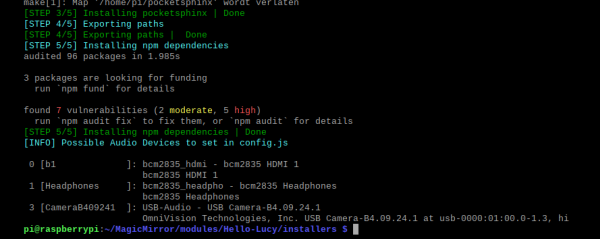
      in the console window or the LOG i see no errors.
      When Mirror starts I see 3 messages from Lucy:

      • Command Please
      • Say Hello Lucy
      • Error

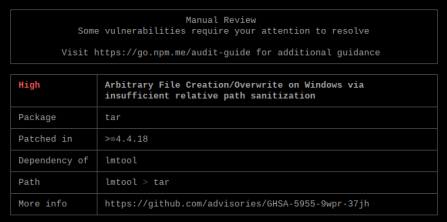
      During npn installation I noticed this, an audit fix did not solved it
      npmerrorKnipsel.PNG

      details: (5x times same message)
      npmerrrodetailKnipsel.PNG

      posted in Troubleshooting
      J
      Johans
    • RE: MMM-Buttons

      @fozi - Thanks will check if a resistor does the trick - if not I order a gesture sensor

      posted in Troubleshooting
      J
      Johans
    • RE: MMM-Buttons

      @johans - they are connected to ground or must the common be connected to the 3.3V pin?

      posted in Troubleshooting
      J
      Johans
    • MMM-Buttons

      Hi, I wanted more pages on my mirror and control them physically with a button.
      installed MMM-Pages / MMM-Page Selector / MMM-Buttons and MMM-Remote Control.
      (First I tried to use MPR-121 but that gives too many errors during installation so I gave up)
      3 buttons connected to Pin 23-34-25 (BCM numbering - RPI-4/4GB)
      Now when I press a button nothing happens. Can’t see what could be wrong.
      this my config:

      {
          module: 'MMM-Buttons',
          config: {
              buttons: [
                  {
                      pin: 23,
                      name: "page changes",
                      longPress: {
                          notification: "PAGE_DECREMENT",
                          payload: {action: ""}
                      },
                      shortPress: {
                          notification: "PAGE_INCREMENT",
                          payload: {action: ""}
                      },
                  },
                  {
                      pin: 24,
                      name: "monitor_control",
                      longPress: {
                          notification: "REMOTE_ACTION",
                          payload: {action: "MONITOROFF"}
                      },
                      shortPress: {
                          notification: "REMOTE_ACTION",
                          payload: {action: "MONITORON"}
                      },
                  },
                  {
                      pin: 25,
                      name: "power",
                      longPress: {
                          title: "Power off",
                          message: "Keep pressed for 3 seconds to shut down",
                          imageFA: "power-off",
                          notification: "REMOTE_ACTION",
                          payload: {action: "SHUTDOWN"}
                      },
      		 shortPress: {
                          title: "test page up",
                          notification: "PAGE_INCREMENT",   // as test
                          payload: {action: "1"}            // as test
                      },
                  },
              ]
          }
      },
      
      posted in Troubleshooting
      J
      Johans
    • RE: MMM-Garbage : add different icon per wast type

      Thanks for the tip, this one is perfect for me.

      posted in Requests
      J
      Johans
    • MMM-Garbage : add different icon per wast type

      Hi, like this garbage module, but How to change Icons? Now I can only change color of the waste bin Icon, but I would like to have a different icon for each type of waste.

      Green Waste
      Garbage
      Glass
      Paper
      Plastic
      Would that be possible ?

      posted in Requests
      J
      Johans
    • RE: MMM-WifiPassword shows incomplete QR code

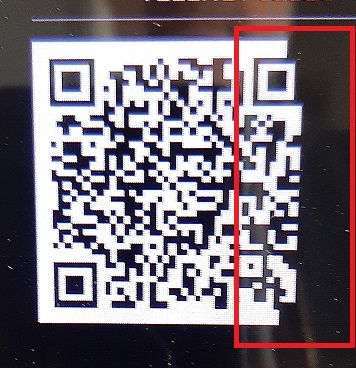
      @sdetweil - you are right, changed position and now it shows the QR code correctly.

      posted in Utilities
      J
      Johans
    • MMM-WifiPassword shows incomplete QR code

      The Wifi QR-Code is not shown correctly.
      Just installed module - no modifications on css …

      My Config:

            disabled: false,   
      	    	module: 'MMM-WiFiPassword',
      	    	position: "top_left",
      		      config: {
      			network: "xxxxxxx", 
      			password: "xxxxxxxxxxxx",
      			layoutVertical: false,
      			hiddenId: true,
      			showPassword: false,
      			showAuthType: false,
      			showNetwork: false,
      			header: "blablabla",
      		      }
      

      See picture:

      20211108_214059.jpg

      posted in Utilities
      J
      Johans
    • RE: MMM-iFrame-Ping

      @agp42 Ok, thanks for the tip, I’ll checkup the README file.

      posted in Utilities
      J
      Johans
    • RE: MMM-iFrame-Ping

      @agp42 Would it be possible to have 2 instances in the config file, working independently?

      posted in Utilities
      J
      Johans
    • RE: MMM-Page-Selector: A page switcher that can set positions of modules

      @veldrovive said in MMM-Page-Selector: A page switcher that can set positions of modules:

      pages: {“all”: “some_position”}

      Thanks for the info, I should have read the README first. Sorry.

      posted in System
      J
      Johans
    • RE: MMM-Page-Selector: A page switcher that can set positions of modules

      @veldrovive
      Hi, just made a fresh install, and applied your module and MMM-Page-indicator.

      Pages are shown, but page indicator and newsfeed module are not on the screen.
      When I disbable MMM-Page-Selector, then Newsfeed & MMM-Page-indicator are visisble.

      As far as I understand, config is OK

      	modules: [
      		{
      			module: "alert",
      			pages: "all",
      		},
      		{
      			disabled: false,
      		        module: "MMM-Page-Selector",
      		        position: "top_bar",
      		        config: {
      			        defaultPage: "Page1",
      		                displayTitle: true,
      			        selectPageNotif: ["SELECT_PAGE"],
      		                incrementPageNotif: ["PAGE_UP"],
      		                decrementPageNotif: ["PAGE_DOWN"],
         			        autoChange: {
      				     	    interval: 100,    // Change page every 100 sec
      				            }
      		                   }
      		},		
      
      		{
      			module: "updatenotification",
      			position: "top_bar",
      			pages: {"Page1": "top_bar"},
      		},
      		{
      			module: "clock",
      			position: "top_left",
      			pages: {"Page1": "top_left", "Page2": "top_left", "Page3": "top_left", "Page4": "top_left"},
      
      		},
      		{
      			module: "compliments",
      			position: "lower_third",
      			pages: {"Page1": "lower_third", "Page2": "lower_third", "Page3": "lower_third", "Page4": "lower_third"},
      		},
      		{
      		        disabled: false,
      			module: "MMM-rain-forecast",
      			position: "top_right",   // see mirror setting for options
      			pages: {"Page1": "top_right"},
      			//header: "Regen Voorspelling", 
      			config: {   
      		                lat: 50.908529,
      		                lon: 3.965639,				
      				pleaseWait: "Wachten a.u.b",
      				noRainText: "Tot %s GEEN regen",
      				fillColour: '#0074d9'   // This is a blue color you can also use blue, cyan etc
      				}
      		},	
      
      		{
      			module: "newsfeed",
      			position: "bottom_bar",
      			pages: "all",
      			config: {
      				feeds: [
      					{
      						title: "New York Times",
      						url: "http://www.nytimes.com/services/xml/rss/nyt/HomePage.xml"
      					}
      				],
      				showSourceTitle: true,
      				showPublishDate: true
      			}
      		},
      		{
      			disabled: false,
      		        module: "MMM-page-indicator",
      		        position: "bottom_bar",
      			pages: "all",
      		        config: {
      		            //pages: 4,  // No need to set this
      		        }
      		},	
      		{
      			module: 'MMM-Cursor',
      			pages: "all",
      		},
      	]

      
      
      posted in System
      J
      Johans
    • RE: MMM-DarkSkyForecast - Yet ANOTHER weather module

      When I run directly in the browser, it’s OK, but thats not the main goal, should run via the MagicMirror.

      posted in Utilities
      J
      Johans
    • RE: MMM-DarkSkyForecast - Yet ANOTHER weather module

      @j-e-f-f
      No, It doesn’t come back.
      I made a new installation on fresh SD card.
      All works fine without installing your module, after that it’s not working anymore.

      posted in Utilities
      J
      Johans
    • RE: MMM-DarkSkyForecast - Yet ANOTHER weather module

      @johans
      I’ll guess something went wrong when I paste the code

      {
      			disabled: false, 
      			module: "MMM-Widget",
      	   	        position: "middle_center",
      	 		pages: {"Page1": "lower_third"},
      			config: {
      			widgets: [
      		        { //insert your script or html codes here.
      		        html:`     
                              <!-- TradingView Widget BEGIN --> 
      			<html lang="en">
      			<head>
      			<title>JSTAL MIRROR PLAYER</title>
      			<meta charset="UTF-8">
      			<meta name="viewport" content="width=device-width, initial-scale=1">
      			<link rel="stylesheet" type="text/css" href="http://localhost:8080/modules/MyPlayer/css/styles.css">   <!-- page design -->
      		        <link rel="stylesheet" href="https://cdnjs.cloudflare.com/ajax/libs/font-awesome/4.7.0/css/font-awesome.min.css">
      			<script src="https://ajax.googleapis.com/ajax/libs/jquery/2.1.1/jquery.min.js"></script>  <!-- For audio play -->
      			<style>
      			</style>
      			</head>
      			<body>
      			
      			<div class="header">
      			  <h1>Mirror Webradio / MP3 Player</h1>
      			</div>
      			
      			<div class="row">
      			  <div class="main">
      			     <p>My Radio Stations</p>
      				 <img src="http://localhost:8080/modules/MyPlayer/images/JoeFM.jpg" style="width:5%;">
      				 <audio id="myAudio0" src="http://icecast-qmusic.cdp.triple-it.nl:80/JOEfm_be_live_128.mp3" preload="false" controls="true" volume="1.0"></audio>
      			     <script>   <!-- Script play pause toggle -->
      				 var myAudio0 = document.getElementById("myAudio0");
      					function togglePlay() {
      					return myAudio0.paused ? myAudio0.play() : myAudio0.pause();
      					};
      				 </script> <br>
      				 <img src="https://upload.wikimedia.org/wikipedia/commons/0/09/Qmusiclogo2015red.jpg" style="width:5%;">
      				 <audio id="myAudio1" src="http://icecast-qmusic.cdp.triple-it.nl:80/Qmusic_be_live_96.mp3" preload="false" controls="true" volume="1.0"></audio>
      			     <script>   <!-- Script play pause toggle -->
      				 var myAudio1 = document.getElementById("myAudio1");
      					function togglePlay() {
      					return myAudio1.paused ? myAudio1.play() : myAudio1.stoppause();
      					};
      				 </script> <br>
      				 <img src="https://pbs.twimg.com/profile_images/1612540320/FAMILYRADIO_LOGO_WEB_400x400.jpg" style="width:5%;">
      				 <audio id="myAudio2" src="http://www.clubfmserver.be:8000/family.mp3" preload="false" controls="true" volume="1.0"></audio>
      			     <script>   <!-- Script play pause toggle -->
      				 var myAudio2 = document.getElementById("myAudio2");
      					function togglePlay() {
      					return myAudio2.paused ? myAudio2.play() : myAudio2.pause();
      					};
      				 </script> <br>
      			    <img src="https://upload.wikimedia.org/wikipedia/commons/3/36/MNM_logo.png" style="width:5%;">
      				 <audio id="myAudio3" src="http://icecast.vrtcdn.be/mnm_hits-high.mp3" preload="false" controls="true" volume="1.0"></audio>
      			     <script>   <!-- Script play pause toggle -->
      				 var myAudio3 = document.getElementById("myAudio3");
      					function togglePlay() {
      					return myAudio3.paused ? myAudio3.play() : myAudio3.pause();
      					};
      				 </script> <br>	   
      			     <img src="https://upload.wikimedia.org/wikipedia/commons/thumb/1/19/Radio_2_Logo.svg/1000px-Radio_2_Logo.svg.png" style="width:5%;">
      				 <audio id="myAudio4" src="http://icecast.vrtcdn.be/ra2ovl-high.mp3" preload="false" controls="true" volume="1.0"></audio>
      			     <script>   <!-- Script play pause toggle -->
      				 var myAudio4 = document.getElementById("myAudio4");
      					function togglePlay() {
      					return myAudio4.paused ? myAudio4.play() : myAudio4.pause();
      					};
      				 </script> <br>
      			     <img src="https://pbs.twimg.com/profile_images/1476072724/Logo-alta-resolucao-MusicCityGame.jpg" style="width:5%;">
      				 <audio id="myAudio5" src="http://stream2.intronic.nl:80/citymusic" preload="false" controls="true" volume="1.0"></audio>
      			     <script>   <!-- Script play pause toggle -->
      				 var myAudio5 = document.getElementById("myAudio5");
      					function togglePlay() {
      					return myAudio5.paused ? myAudio5.play() : myAudio5.pause();
      					};
      				 </script> <br>		
      					
      					
      			        <hr><p>Select and Play MP3 from Local database folder </p>
      			        <input type="file" id="songs" multiple> <br> <br>
      				<i class="fa fa-music"></i>
      			        <audio controls id="myAudio" autoplay></audio>
      			    
      					 <script>   <!-- Script play pause toggle -->
      					
      						var songs = document.getElementById("songs"),
      							myAudio = document.getElementById("myAudio");
      							function next(n){
      							  var url = URL.createObjectURL(files[n]);
      							  myAudio.setAttribute('src', url);
      							  myAudio.play();
      							}
      							var _next = 0,
      							files,
      							len;
      							songs.addEventListener('change', function() {
      							  files = songs.files;
      							  len = files.length;
      							  if(len){
      							next(_next);
      							  }
      							});
      							myAudio.addEventListener("ended", function(){
      							   _next += 1;
      							   next(_next);
      							   console.log(len, _next);
      							   if((len-1)==_next){
      							 _next=-1;
      							   }
      							});
      					 </script>	   
      			
      			</body>
      	
      			<!-- TradingView Widget END -->
                              `,    // Ends of Widget - important to set!
      		        width: "460px",
      		        height: "525px",
      		        backgroundColor: "#256d7b"   //"#FFF"
      		      },
      			]
      		  }
      		},
      
      
      posted in Utilities
      J
      Johans
    • RE: MMM-DarkSkyForecast - Yet ANOTHER weather module

      @j-e-f-f installed latest version of your nicely build weather forecast module, but now I see that my personal web player is not working anymore.

      All content is displayed on the mirror, but there is no reaction when I press a play button (seems play buttons are disabled)

      To show the player on my mirror I’ve abused the widget module.

      It shows me 6 radio stations and a selection button for MP3’s on the SD card of the raspberry. (All simple stuff – so far no rocket science)

      I’m sure problem is related towards the installation of your weather module, as I did a rebuild on another SD card to try -out.

      Removing and re-installing your module or the widget module was no solution so far.

      Started mirror in dev mode, but here also I don’t see any problem.

      As I read here that you updated this module to use the Nunjucks html templating system, I suspect it has a relation with my html code I’m using in the widget module.

      See below code in the config. Perhaps somebody can port this code according the Nunjucks html. (sound lick chinees for me  )

         {
         		disabled: false, 
         		module: "MMM-Widget",
            	        position: "middle_center",
          		pages: {"Page1": "lower_third"},
         		config: {
         		widgets: [
         	        { //insert your script or html codes here.
         	        html:`     
                             <!-- TradingView Widget BEGIN --> 
         		<html lang="en">
         		<head>
         		<title>JSTAL MIRROR PLAYER</title>
         		<meta charset="UTF-8">
         		<meta name="viewport" content="width=device-width, initial-scale=1">
         		<link rel="stylesheet" type="text/css" href="http://localhost:8080/modules/MyPlayer/css/styles.css">   <!-- page design -->
         	        <link rel="stylesheet" href="https://cdnjs.cloudflare.com/ajax/libs/font-awesome/4.7.0/css/font-awesome.min.css">
         		<script src="https://ajax.googleapis.com/ajax/libs/jquery/2.1.1/jquery.min.js"></script>  <!-- For audio play -->
         		<style>
         		</style>
         		</head>
         		<body>
         		
         		<div class="header">
         		  <h1>Mirror Webradio / MP3 Player</h1>
         		</div>
         		
         		<div class="row">
         		  <div class="main">
         		     <p>My Radio Stations</p>
         			 <img src="http://localhost:8080/modules/MyPlayer/images/JoeFM.jpg" style="width:5%;">
         			 <audio id="myAudio0" src="http://icecast-qmusic.cdp.triple-it.nl:80/JOEfm_be_live_128.mp3" preload="false" controls="true" volume="1.0"></audio>
         		     <script>   <!-- Script play pause toggle -->
         			 var myAudio0 = document.getElementById("myAudio0");
         				function togglePlay() {
         				return myAudio0.paused ? myAudio0.play() : myAudio0.pause();
         				};
         			 </script> <br>
         			 <img src="https://upload.wikimedia.org/wikipedia/commons/0/09/Qmusiclogo2015red.jpg" style="width:5%;">
         			 <audio id="myAudio1" src="http://icecast-qmusic.cdp.triple-it.nl:80/Qmusic_be_live_96.mp3" preload="false" controls="true" volume="1.0"></audio>
         		     <script>   <!-- Script play pause toggle -->
         			 var myAudio1 = document.getElementById("myAudio1");
         				function togglePlay() {
         				return myAudio1.paused ? myAudio1.play() : myAudio1.stoppause();
         				};
         			 </script> <br>
         			 <img src="https://pbs.twimg.com/profile_images/1612540320/FAMILYRADIO_LOGO_WEB_400x400.jpg" style="width:5%;">
         			 <audio id="myAudio2" src="http://www.clubfmserver.be:8000/family.mp3" preload="false" controls="true" volume="1.0"></audio>
         		     <script>   <!-- Script play pause toggle -->
         			 var myAudio2 = document.getElementById("myAudio2");
         				function togglePlay() {
         				return myAudio2.paused ? myAudio2.play() : myAudio2.pause();
         				};
         			 </script> <br>
         		    <img src="https://upload.wikimedia.org/wikipedia/commons/3/36/MNM_logo.png" style="width:5%;">
         			 <audio id="myAudio3" src="http://icecast.vrtcdn.be/mnm_hits-high.mp3" preload="false" controls="true" volume="1.0"></audio>
         		     <script>   <!-- Script play pause toggle -->
         			 var myAudio3 = document.getElementById("myAudio3");
         				function togglePlay() {
         				return myAudio3.paused ? myAudio3.play() : myAudio3.pause();
         				};
         			 </script> <br>	   
         		     <img src="https://upload.wikimedia.org/wikipedia/commons/thumb/1/19/Radio_2_Logo.svg/1000px-Radio_2_Logo.svg.png" style="width:5%;">
         			 <audio id="myAudio4" src="http://icecast.vrtcdn.be/ra2ovl-high.mp3" preload="false" controls="true" volume="1.0"></audio>
         		     <script>   <!-- Script play pause toggle -->
         			 var myAudio4 = document.getElementById("myAudio4");
         				function togglePlay() {
         				return myAudio4.paused ? myAudio4.play() : myAudio4.pause();
         				};
         			 </script> <br>
         		     <img src="https://pbs.twimg.com/profile_images/1476072724/Logo-alta-resolucao-MusicCityGame.jpg" style="width:5%;">
         			 <audio id="myAudio5" src="http://stream2.intronic.nl:80/citymusic" preload="false" controls="true" volume="1.0"></audio>
         		     <script>   <!-- Script play pause toggle -->
         			 var myAudio5 = document.getElementById("myAudio5");
         				function togglePlay() {
         				return myAudio5.paused ? myAudio5.play() : myAudio5.pause();
         				};
         			 </script> <br>		
         				
         				
         		        <hr><p>Select and Play MP3 from Local database folder </p>
         		        <input type="file" id="songs" multiple> <br> <br>
         			<i class="fa fa-music"></i>
         		        <audio controls id="myAudio" autoplay></audio>
         		    
         				 <script>   <!-- Script play pause toggle -->
         				
         					var songs = document.getElementById("songs"),
         						myAudio = document.getElementById("myAudio");
         						function next(n){
         						  var url = URL.createObjectURL(files[n]);
         						  myAudio.setAttribute('src', url);
         						  myAudio.play();
         						}
         						var _next = 0,
         						files,
         						len;
         						songs.addEventListener('change', function() {
         						  files = songs.files;
         						  len = files.length;
         						  if(len){
         						next(_next);
         						  }
         						});
         						myAudio.addEventListener("ended", function(){
         						   _next += 1;
         						   next(_next);
         						   console.log(len, _next);
         						   if((len-1)==_next){
         						 _next=-1;
         						   }
         						});
         				 </script>	   
         		
         		</body>
         
         		<!-- TradingView Widget END -->
                             `,    // Ends of Widget - important to set!
         	        width: "460px",
         	        height: "525px",
         	        backgroundColor: "#256d7b"   //"#FFF"
         	      },
         		]
         	  }
         	},


      For people interested here the CSS details as well.

      /* add here some separate css data */
      /* Style the body margin: 0  */
      body {
          font-family: Arial;
          margin: auto;
          width: 450px;
          height: 500px;
          border: 3px solid #256d7b;
      }
      
      /* Header/logo Title  - color = #1abc9c/#008080  of #256d7b */
      .header {
          padding: 5px;
          text-align: center;
          background: #256d7b;
          color: white;
      }
      
      /* Increase the font size of the heading */
      .header h1 {
          font-size: 20px;
      }
      
      /* Main column   color = #fcfcfc or white */
      .main {   
          -ms-flex: 60%; /* IE10 */   
          flex: 60%;
          background-color: #fcfcfc;
          padding: 20px;
          text-align: center;
      }
      
      /* Draw up a vertical line */
      hr.vertical
      {
         width: 5px;
         height: 100%; /* or height in PX */
      } 
      
      .slider {
        position: absolute;
        cursor: pointer;
        top: 0;
        left: 0;
        right: 0;
        bottom: 0;
        background-color: #ca2222;
        -webkit-transition: .4s;
        transition: .4s;
         border-radius: 34px;
      }
      .slider:before {
        position: absolute;
        content: "";
        height: 26px;
        width: 26px;
        left: 4px;
        bottom: 4px;
        background-color: white;
        -webkit-transition: .4s;
        transition: .4s;
        border-radius: 50%;
      }
      
      input:checked + .slider {
        background-color: #2ab934;
      }
      
      input:focus + .slider {
        box-shadow: 0 0 1px #2196F3;
      }
      
      input:checked + .slider:before {
        -webkit-transform: translateX(26px);
        -ms-transform: translateX(26px);
        transform: translateX(55px);
      }
      /*------ ADDED CSS ---------*/
      .slider:after
      {
       content:'OFF';
       color: white;
       display: block;
       position: absolute;
       transform: translate(-50%,-50%);
       top: 50%;
       left: 50%;
       font-size: 10px;
       font-family: Verdana, sans-serif;
      }
      
      input:checked + .slider:after
      {  
        content:'ON';
      }
      

      Maybe there are other ways to embed my player on the mirror, but for now MMM-Widget was the only thing I found to do.

      Hope somebody can help me out.

      Thx.

      posted in Utilities
      J
      Johans
    • RE: Complete Walkthrough - Install MagicMirror on a PC - Windows 7/10

      @mykle1 FYI
      Meanwhile I found the problem of port 8080, due to some malware on that PC, the proxi settings where modified, only option was to re-install OS. Lucky I had some backup so that didn’t took so long.
      Now proxi settings are no longer hi-jacked and I can run MM normally.
      Problem solved!

      posted in Troubleshooting
      J
      Johans
    • RE: Complete Walkthrough - Install MagicMirror on a PC - Windows 7/10

      @mykle1
      Thanks for the info, can’t find out who is using port 8080, but I changed in the config to use another port.
      Now all is working. :thumbs_up_light_skin_tone:

      posted in Troubleshooting
      J
      Johans
    • RE: Complete Walkthrough - Install MagicMirror on a PC - Windows 7/10

      @mykle1

      Followed your guide to install on my windows 10 - 64 bit machine.
      Installation went OK, but when I start mirror I just get a black screen.

      This is the error message

      Launching application.
      Whoops! There was an uncaught exception...
      { Error: listen EADDRINUSE 127.0.0.1:8080
          at Object._errnoException (util.js:1024:11)
          at _exceptionWithHostPort (util.js:1046:20)
          at Server.setupListenHandle [as _listen2] (net.js:1351:14)
          at listenInCluster (net.js:1392:12)
          at GetAddrInfoReqWrap.doListen [as callback] (net.js:1501:7)
          at GetAddrInfoReqWrap.onlookup [as oncomplete] (dns.js:97:10)
        code: 'EADDRINUSE',
        errno: 'EADDRINUSE',
        syscall: 'listen',
        address: '127.0.0.1',
        port: 8080 }
      MagicMirror will not quit, but it might be a good idea to check why this happened. Maybe no internet connection?


      Hope you can help me out.

      posted in Troubleshooting
      J
      Johans
    • RE: MMM-Lunartic

      @mykle1 said in MMM-Lunartic:

      "
      nl translation

      “New Moon - No visible moon”: “Nieuwe Maan - Niet zichtbaar”,
      "The last full moon was ": “Laatste volle Maan was”,

      Thanks for updating this nice module.

      posted in Education
      J
      Johans
    • 1
    • 2
    • 3
    • 4
    • 5
    • 2 / 5