@lucallmon How about you complain on their site instead of here? Quote from https://newsapi.org/sources:
Can’t see the one you want? Send us an email request (support@newsapi.org) and we can probably add it.
@lucallmon How about you complain on their site instead of here? Quote from https://newsapi.org/sources:
Can’t see the one you want? Send us an email request (support@newsapi.org) and we can probably add it.
@Steff Seems like you need to push your changes. They are local only unless you use git push to send them to the github server.
TLDR: You need to enable listening to all addresses (see the comment on the Github issue) in addition to the usual adaptation of the ipWhitelist. Add this line to your config.js:
address: "0.0.0.0",
Since MagicMirror 2.1.3, the webserver only listens to the loopback interface be default. This removes any possible attack on the webserver for most users (not that their are any known attacks right now, but in times of mirai it is a good thing!), but unfortunately also effectively stops accessing the MagicMirror through HTTP and how the remote module currently works. If any developer has a good idea how to combine the best of both worlds, please let me know.
@saifkazi I suggest you update again and try it out.
I offer to help as a moderator.
In the last weeks since Christmas I didn’t have as much time for the project and the forum, I had to do a lot of stuff for university and work, but things have calmed down a bit now. In the next days I will start dealing with all the issues on my modules, since v2.1.0 came out, and hopefully also soon help with moderating the forum.
@Mar said in [MMM-PIR-Sensor] Install failing:
I’ve tried following the instruction above of removing and reinstalling but I keep getting the below errors. I’m not even sure what they are unfortunately, wondering if anyone is able to help.
pi@raspberrypi:~/MagicMirror/modules/MMM-PIR-Sensor $ npm install
npm WARN engine electron-rebuild@1.5.7: wanted: {"node":">=6.0.0"} (current: {"node":"4.2.1","npm":"2.14.7"})
This is an old node version. Please update your node and npm. (If you need help check the answers to this SO question.)
New update:
@Mykle1 Thanks for mentioning. :)
@Baxer If you do not have a button, you could use a custom URL together with the Remote-Control (you need to install and configure the module though, do not forget to adapt your IP whitelist). Then you can send a notification request via an URL by accessing a custom URL.
In your case the URL would probably look like this:
http://192.168.xxx.xxx:8080/remote?notification=UPDATE_SL&action=NOTIFICATION
Or you could change the module to use a timer, but I assume the author of the module had a good reason for not doing that.
If anyone is interested in helping to test the next major (and future) versions of the module, I am searching for beta testers. Please note that the version may still contain bugs, and thus involves an (unlikely) risk of your Raspberry Pi explo… I mean you having to fix some stuff from the command line and your config.js by yourself.
@Mitchfarino This could be an option, however it only visually looks the same.
If for example a module temporarily does not work for some reason (blocks the start of the mirror), hiding it with the Remote-Control would not help.
What you probably wanted to say is: This should also be added to the Remote Control module. ;) And I would like to include this option in the GUI for the config there. And there is a big advantage in a config option to disable a module (versus commenting out), since this leaves the values readable from other JS code, i.e. the Remote Control module.
Also, I decided to release all the stuff I have worked on as version 1.1.0, some of it is still experimental, but I put a (hopefully) clear warning before you can mess up your config.
git pull)config.js
config.js in the config folder@AAPS (and everyone else): You can try the new version, but you can also go back to a previous version afterwards with the commands:
cd MagicMirror/modules/MMM-Remote-Control # or wherever you installed the Mirror and the module
git checkout v1.0.0 # or the version you want
Currently, there is v1.0.0 (which is probably the one you are on) and v1.1.0 as older versions. To check out the most recent version use git checkout master again.
@fox Interesting. What changes did you make? I will try to give you a short git crash course for your case: You can get an overview via git status (should show changed files) and git diff (showing the changes themselves). If you do not care about these changes you should be able to use git reset --hard origin/master or if you do care about them use git stash, then do git pull, and then git stash pop to apply the changes again.
The user needs rights to read and write FRITZ!Box Settings (FRITZ!Box Einstellungen). Otherwise it seems to be right. Can you activate this and try again?
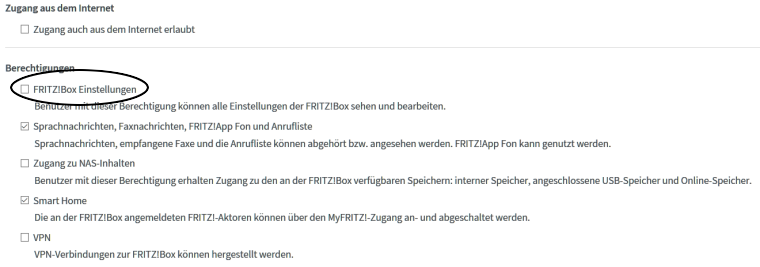
On a side note: loadSpecificPhonebook is currently not used in the code, so you may remove it. It just loads all available phonebooks from the FRITZ!Box.
Please post again if you encounter any problems.
I myself use a switch originally designed for being operated by foot, however my whole setup is not the usual one (see my “interactive” prezi - almost at the end there is picture of what the product looks like). The switch is hidden underneath the boards between shoes and magic mirror. It it probably not worth for saving money, but I like to be able to switch things off completely.
Best regards,
Joseph
@rvdgeer Glad you like it. :)
By the way I am also looking for new ideas, if anyone wants to a do a certain thing via this interface, I would happy to add it, if it is possible.
The module was updated a few days ago, to update the way the FRITZ!Box is accessed. If you navigate to the MMM-FRITZ-Box-Callmonitor folder and pull and reset the git, the install should be clean though. You can do this with code on the bottom of this post.
Can you check the output of the console? If you use pm2 start mm to start your mirror, please execute the following on your mirror, to restart it, clear the logs, and show the log files while the mirror starts up:
pm2 stop mm && pm2 flush && pm2 start mm && pm2 logs mm
Is there any error appearing, that is related to this module? Please make sure that you remove any private information if you want to post the output here. Also can you show the config options you use (replace username and password with XXX)?
Clean installation:
cd modules/MMM-FRITZ-Box-Callmonitor
git reset --hard
git pull
# do the installation again
npm install
# this should not be neccesary again
# sudo apt-get install python-dev libxml2-dev libxslt1-dev zlib1g-dev && sudo pip install fritzconnection
@BillyCallahan Based on what @Dom1n1c said: My screen does not show the brand when it wakes up from standby, sometimes you might be able to find an option in the internal menu of the screen.
As for triggering the tvservice commands, there are modules that do it automatically based on a PIR-Sensor or via a webcam. They switch on the screen when someone is moving in front of the mirror, and switch it off after a fixed time (e.g. 60 seconds).