Then yes, write the proper PHP code and stick it in <?php ... ?> tags.
A New Chapter for MagicMirror: The Community Takes the Lead
Read the statement by Michael Teeuw here.
Read the statement by Michael Teeuw here.
K
Offline
Posts
-
RE: Run JavaScript if a file is created
-
RE: This might be a daft question, but...
I use Notepad++, it does the job for me. However, I have other editors that I use for heavier tasks, like when I’m writing C/C++ code. For a peek at my crazy dev environment, read this post: https://forum.magicmirror.builders/topic/265/my-setup-or-how-crazy-i-am
-
RE: Run JavaScript if a file is created
This is hard to answer because I don’t know what your PHP file looks like. I don’t know if you are
echo-ing HTML data, or usingHEREDOC? I’m flying blind here … (as much fun as that could be) -
RE: Choosing mirror. 2 samples
For the record, I’m in the same rpi user group that’s chanting: PXE … PXE … PXE … (ideally wireless, but that’s a big overhead to have, ethernet would be fine)
-
RE: Run JavaScript if a file is created
Oy, why do it that way … your index.php will never get updated if there’s an upstream change in the code (because we use index.html). You should use the existing infrastructure in MM². Create a new module, have it display in a specific region on the mirror. Every 5 minutes, have the module refresh by doing a call to its node_helper. The node_helper can be a simply python script that checks the specific file in question and reports back to the module.
I thought the PHP script was doing something … it’s not in this case. You don’t need PHP at all for this.
Some places to look for coding ideas:
MM² Module Development Documentation
Look at how modules such as the calendar and newsfeed implement anode_helperwhich does the background tasksYou could still use PHP to do the file checking for you, but to me that’s a bit of an unnecessary overhead.
-
RE: Choosing mirror. 2 samples
Other than being ‘too much for what you’d use it for’, old tablet are cheap to come by. The trick is going to be keeping them running. I do like the rpi zero idea because they would all be connected to my main network and I can easily push updates to them that way.
-
RE: Run JavaScript if a file is created
Earlier you mentioned you using PHP, so I kept it in the loop. Use node_helper to call the PHP script. Let the PHP script check for the file and report back to node_helper which in turn reports to the module.
-
RE: Choosing mirror. 2 samples
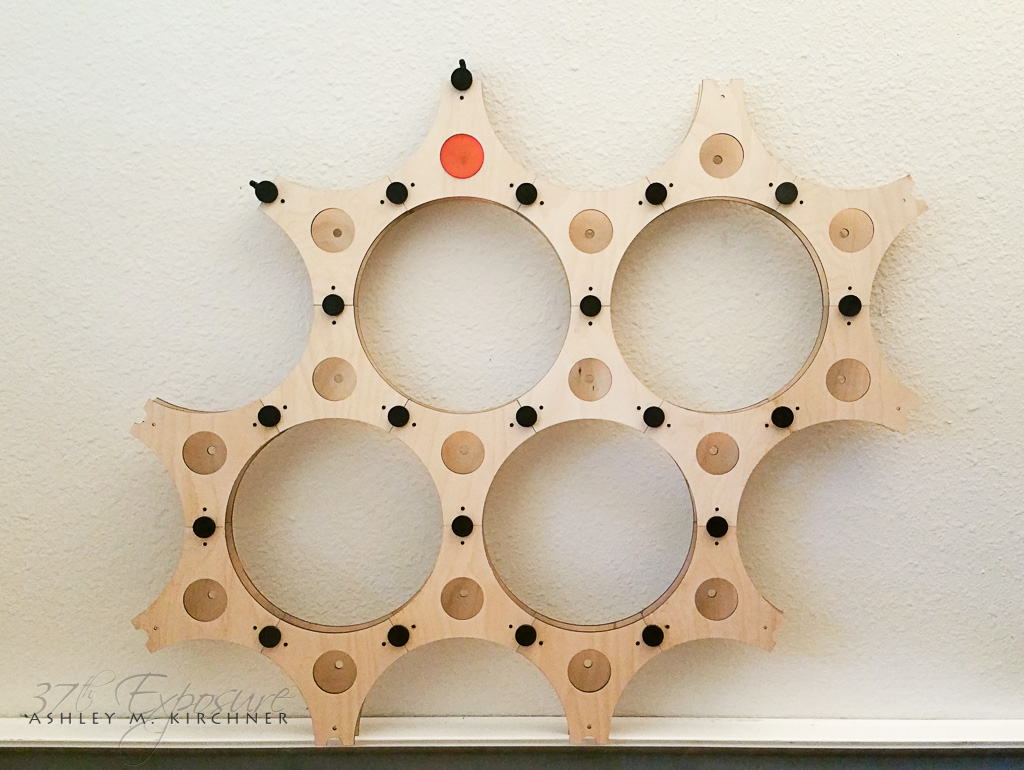
What you see there are laser cut wood pieces. The connectors and light cups are done on an Ultimaker 2.
-
RE: Choosing mirror. 2 samples
Problem with using screens attached to the rpi is that they will all display the same thing, whereas a tablet, being a separate device, can load up MM² as an external URL. It doesn’t have to be a tablet, it could be something completely different. For that matter, they can be rpi zero devices with a screen attached. Those things are $5 each and while MM² won’t run on them, you can still load up a browser on them. :)
-
RE: MMM-Button white screen
That tells me you didn’t read the instructions, because step 2, under Installation, it specifically says to run
'npm install'which would’ve taken care of installingonofffor you. I find it helps when I follow the author’s instructions. -
RE: Choosing mirror. 2 samples
Here I printed multiple white covers, testing different printing methods, and I also tried doing the connecting pieces in white, just to see how it looks like. I think I like the black ones better. Anyway, you get the idea …
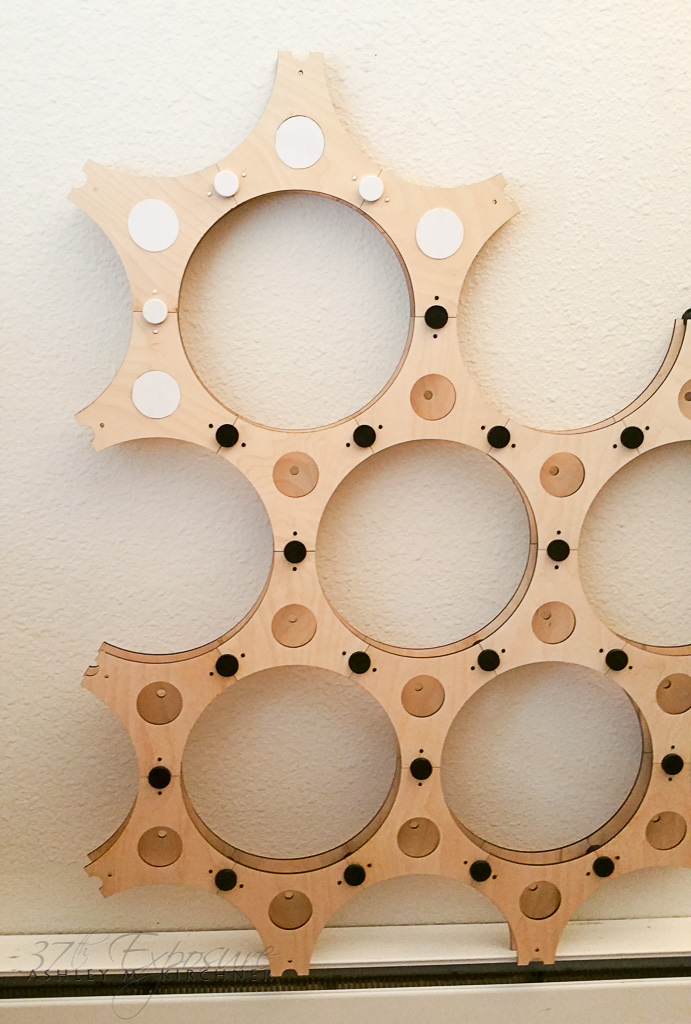
-
RE: Choosing mirror. 2 samples
I can’t think of any reason not to use a TV, other than power usage. And I’m kinda, sort, every-so-often, pondering the idea of having multiple instances of MM² running, on multiple screens, each with its own config. Consider a large installation of round mirrors (like 10" across), and each one having a screen (like a cheap tablet) behind them displaying a specific module. Could be fun, if not heavy. :)
Mock up: 8" large circles
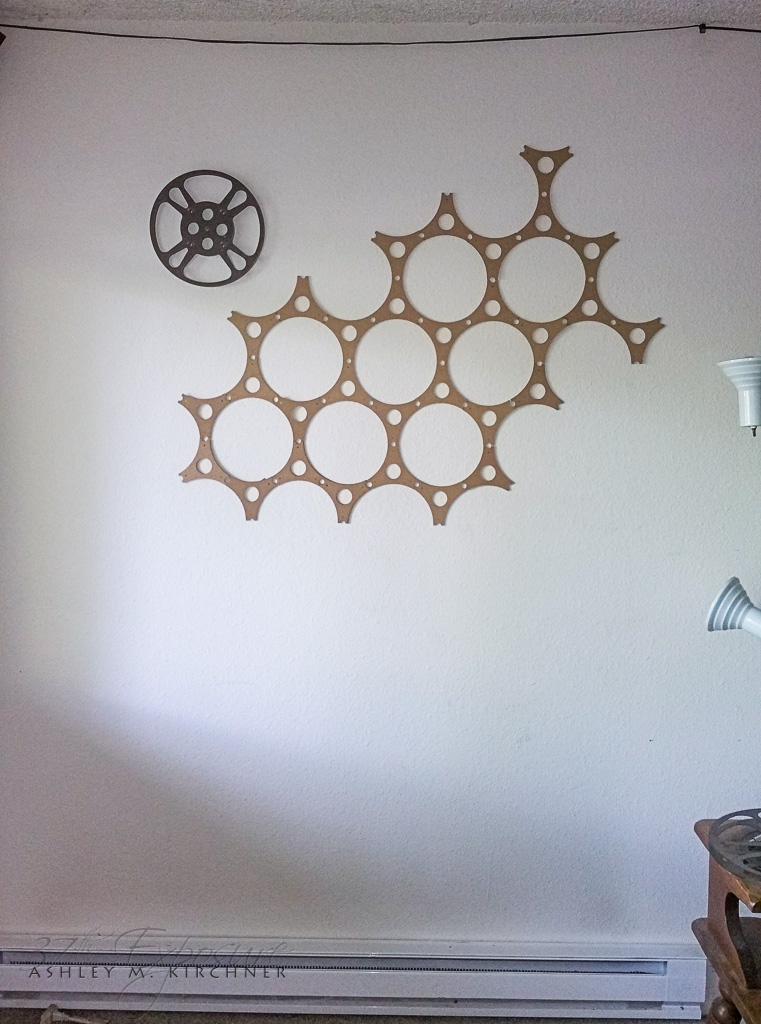
Test pieces cut out of wood: 10" circles: The holes that match the one at the top with a red cover on it are meant to have either a frosted piece of acrylic, or smoke color, with an RGBW LED module under them, so they can all be lit up. The front and back pieces are 1" apart, so a tablet can very easily fit between them.
-
RE: Choosing mirror. 2 samples
Yeah, I definitely like the lighter one better (specially with the TV completely off!), but you need to decide on the reflective property. If it doesn’t suit you (you can’t quite see the mustache hair), then you’ll have to figure something else out.
-
RE: Choosing mirror. 2 samples
The only reason I ask is because you can do one of three things here:
- pick the best reflective mirror and just deal with the lesser light shining through, or
- use the lighter one and when you want to use it as a mirror, you can either:
a) turn off all the modules, but the TV remains on, or
b) turn off the TV all together
Using the lighter one is contingent on how well it reflects when there’s nothing being displayed or the TV is completely turned off. But if it reflects better, then that may be the way to go.
I realize the last option may be somewhat annoying but it would work. And turning off the modules is a piece of cake. Or you could even turn off the HDMI output on the rpi, but the TV remains on … although some (most?) TV will then also turn off the screen’s backlight if they don’t detect an HDMI signal. Mine does. It stays on for a few seconds then the backlight turns off. The TV is still on, but the screen is off completely.
-
RE: Choosing mirror. 2 samples
How well does the light one reflect if the TV screen is on, but there’s nothing on it?
How well does the light one reflect if the TV screen is completely off? -
RE: Run JavaScript if a file is created
Not necessarily:
MM² module --> node_helper --> php --> node_helper --> MM² module -
RE: Calendar won't finish loading
Please note that Raspberry Pi 1 (any version) is not supported. The software on them is just too damn old. You might be able to run MM¹ on it.
-
RE: Run JavaScript if a file is created
Have the script check for the date stamp on the file. Have Tasker just
'touch'the existing file. The script needs to store the date stamp when it checks the file. Something like this:// pseudo code, it won't brew coffee var prev_datestamp = 0; var expire_time = 15 * 60 * 1000; // 15 minutes // run every five minutes if (file exists) { if (file.datestamp > previous_datestamp) { // train is on the way, quick, hide the money, hide the poker table // oh, refresh the mirror too previous_datestamp = file.datestamp; } else if (now > file.datestamp + expire_time) { // it's been 15 minutes, be afraid, be very afraid // clear mirror message } } -
RE: Secure Wireless Home Automation
I use RF and BLE for most of my communications in the house. I started with RF a few years ago, using cheap nRF24L01+ modules (specifically these ones), then I started changing some things to BLE (like light control) so I can trigger them from my phone. Though lately I’ve been using ESP8266 WiFi modules which can encrypt/decrypt data being transferred. They have AES encryption built-in.
Don’t ask me for any finished (or properly working) code though. :) It’s what I call a ‘beer project’, meaning when I have time to sit and have a beer, then I will have time to work on that project.
-
RE: Building the Frame
My recommendation is to contact a local frame shop, like picture frames. Not only do they often have scrap material that you can have for free, or for dirt cheap, but they can also help you build a frame, or give you pointers on how to do that.