A New Chapter for MagicMirror: The Community Takes the Lead
Read the statement by Michael Teeuw here.
Read the statement by Michael Teeuw here.
 L
Offline
L
Offline
Posts
-
RE: SSH Tutorial
-
RE: MMM-Strava
@ctatos said in MMM-Strava:
For non-paying Strava users, it seems like the API request goes through but no data is fetched…
From Strava: “We realize these API changes could be especially challenging for some developers, so they’ll be non-breaking for > 30 days, returning empty data during that time so they can make necessary adjustments. After June 18th, those endpoints will
either omit the data or return an error message.”That’s only valid for segment leaderboards which are not used in this module.
This module only calls user statistics which will still work with the changes. -
RE: Gosund SP111
@lordhelix Go flash it with Tasmota, use mine and have fun!
:-)
Bummer that you can’t use it. -
RE: Minimal depth of a frame for the magic mirror
@stepan I have 6-7 cm depth with shortwired power supply for the monitor and angled hdmi cable.
If you want to go thinner, look for a monitor that has it’s HDMI port in the same plane/direction as the screen. There are some that have this. Mine unfortunately not.
-
MMM-Tasmota [beta]
Description:
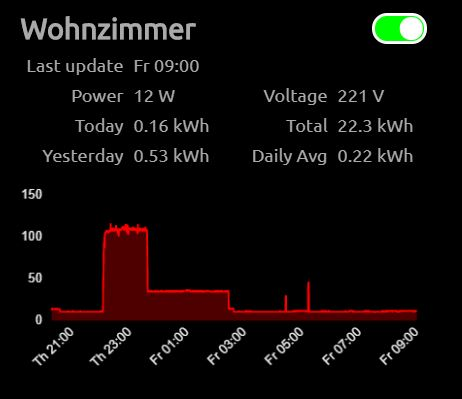
A module that controls and (optionally) displays power stats of your Tasmota devices with.
The module works with MQTT (and needs a broker).
I have decided for now to use the MQTT npm module instead of the mqtt notification module provided here.THIS IS IN BETA! I’m happy for anyone wanting to test this out!
Any ideas highly appreciated!Screenshots:
Download:
[card:lavolp3/MMM-Tasmota]
https://github.com/lavolp3/MMM-TasmotaFeatures
- Touch support to switch on and off your Tasmota devices
- collects power stats and, saves to json converts to graph.
Tested with:
- Gosund SP1
-
RE: Runtastic, or any other training app
@duxnobis It will only be based on Strava but have many sub-modules:
- running records
- yearly progression
- weekly relative effort graph
- competition (against other athletes)
- trophy board (unfortunately not working properly anymore since recent API “update”)
- stats around recent activities
and more
Strava is the only sports platform I know of that has a useful API, which unfortunately gets more limited with every update. It is possible to transfer all activities from runtastic. I don’t know about apple data.
-
RE: Runtastic, or any other training app
-
RE: Building dashboard with touch controls
@lavolp3 Have now found the documentation for the Microsoft Graph API. I Will work on this presumably tomorrow.
-
RE: Building dashboard with touch controls
@Lucker25 can you let me have a link to your timer module?
Reg. NavigationBar: This is mine:
https://github.com/lavolp3/MMM-NavigationBar
This works with MMM-pages
And regarding ToDo:
I’m having problems with the API. I can call all lists and items but can’t find my way around Microsoft graph and adding new items or deleting items via input.
Do you maybe know a solution to that?See the current status here:
https://github.com/lavolp3/MMM-MicrosoftToDo
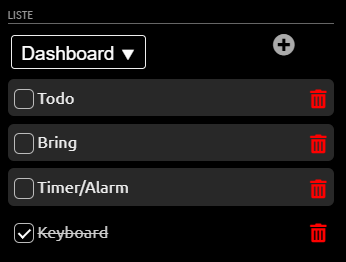
I’ll publish this later under another name since it’s completely different from the original
We have the same goals, let’s work together on it!
-
RE: Meross
@thetobyde for the DOM I have created the following elements:
var label = document.createElement("label");
                                label.className = "tasmota-switch";
                                label.id = "switch-" + topic;
                                    var input = document.createElement("input");
                                    input.type = "checkbox";
                                    input.id = "checkbox-" + topic;
                                    input.checked = this.setSwitch(topic);
                                    var span = document.createElement("span");
                                    span.className = "slider round";
                                    span.id = "slider-" + topic;
                                    span.onclick = function() { self.toggleSwitch(topic); };
                                label.appendChild(input);
                                label.appendChild(span);
there is a label (as wrapper), a (hidden) checkbox, and a span that is the actual slider.
The onclick function for the slider looks like this:toggleSwitch: function(topic) { this.sendSocketNotification("TOGGLE_SWITCH", topic); console.log("Switch toggled: " + topic); },So, rather generic. There you need to tell the api that you have toggled the switch.
Also, at every DOM update you need to check the api for the switch state (see the
this.setSwitch-function above). It may have been switched from another endpoint or app.
The result sets the “checked” state of the hidden input.setSwitch: function(topic) { this.log("Setting switch for " + topic); var powerState = this.tasmotaData.tele[topic].STATE.POWER; return (powerState === "ON") ? true : false; },The rest is css:
/*** SWITCHES ***/

.MMM-Tasmota .tasmota-switch {
    float: right;
    position: relative;
    display: inline-block;
    width: 90px;
    height: 34px;
}

/* Hide default HTML checkbox */
.MMM-Tasmota .tasmota-switch input {
    opacity: 0;
    width: 0px;
    height: 0px;
}

/* The slider */
.MMM-Tasmota .slider {
    position: absolute;
    cursor: pointer;
    top: 0;
    left: 30px;
    right: 0;
    bottom: 0;
    background-color: #f00;
    border: 3px solid white;
    -webkit-transition: .2s;
    transition: .2s;
}

.MMM-Tasmota .slider:before {
    position: absolute;
    content: "";
    height: 26px;
    width: 26px;
    left: 3px;
    bottom: 1px;
    background-color: white;
    -webkit-transition: .2s;
    transition: .2s;
}

.MMM-Tasmota input:checked + .slider {
    background-color: #0f0;
}

.MMM-Tasmota input:checked + .slider:before {
    -webkit-transform: translateX(24px);
    -ms-transform: translateX(24px);
    transform: translateX(24px);
}

/* Rounded sliders */
.MMM-Tasmota .slider.round {
    border-radius: 34px;
}

.MMM-Tasmota .slider.round:before {
    border-radius: 50%;
}
I will publish all of that with my MMM-Tasmota module.
-
RE: Meross
Meross has a cloud api so shouldn’t be too difficult to mplement.
However I don’t have the hardware nor the time unfortunately.Also, you could easily create touch sliders with some css magic and event listeners.
I have done this for my tasmota module.If you need the code, let me know.

-
RE: Building dashboard with touch controls
@Lucker25 I’m planning the same so keep an eye out for my modules. Maybe we can work together on some things.
I’m currently building several modules with touch support (todo list, timer, alarm, shopping list, soccer standings, stocks…) and have finished a virtual keyboard (MMM-Keyboard).I’m planning to just build a simple case from wood and I’m using one of the several displays (7 inch 1200 * 600 px) on the market for the raspi.
-
RE: SenseHat data on MM?
@framboise-pi Well this is a fantastic idea!
Now I only need something useful to show with the 8x8 led matrix so I can justify the build into the mirror… -
RE: *NEW LIST 29.06.2021* Two way community order for mirror glass for all european countries - Open until at least 10 people have entered
1 Ivanov_d 0,8 0,73 0,58 0,58 Bulgaria polished edges confirmed 2 fribse 0,7 0,6 0,42 0,42 Denmark polished edges confirmed 3 lavolp3 0,666 0,666 0,44 0,44 Germany confirmed 4 super99iper 0,735 1,26 0,9261 0,9261 Italy polished edges confirmed 5 Photon2000 0,79 0,79 0,62 0,62 Germany polished edges confirmed 6 lolo 0,84 0,7 0,59 0,59 Croatia polished edges confirmed 7 gdr2404 1,1 0,45 0,5 0,5 United Kingdom polished edges 8 hozt 0,48 0,70 0,294 0,4 Portugal polished edges confirmed 9 gianni.b 0,911 0,522 0,4755 0,4755 Italy polished edges confirmed 10 djdocta 0,578 0,953 0,55 0,55 Belgium Confirmed 11 uros76 0,4 1 0,4 0,4 Poland polished edges confirmed BRING IT ON!
-
RE: MMM-MyCommute
I see that the most recent active fork of this module has changed to @qistoph ?
I am wondering if the module still works with one origin or if there’s already a possibility for several routes with different origins and destinations? -
RE: MMM-RAIN-MAP (new: version 2.x)
@Fozi @chassain-0 Ah that may be what is crashing my pi recently every day. I’ll try disabling the module…
-
RE: Config Error
@lavolp3 The alert part needs to look like this:
{ module: "alert", position: "right", welcome_message: "a string" }, -
RE: Config Error
@sdetweil Looking at above post, there’s looots of errors in the config.
@PHAGE-GOV we can’t lead you through all of these.
You need to understand how config.js needs to look. Only one comma set false or forgotten breaks the whole file and the mirror. -
RE: Config Error
@PHAGE-GOV I guess you have that part in the alert module.
It needs to be like @sdetweil said. on the left side a single word, here
welcome_message. You need to take care of underlines and the upper-/lowercase.
Then there is a:and then the value which can be a string or false.welcome_message: 'Any string you like'OR
welcome_message: false -
RE: MMM-SystemStats (cpu temp/load, fre ram ...)
@BKeyport said in MMM-SystemStats (cpu temp/load, fre ram ...):
that’s not working, just get NaN… I think that’s because the string’s already got the “°C” at that point.
ah the parsefloat is missing.
How aboutthis.stats.cpuTemp = payload.cpuTemp + " / " + (parseFloat(payload.cpuTemp) * 9 / 5 + 32).toFixed(1) + "°F";